
4.如何实现用MTQQ通过服务器实现订阅者和发布者的通讯
1.本例子意在用moquette服务器来作为消息转发,通过订阅者订阅消息,发布者发布消息,然后发布者的消息可以通过服务器转发给订阅者
服务器例子:
https://github.com/andsel/moquette
核心代码为:
    /*

 * Copyright (c) 2012-2015 The original author or authors

 * ------------------------------------------------------

 * All rights reserved. This program and the accompanying materials

 * are made available under the terms of the Eclipse Public License v1.0

 * and Apache License v2.0 which accompanies this distribution.

 *

 * The Eclipse Public License is available at

 * http://www.eclipse.org/legal/epl-v10.html

 *

 * The Apache License v2.0 is available at

 * http://www.opensource.org/licenses/apache2.0.php

 *

 * You may elect to redistribute this code under either of these licenses.

 */

package io.moquette.testembedded;

import io.moquette.interception.AbstractInterceptHandler;

import io.moquette.interception.InterceptHandler;

import io.moquette.interception.messages.*;

import io.moquette.parser.proto.messages.AbstractMessage;

import io.moquette.parser.proto.messages.PublishMessage;

import io.moquette.server.Server;

import io.moquette.server.config.IConfig;

import io.moquette.server.config.ClasspathConfig;

import java.io.IOException;

import java.nio.ByteBuffer;

import java.util.List;

import static java.util.Arrays.asList;

    public class EmbeddedLauncher {

    static class PublisherListener extends AbstractInterceptHandler {

        @Override

        public void onPublish(InterceptPublishMessage msg) {

            System.out.println("Received on topic: " + msg.getTopicName() + " content: " + new String(msg.getPayload().array()));

        }

    }

    public static void main(String[] args) throws InterruptedException, IOException {

        final IConfig classPathConfig = new ClasspathConfig();

        final Server mqttBroker = new Server();

        List<? extends InterceptHandler> userHandlers = asList(new PublisherListener());

        mqttBroker.startServer(classPathConfig, userHandlers);

        System.out.println("Broker started press [CTRL+C] to stop");

        //Bind  a shutdown hook

        Runtime.getRuntime().addShutdownHook(new Thread() {

            @Override

            public void run() {

                System.out.println("Stopping broker");

                mqttBroker.stopServer();

                System.out.println("Broker stopped");

            }

        });

        Thread.sleep(20000);

        System.out.println("Before self publish");

        PublishMessage message = new PublishMessage();

        message.setTopicName("/exit");

        message.setRetainFlag(true);

//        message.setQos(AbstractMessage.QOSType.MOST_ONE);

//        message.setQos(AbstractMessage.QOSType.LEAST_ONE);

        message.setQos(AbstractMessage.QOSType.EXACTLY_ONCE);

        message.setPayload(ByteBuffer.wrap("Hello World!!".getBytes()));

        mqttBroker.internalPublish(message);

        System.out.println("After self publish");

    }

}
配置文件:
##############################################

#  Moquette configuration file.

#

#  The synthax is equals to mosquitto.conf

#

##############################################

port 1883

#websocket_port 8080

host 127.0.0.1

#Password file

password_file password_file.conf

#ssl_port 8883

#jks_path serverkeystore.jks

#key_store_password passw0rdsrv

#key_manager_password passw0rdsrv

allow_anonymous true
配置端口为1883,而ip为127.0.0.1
启动服务器:
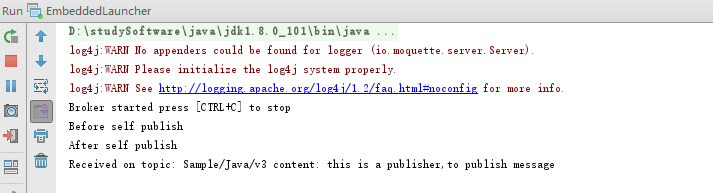
效果为:

2.客户端源码
https://github.com/eclipse/paho.mqtt.java
核心代码:
1)订阅者源码
/*******************************************************************************

 * Copyright (c) 2009, 2014 IBM Corp.

 *

 * All rights reserved. This program and the accompanying materials

 * are made available under the terms of the Eclipse Public License v1.0

 * and Eclipse Distribution License v1.0 which accompany this distribution.

 *

 * The Eclipse Public License is available at

 *    http://www.eclipse.org/legal/epl-v10.html

 * and the Eclipse Distribution License is available at

 *   http://www.eclipse.org/org/documents/edl-v10.php.

 *

 * Contributors:

 *    Dave Locke - initial API and implementation and/or initial documentation

 */

package org.eclipse.paho.sample.mqttv3app;

import java.io.IOException;

import java.sql.Timestamp;

import org.eclipse.paho.client.mqttv3.IMqttDeliveryToken;

import org.eclipse.paho.client.mqttv3.MqttCallback;

import org.eclipse.paho.client.mqttv3.MqttClient;

import org.eclipse.paho.client.mqttv3.MqttConnectOptions;

import org.eclipse.paho.client.mqttv3.MqttException;

import org.eclipse.paho.client.mqttv3.MqttMessage;

import org.eclipse.paho.client.mqttv3.persist.MqttDefaultFilePersistence;

/**

 * A sample application that demonstrates how to use the Paho MQTT v3.1 Client blocking API.

 *

 * It can be run from the command line in one of two modes:

 *  - as a publisher, sending a single message to a topic on the server

 *  - as a subscriber, listening for messages from the server

 *

 *  There are three versions of the sample that implement the same features

 *  but do so using using different programming styles:

 *  <ol>

 *  <li>Sample (this one) which uses the API which blocks until the operation completes</li>

 *  <li>SampleAsyncWait shows how to use the asynchronous API with waiters that block until

 *  an action completes</li>

 *  <li>SampleAsyncCallBack shows how to use the asynchronous API where events are

 *  used to notify the application when an action completes<li>

 *  </ol>

 *

 *  If the application is run with the -h parameter then info is displayed that

 *  describes all of the options / parameters.

 */

public class Sample implements MqttCallback {

    /**

     * The main entry point of the sample.

     *

     * This method handles parsing of the arguments specified on the

     * command-line before performing the specified action.

     */

    public static void main(String[] args) {

        // Default settings:

        boolean quietMode     = false;

        String action         = "subscribe";

        String topic         = "";

        String message         = "this is a subscriber,to subscribe message";

        int qos             = 2;

        String broker         = "127.0.0.1";

        int port             = 1883;

        String clientId     = null;

        String subTopic        = "Sample/#";

        String pubTopic     = "Sample/Java/v3";

        boolean cleanSession = true;            // Non durable subscriptions

        boolean ssl = false;

        String password = null;

        String userName = null;

        // Parse the arguments -

        for (int i=0; i<args.length; i++) {

            // Check this is a valid argument

            if (args[i].length() == 2 && args[i].startsWith("-")) {

                char arg = args[i].charAt(1);

                // Handle arguments that take no-value

                switch(arg) {

                    case 'h': case '?':    printHelp(); return;

                    case 'q': quietMode = true;    continue;

                }

                // Now handle the arguments that take a value and

                // ensure one is specified

                if (i == args.length -1 || args[i+1].charAt(0) == '-') {

                    System.out.println("Missing value for argument: "+args[i]);

                    printHelp();

                    return;

                }

                switch(arg) {

                    case 'a': action = args[++i];                 break;

                    case 't': topic = args[++i];                  break;

                    case 'm': message = args[++i];                break;

                    case 's': qos = Integer.parseInt(args[++i]);  break;

                    case 'b': broker = args[++i];                 break;

                    case 'p': port = Integer.parseInt(args[++i]); break;

                    case 'i': clientId = args[++i];                  break;

                    case 'c': cleanSession = Boolean.valueOf(args[++i]).booleanValue();  break;

                    case 'k': System.getProperties().put("javax.net.ssl.keyStore", args[++i]); break;

                    case 'w': System.getProperties().put("javax.net.ssl.keyStorePassword", args[++i]); break;

                    case 'r': System.getProperties().put("javax.net.ssl.trustStore", args[++i]); break;

                    case 'v': ssl = Boolean.valueOf(args[++i]).booleanValue(); break;

                    case 'u': userName = args[++i];               break;

                    case 'z': password = args[++i];               break;

                    default:

                        System.out.println("Unrecognised argument: "+args[i]);

                        printHelp();

                        return;

                }

            } else {

                System.out.println("Unrecognised argument: "+args[i]);

                printHelp();

                return;

            }

        }

        // Validate the provided arguments

        if (!action.equals("publish") && !action.equals("subscribe")) {

            System.out.println("Invalid action: "+action);

            printHelp();

            return;

        }

        if (qos < 0 || qos > 2) {

            System.out.println("Invalid QoS: "+qos);

            printHelp();

            return;

        }

        if (topic.equals("")) {

            // Set the default topic according to the specified action

            if (action.equals("publish")) {

                topic = pubTopic;

            } else {

                topic = subTopic;

            }

        }

        String protocol = "tcp://";

    if (ssl) {

      protocol = "ssl://";

    }

    String url = protocol + broker + ":" + port;

        if (clientId == null || clientId.equals("")) {

            clientId = "SampleJavaV3_"+action;

        }

        // With a valid set of arguments, the real work of

        // driving the client API can begin

        try {

            // Create an instance of this class

            Sample sampleClient = new Sample(url, clientId, cleanSession, quietMode,userName,password);

            // Perform the requested action

            if (action.equals("publish")) {

                sampleClient.publish(topic,qos,message.getBytes());

            } else if (action.equals("subscribe")) {

                sampleClient.subscribe(topic,qos);

            }

        } catch(MqttException me) {

            // Display full details of any exception that occurs

            System.out.println("reason "+me.getReasonCode());

            System.out.println("msg "+me.getMessage());

            System.out.println("loc "+me.getLocalizedMessage());

            System.out.println("cause "+me.getCause());

            System.out.println("excep "+me);

            me.printStackTrace();

        }

    }

    // Private instance variables

    private MqttClient             client;

    private String                 brokerUrl;

    private boolean             quietMode;

    private MqttConnectOptions     conOpt;

    private boolean             clean;

    private String password;

    private String userName;

    /**

     * Constructs an instance of the sample client wrapper

     * @param brokerUrl the url of the server to connect to

     * @param clientId the client id to connect with

     * @param cleanSession clear state at end of connection or not (durable or non-durable subscriptions)

     * @param quietMode whether debug should be printed to standard out

   * @param userName the username to connect with

   * @param password the password for the user

     * @throws MqttException

     */

    public Sample(String brokerUrl, String clientId, boolean cleanSession, boolean quietMode, String userName, String password) throws MqttException {

        this.brokerUrl = brokerUrl;

        this.quietMode = quietMode;

        this.clean        = cleanSession;

        this.password = password;

        this.userName = userName;

        //This sample stores in a temporary directory... where messages temporarily

        // stored until the message has been delivered to the server.

        //..a real application ought to store them somewhere

        // where they are not likely to get deleted or tampered with

        String tmpDir = System.getProperty("java.io.tmpdir");

        MqttDefaultFilePersistence dataStore = new MqttDefaultFilePersistence(tmpDir);

        try {

            // Construct the connection options object that contains connection parameters

            // such as cleanSession and LWT

            conOpt = new MqttConnectOptions();

            conOpt.setCleanSession(clean);

            if(password != null ) {

              conOpt.setPassword(this.password.toCharArray());

            }

            if(userName != null) {

              conOpt.setUserName(this.userName);

            }

            // Construct an MQTT blocking mode client

            client = new MqttClient(this.brokerUrl,clientId, dataStore);

            // Set this wrapper as the callback handler

            client.setCallback(this);

        } catch (MqttException e) {

            e.printStackTrace();

            log("Unable to set up client: "+e.toString());

            System.exit(1);

        }

    }

    /**

     * Publish / send a message to an MQTT server

     * @param topicName the name of the topic to publish to

     * @param qos the quality of service to delivery the message at (0,1,2)

     * @param payload the set of bytes to send to the MQTT server

     * @throws MqttException

     */

    public void publish(String topicName, int qos, byte[] payload) throws MqttException {

        // Connect to the MQTT server

        log("Connecting to "+brokerUrl + " with client ID "+client.getClientId());

        client.connect(conOpt);

        log("Connected");

        String time = new Timestamp(System.currentTimeMillis()).toString();

        log("Publishing at: "+time+ " to topic \""+topicName+"\" qos "+qos);

        // Create and configure a message

           MqttMessage message = new MqttMessage(payload);

        message.setQos(qos);

        // Send the message to the server, control is not returned until

        // it has been delivered to the server meeting the specified

        // quality of service.

        client.publish(topicName, message);

        // Disconnect the client

        client.disconnect();

        log("Disconnected");

    }

    /**

     * Subscribe to a topic on an MQTT server

     * Once subscribed this method waits for the messages to arrive from the server

     * that match the subscription. It continues listening for messages until the enter key is

     * pressed.

     * @param topicName to subscribe to (can be wild carded)

     * @param qos the maximum quality of service to receive messages at for this subscription

     * @throws MqttException

     */

    public void subscribe(String topicName, int qos) throws MqttException {

        // Connect to the MQTT server

        client.connect(conOpt);

        log("Connected to "+brokerUrl+" with client ID "+client.getClientId());

        // Subscribe to the requested topic

        // The QoS specified is the maximum level that messages will be sent to the client at.

        // For instance if QoS 1 is specified, any messages originally published at QoS 2 will

        // be downgraded to 1 when delivering to the client but messages published at 1 and 0

        // will be received at the same level they were published at.

        log("Subscribing to topic \""+topicName+"\" qos "+qos);

        client.subscribe(topicName, qos);

        // Continue waiting for messages until the Enter is pressed

        log("Press <Enter> to exit");

        try {

            System.in.read();

        } catch (IOException e) {

            //If we can't read we'll just exit

        }

        // Disconnect the client from the server

        client.disconnect();

        log("Disconnected");

    }

    /**

     * Utility method to handle logging. If 'quietMode' is set, this method does nothing

     * @param message the message to log

     */

    private void log(String message) {

        if (!quietMode) {

            System.out.println(message);

        }

    }

    /****************************************************************/

    /* Methods to implement the MqttCallback interface              */

    /****************************************************************/

    /**

     * @see MqttCallback#connectionLost(Throwable)

     */

    public void connectionLost(Throwable cause) {

        // Called when the connection to the server has been lost.

        // An application may choose to implement reconnection

        // logic at this point. This sample simply exits.

        log("Connection to " + brokerUrl + " lost!" + cause);

        System.exit(1);

    }

    /**

     * @see MqttCallback#deliveryComplete(IMqttDeliveryToken)

     */

    public void deliveryComplete(IMqttDeliveryToken token) {

        // Called when a message has been delivered to the

        // server. The token passed in here is the same one

        // that was passed to or returned from the original call to publish.

        // This allows applications to perform asynchronous

        // delivery without blocking until delivery completes.

        //

        // This sample demonstrates asynchronous deliver and

        // uses the token.waitForCompletion() call in the main thread which

        // blocks until the delivery has completed.

        // Additionally the deliveryComplete method will be called if

        // the callback is set on the client

        //

        // If the connection to the server breaks before delivery has completed

        // delivery of a message will complete after the client has re-connected.

        // The getPendingTokens method will provide tokens for any messages

        // that are still to be delivered.

    }

    /**

     * @see MqttCallback#messageArrived(String, MqttMessage)

     */

    public void messageArrived(String topic, MqttMessage message) throws MqttException {

        // Called when a message arrives from the server that matches any

        // subscription made by the client

        String time = new Timestamp(System.currentTimeMillis()).toString();

        System.out.println("Time:\t" +time +

                           "  Topic:\t" + topic +

                           "  Message:\t" + new String(message.getPayload()) +

                           "  QoS:\t" + message.getQos());

    }

    /****************************************************************/

    /* End of MqttCallback methods                                  */

    /****************************************************************/

       static void printHelp() {

          System.out.println(

              "Syntax:\n\n" +

                  "    Sample [-h] [-a publish|subscribe] [-t <topic>] [-m <message text>]\n" +

                  "            [-s 0|1|2] -b <hostname|IP address>] [-p <brokerport>] [-i <clientID>]\n\n" +

                  "    -h  Print this help text and quit\n" +

                  "    -q  Quiet mode (default is false)\n" +

                  "    -a  Perform the relevant action (default is publish)\n" +

                  "    -t  Publish/subscribe to <topic> instead of the default\n" +

                  "            (publish: \"Sample/Java/v3\", subscribe: \"Sample/#\")\n" +

                  "    -m  Use <message text> instead of the default\n" +

                  "            (\"Message from MQTTv3 Java client\")\n" +

                  "    -s  Use this QoS instead of the default (2)\n" +

                  "    -b  Use this name/IP address instead of the default (m2m.eclipse.org)\n" +

                  "    -p  Use this port instead of the default (1883)\n\n" +

                  "    -i  Use this client ID instead of SampleJavaV3_<action>\n" +

                  "    -c  Connect to the server with a clean session (default is false)\n" +

                  "     \n\n Security Options \n" +

                  "     -u Username \n" +

                  "     -z Password \n" +

                  "     \n\n SSL Options \n" +

                  "    -v  SSL enabled; true - (default is false) " +

                  "    -k  Use this JKS format key store to verify the client\n" +

                  "    -w  Passpharse to verify certificates in the keys store\n" +

                  "    -r  Use this JKS format keystore to verify the server\n" +

                  " If javax.net.ssl properties have been set only the -v flag needs to be set\n" +

                  "Delimit strings containing spaces with \"\"\n\n" +

                  "Publishers transmit a single message then disconnect from the server.\n" +

                  "Subscribers remain connected to the server and receive appropriate\n" +

                  "messages until <enter> is pressed.\n\n"

              );

    }

}
客户端-发布者
只需在configutation里面修改传入的参数即可:
为保证是同一个主题,则需要保证传入-a -t两个参数
-a subscribe -t Sample/Java/v3
最终运行结果:
服务器
订阅者:
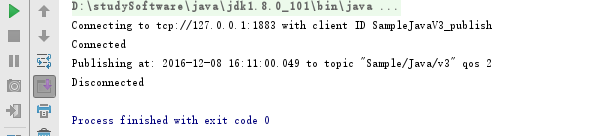
发布者

4.如何实现用MTQQ通过服务器实现订阅者和发布者的通讯的更多相关文章
- Redis集群~StackExchange.redis连接Sentinel服务器并订阅相关事件(原创)
回到目录 对于redis-sentinel我在之前的文章中已经说过,它是一个仲裁者,当主master挂了后,它将在所有slave服务器中进行选举,选举的原则当然可以看它的官方文章,这与我们使用者没有什 ...
- SSE:服务器发送事件,使用长链接进行通讯
概述 传统的网页都是浏览器向服务器“查询”数据,但是很多场合,最有效的方式是服务器向浏览器“发送”数据.比如,每当收到新的电子邮件,服务器就向浏览器发送一个“通知”,这要比浏览器按时向服务器查询(po ...
- SSE:服务器发送事件,使用长链接进行通讯 基础学习
HTML5中新加了EventSounce对象,实现即时推送功能,可以从下面连接中学习, http://www.kwstu.com/ArticleView/kwstu_20140829064746093 ...
- 【开源】MQTT推送服务器——zer0MqttServer(Java编写)
目录 说明 功能 如何使用 参考帮助 说明 重要的放前面:V1.0版本是一个非常基础的版本,除了完整的MQTT协议实现外,其他功能什么都没做. MQTT 协议是 IBM 开发的即时通讯协议,相对于 I ...
- HTML5服务器推送消息的各种解决办法
摘要 在各种BS架构的应用程序中,往往都希望服务端能够主动地向客户端推送各种消息,以达到类似于邮件.消息.待办事项等通知. 往BS架构本身存在的问题就是,服务器一直采用的是一问一答的机制.这就意味着如 ...
- 提升linux下tcp服务器并发连接数限制
1.修改用户进程可打开文件数限制 在Linux平台上,无论编写客户端程序还是服务端程序,在进行高并发TCP连接处理时,最高的并发数量都要受到系统对用户单一进程同时可打开文件数量的限制(这是因为系统 ...
- sql server 本地复制订阅 实现数据库服务器 读写分离(转载)
转载地址:http://www.cnblogs.com/echosong/p/3603270.html 再前段echosong 写了一遍关于mysql 数据同步实现业务读写分离的文章,今天咱们来看下S ...
- Comet:基于 HTTP 长连接的“服务器推”技术解析
原文链接:http://www.cnblogs.com/deepleo/p/Comet.html 一.背景介绍 传统web请求,是显式的向服务器发送http Request,拿到Response后显示 ...
- SQL Server服务器名称与默认实例名不一致的修复方法
SQL Server服务器名称与默认实例名不一致的修复方法 分类: 个人累积 SQl SERVER 数据库复制2011-08-10 09:49 10157人阅读 评论(0) 收藏 举报 sql ser ...
随机推荐
- springboot(四):thymeleaf使用详解
在上篇文章springboot(二):web综合开发中简单介绍了一下thymeleaf,这篇文章将更加全面详细的介绍thymeleaf的使用.thymeleaf 是新一代的模板引擎,在spring4. ...
- C#RichTextBox种跳转到指定行
用这个方法,iCodeRowsID是要跳转的行号,rtb是RiCHTextBox控件名. 其中rtb.Lines.Length可获得最大行数 private void TrunRowsId(int i ...
- OpenCV探索之路(十四):绘制点、直线、几何图形
绘制点和圆 void cvCircle( CvArr* img, CvPoint center, int radius, CvScalar color, int thickness=1, int li ...
- JS Event事件流(冒泡机制、捕获机制、事件绑定)
1.事件流 事件流:从页面中接收事件的顺序.也就是说当一个事件产生时,这个事件的传播过程,就是事件流. IE的事件流 IE中的事件流叫事件冒泡:事件冒泡:事件开始时由最具体的元素接收,然后逐级向上传播 ...
- hadoop2.7.2单机与伪分布式安装
环境相关 系统:CentOS 6.8 64位 jdk:1.7.0_79 hadoop:hadoop 2.7.2 安装java环境 详见:linux中搭建java开发环境 创建hadoop用户 # 以r ...
- C语言之循环结构
程序结构: 顺序结构 条件结构(分支结构) if结构,if-else结构 ,多重if分支结构,switch结构 循环结构:做重复的事情 while循环,do..while循环和for循环. 写循环结构 ...
- Oracle体系结构之进程
Oracle体系结构之进程 一.概述 Oracle中的每个进程都要执行一个特定的任务(或者一组任务),每个进程都会为自己分配内存(PGA)来完成它的任务.一个Oracle实例主要有以下3类进程: (1 ...
- (转) Java RMI 框架(远程方法调用)
"原创作品,允许转载,转载时请务必以超链接形式标明文章 原始出处 .作者信息和本声明.否则将追究法律责任.http://haolloyin.blog.51cto.com/1177454/33 ...
- HTML----网页基础和基本标签
网页分类: 1.静态网页:所有内容全写死,都写在源代码中,若修改必须修改源代码,后缀为.html或htm 2.动态网页:内容大部分来自于数据库,可以修改,后缀为.aspx(c#).jsp(java). ...
- sleep()
sleep() 方法可以使当前线程(即调用该方法的线程)暂停执行一段时间, 让其他线程有机会继续执行, 但它并不释放对象锁: 所以当sleep()方法结束时: 当前线程还是拥有对象锁: 当线程拥有对象 ...