
C#Winform 自定义透明按钮和单窗体模块化实现
技术看点
- WinForm自定义控件的使用
- WinForm单窗体应用如何模块化
需求及效果
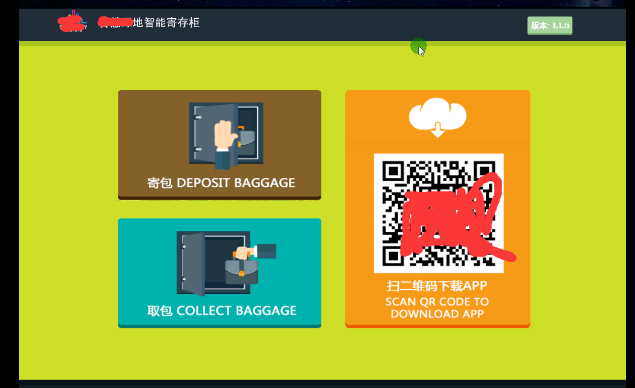
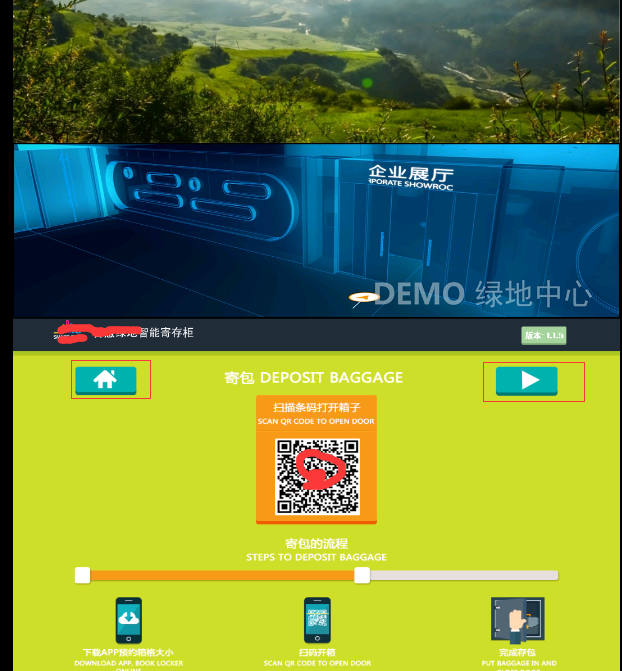
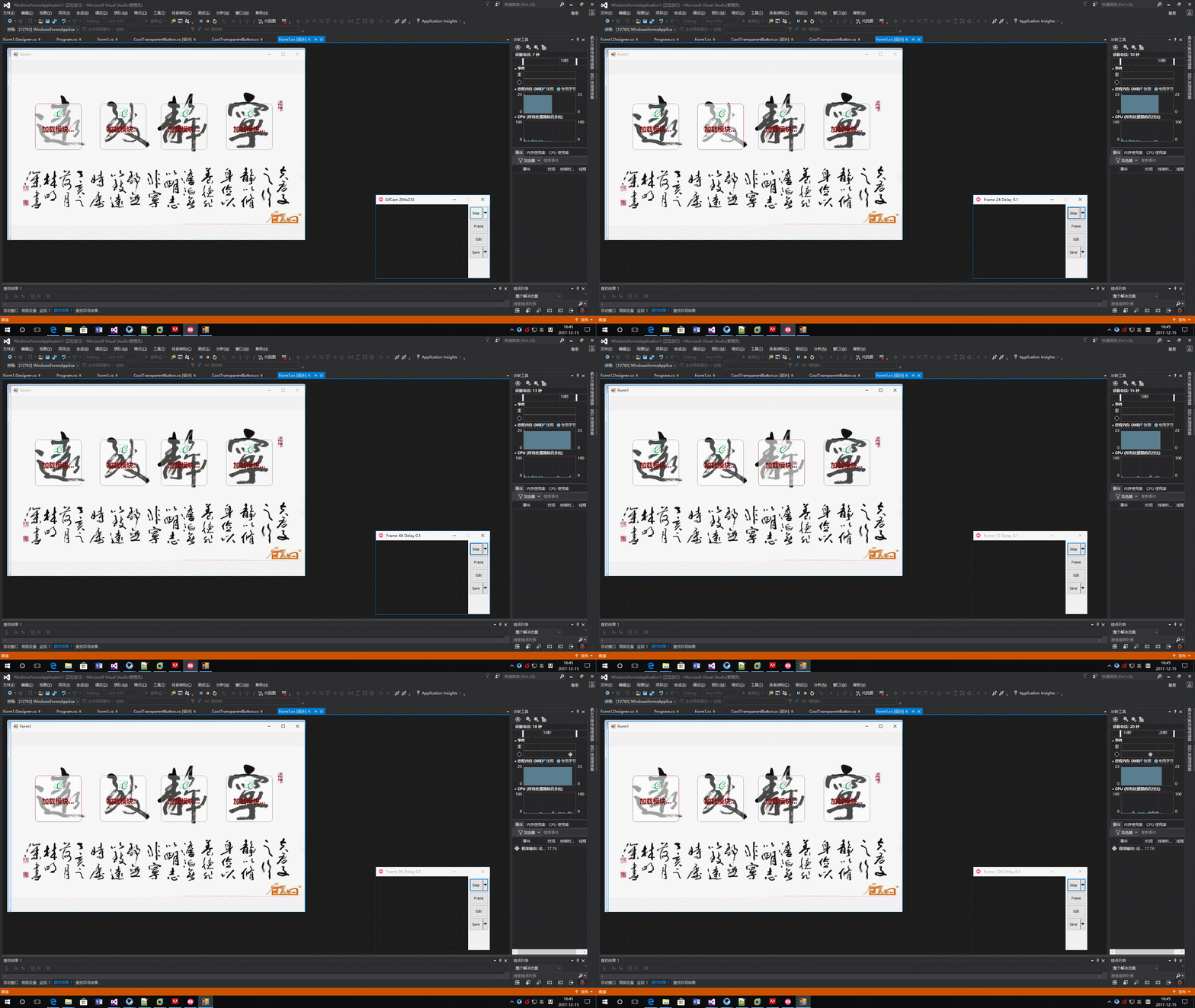
又来一波 C# GDI自定义控件show 。这个控件已经使用几年了,最近找出来重构一下。原来是没有边框的,那么导致导航的功能不是很突出。本来想加个效果:在执行单击时显示Loading动画,在执行完单击事件后恢复原样。这就是网页里见到的局部刷新,Ajax常用的场景。无奈要下班了,还没弄出来。需求来自几年前一个智能储物柜项目,人机界面有个美工设计好的效果图,为了省事和通用,需要一个透明的按钮来实现导航的任务。就是控件只是设计时可见,运行时不可见。
关键点说明
1)、GraphicsPath实现矩形的圆角羽化处理
 using (GraphicsPath path = new GraphicsPath())

            {

                #region 羽化,圆角处理

                path.StartFigure();

                path.AddArc(new Rectangle(new Point(rect.X, rect.Y), new Size( * Radius,  * Radius)), , );

                path.AddLine(new Point(rect.X + Radius, rect.Y), new Point(rect.Right - Radius, rect.Y));

                path.AddArc(new Rectangle(new Point(rect.Right -  * Radius, rect.Y), new Size( * Radius,  * Radius)), , );

                path.AddLine(new Point(rect.Right, rect.Y + Radius), new Point(rect.Right, rect.Bottom - Radius));

                path.AddArc(new Rectangle(new Point(rect.Right -  * Radius, rect.Bottom -  * Radius), new Size( * Radius,  * Radius)), , );

                path.AddLine(new Point(rect.Right - Radius, rect.Bottom), new Point(rect.X + Radius, rect.Bottom));

                path.AddArc(new Rectangle(new Point(rect.X, rect.Bottom -  * Radius), new Size( * Radius,  * Radius)), , );

                path.AddLine(new Point(rect.X, rect.Bottom - Radius), new Point(rect.X, rect.Y + Radius));

                path.CloseFigure();

                #endregion
要点就是画几段弧线和矩形连接起来。透明就是用了Color.FromArgb加上透明度,然后填充GraphicsPath形成透明区域。
g.FillPath(new SolidBrush(Color.FromArgb(, BackColor)), path);
2)、单窗体应用如何模块化
窗体只有一个,但操作界面好多个,由于是无人值守的应用。那么老是切换窗体操作是非常不方便的。工作区域是一个容器Panel,把每个操作界面定义成一个Panel作为只容器。
 public partial class DepositBizPanel : UserControl

    {

        private BackgroundStyle backgroundStyle = BackgroundStyle.Green;

        /// <summary>

        /// 主题风格

        /// </summary>

        public BackgroundStyle BackgroundStyle

        {

            get { return backgroundStyle; }

            set

            {

                backgroundStyle = value;

                switch (value)

                {

                    case GreenlandExpressBox.BackgroundStyle.Blue:

                        BackgroundImage = Properties.Resources.jbblue;

                        break;

                    case GreenlandExpressBox.BackgroundStyle.Orange:

                        BackgroundImage = Properties.Resources.jborange;

                        break;

                    case GreenlandExpressBox.BackgroundStyle.Green:

                        BackgroundImage = Properties.Resources.jbgreen;

                        break;

                }

                Invalidate();

            }

        }

        public Panel ParentPanel

        {

            get;

            set;

        }

        public Bitmap QR_Barcode

        {

            get { return (Bitmap)pbxBarcode.Image; }

            set { pbxBarcode.Image = value; }

        }

        public DialogResult PanelDiagResult

        {

            get;

            set;

        }

        public DepositBizPanel(Panel parent, Bitmap barcode, BackgroundStyle style)

        {

            InitializeComponent();

            DoubleBuffered = true;

            ParentPanel = parent;

            QR_Barcode = barcode;

            BackgroundStyle = style;

        }

        private void btnback_Click(object sender, EventArgs e)

        {

            foreach (Control panel in ParentPanel.Controls)

            {

                if (panel is DepositBizPanel)

                {

                    ParentPanel.Controls.Remove(panel);

                    PanelDiagResult = DialogResult.Cancel;

                    break;

                }

            }

        }

        private void btnprocessnext_Click(object sender, EventArgs e)

        {

            foreach (Control panel in ParentPanel.Controls)

            {

                if (panel is DepositBizPanel)

                {

                    ParentPanel.Controls.Remove(panel);

                    PanelDiagResult = DialogResult.OK;

                    break;

                }

            }

        }

    }
人机操作界面例子
透明按钮自定义控件全部代码
自定义按钮:
/// <summary>

    /// Cool透明自定义按钮

    /// </summary>

    public partial class CoolTransparentButton : UserControl

    {

        private Size iconSize = new Size(, );

        public Size IconSize

        {

            get

            {

                return iconSize;

            }

            set

            {

                iconSize = value;

                Invalidate();

            }

        }

        private string _ButtonText;

        public string ButtonText

        {

            get { return _ButtonText; }

            set

            {

                _ButtonText = value;

                Invalidate();

            }

        }

        protected Image _IconImage;

        public Image IconImage

        {

            get

            {

                return _IconImage;

            }

            set

            {

                _IconImage = value;

                Invalidate();

            }

        }

        private bool _FocseActived = false;

        private Color _BorderColor = Color.White;

        public Color BorderColor

        {

            get

            {

                return _BorderColor;

            }

            set

            {

                _BorderColor = value;

                Invalidate();

            }

        }

        private int _Radius = ;

        public int Radius

        {

            get

            {

                return _Radius;

            }

            set

            {

                _Radius = value;

                Invalidate();

            }

        }

        private bool ifDrawBorderWhenLostFocse = true;

        /// <summary>

        /// 失去焦点是否画边框

        /// </summary>

        public bool IfDrawBorderWhenLostFocse

        {

            get

            {

                return ifDrawBorderWhenLostFocse;

            }

            set

            {

                ifDrawBorderWhenLostFocse = value;

                Invalidate();

            }

        }

        /// <summary>

        /// 是否处于激活状态(焦点)

        /// </summary>

        public bool FocseActived

        {

            get { return _FocseActived; }

            set

            {

                _FocseActived = value;

                Invalidate();

            }

        }

        public CoolTransparentButton()

        {

            DoubleBuffered = true;

            BackColor = Color.Transparent;

            SetStyle(ControlStyles.AllPaintingInWmPaint | ControlStyles.OptimizedDoubleBuffer | ControlStyles.ResizeRedraw, true);

            SetStyle(ControlStyles.Opaque, false);

            UpdateStyles();

        }

        protected override void OnPaint(PaintEventArgs e)

        {

            var rect = ClientRectangle;

            rect.Inflate(-, -);

            Graphics g = e.Graphics;

            g.SmoothingMode = SmoothingMode.HighQuality;

            using (GraphicsPath path = new GraphicsPath())

            {

                #region 羽化,圆角处理

                path.StartFigure();

                path.AddArc(new Rectangle(new Point(rect.X, rect.Y), new Size( * Radius,  * Radius)), , );

                path.AddLine(new Point(rect.X + Radius, rect.Y), new Point(rect.Right - Radius, rect.Y));

                path.AddArc(new Rectangle(new Point(rect.Right -  * Radius, rect.Y), new Size( * Radius,  * Radius)), , );

                path.AddLine(new Point(rect.Right, rect.Y + Radius), new Point(rect.Right, rect.Bottom - Radius));

                path.AddArc(new Rectangle(new Point(rect.Right -  * Radius, rect.Bottom -  * Radius), new Size( * Radius,  * Radius)), , );

                path.AddLine(new Point(rect.Right - Radius, rect.Bottom), new Point(rect.X + Radius, rect.Bottom));

                path.AddArc(new Rectangle(new Point(rect.X, rect.Bottom -  * Radius), new Size( * Radius,  * Radius)), , );

                path.AddLine(new Point(rect.X, rect.Bottom - Radius), new Point(rect.X, rect.Y + Radius));

                path.CloseFigure();

                #endregion

                if (!FocseActived)

                {

                    if (ifDrawBorderWhenLostFocse)

                        g.DrawPath(new Pen(Color.Gray, ), path);

                    g.FillPath(new SolidBrush(Color.FromArgb(, BackColor)), path);

                }

                else

                {

                    g.DrawPath(new Pen(BorderColor, ), path);

                    rect.Inflate(-, -);

                    g.FillPath(new SolidBrush(Color.FromArgb(, BackColor)), path);

                }

                #region 画文本

                g.SmoothingMode = SmoothingMode.AntiAlias;

                if (IconImage != null)

                {

                    Rectangle rc = new Rectangle((Width - ) / , , IconSize.Width, IconSize.Height);

                    g.DrawImage(IconImage, rc);

                }

                if (!string.IsNullOrEmpty(ButtonText))

                {

                    using (StringFormat f = new StringFormat())

                    {

                        Rectangle rectTxt = new Rectangle(, (Height - ) / , Width, );

                        f.Alignment = StringAlignment.Center;// 水平居中对齐

                        f.LineAlignment = StringAlignment.Center;   // 垂直居中对齐

                        f.FormatFlags = StringFormatFlags.NoWrap;// 设置为单行文本

                        SolidBrush fb = new SolidBrush(this.ForeColor); // 绘制文本

                        e.Graphics.DrawString(ButtonText, new Font("微软雅黑", 16F, FontStyle.Bold), fb, rectTxt, f);

                    }

                }

                #endregion

            }

        }

        protected override void OnMouseHover(EventArgs e)

        {

            FocseActived = true;

        }

        protected override void OnMouseLeave(EventArgs e)

        {

            FocseActived = false;

        }

        protected override void OnEnter(EventArgs e)

        {

            FocseActived = true;

        }

        protected override void OnLeave(EventArgs e)

        {

            FocseActived = false;

        }

    }
注释不是很多,如有需要拿走不谢.
C#Winform 自定义透明按钮和单窗体模块化实现的更多相关文章
- c#winform自定义窗体,重绘标题栏,自定义控件学习
c#winform自定义窗体,重绘标题栏 虽然现在都在说winform窗体太丑了,但是我也能尽量让桌面应用程序漂亮那么一点点话不多说,先上图 重绘标题栏先将原生窗体设置成无边框,FormBoderSt ...
- WPF权限控制——【3】数据库、自定义弹窗、表单验证
你相信"物竞天择,适者生存"这样的学说吗?但是我们今天却在提倡"尊老爱幼,救死扶伤",帮助并救护弱势群体:第二次世界大战期间,希特勒认为自己是优等民族,劣势民族 ...
- Winform的"透明"
手头目前的一个项目(.Net4.0)中有这样一个需求:在程序中要进行视频采集,并且要在视频影像区域进行绘图编辑,对绘图能进行拉伸,拖拽和删除.从需求来看,必须得在视频影像区的上方盖一层画布才能这么操作 ...
- OC导航栏自定义返回按钮
[iOS]让我们一次性解决导航栏的所有问题 在默认情况下,导航栏返回按钮长这个样子 导航栏默认返回按钮 导航栏左上角的返回按钮,其文本默认为上一个ViewController的标题,如果上一个Vi ...
- 自定义常用input表单元素三:纯css实现自定义Switch开关按钮
自定义常用input表单元素的第三篇,自定义一个Switch开关,表面上看是和input没关系,其实这里采用的是checkbox的checked值的切换.同样,采用css伪类和"+" ...
- VB6史无前例的子类化之透明按钮
[原创文章,转发请保留版权信息] 作者:mezstd 文章地址:http://www.cnblogs.com/imez/p/3299728.html 效果图: 请原谅笔者无耻地称之为史无前例,至少在笔 ...
- WPF 无边框透明按钮
在实际开发过程中,有时候要设置一个无边框的按钮,或者无边框的透明按钮. 按钮效果如下: 1.当你应用telerik组件中的Button时,这个直接就可以设置 telerik:StyleManager. ...
- Mono自定义图片按钮
首先,我们编写一个MyImageButton类,继承自LinearLayout public class MyPhoneImageButton:LinearLayout { private Image ...
- SharePoint 2013 关于自定义显示列表表单的bug
1.在SharePoint 2013中,我们隐藏列表Dispform页面的ListFormWebPart部件,转而使用自定义显示列表表单进行展示,因为这样更容易定制我们需要的显示: 2.之后发现文件夹 ...
随机推荐
- window.open()被拦截问题
最近做项目的时候遇到一个需求,在商品详情页面中点击购买按钮,之后再新标签页中打开生成的订单页面,所以想用window.open()来实现.但是测试的时候发现打开的链接被浏览器拦截. 之后,开始在网上查 ...
- cronlog分割tomcat catalina.out日志
Tomcat 下日志文件 catalina.out 过大,几百兆或几个G,进而造成再也无法写入更多的日志内容,至使 Tomcat 无法处理请求,所以依靠cronlog来分割: 具体步骤如下: 1.安装 ...
- Python爬虫(十七)_糗事百科案例
糗事百科实例 爬取糗事百科段子,假设页面的URL是: http://www.qiushibaike.com/8hr/page/1 要求: 使用requests获取页面信息,用XPath/re做数据提取 ...
- android boot.img
android在启动时uboot推断有没有组合健按下或者cache分区的升级文件来决定进入哪个系统(可能还有别的推断方式) 有组合健按下或者cache分区有升级文件,则载入recovery.img进入 ...
- WAS集群系列(2):数据库连接低级错误——网络连接问题
环境 项目点 指标 WAS版本号 7.0 应用server操作系统 Windows 2008 应用server系统位数 64bit 数据库server操作系统 CentOS 5.6 数据库版本号 Or ...
- Linux多线程实践(三)线程的基本属性设置API
POSIX 线程库定义了线程属性对象 pthread_attr_t ,它封装了线程的创建者能够訪问和改动的线程属性.主要包含例如以下属性: 1. 作用域(scope) 2. 栈尺寸(stack siz ...
- js复制链接
需求:js复制一个并非当前页面的链接 实现: html <button class="btn btn-primary btn_copyurl">复制课程链接</b ...
- IdentityServer(12)- 使用 ASP.NET Core Identity
IdentityServer具有非常好的扩展性,其中用户及其数据(包括密码)部分你可以使用任何想要的数据库进行持久化. 如果需要一个新的用户数据库,那么ASP.NET Core Identity是你的 ...
- 主次设备号 Device Major and Minor Numbers
对于一个设备文件而言真正重要的标志是它的主次设备号(major and minor device numbers).如果我们用ls命令列出/dev下的一个设备: frank@under:~$ ls - ...
- SpringBoot Test集成测试
1.pom,文件添加相关依赖 如何测试SpringBoot的请求?使用spring-boot-starter-test这个包即可完成测试,SpringBoot项目为什么需要测试本章不作过多说明,重点放 ...