
Oracle EBS 12.2.6 on VirtualBox
Back in May, Oracle announced the general availability of Oracle VM Virtual Appliance for E-Business Suite 12.2.6 for download from the Oracle Software Delivery Cloud.
In this series of Blog posts I will detail how you can build an Oracle EBS 12.2.6 environment with VirtualBox for use on a laptop / PC.
Getting Started
Logon to the Oracle Software Delivery Cloud using you SSO credentials and search for ‘Oracle Virtual Appliance‘ , select the Product as below and click ‘Continue’ to download the Oracle VM Virtual Appliance for Oracle E-Business Suite.
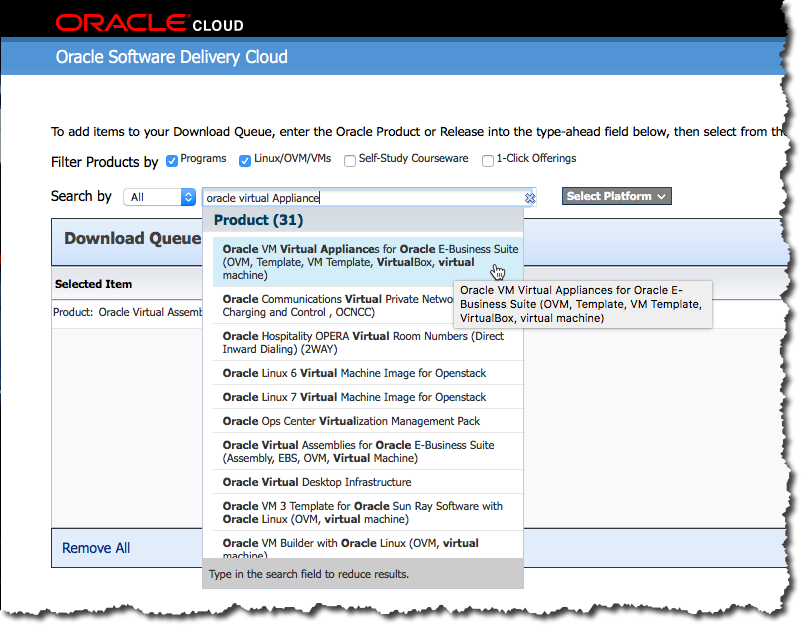
Compatible with VirtualBox
As you can see from above, the Oracle VM Virtual Appliance for Oracle E-Business Suite supports both Oracle VM and Oracle VirtualBox. Once download the Virtual Appliance can be imported into VirtualBox for running on a laptop / PC.
The Oracle VM Virtual Appliances for Oracle E-Business Suite 12.2.6.0.0 for x86 64bit is packaged in 19 files requiring 69.4 GB, so may take some considerable time to download depending upon your network / internet connection.
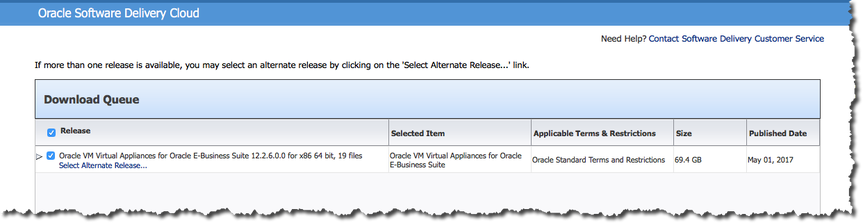
The Download
You can download the 19 Oracle VM Virtual Appliances files individually by clicking on the file name or them all use wget, if you have never used wget you can read the following post on how to use wget for downloading.
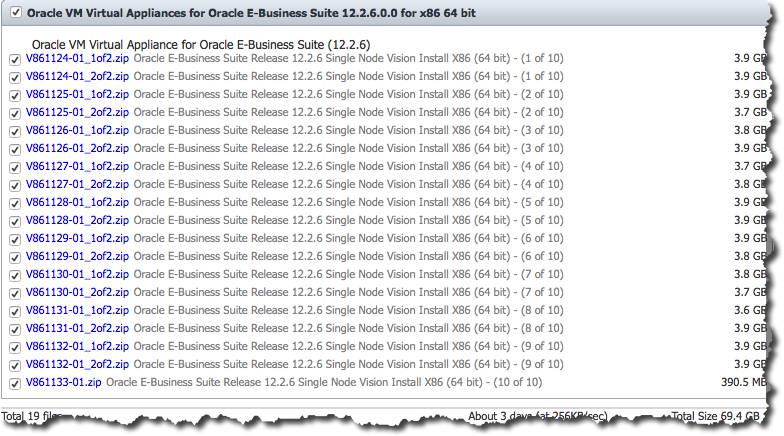
The distribution includes the entire Oracle EBS Technology and Apps stack including the example Vision database.
|
COMPONENT |
VERSION |
|
RDBMS Oracle Home |
12.1.0.2 |
|
Application Code Level |
Oracle E-Business Suite 12.2.6 Release Update Pack (My Oracle Support Knowledge Document 2114016.1) + AD and TXK Delta 8 (My Oracle Support Knowledge Document 2159750.1) |
|
Oracle Forms and Reports |
10.1.2.3 |
|
WebLogic Server |
10.3.6 |
|
Web Tier |
11.1.1.9 |
|
JDK |
JDK 1.7 build 1.7.0_121-b15 |
|
Java Plugin |
J2SE 1.7 |
|
Critical Patch Update (CPU) |
October 2016 |
In my next post I will detail how build an Oracle E-BS 12.2.6 environment within VirtualBox.
If you followed my previous post Oracle E-Business Suite R12.2.6 on Virtual Box you will have already downloaded the 19 required zip files, and be ready to go.
Ok, change directory to the location of the downloaded files, unzip and concatenate them into a single OVA file using the following:
$ unzip ‘V*.zip’
$ cat Oracle-E-Business-Suite-12.2.6_VISION_INSTALL.ova.* > Oracle-E-Business-Suite-12.2.6_VISION_INSTALL.ova
Getting started – Virtual Box
Start Virtual Box and navigate to File -> Import Appliance
Click on ‘Expert Mode’ and edit the ‘Virtual Disk Image’ path to a location with adequate space (~500GB), in this example I am using my Samsung Portable SSD T1 1TB dive mounted at ‘/Volumes/Samsung_T1’
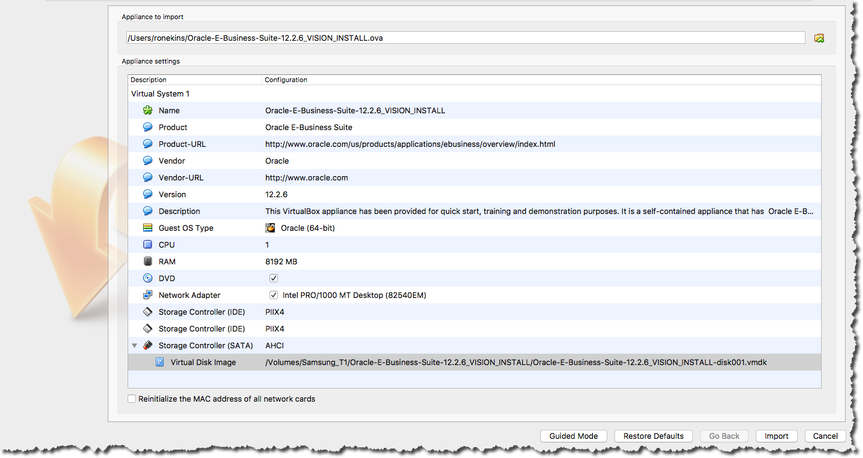
Click ‘Import’, go to lunch or grab a coffee and watch the progress bar if you prefer, the remaining time will re-calulate periodically.

Once complete, start up your new Oracle EBS R12.2.6 VM from within Oracle VirtualBox
Oracle E-Business Suite R12.2.6
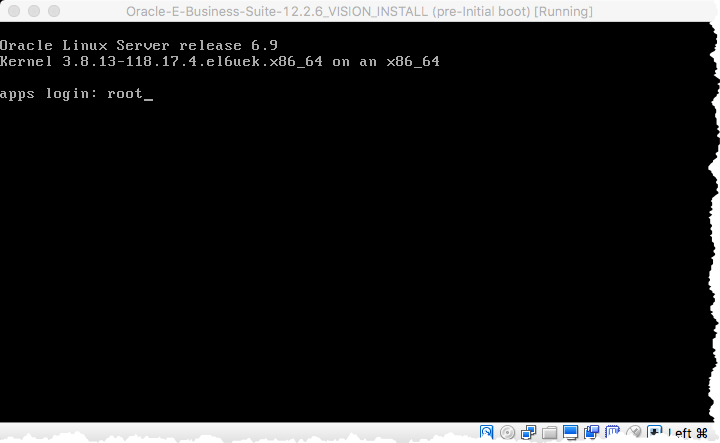
The initial boot will prompt you to change the ‘root’, ‘oracle’ and ‘applmgr’ passwords, the process will continue to start and configure an Oracle 12.1.0.2 database called ‘EBSDB’.
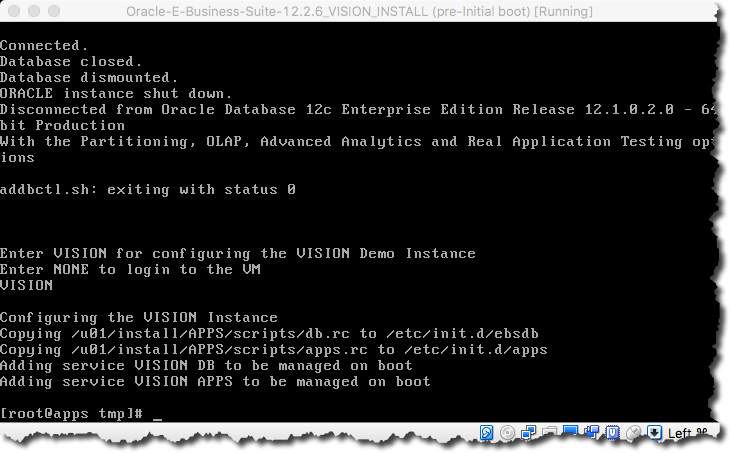
Use ‘ifconfig -a’ to determine your VM’s IP address from you VirtualBox console before using SSH from your host to connect using your preferred client.
Add the IP address to your local ‘/etc/host’ file so your browser can resolve your Oracle EBS VISION sandbox environment. e.g.
#
192.168.0.23 apps.example.com apps
#
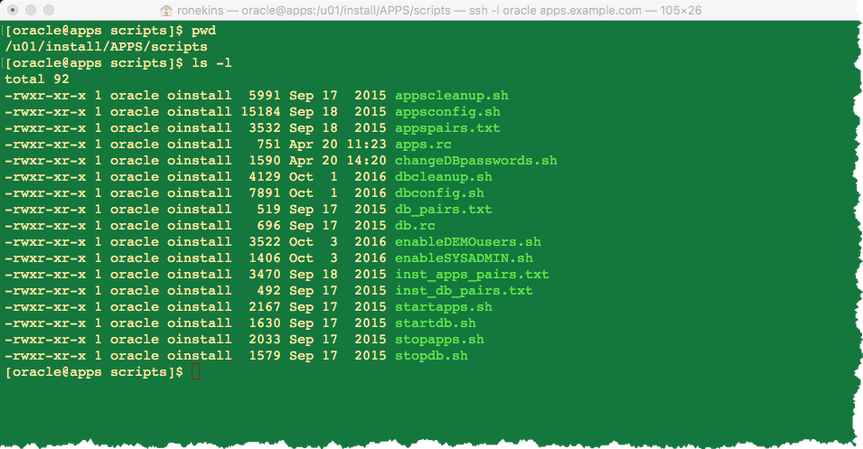
Change directory to ‘/u01/install/APPS/scripts’ to access the database and application stop / start scripts and run ‘startdb.sh’ and ‘startapps.sh’
- startdb.sh
- stopdb.sh
- startapps.sh
- stopapps.sh
[oracle@apps scripts]$ ./startdb.sh
Logfile: /u01/install/APPS/12.1.0/appsutil/log/EBSDB_apps/addlnctl.txt
You are running addlnctl.sh version 120.4
Starting listener process EBSDB …
LSNRCTL for Linux: Version 12.1.0.2.0 – Production on 15-AUG-2017 07:42:19
Copyright (c) 1991, 2014, Oracle. All rights reserved.
Starting /u01/install/APPS/12.1.0/bin/tnslsnr: please wait…
TNSLSNR for Linux: Version 12.1.0.2.0 – Production
System parameter file is /u01/install/APPS/12.1.0/network/admin/EBSDB_apps/listener.ora
Log messages written to /u01/install/APPS/12.1.0/admin/EBSDB_apps/diag/tnslsnr/apps/ebsdb/alert/log.xml
Listening on: (DESCRIPTION=(ADDRESS=(PROTOCOL=tcp)(HOST=apps.example.com)(PORT=1521)))
Connecting to (DESCRIPTION=(ADDRESS=(PROTOCOL=TCP)(HOST=apps.example.com)(PORT=1521)))
STATUS of the LISTENER
————————
Alias EBSDB
Version TNSLSNR for Linux: Version 12.1.0.2.0 – Production
Start Date 15-AUG-2017 07:42:19
Uptime 0 days 0 hr. 0 min. 0 sec
Trace Level off
Security ON: Local OS Authentication
SNMP OFF
Listener Parameter File /u01/install/APPS/12.1.0/network/admin/EBSDB_apps/listener.ora
Listener Log File /u01/install/APPS/12.1.0/admin/EBSDB_apps/diag/tnslsnr/apps/ebsdb/alert/log.xml
Listening Endpoints Summary…
(DESCRIPTION=(ADDRESS=(PROTOCOL=tcp)(HOST=apps.example.com)(PORT=1521)))
Services Summary…
Service “EBSDB” has 1 instance(s).
Instance “EBSDB”, status UNKNOWN, has 1 handler(s) for this service…
The command completed successfully
addlnctl.sh: exiting with status 0
addlnctl.sh: check the logfile /u01/install/APPS/12.1.0/appsutil/log/EBSDB_apps/addlnctl.txt for more information …
You are running addbctl.sh version 120.1
Starting the database EBSDB …
SQL*Plus: Release 12.1.0.2.0 Production on Tue Aug 15 07:42:19 2017
Copyright (c) 1982, 2014, Oracle. All rights reserved.
Connected to an idle instance.
ORA-32004: obsolete or deprecated parameter(s) specified for RDBMS instance
ORACLE instance started.
Total System Global Area 2147483648 bytes
Fixed Size 2926472 bytes
Variable Size 1308625016 bytes
Database Buffers 822083584 bytes
Redo Buffers 13848576 bytes
Database mounted.
Database opened.
Disconnected from Oracle Database 12c Enterprise Edition Release 12.1.0.2.0 – 64bit Production
With the Partitioning, OLAP, Advanced Analytics and Real Application Testing options
addbctl.sh: exiting with status 0
[oracle@apps scripts]$ ./startapps.sh
Starting the Oracle E-Business Suite Application Tier Services
You are running adstrtal.sh version 120.24.12020000.11
…
All enabled services for this node are started.
adstrtal.sh: Exiting with status 0
adstrtal.sh: check the logfile /u01/install/APPS/fs1/inst/apps/EBSDB_apps/logs/appl/admin/log/adstrtal.log for more information …
Before you can logon you will need to enable SYSADMIN and the Demo accounts, Oracle have provided scripts to do this e.g.
[oracle@apps scripts]$ ./enableSYSADMIN.sh
This script will let you set a new password for the SYSADMIN EBS Applications User, the default password most likely was “sysadmin”, so pick a different one now.
Enter new password for SYSADMIN:
Re-enter password for SYSADMIN:
Changing password for SYSADMIN
Log filename : L7583909.log
Report filename : O7583909.out
[oracle@apps scripts]$
[oracle@apps scripts]$ ./enableDEMOusers.sh
Enter a new password for the EBS Applications Users, the default password
most likely was “welcome”, so pick a different one now…
Enter new password for DEMO users:
Re-enter password for DEMO users:
Setting password for DEMO users…
Log filename : L7583911.log
…
[oracle@apps scripts]$
Oracle EBS R12 Dashboard
You should now be able to logon as ‘SYSADMIN’ or explore your Oracle EBS R12.2.6 VISION sandbox environment using the Demo users (see below) and the password defined above at: http://apps.example.com:8000/
“AFENG”, “AMARLIN”, “AMILLER”, “APOTTER”, “BPALMER”, “BWEBB”
“CBROWN”, “CONMGR”, “CONTMGR”, “CSADM”, “DBAKER”, “EBUSINESS”
“FBRAMER”, “HRMS”, “ILANG”, “ISUPPORTADMIN”, “JFROST”
“KJONES”, “LJONES”, “MFG”, “MGRMKT”, “MNT”, “OPERATIONS”
“PHENRY”, “PIMMGR”, “PLMMGR”, “PROCESS_OPS”, “PROJMFG”
“PSTOCK”, “RBATES”, “SCRIPTUSER”, “SERVICES”, “SFM”
“SPAIN”, “SVYADMIN”, “TRADEMGR”
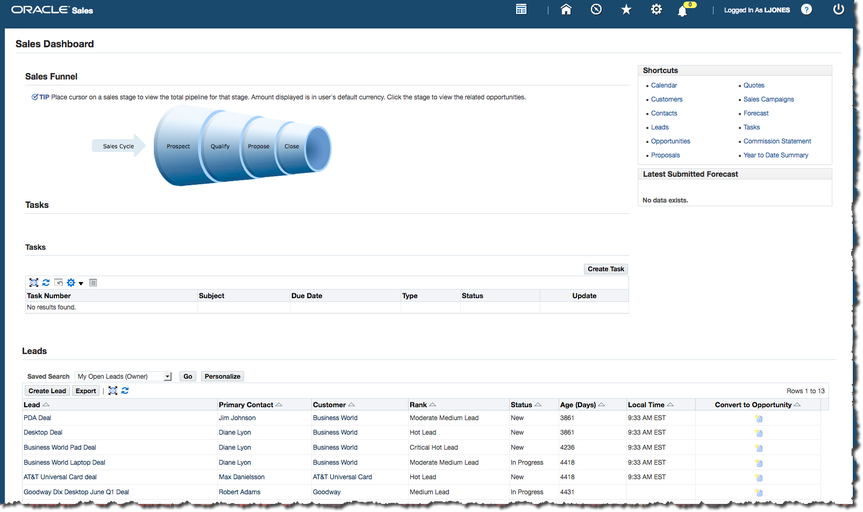
Sales Dashboard – LJONES
来自 <https://ronekins.wordpress.com/2017/08/15/oracle-ebs-r12-2-6-on-virtual-box-pt2/>
Oracle EBS 12.2.6 on VirtualBox的更多相关文章
- oracle ebs 12.20 安装成功其过程失败日记及总结(1)
由于公司业务须要,须要安装oracle ebs进行 form 开发,所以就開始了痛苦oracle ebs安装之过程.刚開始是在vm中win2003 server 中安装ebs,,不知是我自已的水平太差 ...
- 第7篇 ORACLE EBS DEMO虚拟机环境的安装
ERP信息系统的实施不仅要求懂得道理方面的知识,更要侧重于应用实践.为了有一个稳定的测试环境.初学者可以自己搭建一个EBS DEMO环境.本节介绍EBS DEMO环境虚拟机的安装.一. 安装前的准备( ...
- ebs 12.1.1 单节点多用户安装
本次测试环境:操作系统 oracle linux 6.9 oracle ebs 12.1.1 192.168.20.210 erpapp1.hthorizon.com erpapp1 yum ...
- Oracle EBS 常用网站列表
http://www.lifandong.com/erp/356 Oracle EBS 常用网站列表 英文站: Oracle EBS R12 官方参考手册(User Guide, Implementa ...
- Oracle EBS R12 (12.1.3) Installation Linux(64 bit)
Oracle EBS R12 (12.1.3) Installation Linux(64 bit) Contents Objective. 3 1 Download & Unzip. 3 D ...
- Oracle EBS进化史
https://blogs.oracle.com/ptian/entry/oracle_ebs%E8%BF%9B%E5%8C%96%E5%8F%B2 通过图表总结了下Oracle EBS的进化历史,回 ...
- Oracle EBS Form 发布到Server端的注意事项
前段时间在本地XP系统上测试了一些整合javabean的Form例子,想着发布到服务器段去看看能否运行正常,一开始以为会和本地XP系统一样,部署到相关的目录下进行一些配置就可以了,但实际过程却和想象的 ...
- Oracle EBS Form Builder使用Java beans创建窗体
最近有个项目,需要研究一下Oracle的E-Business Sutie(EBS),对于以前没接触此套件的我来说,简直太痛苦了.在网上找了一堆资料,试着进行Form二次开发,也遇到各类奇葩问题.目前遇 ...
- Oracle EBS Java Applet报错:找不到类
Oracle EBS Home Page可以打开,但是无法打开EBS的Form,查看Java控制台,有错误报出. java控制台报错,如下: Java Plug-in 1.6.0_07 使用 JRE ...
随机推荐
- 在 Win 7或8 下使用 VirtualBOX 虚拟机安装 OS X 10.11 El Capitan 及 Xcode 7.0
注:本文源自于: http://bbs.feng.com/read-htm-tid-9908410.html _____________________________________________ ...
- Laravel框架中的event事件操作
有时候当我们单纯的看 Laravel 手册的时候会有一些疑惑,比如说系统服务下的授权和事件,这些功能服务的应用场景是什么,其实如果没有经历过一定的开发经验有这些疑惑是很正常的事情,但是当我们在工作中多 ...
- 双线程 线性dp 传纸条
/* 两种做法:一是暴力dp[i][j][k][l] 二是以走的步数k作为阶段, dp[k][i][j]表示走到第k步,第一个人横坐标走到i,第二个人横坐标走到j 可以以此推出第第一个人的坐标为[i, ...
- WCF简介-01
WCF Windows Communication Foundation 1.1 新建一个"空白解决方案" 1.2 在解决方案中添加类库IBLL 1.2.1 添加接口IUserIn ...
- Ext.js入门(二)
ExtJs OOP基础 一:ExtJs中的面向对象 1.ExtJs中命名空间的定义 Ext中的命名空间类似于C#中的namespace和java中的包,用来对工程中的类进行更好的 ...
- 在.NET环境下使用KAFKA
近日基于项目的解耦与削峰需求,决定在项目中引入消息队列.因为同时项目部分业务已经迁移到Java上,所以消息队列组件又要兼顾Java环境下的使用,选来选去对比了RabbitMQ.RocketMQ和Kaf ...
- [转] webpack热更新配置小结
webpack热更新配置 热更新,可以使开发的人在修改代码后,不用刷新浏览器即可以看到修改后的效果.而它的另一个好处则是可以只替换修改部分相关的代码,大大的缩短了构建的时间. 热更新一般会涉及到两种场 ...
- POJ 3421 X-factor Chains (因式分解+排列组合)
题意:一条整数链,要求相邻两数前一个整除后一个.给出链尾的数,求链的最大长度以及满足最大长度的不同链的数量. 类型:因式分解+排列组合 算法:因式分解的素因子个数即为链长,链中后一个数等于前一个数乘以 ...
- java基础面试题-1
1.一个Java源文件中是否可包含多个类?有什么限制? 可以包含多个类,但只能有一个public类,并且public类名必须与文件名相同. 2.说说&和&&的区别 &a ...
- java web开发阅读笔记:第一章
学习该书前所用推荐书籍<名师讲坛—java开发实战经典> 一web开发前奏 1.1网页发展 首先搞懂. 1.HTTP:超级文本传输协议,是一种通讯协议. 通过这个网络协议WW浏览器与WWW ...