
【Alpha版本】冲刺阶段——Day6
【Alpha版本】冲刺阶段——Day6
阅读目录
* [今日进展](#1)
* [问题困难](#2)
* [明日任务](#3)
* [今日贡献量](#4)
* [TODOlist](#5)
【今日进展】
- 为注册模块增加界面代码
public static void Windows() {

        WindowActionEvent win=new WindowActionEvent();

        win.setBounds(780,450,290,130);

        win.setTitle("注册");

    }

    public static class WindowActionEvent extends JFrame {

        public static String name;

        public static String cipher;

        JButton button;

        JTextField inputText;

        JPasswordField inputCipher;

        public WindowActionEvent() {

            init();

            setVisible(true);

            setResizable(false);

        }

        void init() {

            setLayout(new FlowLayout());

            inputText=new JTextField(20);

            inputCipher=new JPasswordField(20);

            button = new JButton("注册");

            button.addActionListener(event->{

                name=inputText.getText();

                char [] a=inputCipher.getPassword();

                cipher=new String(a);

                //System.out.println(name);

                //System.out.println(cipher);

                Register register=new Register();

                register.insertMessage(name,cipher);

            });

            add(new JLabel("新账号"));

            add(inputText);

            add(new JLabel("  密码"));

            add(inputCipher);

            add(button);

        }

    }

}
为登录模块增加界面代码
为修改密码模块增加界面代码
为注销模块增加界面代码
完成主函数代码
public class Program{

    public static void main(String[] args) throws SQLException {

        WindowActionEvent win=new WindowActionEvent();

        win.setBounds(700,450,450,100);

        win.setTitle("Java红茶加密存储系统");

        CreatTable.Creat();

    }

    public static class WindowActionEvent extends JFrame {

        JButton button1;

        JButton button2;

        JButton button3;

        JButton button4;

        public WindowActionEvent() {

            init();

            setVisible(true);

            setResizable(false);

            setDefaultCloseOperation(JFrame.EXIT_ON_CLOSE);

        }

        void init() {

            FlowLayout flowLayout=new FlowLayout();

            flowLayout.setAlignment(FlowLayout.CENTER);

            setLayout(flowLayout);

            button1 = new JButton("登录");

            button1.setPreferredSize(new Dimension(100,40));

            button2 = new JButton("注册");

            button2.setPreferredSize(new Dimension(100,40));

            button3 = new JButton("注销");

            button3.setPreferredSize(new Dimension(100,40));

            button4 = new JButton("修改密码");

            button4.setPreferredSize(new Dimension(100,40));

            button1.addActionListener(event->{

                Login.Windows();

                /*

                login.setName();

                login.setCipher();

                login.LOGIN();

                */

            });

            button2.addActionListener(event->{

                Register.Windows();

            });

            button3.addActionListener(event->{

                Cancel.Windows();

            });

            button4.addActionListener(event->{

                Modify.Windows();

            });

            add(button1);

            add(button2);

            add(button3);

            add(button4);

        }

    }

}
【问题困难】
- 界面比列设计不合理,影响美观度。
【明日任务】
韩啸: 跟进TODOList,准备答辩
夏云霄: 跟进燃尽图,准备答辩
陈思兵: 理解代码、制作答辩ppt
朱文远:将现有程序打包成jar包,准备答辩
张家佳:收集团队成员进展并且汇总,撰写博客,准备答辩
【今日贡献量】
| 韩啸 | 夏云霄 | 陈思兵 | 朱文远 | 张家佳 |
|---|---|---|---|---|
| 4 | 5.5 | 5 | 5.5 | 3 |
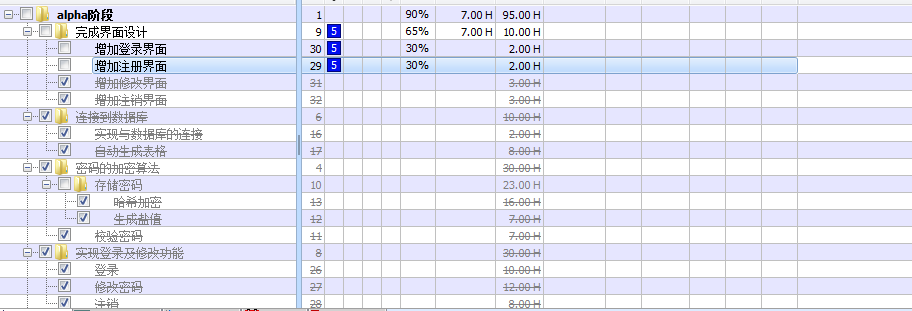
【TODOlist】
【Alpha版本】冲刺阶段——Day6的更多相关文章
- 作业七:团队项目——Alpha版本冲刺阶段
本次作业为期三周时间,要求各组结合所选项目并阅读教材<构建之法>第六章内容,完成项目的Alpha版本.本阶段的主要内容如下:(20分) 1. 每天组织一次站立会议,讨论每个成员的昨天进 ...
- 作业七:团队项目——Alpha版本冲刺阶段010
今日安排:组内成员讨论 今日进程:组内成员讨论结束,并有明确的解决办法,每个人准备实践
- 作业七:团队项目——Alpha版本冲刺阶段009
今日安排:组内成员讨论 今日进度:组内成员讨论分工细节以及可能遇到的问题,并提出解决方案
- 作业七:团队项目——Alpha版本冲刺阶段008
今日进度:组内成员讨论 今日安排:组内成员分工
- 作业七:团队项目——Alpha版本冲刺阶段007
今日进展:完善游戏主体代码. 今日安排:让游戏能运行起来.
- 作业七:团队项目——Alpha版本冲刺阶段006
今日进展:完成主体代码. 今日安排:对程序主体进行编写.
- 作业七:团队项目——Alpha版本冲刺阶段005
今日进展:编写代码. 今日安排:完成开始部分代码.
- 作业七:团队项目——Alpha版本冲刺阶段004
今日进展:我们的扫雷基本界面已经差不多了,准备开始编写内部代码. 今日安排:做好界面,准备开始代码编写.
- 作业七:团队项目——Alpha版本冲刺阶段003
今日进展:我们的目标是做一款扫雷游戏,所以我们先去玩了几款游戏,找到了扫雷游戏的一些特点. 今日安排:先进行了一些必要的游戏过程,进行了基本的扫雷界面规划.
- 作业七:团队项目——Alpha版本冲刺阶段002
今日进展:我们终于安装好了软件,今天开始进行作业设计. 今日安排:今天开始我们要开始我们的框架的设计.
随机推荐
- centos安装卸载Postgresql数据库PGSQL10
这几天ytkah正在测试Odoo,而Odoo12一定要PGSQL10否则安装数据库的时候会出错,所以就直接安装gpsql10.首先卸载旧版本postgresql yum remove postgres ...
- idea structure窗口
https://blog.csdn.net/qq_19934363/article/details/87994000
- pycharm如何设置注释的字体颜色
一.pycharm如何设置注释的字体颜色 1.打开pycharm编辑器,file > settings > Editor > Color Scheme > python > ...
- 006-docker-安装-nginx
1.搜索镜像 docker search nginx 2.拉取合适镜像 docker pull nginx docker images 3.使用镜像 docker run -p 8080:80 --n ...
- NYOJ 圈水池
#include<iostream> #include<cstdio> #include<cstring> #include<algorithm> #i ...
- nginx --反向代理配置文件
配置文件如下图 server { listen 8080; server_name 0.0.0.0;//这里可以配置相应域名 root /www/facei; index index.html i ...
- poi api工具
------------官网api地址 http://poi.apache.org/apidocs/index.html ------------官方下载地址 http://poi.apache.or ...
- spring框架中的注解
- 虚拟主机是设置在httpd-vhosts.conf还是vhosts.conf还是httpd.conf
https://blog.csdn.net/weisubao/article/details/43536723 解决方案:虚拟主机是设置在httpd-vhosts.conf还是vhosts.conf还 ...
- 第一次java测试有感
今天下午的Java测试体会深刻,真的可能我一暑假学的还没有今天一下午学的多.但通过今天一下午地与Java近距离接触 ,我感受到我与真正的Java距离还是特别远的.以后我的路还很长,我对Java仍然还是 ...