
nginx --反向代理配置文件
server {

    listen       8080;

    server_name  0.0.0.0;//这里可以配置相应域名

    root /www/facei;

    index index.html index.htm;

    access_log  /var/log/nginx/facei.access.log;

    error_log  /var/log/nginx/facei.error.log;

    location / {

        try_files $uri $uri /index.html =404;

    }

    location ~ /(oauth|rest)\/ {

        proxy_pass https://aip.baidubce.com;//反向代理配置

    }

}
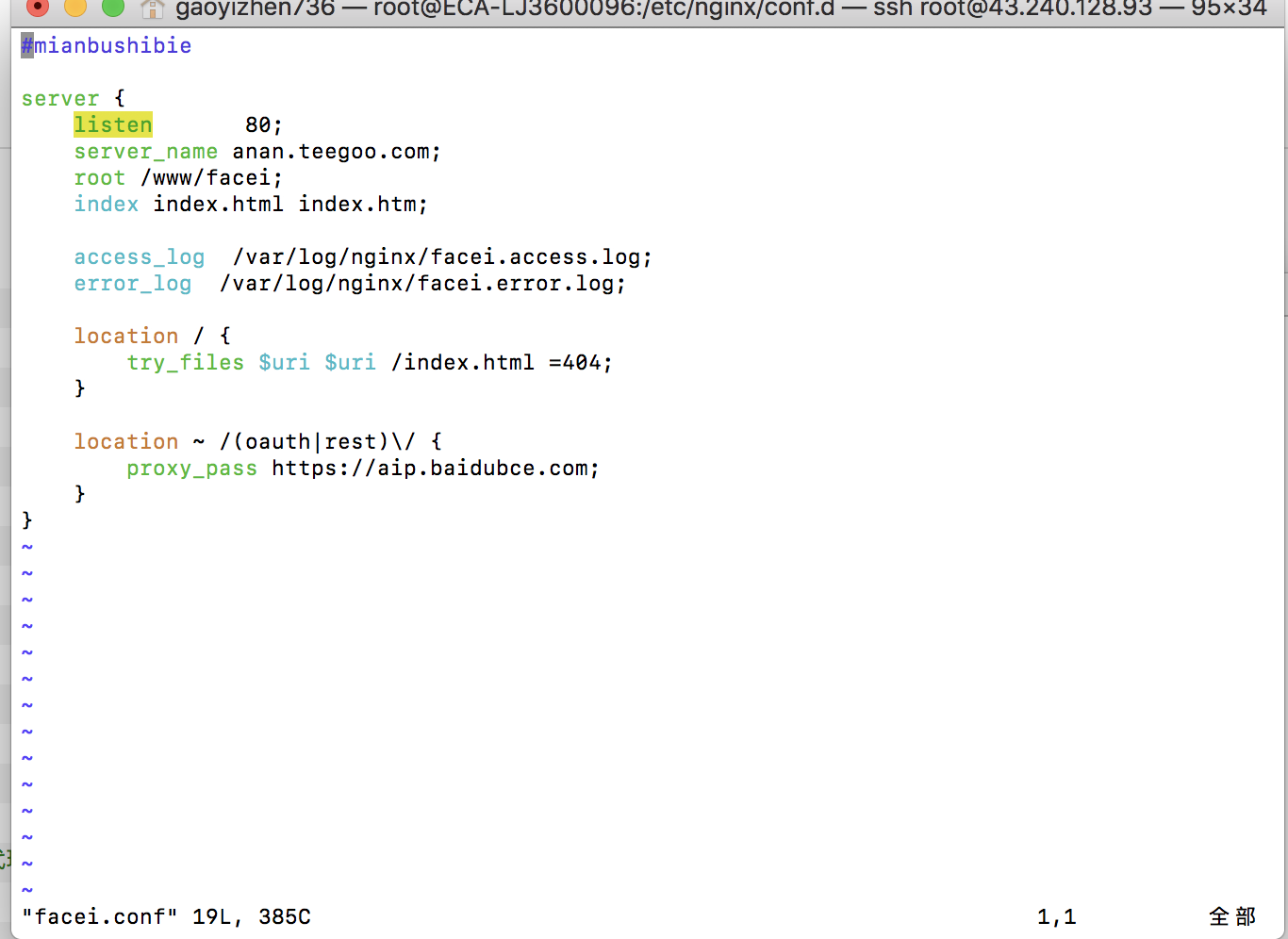
nginx 配置文件在centos上的路径是
/etc/nginx/conf.d/文件夹是其他站点的配置文件
/etc/nginx/nginx.conf 是配置文件
一般主配置都在nginx.conf里面,站点的配置都会放在conf.d里面。
下图是其他服务器的配置文件,待后续研究
user  sasuke;

worker_processes  2;

error_log  /home/sasuke/app/log/error.log;

pid        /home/sasuke/app/log/nginx.pid;

worker_rlimit_nofile 65535;

events {

    use epoll;

    worker_connections 1024;

    accept_mutex on;

    multi_accept on;

}

http {

    include       /etc/nginx/mime.types;

    default_type  application/octet-stream;

    log_format  main   '$remote_addr - $remote_user [$time_local] "$request" $status $body_bytes_sent "$http_referer" "$http_user_agent" "$http_x_forwarded_for"';

    log_format  log404 '$status [$time_local] $remote_addr $host$request_uri $sent_http_location';

    access_log  /home/sasuke/app/log/access.log  main;

    access_log  /home/sasuke/app/log/access.404.log  log404;

    sendfile       on;

    tcp_nopush     on;

    proxy_connect_timeout 90;

    proxy_read_timeout 180;

    proxy_send_timeout 180;

    keepalive_timeout  120;

    tcp_nodelay on;

    proxy_intercept_errors on;

    server {

        listen       80;

        server_name  10.20.24.131;

        charset      utf-8;

        access_log   /home/sasuke/app/log/host.access.log  main;

        add_header   'Access-Control-Allow-Origin' '*';

        location / {

            index index.html index.htm;

        }

        location ^~ /app/ {

            proxy_pass        http://10.20.24.131:9800;

            proxy_redirect    off;

            proxy_set_header  X-Forwarded-For  $proxy_add_x_forwarded_for;

        }

    #location ~ .*\.(html|htm|gif|jpg|jpeg|bmp|png|ico|txt|js|css|json)$ {

    #    root /home/sasuke/app/web/www;

    #    expires -1;

    #}

        location ~ .*$ {

            root /home/sasuke/app/web/www;

            expires -1;

        }

    }

}
服务器上nginx.conf 的配置文件如下
Last login: Tue Jun 12 09:58:04 on ttys001

C02VQ00YHTD7:~ gaoyizhen736$ ssh root@43.240.128.93

root@43.240.128.93's password:

harset      utf-8;

        access_log   /home/sasuke/app/log/host.access.log  main;

        add_header   'Access-Control-Allow-Origin' '*';

        location / {

            index index.html index.htm;

        }

        location ^~ /app/ {

            proxy_pass        http://10.20.24.131:9800;

            proxy_redirect    off;

            proxy_set_header  X-Forwarded-For  $proxy_add_x_forwarded_for;

        }

	#location ~ .*\.(html|htm|gif|jpg|jpeg|bmp|png|ico|txt|js|css|json)$ {

	#    root /home/sasuke/app/web/www;

	#    expires -1;

	#}

        location ~ .*$ {

            root /home/sasuke/app/web/www;

            expires -1;

        }

    }

}

Permission denied, please try again.

root@43.240.128.93's password:

Last failed login: Tue Jun 12 10:09:26 CST 2018 from 101.89.64.6 on ssh:notty

There were 2 failed login attempts since the last successful login.

Last login: Tue Jun 12 09:58:58 2018 from 101.89.64.6

WARNING: If you are not authorized to access this private computer system, disconnect now. All activities on this system will be monitored and recorded without prior notification or permission!

**************************************************************************

*                                                                        *

*Attention: Auditing process will report your every action!              *

*Warning: Don't delete any files in directory /root/slogs!!              *

*                                                                        *

*                          -PING AN INSURANCE (GRP) COMPANY OF CHINA,LTD.*

**************************************************************************

Script started, file is /root/slogs/2018-06-12_10:09:37pts-0root.log

[root@ECA-LJ3600096 ~]# cd /

[root@ECA-LJ3600096 /]# cd etc/nginx

[root@ECA-LJ3600096 nginx]# ls

conf.d                  koi-utf             scgi_params

default.d               koi-win             scgi_params.default

fastcgi.conf            mime.types          uwsgi_params

fastcgi.conf.default    mime.types.default  uwsgi_params.default

fastcgi_params          nginx.conf          win-utf

fastcgi_params.default  nginx.conf.default

[root@ECA-LJ3600096 nginx]# vim nginx.conf

# For more information on configuration, see:

#   * Official English Documentation: http://nginx.org/en/docs/

#   * Official Russian Documentation: http://nginx.org/ru/docs/

user root;

#user nginx;//权限不够改成user root  重启的时候需要带上sudo

worker_processes auto;

error_log /var/log/nginx/error.log;

pid /run/nginx.pid;

# Load dynamic modules. See /usr/share/nginx/README.dynamic.

include /usr/share/nginx/modules/*.conf;

events {

    worker_connections 1024;

}

http {

    log_format  main  '$remote_addr - $remote_user [$time_local] "$request" '

                      '$status $body_bytes_sent "$http_referer" '

                      '"$http_user_agent" "$http_x_forwarded_for"';

    access_log  /var/log/nginx/access.log  main;
nginx --反向代理配置文件的更多相关文章
- nginx.conf nginx反向代理配置文件
nginx反向代理配置文件 nginx.conf proxy_default.conf proxy.conf vhost/*.conf upstream/*.conf cache/*.conf ngi ...
- nginx - 反向代理 - 配置文件 header - 日志log格式
server { listen ; server_name paas.service.consul; client_max_body_size 512m; access_log /data/bkdat ...
- nginx - 反向代理 - 配置文件模板 - nginx 代理tcp的服务 - 部署示意图
danjan01deiMac:~ danjan01$ cat /usr/local/etc/nginx/nginx.conf|grep -v '^$' worker_processes 1; even ...
- Nginx反向代理配置文件
server { listen ; server_name ; root E:/Upays/public/; index index.php index.html; log_not_found off ...
- Nginx反向代理配置可跨域
由于业务需要,同一项目中的前端代码放在静态环境中,而后端代码放在tomcat中,但此时问题却出现了:前端使用ajax请求后端获取数据时出现如下报错 XMLHttpRequest cannot load ...
- 十.nginx反向代理负载均衡服务实践部署
期中集群架构-第十章-nginx反向代理负载均衡章节章节====================================================================== 0 ...
- linux篇—Nginx反向代理负载均衡
一.环境准备 反向代理功能架构 3台web服务器,组建出web服务器集群 web01 10.0.0.7 172.16.1.7 web02 10.0.0.8 172.16.1.8 web03 10.0. ...
- nginx反向代理出现了代理的端口号
nginx反向代理显示了代理的端口号 nginx反向代理配置文件 upstream mall { server 1.1.1.1:10261 weight=1; } server { listen 80 ...
- 使用nginx反向代理到不同服务器(共享同一端口)配置文件
使用nginx反向代理到不同服务器(共享同一端口)配置文件 https://blog.csdn.net/wang_k_123/article/details/72779443 https://www. ...
随机推荐
- python网络编程之UDP方式传输数据
UDP --- 用户数据报协议(User Datagram Protocol),是一个无连接的简单的面向数据报的运输层协议. UDP不提供可靠性,它只是把应用程序传给IP层的数据报发送出去,但是并不能 ...
- SQLAlchemy详细教程
http://www.360doc.com/content/15/0914/16/360939_499094891.shtml
- &与&问题
1.后台传到前端的url,如果有&会被前端解析成&的(直接js获取的时候),所以最好是将数值放到input中,然后再获取
- Linux->Windows主机目录和文件名中文乱码恢复
目录 Linux->Windows主机目录和文件名中文乱码恢复 声明 一. 乱码问题 二. 调试环境 三. 目录和文件名乱码恢复 3.1 可选方案 3.1.1 通过合适的编解码转换 3.1.2 ...
- Scala中的协变,逆变,上界,下界等
Scala中的协变,逆变,上界,下界等 目录 [−] Java中的协变和逆变 Scala的协变 Scala的逆变 下界lower bounds 上界upper bounds 综合协变,逆变,上界,下界 ...
- js函数 eql,equal,equalp
function eql(obj, other) { if(stringp(obj) && stringp(other) && obj === other) retur ...
- 设计模式学习--Builder
What Builder:将一个复杂的对象的构建和表示分离,使得同样的构建过程可以创建不同的表示. Why Builder也是创建型模式的一种,它是一步一步的向导式的创建一个复杂的对象,Builder ...
- css3---2D效果 ---3D效果
CSS3边框: CSS3圆角:border-radius(**px 或 **%) 属性——创建边框线的圆角 CSS3盒子阴影:box-shadow属性——创建阴影 box-shadow:30px 0p ...
- 文件二进制与String相互转换
//转换base64 OpenFileDialog dialog = new OpenFileDialog(); //dialog.Filter = "所有文件(*.*)|*.*" ...
- [No0000B9]C# 类型基础 值类型和引用类型 及其 对象复制 浅度复制vs深度复制 深入研究2
接上[No0000B5]C# 类型基础 值类型和引用类型 及其 对象判等 深入研究1 对象复制 有的时候,创建一个对象可能会非常耗时,比如对象需要从远程数据库中获取数据来填充,又或者创建对象需要读取硬 ...