
Thymeleaf 学习笔记-实例demo(中文教程)
compile("org.springframework.boot:spring-boot-starter-thymeleaf")
<?xml version="1.0" encoding="UTF-8"?>

<web-app xmlns="http://java.sun.com/xml/ns/javaee"

         xmlns:xsi="http://www.w3.org/2001/XMLSchema-instance"

         xsi:schemaLocation="http://java.sun.com/xml/ns/javaee

                 http://java.sun.com/xml/ns/javaee/web-app_3_0.xsd"

         version="3.0">

    <!--配置WEB-INF下的servlet-context.xml文件-->

    <servlet>

        <servlet-name>appServlet</servlet-name>

        <servlet-class>org.springframework.web.servlet.DispatcherServlet</servlet-class>

        <init-param>

            <param-name>contextConfigLocation</param-name>

            <param-value>/WEB-INF/servlet-context.xml</param-value>

        </init-param>

        <load-on-startup>1</load-on-startup>

    </servlet>

    <servlet-mapping>

        <servlet-name>appServlet</servlet-name>

        <url-pattern>/</url-pattern>

    </servlet-mapping>

</web-app>
<?xml version="1.0" encoding="UTF-8"?>

<beans xmlns="http://www.springframework.org/schema/beans"

       xmlns:xsi="http://www.w3.org/2001/XMLSchema-instance"

       xmlns:context="http://www.springframework.org/schema/context"

       xmlns:mvc="http://www.springframework.org/schema/mvc"

       xsi:schemaLocation="http://www.springframework.org/schema/mvc

       http://www.springframework.org/schema/mvc/spring-mvc-3.1.xsd

       http://www.springframework.org/schema/beans http://www.springframework.org/schema/beans/spring-beans-3.1.xsd

       http://www.springframework.org/schema/context http://www.springframework.org/schema/context/spring-context-3.1.xsd">

       <!-- Scans the classpath of this application for @Components to deploy as beans -->

       <context:component-scan base-package="com.test.thymeleaf.controller" />

       <!-- Configures the @Controller programming model -->

       <mvc:annotation-driven />

        <!--Resolves view names to protected .jsp resources within the /WEB-INF/views directory -->

        <!--springMVC+jsp的跳转页面配置-->

       <!--<bean class="org.springframework.web.servlet.view.InternalResourceViewResolver">-->

              <!--<property name="prefix" value="/WEB-INF/views/" />-->

              <!--<property name="suffix" value=".jsp" />-->

       <!--</bean>-->

       <!--springMVC+thymeleaf的跳转页面配置-->

       <bean id="templateResolver"

          class="org.thymeleaf.templateresolver.ServletContextTemplateResolver">

         <property name="prefix" value="/WEB-INF/views/" />

         <property name="suffix" value=".html" />

         <property name="templateMode" value="HTML5" />

       </bean>

       <bean id="templateEngine"

           class="org.thymeleaf.spring4.SpringTemplateEngine">

          <property name="templateResolver" ref="templateResolver" />

       </bean>

       <bean class="org.thymeleaf.spring4.view.ThymeleafViewResolver">

         <property name="templateEngine" ref="templateEngine" />

       </bean>

</beans>
package com.test.thymeleaf.controller;

import com.test.thymeleaf.domain.User;

import org.springframework.stereotype.Controller;

import org.springframework.ui.Model;

import org.springframework.web.bind.annotation.RequestMapping;

import org.springframework.web.bind.annotation.RequestMethod;

@Controller

public class HomeController {

    User user = new User();
    //入口

    @RequestMapping(value = "/home")

    public String home(Model model) {

        model.addAttribute("user",user);

        return "aa";

    }


  //提交表单后进行数据读取,并将数据传出

    @RequestMapping(value = "/bb",method = RequestMethod.POST)

    public String bb(User user,Model model) {

        model.addAttribute("user", user);

        model.addAttribute("message", ",welcome");

        return "bb";

    }

}
<!DOCTYPE html>

<html xmlns="http://www.w3.org/1999/xhtml"

      xmlns:th="http://www.thymeleaf.org">
<!DOCTYPE html>

<html xmlns="http://www.w3.org/1999/xhtml"

      xmlns:th="http://www.thymeleaf.org">

<head>

  <title>Home</title>

</head>

<body>

<form th:action="@{/bb}" th:object="${user}" th:method="post">

    <input type="text" th:field="*{name}"/>

    <input type="text" th:field="*{msg}"/>

    <input type="submit"/>

</form>

</body>

</html>
bb.html(用${}读取后台传出的数据动态替换静态数据“vinphy,”和"welcome!")
<!DOCTYPE html>

<html xmlns="http://www.w3.org/1999/xhtml"

      xmlns:th="http://www.thymeleaf.org">

<head>

    <meta charset="utf-8"/>

  <title>Home</title>

</head>

<body>

<div>

<sapn th:text="${user.name}">vinphy,</sapn>

<sapn th:text="${message}">welcome!</sapn>

</div>

</body>

</html>
7.部署访问
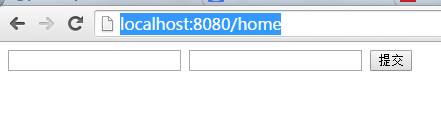
部署后访问http://localhost:8080/home进行访问,出现aa.html的内容
I386P8MNSACP.png)

Thymeleaf 学习笔记-实例demo(中文教程)的更多相关文章
- thymeleaf 学习笔记-基础篇(中文教程)
(一)Thymeleaf 是个什么? 简单说, Thymeleaf 是一个跟 Velocity.FreeMarker 类似的模板引擎,它可以完全替代 JSP .相较与其他的模板引擎,它有如下 ...
- 学习笔记《简明python教程》
学习笔记<简明python教程> 体会:言简意赅,很适合新手入门 2018年3月14日21:45:59 1.global 语句 在不使用 global 语句的情况下,不可能为一个定义于函数 ...
- CUBRID学习笔记 1 简介 cubrid教程
CUBRID 是一个全面开源,且完全免费的关系数据库管理系统.CUBRID为高效执行Web应用进行了高度优化,特别是需要处理大数据量和高并发请求的复杂商务服务.通过提供独特的最优化特性,CUBRID可 ...
- 【Microsoft Azure学习之旅】消息服务Service Bus的学习笔记及Demo示例
今年项目组做的是Cloud产品,有幸接触到了云计算的知识,也了解并使用了当今流行的云计算平台Amazon AWS与Microsoft Azure.我们的产品最初只部署在AWS平台上,现在产品决定同时支 ...
- 学习笔记之Python 3 教程
Python 3 教程 http://www.runoob.com/python3/python3-tutorial.html Python的3.0版本,常被称为Python 3000,或简称Py3k ...
- Android(java)学习笔记212:中文乱码的问题处理(qq登录案例)
1.我们在之前的笔记中LoginServlet.java中,我们Tomcat服务器回复给客户端的数据是英文的"Login Success","Login Failed&q ...
- Android(java)学习笔记155:中文乱码的问题处理(qq登录案例)
1. 我们在之前的笔记中LoginServlet.java中,我们Tomcat服务器回复给客户端的数据是英文的"Login Success","Login Failed& ...
- 学习笔记:yaml语言教程
目录 1.YAML基本概念 1.1 简介 1.2 基本语法 1.3 支持的数据结构: 1.4 注意点 2.数据结构 2.1 字典 2.2 数组 2.3 纯量 2.4 强制类型转换,双! 2.5 字符串 ...
- JavaScript学习笔记-实例详解-类(二)
实例详解-类(二) //===给Object.prototype添加只读\不可枚举\不可配置的属性objectId(function(){ Object.defineProperty(Object ...
随机推荐
- 微信小程序 多个视频播放器
大致思路就是,wx:for="{{ list }}"下两个view,一个视频video,另一个封面image(客户需求,要可以自定义封面).主要控制变量是playIndex,当点击 ...
- 关于JAVA 中的Configuration类
properties文件是Java平台默认的配置文件格式,其优点是格式清晰,简单易懂,使用commons-configuration读取properties文件也比较简单,代码如下: 基本用法: 1. ...
- 【Linux】使用w命令和uptime命令查看系统负载
在Linux系统中查询系统CPU和内存的负载(使用率)时,我们通常习惯于使用top.atop或者ps,这篇文章将要给大家介绍如何使用w命令和uptime命令来查看系统的负载情况,对于uptime命令, ...
- system函数遇到的问题
这几天调程序(嵌入式linux),发现程序有时就莫名其妙的死掉,每次都定位在程序中不同的system()函数,直接在shell下输入system()函数中调用的命令也都一切正常.就没理这个bug,以 ...
- Linux系统命令缩写
命令缩写:(转) ls:list(列出目录内容) cd:Change Directory(改变目录) su:switch user 切换用户 rpm:redhat package manager 红帽 ...
- [svc]glusterfs的简单部署
服务端安装 gluster01主机挂载磁盘 [root@glusterfs01 ~]# mkfs.xfs /dev/sdb [root@glusterfs01 ~]# mkdir -p /data/b ...
- Multiplication of numbers
Questin: There is an array A[N] of N numbers. You have to compose an array Output[N] such that Outpu ...
- 【Ubuntu】xrdp完美实现Windows远程访问Ubuntu 16.04
步骤一.下载TigerVNC Server软件包 下载地址:Tigervnc Deb软件包(适用于Ubuntu 16.04.1 - 64位) 步骤二. 安装TigerVNC Server软件包 1.打 ...
- Mac 抓包工具wireshark使用
共四部分 1.wireshark简介 2.wireshark mac版安装 3.wireshark 抓取普通http 4.高级应用 1.wireshark 简介(百度百科) Wireshark(前称E ...
- Spring Boot 使用Java代码创建Bean并注册到Spring中
版权声明:本文为博主原创文章,未经博主允许不得转载. https://blog.csdn.net/catoop/article/details/50558333 声明同一个类下的多个实例: packa ...