
"Could not resolve host: mirrorlist.centos.org; Unknown error"解决方法
这两天学习历程可谓历尽坎坷,昨天在vSphere Client中安装完CentOS系统后,今天尝试在系统中安装mysql数据库。
由于刚接触Linux,所以对于一些常用指令和操作并不熟悉,也是一边百度一边操作的,所以对照博文进行mysql在线安装:
wget https://cdn.mysql.com//Downloads/MySQL-5.7/mysql-5.7.26-linux-glibc2.12-x86_64.tar.gz
回车确认时出现第一个问题:bash:wget:command not found,原来一般linux最小化安装时,wget不会默认被安装,
于是通过下一条命令来安装wget。
yum -y install wget
紧接着又来了第二个问题:Could not resolve host:mirrorlist.centos.org; Unknown error.网上查了下原因:“本机无法连接网络的网络设置”。
于是靠着强大的百度找到 xixihuang 博主的文章,依靠他的第一个方案终于报错问题,下面记录下处理过程:
步骤1:在终端输入以下命令,查看安装在本机的网卡:
[root@localhost ~]# nmcli d
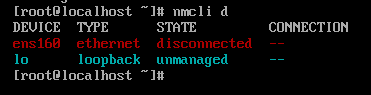
ens160 处于disconnected状态;
步骤2:在终端中输入以下命令,打开网络管理员:
[root@localhost ~]# nmtui
选择“Edit a connection”后按回车键(使用TAB键进行选择的选项)

步骤3:现在可以看到所有的网络接口,选择一个(我的是ens160),然后键盘上下左右键选择到“Edit”并Enter确认进入:
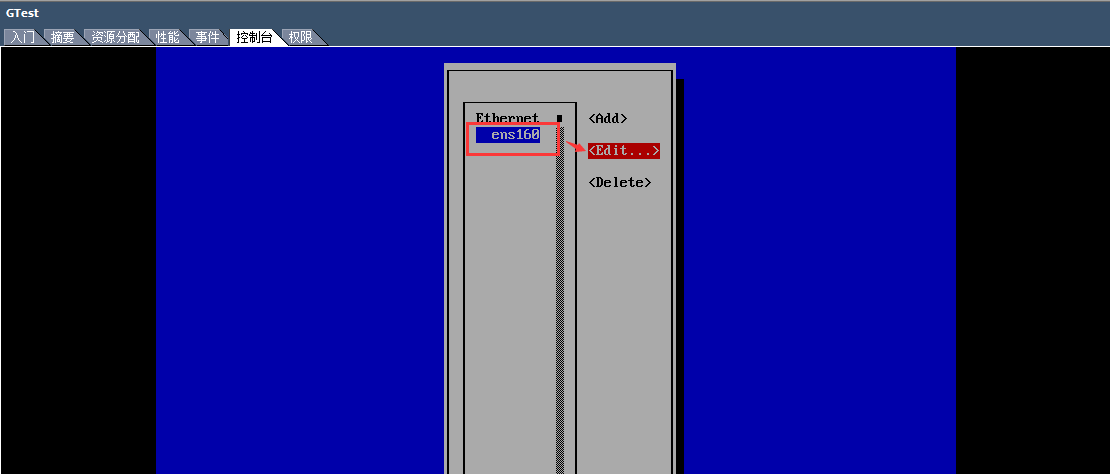
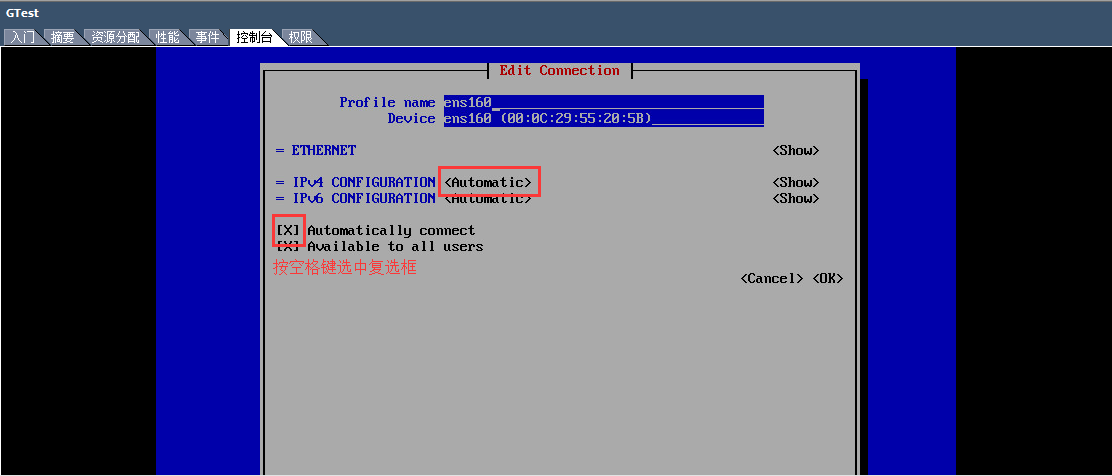
步骤4:进行动态配置:
(1)在IPv4 CONFIGURATION配置选择<Automatic>;
(2)按空格键选择“Automatically connetc”复选框;
(3)点击OK键,退出网络管理器;
(4)依次Back Exit,返回终端界面;
(5)输入命令重新启动网络服务:[root@localhost ~]# systemctl restart network
网络重启后,可通过yum -y install wget进行安装了。安装好wget后,可以使用命令直接下载mysql,命令如下:
[root@localhost ~]wget https://cdn.mysql.com//Downloads/MySQL-5.7/mysql-5.7.26-linux-glibc2.12-x86_64.tar.gz
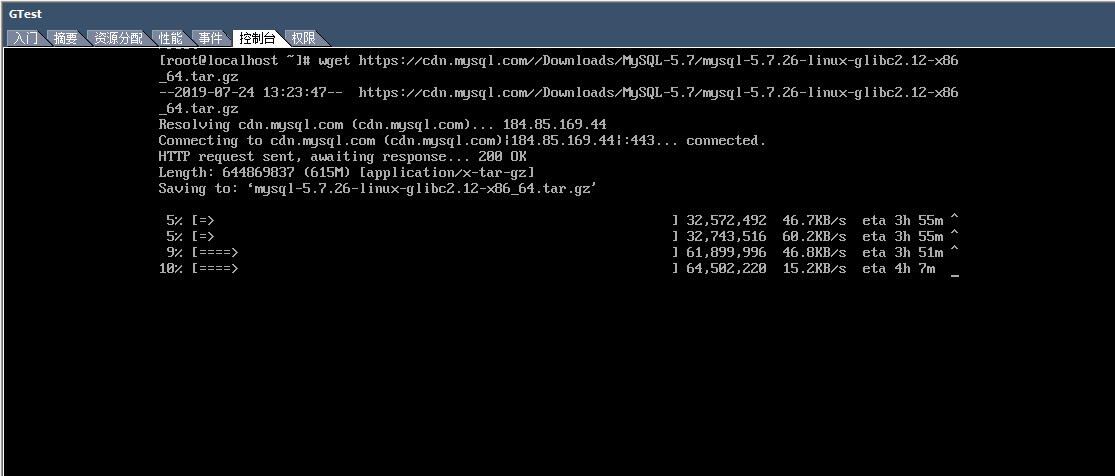
今天先到这,下载完成后再有坑的话继续填吧。
原文参考链接:https://www.cnblogs.com/xixihuang/p/5404517.html
"Could not resolve host: mirrorlist.centos.org; Unknown error"解决方法的更多相关文章
- CentOS报错:Could not retrieve mirrorlist http://mirrorlist.centos.org/?release=7&arch=x86_64&repo=os&infra=stock32 error was 14: curl#6 - "Could not resolve host: mirrorlist.centos.org; Unknown error"
今天安装完带图形界面的CentOS 7后,在Terminal中运行yum安装命令时报了以下错误: Could not retrieve mirrorlist http://mirrorlist.cen ...
- Could not retrieve mirrorlist http://mirrorlist.centos.org/?release=7&arch=x86_64&repo=os&infra=stock32 error was 14: curl#6 - "Could not resolve host: mirrorlist.centos.org; Unknown error"
今天安装完带图形界面的CentOS 7后,在Terminal中运行yum安装命令时报了以下错误: 1 2 3 4 5 6 7 8 9 10 11 12 13 14 15 16 17 18 19 20 ...
- yum 安装报错:Could not retrieve mirrorlist http://mirrorlist.centos.org/?release=7&arch=x86_64&repo=os&infra=stock error was 14: curl#6 - "Could not resolve host: mirrorlist.centos.org; Unknown error"
[root@venn09 ~]# yum install -y vim Loaded plugins: fastestmirror Could not retrieve mirrorlist http ...
- Centos7报Could not resolve host: mirrorlist.centos.org; Unknown error(VMware网络设置)
软件:VMware 12 Linux版本:centOS 7 网络设置:桥接模式 安装后ping百度网址时报错:Name or service not know,使用yum安装时报错:Could not ...
- Could not resolve host: mirrorlist.centos.org Centos 7 Unkown error
安装Centos7(core)以后,网卡默认不会启用.这是一个大坑,直接报错,这是一个过度优化,有几个开发人员/运维人员安装centos7(core)不用ssh去连接服务器的. 报错如下: Loade ...
- yum安装软件报错:curl#6 - "Could not resolve host: mirrorlist.centos.org; Temporary failure in name resolut
# yum install -y epel-release Loaded plugins: fastestmirror Repository base is listed more than once ...
- couldnt resolve host mirrorlist.centos
解决centos 6.3 yum安装软件时找不到镜像问题 [root@nagios-server ~]# yum update –y Loaded plugins: fastestmirror Lo ...
- linux安装软件时提示找不到镜像的问题:Couldn't resolve host 'mirrorlist.centos.org'
问题:[root@cddserver2 ~]# yum -y install gcc-*Loaded plugins: fastestmirror, prestoCould not retrieve ...
- linux安装命令出错(could not resolve host mirrorlist.centos.org)
本次问题出现在虚拟机安装的centos7系统之后,使用yum命令安装wget命令(yum -y install wget),出现could not resolve host mirrorlist.ce ...
随机推荐
- Oracle加密解密
Oracle内部有专门的加密包,可以很方便的对内部数据进行加密(encrypt)和解密(decrypt). 介绍加密包之前,先简单说一下Oracle基本数据类型——RAW类型. RAW,用于保存位串的 ...
- 第八届蓝桥杯C/C++程序设计本科B组决赛 ——瓷砖样式(填空题)【DP?我的暴力排列搜索】
标题:磁砖样式 小明家的一面装饰墙原来是 3*10 的小方格. 现在手头有一批刚好能盖住2个小方格的长方形瓷砖. 瓷砖只有两种颜色:黄色和橙色. 小明想知道,对于这么简陋的原料,可以贴出多少种不同的花 ...
- 一、XML DOM、XMLDocument
一.XML DOM概述 XML 文档大小写敏感.属性用引号括起来,每一个标记都要闭合. DOM是XML文档的内存中树状的表示形式. 继承关系图: XmlNode;//XML节点 ......XmlDo ...
- 关于Mybatis查询结果的封装
1.结果封装为List<Object> 接口示例: public List<Members> selectMembersListByName(String name); 配置文 ...
- Selenium常用API的使用java语言之18-浏览器cookie操作
有时候我们需要验证浏览器中Cookie是否正确, 因为基于真实Cookie的测试是无法通过白盒测试和集成测试进行的.WebDriver提供了操作Cookie的相关方法可以读取. 添加和删除Cookie ...
- 关于创建Django表单Forms继承BaseForm的问题
在创建Django表单时,因为需要验证用户输入的验证码是否正确,因此需要在session里提取当前验证码的值和POST提交过来的值进行比对,如图: form.py from django import ...
- 包,logging日志模块,copy深浅拷贝
一 包 package 包就是一个包含了 __init__.py文件的文件夹 包是模块的一种表现形式,包即模块 首次导入包: 先创建一个执行文件的名称空间 1.创建包下面的__init__.py文件的 ...
- 51 arm x86 的大小端记录
51 是大端模式 arm的cortex m 默认小端,可以设置大端 x86是小端 大端模式:低位字节存在高地址上,高位字节存在低地址上 小端模式:高位字节存在高地址上,低位字节存在低地址上
- java前后分离了 controller接口GET和POST
通用 @RestController GET @RequestMapping("userbase/{userId}") public User selectById(@PathVa ...
- mutt/mail
邮件管理命令 发送和接收邮件