
Swift_IOS之提示框UIAlertController
import UIKit

class ViewController: UIViewController ,UIActionSheetDelegate{

    @IBAction func btn1(_ sender: UIButton) {

        label1.text="文本显示"

        let alertController = UIAlertController(title: "修改文本", message: nil, preferredStyle: UIAlertControllerStyle.alert)

        alertController.addTextField(configurationHandler: { (textField: UITextField!) -> Void in

            textField.placeholder = "请输入内容"

            // 添加监听代码,监听文本框变化时要做的操作

            NotificationCenter.default.addObserver(self, selector: #selector(self.alertTextFieldDidChange), name: NSNotification.Name.UITextFieldTextDidChange, object: textField)

        })

        let cancelAction = UIAlertAction(title: "取消", style: UIAlertActionStyle.cancel, handler: nil)

        let okAction = UIAlertAction(title: "确认", style: UIAlertActionStyle.default , handler: { (action: UIAlertAction!) -> Void in

            let login = (alertController.textFields?.first)! as UITextField

            let str = login.text

            self.label1.text=str

            NotificationCenter.default.removeObserver(self, name: NSNotification.Name.UITextFieldTextDidChange, object: nil)

        })

        okAction.isEnabled = false

        alertController.addAction(cancelAction)

        alertController.addAction(okAction)

        self.present(alertController, animated: true, completion: nil)

    }

    /// 监听文字改变

    @objc func alertTextFieldDidChange(){

        let alertController = self.presentedViewController as! UIAlertController?

        if (alertController != nil) {

            let login = (alertController!.textFields?.first)! as UITextField

            let okAction = alertController!.actions.last! as UIAlertAction

            if (!(login.text?.isEmpty)!) {

                okAction.isEnabled = true

            } else {

                okAction.isEnabled = false

            }

        }

    }

    @IBOutlet weak var label1: UILabel!

    override func viewDidLoad() {

        super.viewDidLoad()

        // Do any additional setup after loading the view, typically from a nib.

    }

    @IBOutlet weak var hello: UILabel!

    override func didReceiveMemoryWarning() {

        super.didReceiveMemoryWarning()

        // Dispose of any resources that can be recreated.

    }

}
效果图
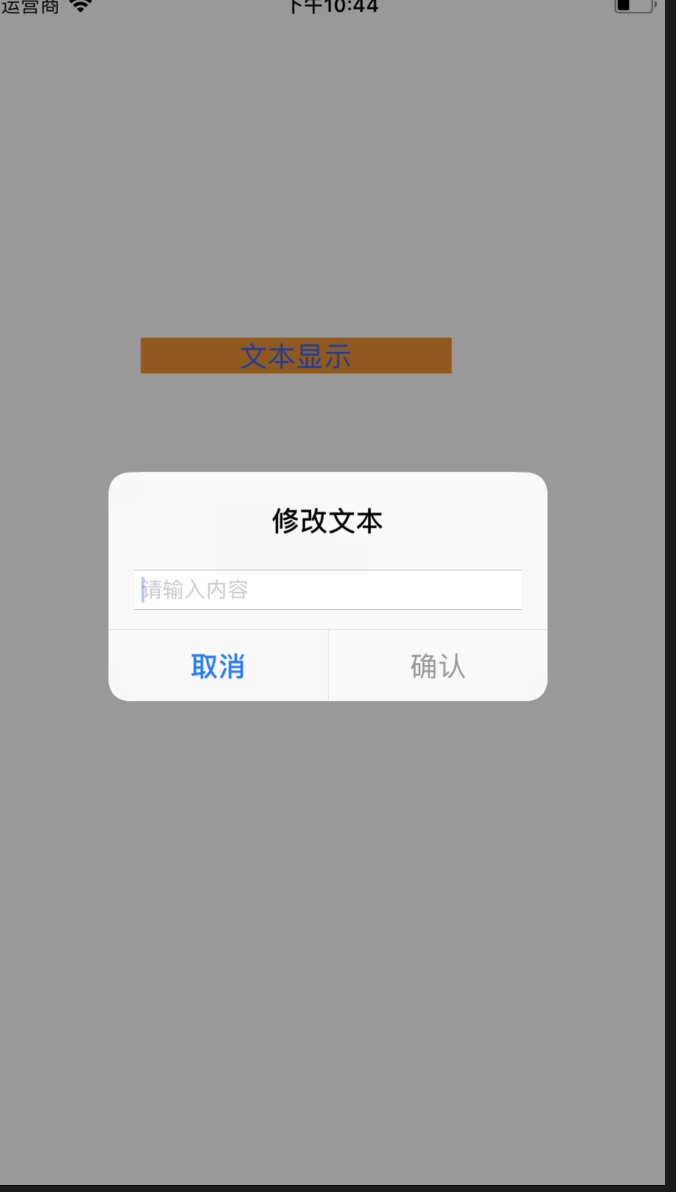
//

//  ViewController.swift

//  hello

//

//  Created by loaderman on 2018/12/22.

//  Copyright © 2018年 loaderman. All rights reserved.

//

import UIKit

class ViewController: UIViewController ,UIActionSheetDelegate{

    @IBAction func btn1(_ sender: UIButton) {

        weak var weakSelf = self // 弱引用

        let alertController = UIAlertController()

        let cancelAction = UIAlertAction(title: "取消", style: .cancel, handler: nil)

        let directMessagesAction = UIAlertAction(title: "私信", style: .default) { (action) in

            self.label1.text="私信"

        }

        let focusOnAction = UIAlertAction(title: "关注", style: .default) { (action) in

            self.label1.text="关注"

        }

        alertController.addAction(focusOnAction)

        alertController.addAction(directMessagesAction)

        alertController.addAction(cancelAction)

        weakSelf!.present(alertController, animated: true, completion: nil)

    }

    @IBOutlet weak var label1: UILabel!

    override func viewDidLoad() {

        super.viewDidLoad()

        // Do any additional setup after loading the view, typically from a nib.

    }

    @IBOutlet weak var hello: UILabel!

    override func didReceiveMemoryWarning() {

        super.didReceiveMemoryWarning()

        // Dispose of any resources that can be recreated.

    }

}
效果
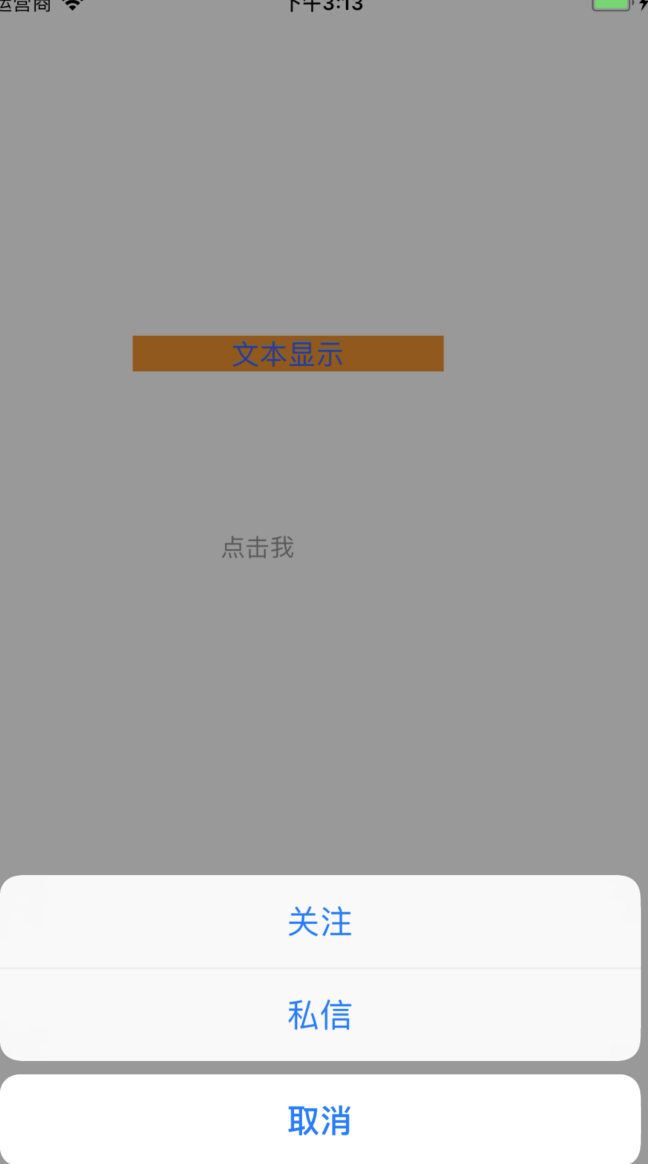
Swift_IOS之提示框UIAlertController的更多相关文章
- 选择提示框UIAlertController 和网络状态判断AFNetworking
// 选择提示框 DownloadView *vc = [[DownloadView alloc] initWithFrame:CGRectMake(, , SCREEN_WIDTH, SCREEN_ ...
- iOS -iOS9中提示框(UIAlertController)的常见使用
iOS 8 之前提示框主要使用 UIAlertView和UIActionSheet:iOS 9 将UIAlertView和UIActionSheet合二为一为:UIAlertController . ...
- 19. UIAlertController 提示框获取文本内容,打印控制台上
1.首先定义一个全局字符串变量,方便接收获取的文本内容 2. -(void)viewDidAppear:(BOOL)animated{ UIAlertController * alert = [UIA ...
- 提示框(UIAlertController)的使用。
添加出现在屏幕中间的提示框(也就是之前的UIAlertView): UIAlertController * av = [UIAlertController alertControllerWithTit ...
- Swift - 告警提示框(UIAlertController)的用法
自iOS8起,苹果就建议告警框使用UIAlertController来代替UIAlertView.下面总结了一些常见的用法: 1,简单的应用(同时按钮响应Handler使用闭包函数) 1 2 3 ...
- iOS - UIAlertController三种显示提示框代码
UIAlertView在IOS 8以上版本已经过时了,官方推荐我们使用UIAlertController代替UIAlertView.UIActionSheet 1、UIAlertController显 ...
- iOS开发——UI基础-提示框
提示框的种类有很多,废话不多说,直接上代码 一.文本提示框 运行结果如下: 代码实现如下: @interface ViewController () // 添加方法 - (IBAction)add; ...
- WKWebView不显示提示框(Swift)
使用WKWebView的时候会出现明明自己做的一些页面有提示框, 为什么使用别人的页面提示框总是不显示, 其实很大部分原因是因为该提示框是通过JS调用的, 需要实现WKUIDelegate来进行监听 ...
- iOS:提示框(警告框)控件UIActionSheet的详解
提示框(警告框)控件2:UIActionSheet 功能:当点击按钮或标签等时,弹出一个提示框,显示必要的提示,然后通过添加的按钮完成需要的功能.它与导航栏类似,它继承自UIView. 风格类型: ...
随机推荐
- Springboot整合cxf后不能访问controller,不能访问接口
参考版本 springboot 1.4.X <=========> cxf-spring-boot-starter-jaxws 3.1.X springboot 1.5.X <=== ...
- Nginx access_log日志添加返回字段
主要为方便单用户请求日志回溯分析 记录用户标记. 将用户信息打印在access_log 日志里. 步骤: 1.重写nginx 的log格式 一般是地址是 /etc/nginx/conf.d/ng ...
- 模板引擎-vue中的模板如何被解析,指令如何处理
模板是什么 <div id='app'> <div> <input v-model="title"/> <button v-on:clic ...
- linux网络编程之system v消息队列(一)
经过上次对于进程通讯的一些理论的认识之后,接下来会通过实验来进一步加深对进程通讯的认识,话不多说,进入正题: 其实还可以通过管道,但是,管道是基于字节流的,所以通常会将它称为流管道,数据与数据之间是没 ...
- unittest单元测试笔记
单元测试 unittest单元测试是基于java的JUnit思想框架开发出来的测试框架 import unittest import HTMLTestRunner class Mytest1(unit ...
- 【安卓周记】笔记复习记录:No.1
[安卓] 1. 安装APK记得考虑兼容7.0,Uri不能直接从Uri.parse()中构建,要使用FileProvider构建Uri. <provider android:name=" ...
- E:first-of-type
E:first-of-type 语法: E:first-of-type { sRules } 说明: 匹配同类型中的第一个同级兄弟元素E.大理石平台[1200mm*1000mm*150mm] 要使该属 ...
- myeclipse关掉references
去掉下面两个勾选:
- linux 中将用户添加到组的 4 个方法
Linux 组是用于管理 Linux 中用户帐户的组织单位.对于 Linux 系统中的每一个用户和组,它都有惟一的数字标识号.它被称为 用户 ID(UID)和组 ID(GID).组的主要目的是为组的成 ...
- WCF wsHttpBinding in SoapUI
当使用wsHttpBinding,而不是平时用的webHttpBinding的时候,用soapui会报错.这个时候需要选中WS-A选项中的"Add default wsa:Action&qu ...