
iOS:提示框(警告框)控件UIActionSheet的详解
提示框(警告框)控件2:UIActionSheet
typedef NS_ENUM(NSInteger, UIActionSheetStyle) {
UIActionSheetStyleAutomatic = -1, //iOS系统自动默认的风格
UIActionSheetStyleDefault = UIBarStyleDefault,// 默认风格,灰色背景上显示白色文字
UIActionSheetStyleBlackTranslucent = UIBarStyleBlackTranslucent //透明黑色背景,白色文字
UIActionSheetStyleBlackOpaque = UIBarStyleBlackOpaque, //纯黑背景,白色文字
};
属性:
@property(nonatomic,assign) id<UIActionSheetDelegate> delegate; // 代理
@property(nonatomic,copy) NSString *title; //标题
@property(nonatomic) UIActionSheetStyle actionSheetStyle; //风格类型
@property(nonatomic,readonly) NSInteger numberOfButtons; //按钮数量
@property(nonatomic) NSInteger cancelButtonIndex; //取消按钮的索引
@property(nonatomic) NSInteger destructiveButtonIndex; //红色按钮索引
@property(nonatomic,readonly) NSInteger firstOtherButtonIndex; //其他第一个按钮索引
@property(nonatomic,readonly,getter=isVisible) BOOL visible; //是否可见
方法:
※创建实例的初始化方法
- (instancetype)initWithTitle:(NSString *)title delegate:(id<UIActionSheetDelegate>)delegate cancelButtonTitle:(NSString *)cancelButtonTitle destructiveButtonTitle:(NSString *)destructiveButtonTitle otherButtonTitles:(NSString *)otherButtonTitles, ...("Use UIAlertController instead.”);
※添加按钮,返回它的索引
- (NSInteger)addButtonWithTitle:(NSString *)title;
※返回指定索引的按钮文字
- (NSString *)buttonTitleAtIndex:(NSInteger)buttonIndex;
※显示在工具栏
- (void)showFromToolbar:(UIToolbar *)view;
※显示在导航栏
- (void)showFromTabBar:(UITabBar *)view;
※显示在工具栏按钮上
- (void)showFromBarButtonItem:(UIBarButtonItem *)item animated:(BOOL)animated ;
※在指定区域和视图上显示
- (void)showFromRect:(CGRect)rect inView:(UIView *)view animated:(BOOL)animated;
※在视图上显示
- (void)showInView:(UIView *)view;
※按钮消失
- (void)dismissWithClickedButtonIndex:(NSInteger)buttonIndex animated:(BOOL)animated;
代理方法:
@protocol UIActionSheetDelegate <NSObject>
@optional
//点击一个按钮时触发的方法
- (void)actionSheet:(UIActionSheet *)actionSheet clickedButtonAtIndex:(NSInteger)buttonIndex;
// 如果没有定义的委托,我们模拟一个点击取消按钮
- (void)actionSheetCancel:(UIActionSheet *)actionSheet;
//将要显示警告框时触发的方
- (void)willPresentActionSheet:(UIActionSheet *)actionSheet;
//已经显示提示框时触发的方法
- (void)didPresentActionSheet:(UIActionSheet *)actionSheet;
//提示框将要消失时触发的方法
- (void)actionSheet:(UIActionSheet *)actionSheet willDismissWithButtonIndex:(NSInteger)buttonIndex;
//提示框已经消失时触发的方法
- (void)actionSheet:(UIActionSheet *)actionSheet didDismissWithButtonIndex:(NSInteger)buttonIndex;
@end
举例如下:类实现协议
@interface ViewController ()<UIActionSheetDelegate>
1. //实例化
    //创建提示框实例

    UIActionSheet *actionSheet = [[UIActionSheet alloc]initWithTitle:@"title" delegate:self cancelButtonTitle:@"cance" destructiveButtonTitle:@"destructive" otherButtonTitles:@"button1", @"button2",nil];
2. //设置风格
    //设置风格

    actionSheet.actionSheetStyle = UIActionSheetStyleBlackTranslucent;
3. //设置代理
    //设置代理

    actionSheet.delegate = self;
4. //在视图上显示
    //在视图上显示

    [actionSheet showInView:self.view];
实现代理方法:
#pragma mark-<UIActionSheetDelegate>
1.点击按钮时触发事件
//点击一个按钮时触发的方法

- (void)actionSheet:(UIActionSheet *)actionSheet clickedButtonAtIndex:(NSInteger)buttonIndex

{

    NSLog(@"actionSheet: clickedButtonAtIndex:");

}
2.取消提示框时触发的事件
// 如果没有定义的委托,我们模拟一个点击取消按钮

- (void)actionSheetCancel:(UIActionSheet *)actionSheet

{

    NSLog(@"actionSheetCancel:");

}
3.提示框将要显示时触发的事件
//将要显示警告框时触发的方

- (void)willPresentActionSheet:(UIActionSheet *)actionSheet

{

    NSLog(@"willPresentActionSheet:");

}
4.显示提示框时触发的方法
//已经显示提示框时触发的方法

- (void)didPresentActionSheet:(UIActionSheet *)actionSheet

{

    NSLog(@"didPresentActionSheet:");

}
5.提示框将要消失时触发的方法
//提示框将要消失时触发的方法

- (void)actionSheet:(UIActionSheet *)actionSheet willDismissWithButtonIndex:(NSInteger)buttonIndex

{

    NSLog(@"actionSheet: willDismissWithButtonIndex:");

}
6.提示框消失时触发的方法
//提示框已经消失时触发的方法

- (void)actionSheet:(UIActionSheet *)actionSheet didDismissWithButtonIndex:(NSInteger)buttonIndex

{

    NSLog(@"actionSheet: didDismissWithButtonIndex:");

}
演示结果如下:
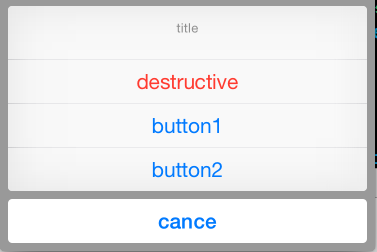
代理方法调用情况如下:
程序运行起来, 没有点击按钮时:
-- ::29.647 提示框UIActionSheet[:] willPresentActionSheet:
点击任意按钮时:
-- ::18.882 提示框UIActionSheet[:] actionSheet: clickedButtonAtIndex:

-- ::18.883 提示框UIActionSheet[:] actionSheet: willDismissWithButtonIndex:

-- ::19.297 提示框UIActionSheet[:] actionSheet: didDismissWithButtonIndex:
iOS:提示框(警告框)控件UIActionSheet的详解的更多相关文章
- 《手把手教你》系列技巧篇(三十八)-java+ selenium自动化测试-日历时间控件-下篇(详解教程)
1.简介 理想很丰满现实很骨感,在应用selenium实现web自动化时,经常会遇到处理日期控件点击问题,手工很简单,可以一个个点击日期控件选择需要的日期,但自动化执行过程中,完全复制手工这样的操作就 ...
- iOS:提示框(警告框)控件UIAlertView的详解
提示框(警告框)控件:UIAlertView 功能:当点击按钮或标签等时,弹出一个提示框,显示必要的提示,然后通过添加的按钮完成需要的功能. 类型:typedef NS_ENUM(NSInte ...
- iOS:网页视图控件UIWebView的详解
网页视图控件:UIWebView 功能:它是继承于UIView的,是一个内置的浏览器控件,以用来浏览从网络下载下来的网页或者本地上加载下来的文档. 枚举: //网页视图导航类型 typedef NS_ ...
- iOS:选择器控件UIPickerView的详解和演示
选择器控件UIPickerView: 功能:它能够创建一个类似于密码锁式的单列或多列的选择菜单,用户可以通过它设置的代理来选择需要菜单中的任意的数据.例如创建日历.字体表(类型.大小.颜色).图库等. ...
- iOS:下拉刷新控件UIRefreshControl的详解
下拉刷新控件:UIRefreshControl 1.具体类信息: @interface UIRefreshControl : UIControl //继承控制类 - (instancetype)ini ...
- iOS:图像选取器控制器控件UIImagePickerController的详解
图像选择控制器:UIImagePickerController 功能:用于选取相册或相机等里面的照片. @interface UIImagePickerController : UINavigatio ...
- delphi控件属性大全-详解-简介
http://blog.csdn.net/u011096030/article/details/18716713 button 组件: CAPTION 属性 :用于在按钮上显示文本内容 Cancel ...
- 【VB技巧】VB ListView 控件功能使用详解
来源:http://lcx.cc/?i=494 ListView控件 在工具箱上击鼠标右键,选择快捷菜单的Components(部件)项,在控件列表中选择Microsoft Windows Commo ...
- 转 VB ListView控件各种操作详解
Private Sub Form_Load() ListView1.ListItems.Clear '清空列表 ListView1.ColumnHeaders.Clear '清空列表头 ListVie ...
随机推荐
- Hadoop(五)分布式集群中HDFS系统的各种角色
NameNode 学习目标 理解 namenode 的工作机制尤其是元数据管理机制,以增强对 HDFS 工作原理的 理解,及培养 hadoop 集群运营中“性能调优”.“namenode”故障问题的分 ...
- LoadRunner 函数大全之中文解释
LoadRunner 函数大全之中文解释 // sapgui_table_set_column_selected 模拟用户 // 单击表中的列标题. int sapgui_table_set_colu ...
- 解决centOS7的IP为127.0.0.1,无法用Xshll链接问题
对于linux不熟悉的我, 安装完centOS7后好多坑,走一步卡一步,记得之前安装其他版本没这么多事.安装完后用ifconfig查看IP,竟然是127.0.0.1,这我就不知道怎么用Xshell链接 ...
- linux——(6)vim与vi
概念:vi与vim的区别 vi是一款老式的文字处理软件,不过现在依然广泛使用,所有的UnixLike系统都会内置vi文本编辑器. vim可以看出vi的升级版,不过vi更像是一个程序开发工具,功能也比v ...
- React Native 系列(一)
前言 本系列是基于React Native版本号0.44.3写的,最初学习React Native的时候,完全没有接触过React和JS,本文的目的是为了给那些JS和React小白提供一个快速入门,让 ...
- 让新版Chrome支持本地跨域请求调试
1.创建一个Chrome的启动快捷方式: 2.右键点击快捷方式属性,然后在目标路径后面,添加以下参数: --disable-web-security --user-data-dir="e:\ ...
- java8新特性——Lambda表达式
上文中简单介绍了一下java8得一些新特性,与优点,也是为本次学习java8新特性制定一个学习的方向,后面几篇会根据上文中得新特性一一展开学习.本文就从java8新特性中比较重要的Lambda表达式开 ...
- 【WIN10】Bind、Binding與Converter的使用
Demo源碼下載:http://yunpan.cn/cHuCmI4NK4xwr 访问密码 8201 1.Bind Bind的使用方式是: <Button Content="{x:Bi ...
- BZOJ 2612 [Poi2003]Sums(最短路)
[题目链接] http://www.lydsy.com/JudgeOnline/problem.php?id=2612 [题目大意] 给定a数组,问num能否被表示为a[1]*x[1]+a[2]*x[ ...
- hihocoder155周 任务分配
时间限制:10000ms 单点时限:1000ms 内存限制:256MB 描述 给定 N 项任务的起至时间( S1, E1 ), ( S2, E2 ), ..., ( SN, EN ), 计算最少需要多 ...