
170629、springboot编程之Druid数据源和监控配置二
上篇是一种配置方式,虽然我们创建了servlet、filter但是没有任务编码,看着是不是很不爽。ok,接下来说一下简介的配置方式,使用代码注册Servlet,也是我个人比较推荐的!
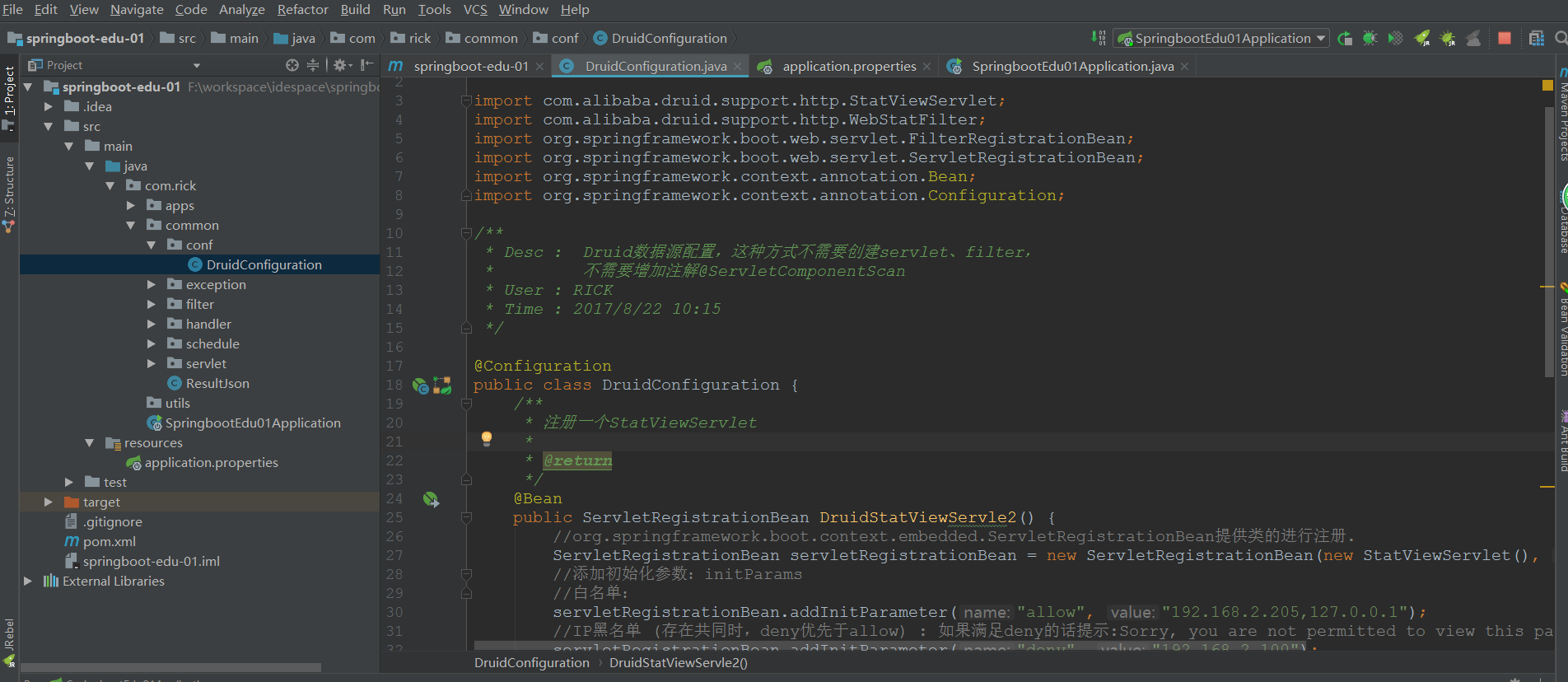
1、创建DruidConfiguration.java类
package com.rick.common.conf;

import com.alibaba.druid.support.http.StatViewServlet;

import com.alibaba.druid.support.http.WebStatFilter;

import org.springframework.boot.web.servlet.FilterRegistrationBean;

import org.springframework.boot.web.servlet.ServletRegistrationBean;

import org.springframework.context.annotation.Bean;

import org.springframework.context.annotation.Configuration;

/**

 * Desc :  Druid数据源配置,这种方式不需要创建servlet、filter,

 *         不需要增加注解@ServletComponentScan

 * User : RICK

 * Time : 2017/8/22 10:15

 */

@Configuration

public class DruidConfiguration {

    /**

     * 注册一个StatViewServlet

     *

     * @return

     */

    @Bean

    public ServletRegistrationBean DruidStatViewServle2() {

        //org.springframework.boot.context.embedded.ServletRegistrationBean提供类的进行注册.

        ServletRegistrationBean servletRegistrationBean = new ServletRegistrationBean(new StatViewServlet(), "/druid2/*");

        //添加初始化参数:initParams

        //白名单:

        servletRegistrationBean.addInitParameter("allow", "192.168.2.205,127.0.0.1");

        //IP黑名单 (存在共同时,deny优先于allow) : 如果满足deny的话提示:Sorry, you are not permitted to view this page.

        servletRegistrationBean.addInitParameter("deny", "192.168.2.100");

        //登录查看信息的账号密码.

        servletRegistrationBean.addInitParameter("loginUsername", "anna");

        servletRegistrationBean.addInitParameter("loginPassword", "anna");

        //是否能够重置数据.

        servletRegistrationBean.addInitParameter("resetEnable", "false");

        return servletRegistrationBean;

    }

    /**

     * 注册一个:filterRegistrationBean

     *

     * @return

     */

    @Bean

    public FilterRegistrationBean druidStatFilter2() {

        FilterRegistrationBean filterRegistrationBean = new FilterRegistrationBean(new WebStatFilter());

        //添加过滤规则.

        filterRegistrationBean.addUrlPatterns("/*");

        //添加不需要忽略的格式信息.

        filterRegistrationBean.addInitParameter("exclusions", "*.js,*.gif,*.jpg,*.png,*.css,*.ico,/druid2/*");

        return filterRegistrationBean;

    }

}
2、启动项目,访问http://localhost:8080/druid2/login.html效果和第一方式一样的,在这就不做截图了
3、项目清单
170629、springboot编程之Druid数据源和监控配置二的更多相关文章
- 170628、springboot编程之Druid数据源和监控配置一
Spring Boot默认的数据源是:org.apache.tomcat.jdbc.pool.DataSource,那么如何修改数据源呢?我已目前使用比较多的阿里数据源Druid为例,如果使用其他的数 ...
- spring boot配置druid数据源和监控配置
直接上代码: 一.pom.xml中添加依赖 <dependency> <groupId>com.github.drtrang</groupId> <artif ...
- springboot学习笔记-4 整合Druid数据源和使用@Cache简化redis配置
一.整合Druid数据源 Druid是一个关系型数据库连接池,是阿里巴巴的一个开源项目,Druid在监控,可扩展性,稳定性和性能方面具有比较明显的优势.通过Druid提供的监控功能,可以实时观察数据库 ...
- SpringBoot:Mybatis + Druid 数据访问
西部开源-秦疆老师:基于SpringBoot 2.1.7 的博客教程 秦老师交流Q群号: 664386224 未授权禁止转载!编辑不易 , 转发请注明出处!防君子不防小人,共勉! 简介 对于数据访问层 ...
- 阿里druid连接池监控配置
首先在web.xml中添加如下配置: <filter> <filter-name>DruidWebStatFilter</filter-name> <filt ...
- SpringBoot项目整合Druid进行统计监控
0.druid介绍,参考官网 1.在项目的POM文件中添加alibaba的druid依赖 <dependency> <groupId>com.alibaba</group ...
- 170717、springboot编程之mybatis数据库开发和aop拦截
一.springboot整合mybaits (1)新建maven project; 新建一个maven project,取名为:spring-boot-mybatis (2)在pom.xml文件中引入 ...
- 170622、springboot编程之JPA操作数据库
JPA操作数据库 什么事JAP?JPA全称Java Persistence API.JPA通过JDK 5.0注解或XML描述对象-关系表的映射关系,并将运行期的实体对象持久化到数据库中. 1.在pom ...
- 170720、springboot编程之properties文件讲解
但是在实际开发过程中有更复杂的需求,我们在对properties进一步的升华.在本篇博客中您将会学到如下知识(这节中有对之前的知识的温故,对之前的升华): (1) 在application.prope ...
随机推荐
- QSignalMapper Class
/************************************************************************************** * QT QSignal ...
- javascript -- 将数组转换为字符串:join()
join(separator) 方法用于把数组中的所有元素放入一个字符串.元素是通过指定的分隔符进行分隔的. separator:可选,指定要使用的分隔符.如果省略该参数,则默认使用逗号作为分隔符 v ...
- IFrame实现的无刷新(仿ajax效果)...
前台代码: <iframe style="display:none;" name="gg"></iframe> <form act ...
- 刚刚完成了在vs2013中通过 ef连接mysql数据库的工作。感觉没有想象中的简单。试了n次终于成功。故记录成功的方法,希望可以帮到大家
分两种情况,如果你是用entity framework 5.0的时候 mysql-connector-net的版本不是很重要. MySQL For VisualStudio的版本也不重要 (这个不装就 ...
- 【Java面试题】43 说出一些常用的类,包,接口,请各举5个
要让人家感觉你对java ee开发很熟,所以,不能仅仅只列core java中的那些东西,要多列你在做ssh项目中涉及的那些东西.就写你最近写的那些程序中涉及的那些类. 常用的类:BufferedRe ...
- vc 获取 硬盘序列号 和 cpu
vc 获取 硬盘序列号 和 cpu 唯一iD的方法?如题---------网上找来很多资料 也没找到, 要支持xp win7 32/64 系统下都能获取 硬盘序列号 和cpu ID 哪位朋友帮帮忙: ...
- c++ word类型
word就是16位的数据 随着机器的发展,C++语言本身并没有规定short的位数,不一定是十六位的(随着计算机的发展,可能改变).但word将永远是16位的--机器发展后只需要修改,typedef ...
- Java动态代理-->Spring AOP
引述要学习Spring框架的技术内幕,必须事先掌握一些基本的Java知识,正所谓“登高必自卑,涉远必自迩”.以下几项Java知识和Spring框架息息相关,不可不学(我将通过一个系列分别介绍这些Jav ...
- Java------遍历Map<k,v>的方法
1. public class MapAction extends ActionSupport{ private Map<String, User> map = new HashMap&l ...
- Android程序增加代码混淆器
增加代码混淆器.主要是增加proguard-project.txt文件的规则进行混淆,之前新建Android程序是proguard.cfg文件 能够看一下我採用的通用规则(proguard-proje ...