
AngularJS学习笔记(2)——与用户交互的动态清单列表
与用户交互的动态清单列表
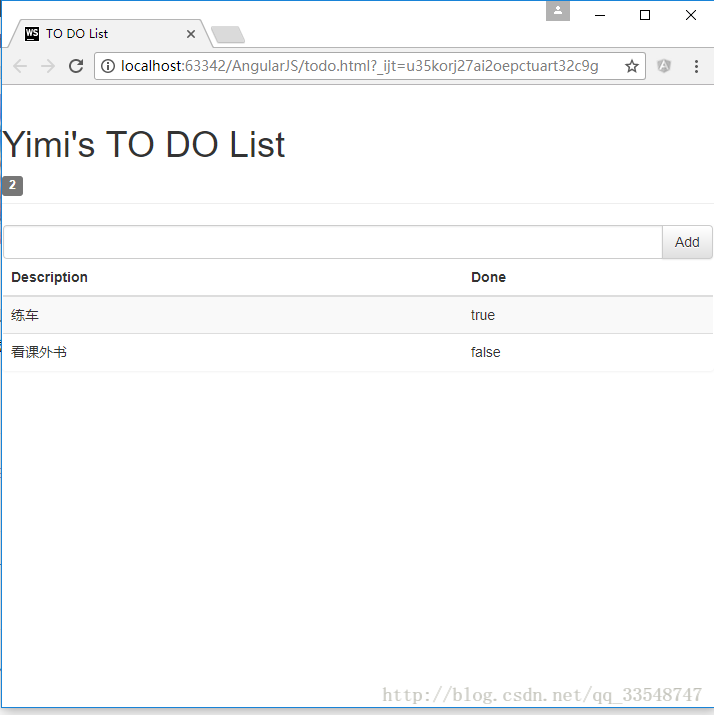
以我之前写的一个清单列表页面作为例子(MVC模式的清单列表效果),优化前代码如下:
<!DOCTYPE html>

<html ng-app="todoApp">

<head>

    <meta charset="UTF-8">

    <title>TO DO List</title>

    <link href="./bootstrap/css/bootstrap.css" rel="stylesheet"/>

    <link href="./bootstrap/css/bootstrap-theme.css" rel="stylesheet"/>

    <script src="./angularJs/angular.js"></script>

    <script>

        var model = {

            user:"Yimi",

            items:[{action:"练车",done:true},

                {action:"看课外书",done:false}]

        };

        var todoApp = angular.module("todoApp",[]);

        todoApp.controller("ToDoCtrl",function($scope){ //以$开头的变量名表示AngularJS的内置特性

            $scope.todo = model;

        });

    </script>

</head>

<body ng-controller="ToDoCtrl">

    <div class="page-header">

        <h1>{{todo.user}}'s TO DO List</h1>

        <span class="label label-default">{{todo.items.length}}</span>

    </div>

    <div class="panel">

        <div class="input-group">

            <input class="form-control"/>

            <span class="input-group-btn">

                <button class="btn btn-default">Add</button>

            </span>

        </div>

        <table class="table table-striped">

            <thead>

                <tr>

                    <th>Description</th>

                    <th>Done</th>

                </tr>

            </thead>

            <tbody>

                <tr ng-repeat="item in todo.items">

                    <td>{{item.action}}</td>

                    <td>{{item.done}}</td>

                </tr>

            </tbody>

    </table>

    </div>

</body>

</html>
效果如下:
优化过程
1.使复选框状态与布尔值同步(双向模型绑定)
想要为Done属性添加复选框,并与true/false的值同步,即达到以下效果: 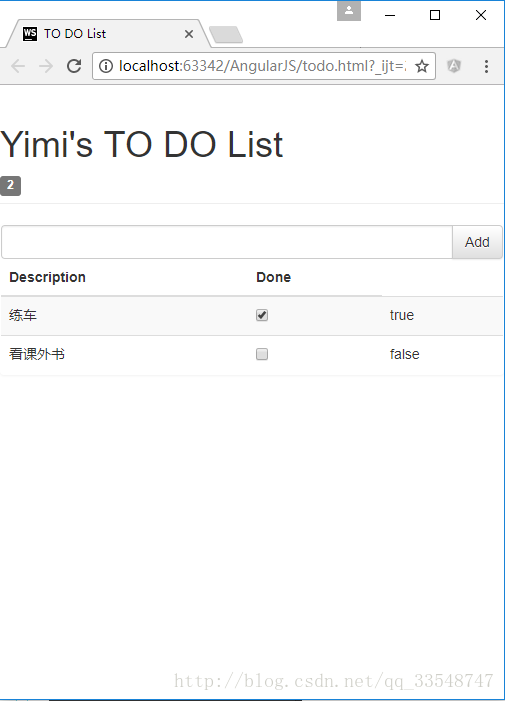
点击复现框会使右侧true/false的值同步变化。
只需要为复选框checkbox指定为与true/false同样的ng-model模型属性:
......

<tbody>

        <tr ng-repeat="item in todo.items">

            <td>{{item.action}}</td>

            <td><input type="checkbox" ng-model="item.done"/></td>

            <td>{{item.done}}</td>

        </tr>

</tbody>

......即checkbox和true/false的模型均为”item.done”,只在原基础上加了一句<td><input type="checkbox" ng-model="item.done"/></td>从而达到双向绑定,同步变化的效果。
2.动态显示待办的事项个数
显示值为false的事项个数,需在控制器todoApp.controller内添加一个计数变量incompleteCount,称为”行为名“。
......

        todoApp.controller("ToDoCtrl",function($scope){ //以$开头的变量名表示AngularJS的内置特性

            $scope.todo = model;

            $scope.incompleteCount = function(){

                var count = 0;

                angular.forEach($scope.todo.items,function(item){

                    if(!item.done){count++;}

                });

                return count;

            }

        });

......
在使用显示待办事项数的标签中调用incompleteCount行为名:
......

<h1>{{todo.user}}'s TO DO List</h1>

    <!--添加ng-hide="incompleteCount() == 0"使未办事项数为0时不显示此标签-->

    <span class="label label-default" ng-hide="incompleteCount() == 0">{{incompleteCount()}}</span>

......
效果如下:
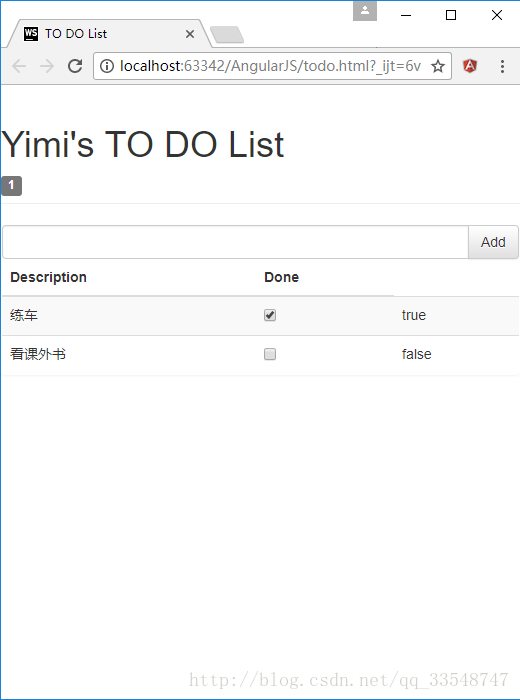
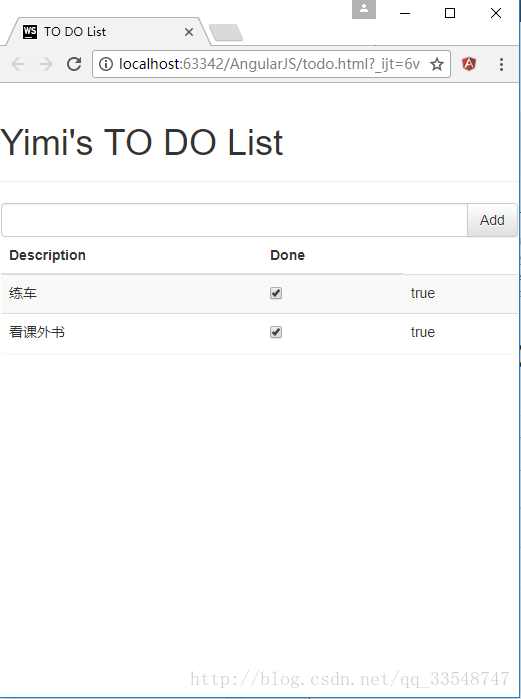
因为使用了ng-hide=”incompleteCount() == 0”,所以当无待办事项时隐藏数量标签:
3.根据待办事项数显示不同颜色标签效果
在控制器todoApp.controller中添加逻辑,设置一个根据待办事项数判定标签class属性的$scope.warningLevel行为:
......

todoApp.controller("ToDoCtrl",function($scope){ //以$开头的变量名表示AngularJS的内置特性

            ......

            cope.warningLevel = function(){

                return $scope.incompleteCount() < 2 ? "label-success" : "label-warning";

            }

        });

......
然后为事项数标签添加ng-class=”warningLevel()”属性:
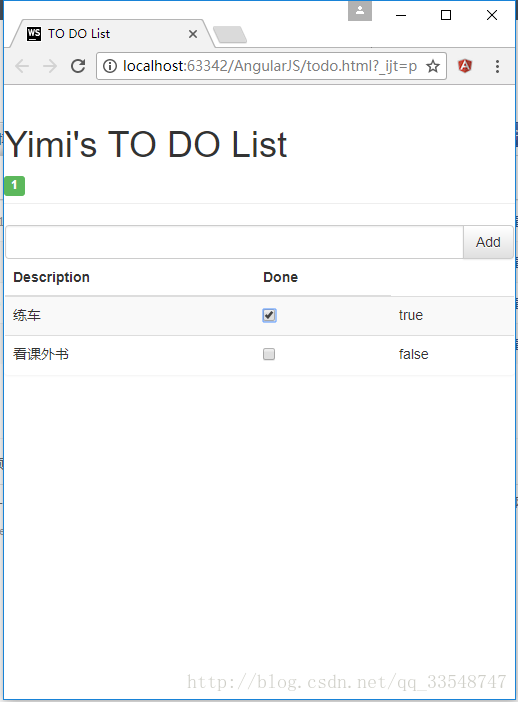
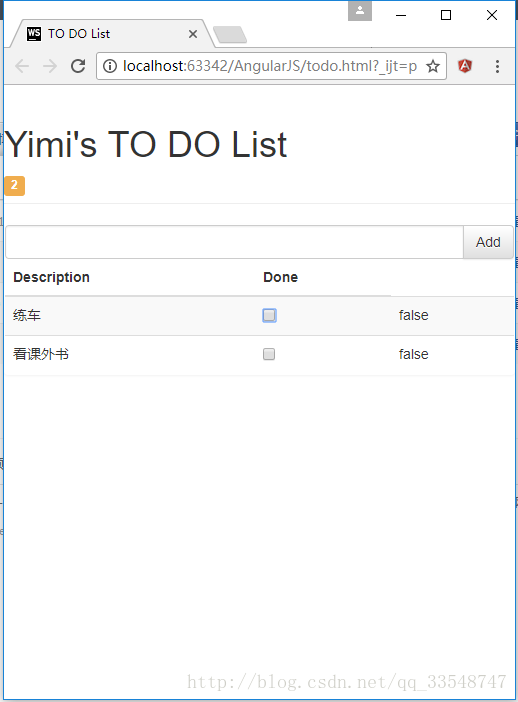
<span class="label label-default" ng-hide="incompleteCount() == 0" ng-class="warningLevel()">{{incompleteCount()}}</span>效果如下:
待办事项数 < 2时
待办事项数 >= 2时
4.响应用户输入
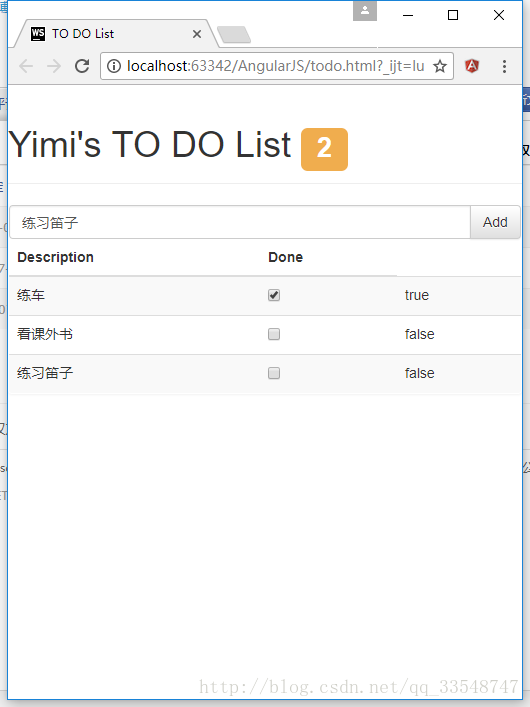
在控制器todoApp.controller中添加逻辑,定义$scope.addNewItem使清单列表具有添加新项的功能:
todoApp.controller("ToDoCtrl",function($scope){ //以$开头的变量名表示AngularJS的内置特性

            ......

            $scope.addNewItem = function(actionText){

                $scope.todo.items.push({action:actionText, done:false});

            }

        });
为输入框与Add按钮双向绑定用户所输入的数据actionText:
<div class="input-group">

        <input class="form-control" ng-model="actionText"/>

        <span class="input-group-btn">

                <button class="btn btn-default" ng-click="addNewItem(actionText)">Add</button>

        </span>

</div>
效果如下(为了更美观,顺便把事项数标签向上移了点儿):
完整源码(所调用的css/js文件需自己再添加)
<!DOCTYPE html>

<html ng-app="todoApp">

<head>

    <meta charset="UTF-8">

    <title>TO DO List</title>

    <link href="./bootstrap/css/bootstrap.css" rel="stylesheet"/>

    <link href="./bootstrap/css/bootstrap-theme.css" rel="stylesheet"/>

    <script src="./angularJs/angular.js"></script>

    <script>

        var model = {

            user:"Yimi",

            items:[{action:"练车",done:true},

                {action:"看课外书",done:false}]

        };

        var todoApp = angular.module("todoApp",[]);

        todoApp.controller("ToDoCtrl",function($scope){ //以$开头的变量名表示AngularJS的内置特性

            $scope.todo = model;

            $scope.incompleteCount = function(){

                var count = 0;

                angular.forEach($scope.todo.items,function(item){

                    if(!item.done){count++;}

                });

                return count;

            }

            $scope.warningLevel = function(){

                return $scope.incompleteCount() < 2 ? "label-success" : "label-warning";

            }

            $scope.addNewItem = function(actionText){

                $scope.todo.items.push({action:actionText, done:false});

            }

        });

    </script>

</head>

<body ng-controller="ToDoCtrl">

<div class="page-header">

    <h1>{{todo.user}}'s TO DO List

    <!--添加ng-hide="incompleteCount() == 0"使未办事项数为0时不显示此标签-->

    <span class="label label-default" ng-hide="incompleteCount() == 0" ng-class="warningLevel()">{{incompleteCount()}}</span></h1>

</div>

<div class="panel">

    <div class="input-group">

        <input class="form-control" ng-model="actionText"/>

        <span class="input-group-btn">

                <button class="btn btn-default" ng-click="addNewItem(actionText)">Add</button>

        </span>

    </div>

    <table class="table table-striped">

        <thead>

        <tr>

            <th>Description</th>

            <th>Done</th>

        </tr>

        </thead>

        <tbody>

        <tr ng-repeat="item in todo.items">

            <td>{{item.action}}</td>

            <td><input type="checkbox" ng-model="item.done"/></td>

            <td>{{item.done}}</td>

        </tr>

        </tbody>

    </table>

</div>

</body>

</html>
AngularJS学习笔记(2)——与用户交互的动态清单列表的更多相关文章
- AngularJS学习笔记(3)——通过Ajax获取JSON数据
通过Ajax获取JSON数据 以我之前写的与用户交互的动态清单列表为例,使用JSON前todo.html代码如下: <!DOCTYPE html> <html ng-app=&quo ...
- AngularJs学习笔记--unit-testing
原版地址:http://docs.angularjs.org/guide/dev_guide.unit-testing javascript是一门动态类型语言,这给她带来了很强的表现能力,但同时也使编 ...
- AngularJs学习笔记--Injecting Services Into Controllers
原版地址:http://docs.angularjs.org/guide/dev_guide.services.injecting_controllers 把service当作被依赖的资源加载到con ...
- AngularJs学习笔记--E2E Testing
原版地址:http://docs.angularjs.org/guide/dev_guide.e2e-testing 当一个应用的复杂度.大小在增加时,使得依靠人工去测试新特性的可靠性.抓Bug和回归 ...
- AngularJs学习笔记--Understanding Angular Templates
原版地址:http://docs.angularjs.org/guide/dev_guide.mvc.understanding_model angular template是一个声明规范,与mode ...
- AngularJs学习笔记--Forms
原版地址:http://code.angularjs.org/1.0.2/docs/guide/forms 控件(input.select.textarea)是用户输入数据的一种方式.Form(表单) ...
- AngularJs学习笔记--expression
原版地址:http://code.angularjs.org/1.0.2/docs/guide/expression 表达式(Expressions)是类Javascript的代码片段,通常放置在绑定 ...
- AngularJs学习笔记--directive
原版地址:http://code.angularjs.org/1.0.2/docs/guide/directive Directive是教HTML玩一些新把戏的途径.在DOM编译期间,directiv ...
- AngularJs学习笔记--Guide教程系列文章索引
在很久很久以前,一位前辈向我推荐AngularJs.但当时我没有好好学习,仅仅是讲文档浏览了一次.后来觉醒了……于是下定决心好好理解这系列的文档,并意译出来(英文水平不足……不能说是翻译,有些实在是看 ...
随机推荐
- 雷林鹏分享:Ruby 文件的输入与输出
Ruby 文件的输入与输出 Ruby 提供了一整套 I/O 相关的方法,在内核(Kernel)模块中实现.所有的 I/O 方法派生自 IO 类. 类 IO 提供了所有基础的方法,比如 read. wr ...
- POJ-3744-概率dp+矩阵幂(分段)
Scout YYF I Time Limit: 1000MS Memory Limit: 65536K Total Submissions: 10214 Accepted: 2980 Desc ...
- OAF调用JavaScript新开窗口
在OAF框架中,ORACLE标准本身并不推荐使用JS,但是仍然提供了相应的方法. String oaUrl="https://www.baidu.com/"; pageContex ...
- Http协议中Cookie详细介绍
Cookie总是保存在客户端中,按在客户端中的存储位置,可分为内存Cookie和硬盘Cookie.内存Cookie由浏览器维护,保存在内存中,浏览器关闭后就消失了,其存在时间是短暂的.硬盘Cookie ...
- 管道 && 消息队列 && 共享内存
http://blog.csdn.net/piaoairy219/article/details/17333691 1. 管道 管道的优点是不需要加锁. 缺点是默认缓冲区太小,只有4K. 一个管道只适 ...
- jquery检测input checked 控件是否被选中的方法
jquery检测input checked 控件是否被选中 js部分 复制代码代码如下: function tongyianniu(){ var gouxuan=$('input[type=check ...
- Big Table中文翻译
题记:google 的成功除了一个个出色的创意外,还因为有 Jeff Dean 这样的软件架构天才. 官方的 Google Reader blog 中有对BigTable 的解释.这是Google 内 ...
- angular学习笔记二
已经了解了angular的基础知识以后,我们继续开始了解angular的基础模块,首先在写angular应用时需要引入angularjs 在使用angular时必须为它定义边界(angular的作用 ...
- FOR UPDATE
1. for update的使用场景 `如果遇到存在高并发并且对于数据的准确性很有要求的场景,是需要了解和使用for update的. 比如涉及到金钱.库存等.一般这些操作都是很长一串并且是开启 ...
- [爬虫] 学Scrapy,顺便把它的官方教程给爬下来
想学爬虫主要是因为算法和数据是密切相关的,有数据之后可以玩更多有意思的事情,数据量大可以挖掘挖掘到更多的信息. 之前只会通过python中的request库来下载网页内容,再用BeautifulSou ...