
AngularJS学习笔记(3)——通过Ajax获取JSON数据
通过Ajax获取JSON数据
以我之前写的与用户交互的动态清单列表为例,使用JSON前todo.html代码如下:
<!DOCTYPE html>

<html ng-app="todoApp">

<head>

    <meta charset="UTF-8">

    <title>TO DO List</title>

    <link href="./bootstrap/css/bootstrap.css" rel="stylesheet"/>

    <link href="./bootstrap/css/bootstrap-theme.css" rel="stylesheet"/>

    <script src="./angularJs/angular.js"></script>

    <script>

        var model = {

            user:"Yimi",

            items:[{action:"练车",done:true},

                {action:"看课外书",done:false}]

        };

        var todoApp = angular.module("todoApp",[]);

        todoApp.controller("ToDoCtrl",function($scope){ //以$开头的变量名表示AngularJS的内置特性

            $scope.todo = model;

            $scope.incompleteCount = function(){

                var count = 0;

                angular.forEach($scope.todo.items,function(item){

                    if(!item.done){count++;}

                });

                return count;

            }

            $scope.warningLevel = function(){

                return $scope.incompleteCount() < 2 ? "label-success" : "label-warning";

            }

            $scope.addNewItem = function(actionText){

                $scope.todo.items.push({action:actionText, done:false});

            }

        });

    </script>

</head>

<body ng-controller="ToDoCtrl">

<div class="page-header">

    <h1>{{todo.user}}'s TO DO List

    <!--添加ng-hide="incompleteCount() == 0"使未办事项数为0时不显示此标签-->

    <span class="label label-default" ng-hide="incompleteCount() == 0" ng-class="warningLevel()">{{incompleteCount()}}</span></h1>

</div>

<div class="panel">

    <div class="input-group">

        <input class="form-control" ng-model="actionText"/>

        <span class="input-group-btn">

                <button class="btn btn-default" ng-click="addNewItem(actionText)">Add</button>

        </span>

    </div>

    <table class="table table-striped">

        <thead>

        <tr>

            <th>Description</th>

            <th>Done</th>

        </tr>

        </thead>

        <tbody>

        <tr ng-repeat="item in todo.items">

            <td>{{item.action}}</td>

            <td><input type="checkbox" ng-model="item.done"/></td>

            <td>{{item.done}}</td>

        </tr>

        </tbody>

    </table>

</div>

</body>

</html>
效果图如下:
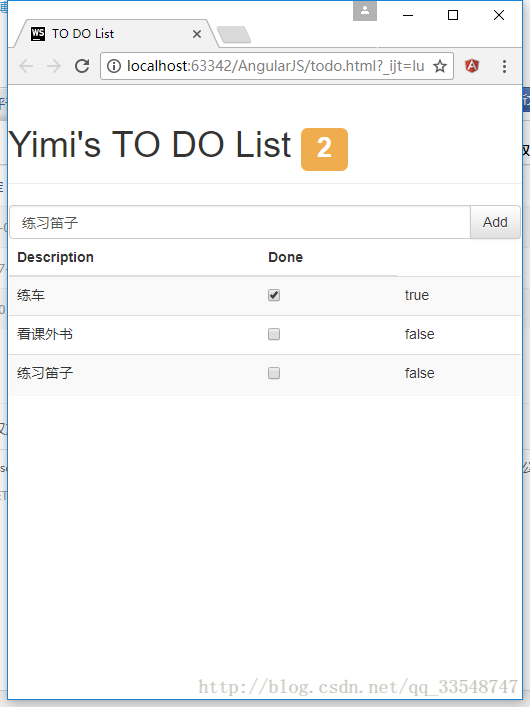
现在把模型model内的items中的值单独写成一个JSON文件,再通过发起Ajax请求的方式获取JSON数据。
1.把todo.html文件内的模型model去除直接定义的items,改成如下形式:
 var model = {

            user: "admin"

        };
2.新建todo.json文件并编写如下代码:
[

  {"action": "练车","done": false},

  {"action": "看书","done": true}

]
3.发起Ajax请求的方式获取JSON数据:
......

todoApp.run(function ($http) {

            $http.get("./todo.json").success(function (data) {

                model.items = data;

                console.log("data:" ,data );

                console.log("items:" , model.items)

            });

        });

......
现在,清单列表中的数据项就都是通过JSON数据来传递的了,使用Chrome可以浏览器查看时可以按F12看到NetWork的状态,状态码为200即成功获取。可以看到todo.json的数据成功获取到了:
而且显示的页面效果与原先一致。
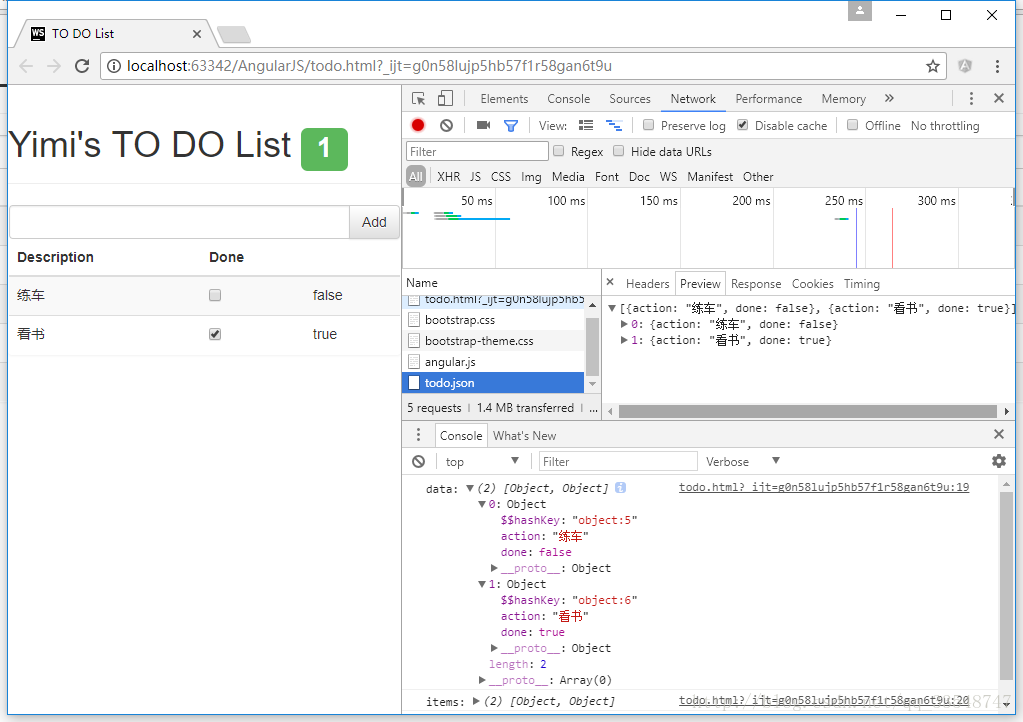
完整源码(css/js文件需自己额外设置):
todo.html
<!DOCTYPE html>

<html ng-app="todoApp">

<head>

    <meta charset="UTF-8">

    <title>TO DO List</title>

    <link href="./bootstrap/css/bootstrap.css" rel="stylesheet"/>

    <link href="./bootstrap/css/bootstrap-theme.css" rel="stylesheet"/>

    <script src="./angularJs/angular.js"></script>

    <script>

        var model = {

            user: "Yimi"

        };

        var todoApp = angular.module("todoApp", []);

        todoApp.run(function ($http) {

            $http.get("./todo.json").success(function (data) {

                model.items = data;

                console.log("data:" ,data );

                console.log("items:" , model.items)

            });

        });

        todoApp.controller("ToDoCtrl", function ($scope) {

            $scope.todo = model;

            $scope.incompleteCount = function () {

                var count = 0;

                angular.forEach($scope.todo.items, function (item) {

                    if (!item.done) {

                        count++;

                    }

                });

                return count;

            }

            $scope.warningLevel = function () {

                return $scope.incompleteCount() < 2 ? "label-success" : "label-warning";

            }

            $scope.addNewItem = function (actionText) {

                $scope.todo.items.push({action: actionText, done: false});

            }

        });

    </script>

</head>

<body ng-controller="ToDoCtrl">

<div class="page-header">

    <h1>{{todo.user}}'s TO DO List

        <!--添加ng-hide="incompleteCount() == 0"使未办事项数为0时不显示此标签-->

        <span class="label label-default" ng-hide="incompleteCount() == 0" ng-class="warningLevel()">{{incompleteCount()}}</span>

    </h1>

</div>

<div class="panel">

    <div class="input-group">

        <input class="form-control" ng-model="actionText"/>

        <span class="input-group-btn">

                <button class="btn btn-default" ng-click="addNewItem(actionText)">Add</button>

        </span>

    </div>

    <table class="table table-striped">

        <thead>

        <tr>

            <th>Description</th>

            <th>Done</th>

            <th></th>

        </tr>

        </thead>

        <tbody>

        <tr ng-repeat="item in todo.items">

            <td>{{item.action}}</td>

            <td><input type="checkbox" ng-model="item.done"/></td>

            <td>{{item.done}}</td>

        </tr>

        </tbody>

    </table>

</div>

</body>

</html>
todo.json
[

  {"action": "练车","done": false},

  {"action": "看书","done": true}

]
AngularJS学习笔记(3)——通过Ajax获取JSON数据的更多相关文章
- Jquery 模板插件 jquery.tmpl.js 的使用方法(1):基本语法,绑定,each循环,ajax获取json数据
jquery.tmpl.js 是一个模板js ,主要有2个方法 (1):$.template()方法,将一段script或者是Html编译为模板,例如 $.template('myTemplate' ...
- 【Spring学习笔记-MVC-4】SpringMVC返回Json数据-方式2
<Spring学习笔记-MVC>系列文章,讲解返回json数据的文章共有3篇,分别为: [Spring学习笔记-MVC-3]SpringMVC返回Json数据-方式1:http://www ...
- 【Spring学习笔记-MVC-3】SpringMVC返回Json数据-方式1
<Spring学习笔记-MVC>系列文章,讲解返回json数据的文章共有3篇,分别为: [Spring学习笔记-MVC-3]SpringMVC返回Json数据-方式1:http://www ...
- ajax获取json数据及实现跨域请求
最近想练习一下ajax获取json数据 , 首先上网找一些在线的可用来测试的接口. -----------------------------------------------------这里是接口 ...
- JS-利用ajax获取json数据,并传入页面生成动态tab
封装好的:ajax.js function ajax(url, fnSucc,fnFaild){ //1[创建] if(window.XMLHttpRequest){ var oAjax = new ...
- Android 学习笔记之Volley(七)实现Json数据加载和解析...
学习内容: 1.使用Volley实现异步加载Json数据... Volley的第二大请求就是通过发送请求异步实现Json数据信息的加载,加载Json数据有两种方式,一种是通过获取Json对象,然后 ...
- jQuery AJAX获取JSON数据解析多种方式示例
<!DOCTYPE html PUBLIC "-//W3C//DTD XHTML 1.0 Transitional//EN" "http://www.w3.org/ ...
- ajax获取json数据为undefined--原因解析
解决办法:var dataObj=eval("("+data+")");//转换为json对象 问题: 1. 碰到一个问题ajax成功获取json数据后,取值显 ...
- java后台设计简单的json数据接口,设置可跨域访问,前端ajax获取json数据
在开发的过程中,有时候我们需要设计一个数据接口.有时候呢,数据接口和Web服务器又不在一起,所以就有跨域访问的问题. 第一步:简单的设计一个数据接口. 数据接口,听起来高大上,其实呢就是一个简单的Se ...
随机推荐
- ADSL拨号上网或者光纤上网设置概要(原创)
不管是在梧州设置光纤还是在太平设置ADSL拨号上网每次设置上网一体机的时候都是遇到各种麻烦...这次又是弄了N久,每次问题各不一样.总结一下操作过程,方便以后又遇问题回头查询自个微博.一.设置电话线的 ...
- UVA-129 Krypton Factor(回溯)
题目大意:由字母A到Z组成的字符串,其中有两个子串完全相同的叫做容易的串,反之叫困难的串.找出由前L个字母组成的第n个困难的串. 题目分析:简单回溯,不过要判断是否存在重复子串比较棘手.<入门经 ...
- Unsupported major.minor version 51.0解决办法(转)
我使用的是Eclipse-jee-indigo + JDK 1.6.23环境,结果使用时出现Unsupported major.minor version 51.0错误提示,下面我来介绍Unsuppo ...
- hell 1>&2 2>&1 &>filename重定向的含义和区别
当初在shell中, 看到">&1"和">&2"始终不明白什么意思.经过在网上的搜索得以解惑.其实这是两种输出. 一.linux重定 ...
- 【DEV GridControl】怎样使GridView中满足某个条件的行可编辑,其余行不可编辑?
DXperience控件包,使用起来非常方便,但有时候某些功能的实现在文档中不太容易找到解决方案,比如下面要提到的这个功能我就在文档中找了很久也没找到,最后还是在官方论坛上找到的. 具体问题是这样的: ...
- C++设计模式之组合模式
DP书上给出的定义:将对象组合成树形结构以表示“部分-整体”的层次结构.组合使得用户对单个对象和组合对象的使用具有一致性.注意两个字“树形”.这种树形结构在现实生活中随处可见,比如一个集团公司,它有一 ...
- ces
1. 测试目录 1.1. 测试目录 2. 测试目录2 2.1 测试目录
- maven+jmeter+jenkins集成
马上要国庆了,最近比较忙,但是感觉忙的效率很一般,之前写过ant的集成,这两天研究了下maven,其中核心的插件便是jmeter-maven-plugin,要想了解更多的朋友,可以自行去官网wiki学 ...
- CentOS6下源码安装mysql-5.6.25
1.1.系统环境检查 1)检查系统版本 mkdir -p /server/tools/ cd /server/tools/ cat /etc/redhat-release 2)配置域名解析 vim / ...
- linux screen 命令详解(转载)
转载于:http://www.cnblogs.com/mchina/archive/2013/01/30/2880680.html 一.背景 系统管理员经常需要SSH 或者telent 远程登录到Li ...