
AngularJS学习笔记(2)——与用户交互的动态清单列表
与用户交互的动态清单列表
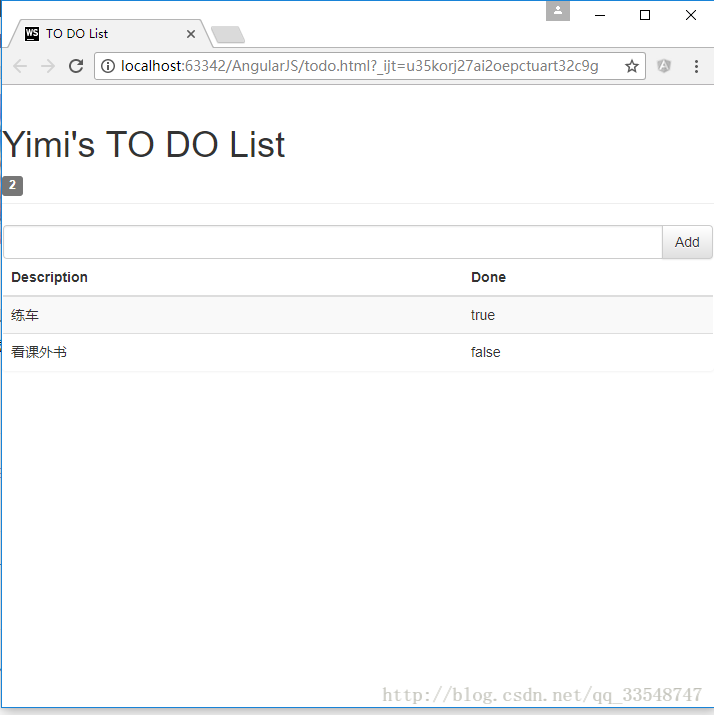
以我之前写的一个清单列表页面作为例子(MVC模式的清单列表效果),优化前代码如下:
<!DOCTYPE html>

<html ng-app="todoApp">

<head>

    <meta charset="UTF-8">

    <title>TO DO List</title>

    <link href="./bootstrap/css/bootstrap.css" rel="stylesheet"/>

    <link href="./bootstrap/css/bootstrap-theme.css" rel="stylesheet"/>

    <script src="./angularJs/angular.js"></script>

    <script>

        var model = {

            user:"Yimi",

            items:[{action:"练车",done:true},

                {action:"看课外书",done:false}]

        };

        var todoApp = angular.module("todoApp",[]);

        todoApp.controller("ToDoCtrl",function($scope){ //以$开头的变量名表示AngularJS的内置特性

            $scope.todo = model;

        });

    </script>

</head>

<body ng-controller="ToDoCtrl">

    <div class="page-header">

        <h1>{{todo.user}}'s TO DO List</h1>

        <span class="label label-default">{{todo.items.length}}</span>

    </div>

    <div class="panel">

        <div class="input-group">

            <input class="form-control"/>

            <span class="input-group-btn">

                <button class="btn btn-default">Add</button>

            </span>

        </div>

        <table class="table table-striped">

            <thead>

                <tr>

                    <th>Description</th>

                    <th>Done</th>

                </tr>

            </thead>

            <tbody>

                <tr ng-repeat="item in todo.items">

                    <td>{{item.action}}</td>

                    <td>{{item.done}}</td>

                </tr>

            </tbody>

    </table>

    </div>

</body>

</html>
效果如下:
优化过程
1.使复选框状态与布尔值同步(双向模型绑定)
想要为Done属性添加复选框,并与true/false的值同步,即达到以下效果: 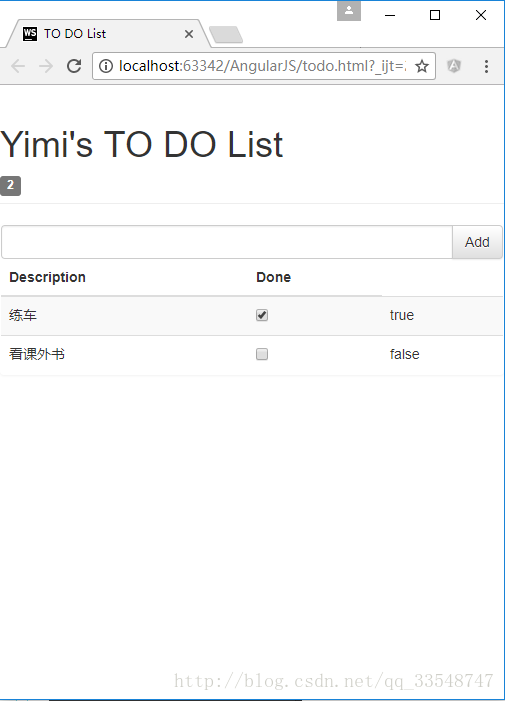
点击复现框会使右侧true/false的值同步变化。
只需要为复选框checkbox指定为与true/false同样的ng-model模型属性:
......

<tbody>

        <tr ng-repeat="item in todo.items">

            <td>{{item.action}}</td>

            <td><input type="checkbox" ng-model="item.done"/></td>

            <td>{{item.done}}</td>

        </tr>

</tbody>

......即checkbox和true/false的模型均为”item.done”,只在原基础上加了一句<td><input type="checkbox" ng-model="item.done"/></td>从而达到双向绑定,同步变化的效果。
2.动态显示待办的事项个数
显示值为false的事项个数,需在控制器todoApp.controller内添加一个计数变量incompleteCount,称为”行为名“。
......

        todoApp.controller("ToDoCtrl",function($scope){ //以$开头的变量名表示AngularJS的内置特性

            $scope.todo = model;

            $scope.incompleteCount = function(){

                var count = 0;

                angular.forEach($scope.todo.items,function(item){

                    if(!item.done){count++;}

                });

                return count;

            }

        });

......
在使用显示待办事项数的标签中调用incompleteCount行为名:
......

<h1>{{todo.user}}'s TO DO List</h1>

    <!--添加ng-hide="incompleteCount() == 0"使未办事项数为0时不显示此标签-->

    <span class="label label-default" ng-hide="incompleteCount() == 0">{{incompleteCount()}}</span>

......
效果如下:
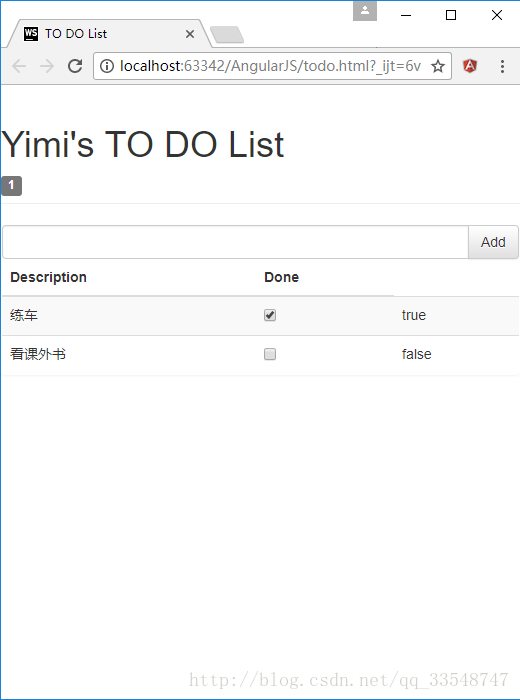
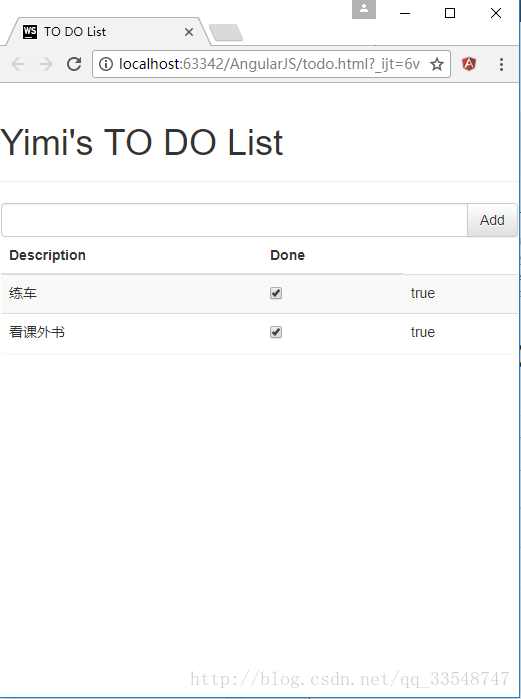
因为使用了ng-hide=”incompleteCount() == 0”,所以当无待办事项时隐藏数量标签:
3.根据待办事项数显示不同颜色标签效果
在控制器todoApp.controller中添加逻辑,设置一个根据待办事项数判定标签class属性的$scope.warningLevel行为:
......

todoApp.controller("ToDoCtrl",function($scope){ //以$开头的变量名表示AngularJS的内置特性

            ......

            cope.warningLevel = function(){

                return $scope.incompleteCount() < 2 ? "label-success" : "label-warning";

            }

        });

......
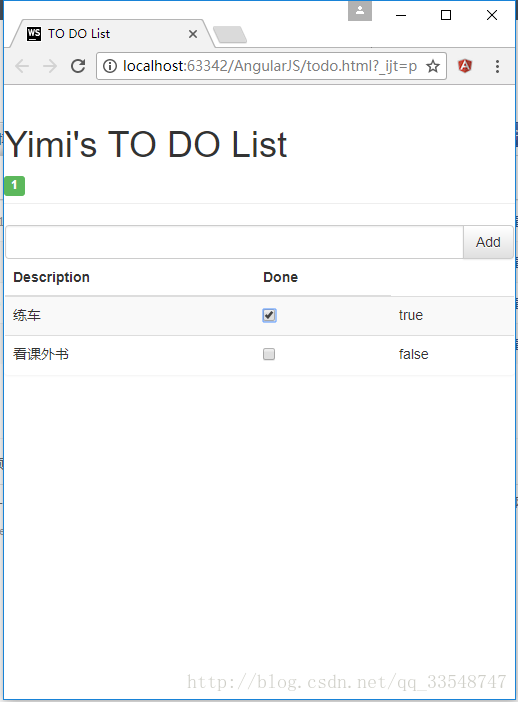
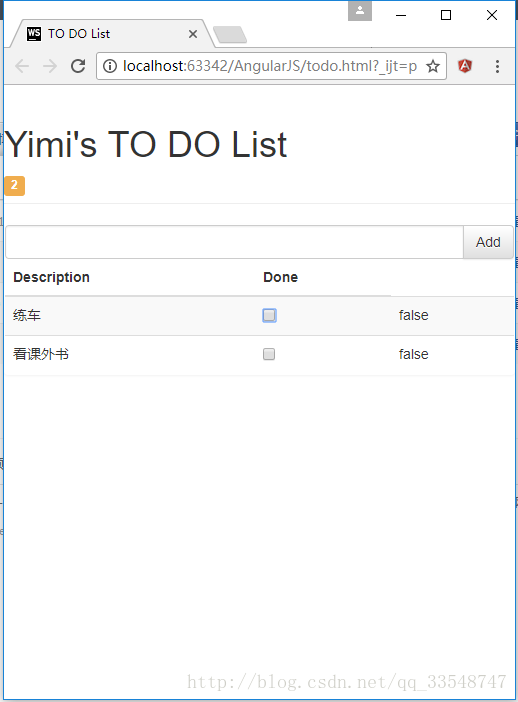
然后为事项数标签添加ng-class=”warningLevel()”属性:
<span class="label label-default" ng-hide="incompleteCount() == 0" ng-class="warningLevel()">{{incompleteCount()}}</span>效果如下:
待办事项数 < 2时
待办事项数 >= 2时
4.响应用户输入
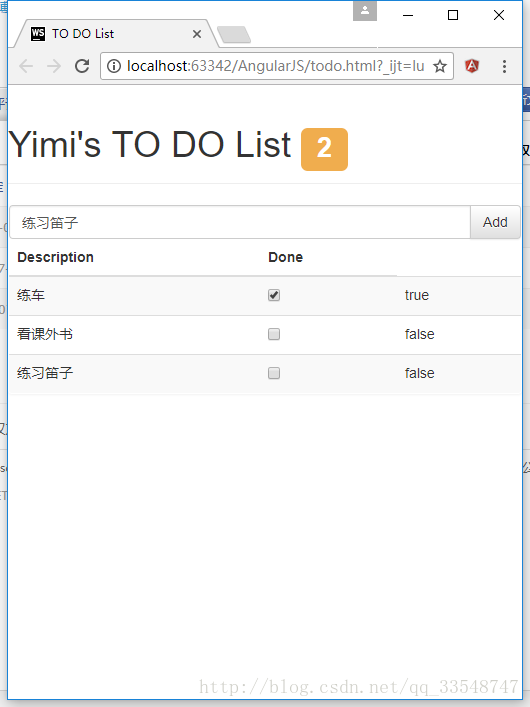
在控制器todoApp.controller中添加逻辑,定义$scope.addNewItem使清单列表具有添加新项的功能:
todoApp.controller("ToDoCtrl",function($scope){ //以$开头的变量名表示AngularJS的内置特性

            ......

            $scope.addNewItem = function(actionText){

                $scope.todo.items.push({action:actionText, done:false});

            }

        });
为输入框与Add按钮双向绑定用户所输入的数据actionText:
<div class="input-group">

        <input class="form-control" ng-model="actionText"/>

        <span class="input-group-btn">

                <button class="btn btn-default" ng-click="addNewItem(actionText)">Add</button>

        </span>

</div>
效果如下(为了更美观,顺便把事项数标签向上移了点儿):
完整源码(所调用的css/js文件需自己再添加)
<!DOCTYPE html>

<html ng-app="todoApp">

<head>

    <meta charset="UTF-8">

    <title>TO DO List</title>

    <link href="./bootstrap/css/bootstrap.css" rel="stylesheet"/>

    <link href="./bootstrap/css/bootstrap-theme.css" rel="stylesheet"/>

    <script src="./angularJs/angular.js"></script>

    <script>

        var model = {

            user:"Yimi",

            items:[{action:"练车",done:true},

                {action:"看课外书",done:false}]

        };

        var todoApp = angular.module("todoApp",[]);

        todoApp.controller("ToDoCtrl",function($scope){ //以$开头的变量名表示AngularJS的内置特性

            $scope.todo = model;

            $scope.incompleteCount = function(){

                var count = 0;

                angular.forEach($scope.todo.items,function(item){

                    if(!item.done){count++;}

                });

                return count;

            }

            $scope.warningLevel = function(){

                return $scope.incompleteCount() < 2 ? "label-success" : "label-warning";

            }

            $scope.addNewItem = function(actionText){

                $scope.todo.items.push({action:actionText, done:false});

            }

        });

    </script>

</head>

<body ng-controller="ToDoCtrl">

<div class="page-header">

    <h1>{{todo.user}}'s TO DO List

    <!--添加ng-hide="incompleteCount() == 0"使未办事项数为0时不显示此标签-->

    <span class="label label-default" ng-hide="incompleteCount() == 0" ng-class="warningLevel()">{{incompleteCount()}}</span></h1>

</div>

<div class="panel">

    <div class="input-group">

        <input class="form-control" ng-model="actionText"/>

        <span class="input-group-btn">

                <button class="btn btn-default" ng-click="addNewItem(actionText)">Add</button>

        </span>

    </div>

    <table class="table table-striped">

        <thead>

        <tr>

            <th>Description</th>

            <th>Done</th>

        </tr>

        </thead>

        <tbody>

        <tr ng-repeat="item in todo.items">

            <td>{{item.action}}</td>

            <td><input type="checkbox" ng-model="item.done"/></td>

            <td>{{item.done}}</td>

        </tr>

        </tbody>

    </table>

</div>

</body>

</html>
AngularJS学习笔记(2)——与用户交互的动态清单列表的更多相关文章
- AngularJS学习笔记(3)——通过Ajax获取JSON数据
通过Ajax获取JSON数据 以我之前写的与用户交互的动态清单列表为例,使用JSON前todo.html代码如下: <!DOCTYPE html> <html ng-app=&quo ...
- AngularJs学习笔记--unit-testing
原版地址:http://docs.angularjs.org/guide/dev_guide.unit-testing javascript是一门动态类型语言,这给她带来了很强的表现能力,但同时也使编 ...
- AngularJs学习笔记--Injecting Services Into Controllers
原版地址:http://docs.angularjs.org/guide/dev_guide.services.injecting_controllers 把service当作被依赖的资源加载到con ...
- AngularJs学习笔记--E2E Testing
原版地址:http://docs.angularjs.org/guide/dev_guide.e2e-testing 当一个应用的复杂度.大小在增加时,使得依靠人工去测试新特性的可靠性.抓Bug和回归 ...
- AngularJs学习笔记--Understanding Angular Templates
原版地址:http://docs.angularjs.org/guide/dev_guide.mvc.understanding_model angular template是一个声明规范,与mode ...
- AngularJs学习笔记--Forms
原版地址:http://code.angularjs.org/1.0.2/docs/guide/forms 控件(input.select.textarea)是用户输入数据的一种方式.Form(表单) ...
- AngularJs学习笔记--expression
原版地址:http://code.angularjs.org/1.0.2/docs/guide/expression 表达式(Expressions)是类Javascript的代码片段,通常放置在绑定 ...
- AngularJs学习笔记--directive
原版地址:http://code.angularjs.org/1.0.2/docs/guide/directive Directive是教HTML玩一些新把戏的途径.在DOM编译期间,directiv ...
- AngularJs学习笔记--Guide教程系列文章索引
在很久很久以前,一位前辈向我推荐AngularJs.但当时我没有好好学习,仅仅是讲文档浏览了一次.后来觉醒了……于是下定决心好好理解这系列的文档,并意译出来(英文水平不足……不能说是翻译,有些实在是看 ...
随机推荐
- Android之利用JSBridge库实现Html,JavaScript与Android的所有交互
java 和 js互通框架 WebViewJavascriptBridge是移动UIView和Html交互通信的桥梁,用作者的话来说就是实现java和js的互相调用的桥梁. 替代了WebView的自带 ...
- BST树、B树、B+树、B*树
1. BST树 即二叉搜索树: 1.所有非叶子结点至多拥有两个儿子(Left和Right): 2.所有结点存储一个关键字: 3.非叶子结点的左指针指向小于其关键字的子树,右指针指向大于其关键字的子树: ...
- js 函数对象
函数是进行模块化程序设计的基础,编写复杂的Ajax应用程序,必须对函数有更深入的了解: javaScript中的函数不同于其他的语言,每个函数都是作为一个对象被维护和运行的,通过函数对象的性质,可以很 ...
- 在vue中使用scss的配置
1.创建一个基于 webpack 模板的新项目 $ vue init webpack myvue 2.在当前目录下,安装依赖 $ cd myvue$ npm install 3.安装sass的依赖包 ...
- vue-cli脚手架目录讲解
build目录 config目录 是webpack配置相关的 node-modules目录 是我们用npm install 安装的依赖代码库 src目录 是我们项目的源码(我们开发的所有项目文件都在s ...
- 用halcon提取衣服徽章
收到一封email,有个学员求助去除衣服上纹理的干扰,然后提取衣服上徽章的边缘的方法. 我想他肯定是个很努力上进的boy,在求助以前也许已经试过各种方法,通过二值化不断的调试阈值, 寻找各种边 ...
- 《转》深入理解Activity启动流程(四)–Activity Task的调度算法
本文原创作者:Cloud Chou. 出处:本文链接 本系列博客将详细阐述Activity的启动流程,这些博客基于Cm 10.1源码研究. 深入理解Activity启动流程(一)--Activity启 ...
- Python基础学习----参数和返回值
# 函数的参数和返回值 # 4种组合方式 # 1.无参无返 # def methodone(): # 2.无参有返 def methodtwo(): a=10 return a # 3.有参无返 # ...
- Linux:有趣的命令(更新)
有趣的命令 oneko命令 执行后会有一只小猫跟着鼠标跑 yum install -y oneko oneko 鼠标拖动那只猫 取消Ctrl+c sl命令 执行后有一火车跑过 yum install ...
- Linux运维学习笔记-通配符及正则表达式知识总结
通配符: * 代表所有 ? 任意一个字符 : 两个命令的分隔符 # 注释 | 管道,将|前命令的执行结果作为|后命令的输入 ~ 用户的家目录 - 上一次的目录 $ 变量前面 ...