
python 进行抓包嗅探
一、绪论
最近一直想弄一个代理,并且对数据包进行解读,从而完成来往流量的嗅探。于是今天学习了一下如何使用Python抓包并进行解包。
首先要用到两个模块
dpkt(我这边ubuntu16.04 LTS)Python2.7中默认安装的
pcap安装
pip install pypcap
然后来说一下,pypcap主要用来抓包或者说是sniffer的,dpkt用来解包的,我对dpkt的认知是解包传输层以及传输层一下的数据比较不错,但是对于应用层数据的解读就是渣渣。尤其是HTTP,所以HTTP部分解包,是我自己重写的,并没有使用dpkt.http.Request和dpkt.http.Response。(总他妈报错).
二、目前做到:
(1)正常解码请求和响应数据包。
(2)对于长连接传输数据的数据包解读失败。
三、先来讲抓包
 import pcap

 import dpkt

 sniffer = pcap.pcap(name="eth1")   #name parameter => interface name

 sniffer.setfilter("tcp")                         #filter sentence

 for packet_time packet_data in sniifer:

     pass

 # packet_time  => packet receive time

 # packet_data  => ethernet level data
四、解包:
 packet = dpkt.ethernet.Ethernet(pdata)#二层数据报文嘛

 print "SRC IP:%d.%d.%d.%d"%tuple(map(ord,list(packet.data.src)))

 print "DST IP:%d.%d.%d.%d"%tuple(map(ord,list(packet.data.dst)))

 print "SRC PORT:%s"%packet.data.data.sport

 print "DST PORT:%s"%packet.data.data.dport
五、HTTP部分是我自己解的包:
 def http_request_analyst(string):

         string = string[1:-1]

         method = string.split(" ")[0]

         print "Method:",method

         path = string.split(" ")[1]

         print "Path:",urllib.unquote(path)

         protover = string.split(" ")[2].split("\\r\\n")[0]

         print "Protocol Version:",protover

         headers = string.split("\\r\\n\\r\\n")[0].split("\\r\\n")[1:]

         print "^^^^^^^^^^^^^^^^^^^^^^^^^^^^^^^^^^^^"

         print "Header:"

         for header in headers:

                 header = header.split(":")

                 try:

                         hstr = "%s:%s"%(str(header[0]),str(header[1])) if header[0] not in ["Referer"] else "%s:%s:%s"%(str(header[0]),str(header[1]),str(header[2]))

                 except Exception,ex:

                         print "[*]",ex

                         print header

                         raw_input()

                 print hstr

         print "^^^^^^^^^^^^^^^^^^^^^^^^^^^^^^^^^^^^"

         print "Data:",string.split("\\r\\n")[-1]
 def http_response_analyst(string):

         string = string[1:-1]

         protover = string.split(" ")[0]

         print "Protocol Version:",protover

         status_code = string.split(" ")[1]

         print "Response Code:",status_code

         status_string = string.split(" ")[2].split("\\r\\n")[0]

         print "Reposne String:",status_string

         headers = string.split("\\r\\n\\r\\n")[0].split("\\r\\n")[1:]

         print repr(headers)

         print repr(string)

         print "^^^^^^^^^^^^^^^^^^^^^^^^^^^^^^^^^^^^"

         print "Header:"

         for header in headers:

                 header = header.split(":")

                 try:

                         hstr = "%s:%s"%(str(header[0]),str(header[1])) if header[0] not in ["Referer"] else "%s:%s:%s"%(str(header[0]),str(header[1]),str(header[2]))

                 except Exception,ex:

                         print "[*]",ex

                         print header

                         raw_input()

                 print hstr

         print "^^^^^^^^^^^^^^^^^^^^^^^^^^^^^^^^^^^^"

         print "Data:",string.split("\\r\\n")[-1]
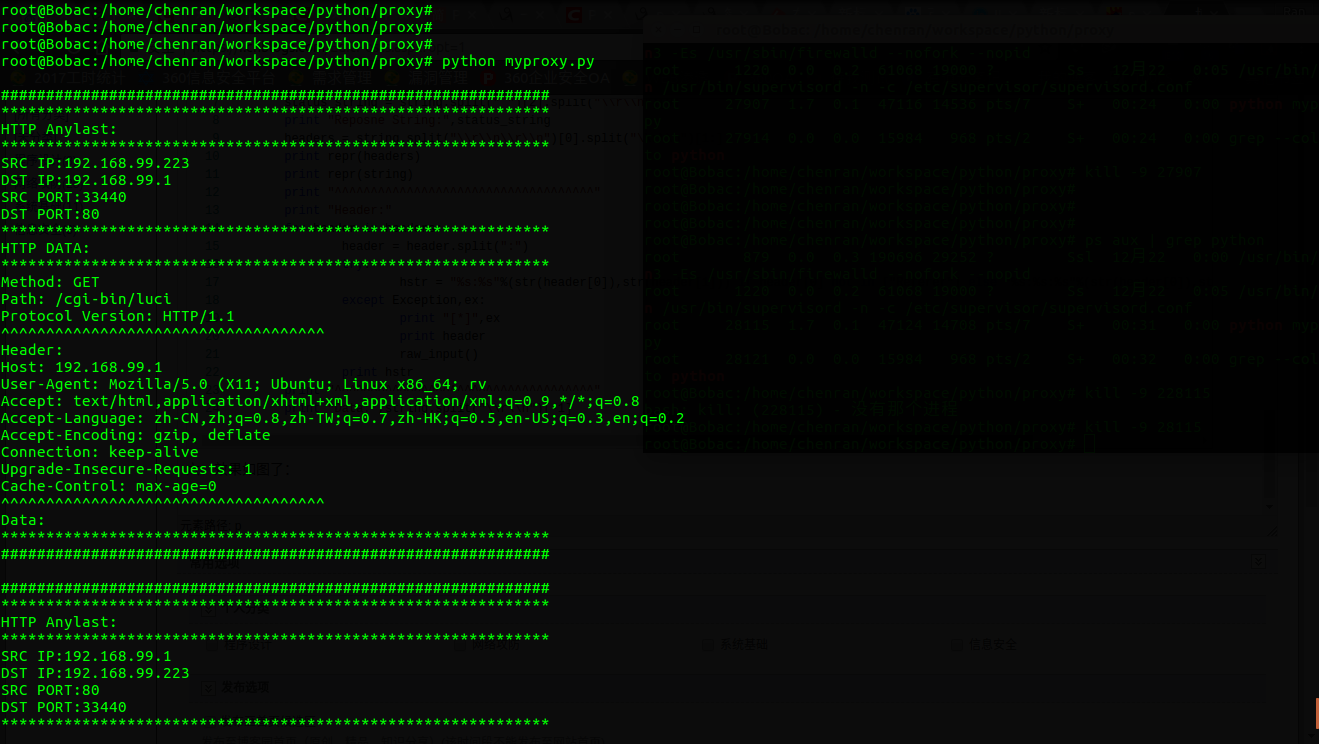
六、效果如图了:

python 进行抓包嗅探的更多相关文章
- 小白日记22:kali渗透测试之提权(二)--抓包嗅探
抓包嗅探 通过抓包嗅探目标机器的流量,发现账号密码. Windows系统 1.Wirehshark 2.Omnipeek 3.commview 4.Sniffpass 只会抓取识别传输密码的明文协议, ...
- Python—网络抓包与解包(pcap、dpkt)
pcap安装 [root@localhost ~]# pip install pypcap 抓包与解包 # -*- coding:utf-8 -*- import pcap, dpkt import ...
- Python + winpcap抓包和发包
winpcapy Python的winpcapy库可以简单地实现收发Layer2层(数据链路层,以太网)数据. winpcapy主页:https://github.com/orweis/winpcap ...
- python抓包截取http记录日志
#!/usr/bin/python import pcap import dpkt import re def main(): pc=pcap.pcap(name="eth1" ...
- python编写网络抓包分析脚本
python编写网络抓包分析脚本 写网络抓包分析脚本,一个称手的sniffer工具是必不可少的,我习惯用Ethereal,简单,易用,基于winpcap的一个开源的软件 Ethereal自带许多协议的 ...
- python socket+tcp三次握手四次撒手学习+wireshark抓包
Python代码: server: #!/usr/bin/python # -*- coding: UTF-8 -*- # 文件名:server.py import socket # 导入 socke ...
- Python+Requests接口测试教程(1):Fiddler抓包工具
本书涵盖内容:fiddler.http协议.json.requests+unittest+报告.bs4.数据相关(mysql/oracle/logging)等内容.刚买须知:本书是针对零基础入门接口测 ...
- Python 爬虫——抖音App视频抓包
APP抓包 前面我们了解了一些关于 Python 爬虫的知识,不过都是基于 PC 端浏览器网页中的内容进行爬取.现在手机 App 用的越来越多,而且很多也没有网页端,比如抖音就没有网页版,那么上面的视 ...
- jmeter压测数据库,抓包工具,python基础
jmeter压力测试 前提场景的设置:单场景(单个接口进行压力测试一个请求)或混合场景(有业务流程的场景进行压力测试多个请求),压测时间一般在5--1515分组具体看需求. 数据准备:数据量少和数据量 ...
随机推荐
- StarRTC , AndroidThings , 树莓派小车,公网环境,视频遥控(二)小车端
原文地址:http://blog.starrtc.com/?p=94 1 创建工程IDE:Android Studio 3.1:File>New>New Project>输入项目名& ...
- 将sqlServer上的数据库文件进行盘目的迁移
在数据库客户端创建数据库时要改为.mdf文件,因为附加问价时附加的是.mdf文件: 在里选中相应的数据库 右键->任务-分离 在 剪切到相应的想放置的盘目. 例如迁移到E盘下: 在数据库-> ...
- 【转】ImageView的Scaletype参数设置
ImageView的Scaletype决定了图片在View上显示时的样子,如进行何种比例的缩放,及显示图片的整体还是部分,等等. 设置的方式包括: 1. 在layout xml中定义Android:s ...
- 后台测试常需要的htm样式
<form name="form" method="post" action="#"> <input type=" ...
- 【转】【Asp.Net】ASP.Net Response.ContentType 详细列表
不同的ContentType 会影响客户端所看到的效果.默认的ContentType为 text/html 也就是网页格式. 代码如: <% response.ContentType =&quo ...
- window,centos双系统坏了
在centos中格式化SD卡的时候,操作错误,误将windows系统C盘的给格式化了.C盘是ntf格式的,现在却变为了fat32的格式. 重启系统,发现还是可以进入到centos,但是window进入 ...
- (转)音频输出PCM与LPCM有什么不同
多声道LPCM:无损音轨原始存在格式,概念上等效于wave文件,并不需要运算解码,可直接输入功放进行DA转换,光纤和同轴接口只能传输2声道LPCM,多声道LPCM需要HDMI接口传输. PCM: ...
- pyqt声音输入
参考文档: http://blog.csdn.net/jdh99/article/details/39525451 http://blog.csdn.net/jdh99/article/details ...
- ThinkPHP的ajaxReturn方法的使用
ThinkPHP后端的代码如下: public function testAjax(){ $this->ajaxReturn(array('name'=>'z','age'=>18) ...
- 修改php上传文件尺寸、响应时间、时区时间等设置
修改php上传文件尺寸.响应时间 1.修改php.ini 1.post_max_size 指通过表单POST给PHP的所能接收的最大值,包括表单里的所有值,默认为8M(改为150M),看你自己需要进行 ...