
nRF5 SDK for Mesh(四) 源码编译
The mesh library and example applications can be built using either CMake or SEGGER Embedded Studio.
Using CMake provides the possiblity to build both for host (unit tests) and target, while SEGGER Embedded Studio provides a way of quickly getting the example code up and running with full debug capability.
Before you continue, check Installing the mesh toolchain ro instructions on setting up the development environment for mesh.
编译 MESH 协议栈
可以使用CMake或SEGGER嵌入式Studio构建网格库和示例应用程序。使用CMake提供了为主机(单元测试)和目标构建的可能性,而SEGGER嵌入式Studio提供了一种快速获取示例代码并运行完全调试功能的方法。在继续之前,请检查安装网格工具链的指令,以设置网格的开发环境。
Building with SEGGER Embedded Studio
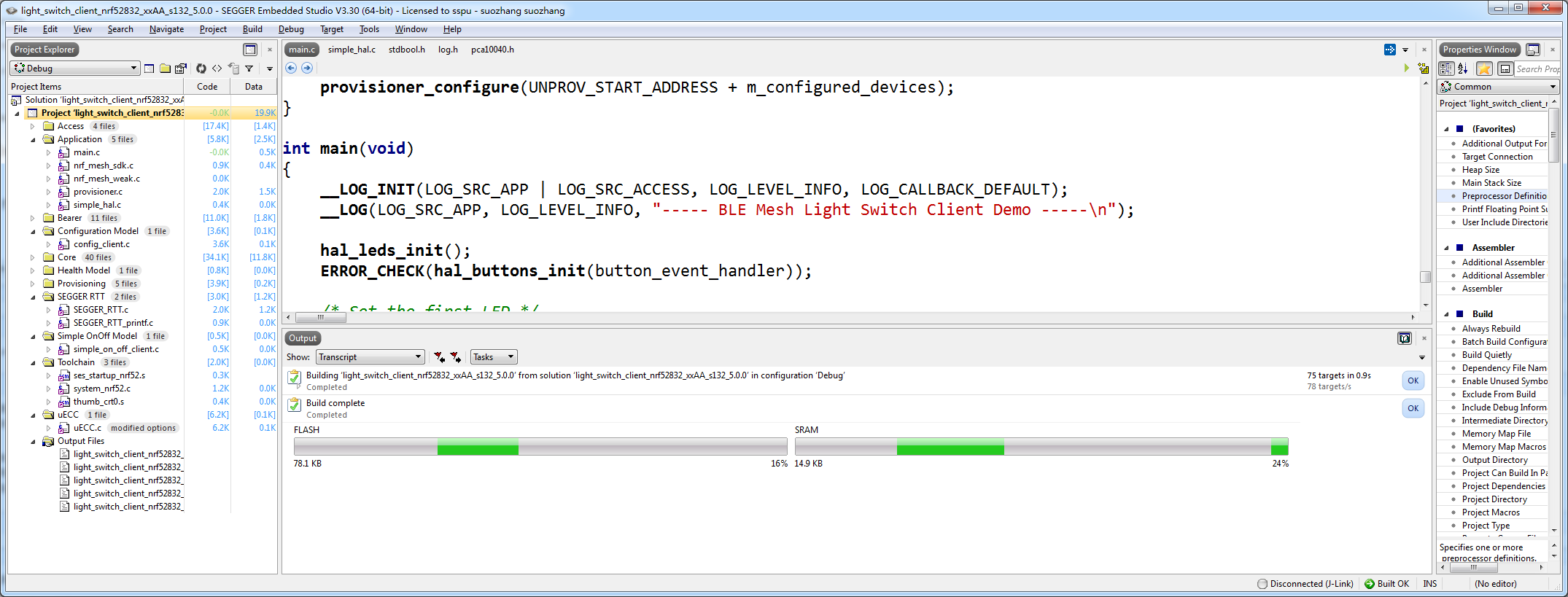
To build with SEGGER Embedded Studio, open one of the project files located in the examples/ folder, e.g.,examples/light_switch/client/light_switch_client_nrf52832_xxAA_s132_5_0_0.emProject.
To compile the example, go to Build -> Build light_switch_client_nrf52832_xxAA_s132_5.0.0. After the compilation is complete, first erase the device using Target -> Erase all and run the example with Debug -> Go. This will download the matching SoftDevice and the compiled example and start the debugger. When the download is complete select Debug -> Goagain to start the code execution.
Building with CMake
From About CMake:
CMake is an extensible, open-source system that manages the build process in an operating system and in a compiler-independent manner.
In other words, CMake does not build from the source directly, but generates the native build tool files (for example, a set of Makefiles or a build.ninja configuration). Which build tool to target is controlled via the -G argument, for example: -G Ninja, -G "Unix Makefiles" and many more. CMake can generate IDE project files for IDEs such as Eclipse as well. However, this guide only targets Ninja and GNU Make.
Important: All examples built by the CMake-generated build system do not include the SoftDevice as part of the generated HEX files. Therefore, the SoftDevice must already be present on the device before flashing the HEX file for the example mesh application.
Generating build files
Important: In this section, we are genating build files for the Ninja build tool. On Debian/Linux, you may drop the
-G Ninjaargument as the default generator is for Unix Makefiles and use themakecommand instead ofninja.
Good practice is to create a build folder in the root directory for the mesh stack repository, where all artifacts generated by the Ninja build system are stored, such as:
mesh-btle $ mkdir build

mesh-btle $ cd build
Before you can build with Ninja, you must generate the correct build files with CMake:
build$ cmake -G Ninja -DTOOLCHAIN=gccarmemb -DPLATFORM=nrf52840_xxAA ..
Based on the options given in the command line arguments, four main parameters are set:
TOOLCHAINgccarmembfor the GNU ARM Embedded toolchainarmccfor the Keil ARMCC toolchainclangfor the Clang compiler (with GNU ARM Embedded assembler and linker)
PLATFORMnrf51422_xxACnrf52832_xxAAnrf52840_xxAA
BOARD: valid board combination based on platform typeSOFTDEVICE: valid SoftDevice based on platform type
The build system will ensure a valid BOARD and SOFTDEVICE for each given platform. Calling cmake -G Ninja .. will default to thenrf52832_xxAA platform with the S132 v5.0.0 SoftDevice and the GNU ARM Embedded Toolchain.
After the Ninja build files are generated, running ninja will build all the targets (examples and libraries). Documentation can be built with ninja doc. If you have PC-Lint installed, the sources can be linted using the ninja lint command. To see a list of available build targets, run the following command:
build $ ninja help
To build a specific target from this list, run, for example, ninja mesh_core_nrf52840_xxAA if the current platform is nrf52840_xxAA.
CMake generates Ninja build files in the folder in which CMake is run (but not in any of its subfolders), so all targets must be built from that directory. In other words, in-directory building is not supported and running ninja in one of the example folders will result in an error message generated by the Ninja build system.
However, the mesh stack can be built from its root directory as well, which will place the generated artifacts in the folder where the source files are kept:
mesh-btle $ cmake -G Ninja    # Generate build files

mesh-btle $ ninja
By default, CMake is configured to build for target using the GNU ARM Embedded toolchain. To build with ARMCC instead, setTOOLCHAIN to armcc:
mesh-btle $ mkdir build && cd build         # Create a build directory

build $ cmake -G Ninja -DTOOLCHAIN=armcc .. # Generate build files

build $ ninja
Generating SEGGER Embedded Studio project files
Warning: The generator will overwrite any existing projects, please back up existing projects before running the generator.
It is possible to generate SEGGER Embedded Studio project files using the CMake build system. With the optionGENERATE_SES_PROJECTS enabled, CMake will generate a SEGGER Embedded Studio project based on the current settings. For example, to generate a project for nrf51422_xxAC using the S110 SoftDevice, run CMake in your build directory like this:
cmake -G Ninja -DGENERATE_SES_PROJECTS=ON -DPLATFORM=nrf51422_xxAC -DSOFTDEVICE=s110_8.0.0 ..
Useful CMake command line options
CMake allows you to generate project files in release or debug configurations. To do so, use the -DCMAKE_BUILD_TYPE option:
build $ cmake -DCMAKE_BUILD_TYPE=Release .. # Generates build files in release mode

build $ cmake -DCMAKE_BUILD_TYPE=Debug ..   # Generates build files in debug mode
The default build type is Debug if the CMake project is a Git repository (contains a .git directory), otherwise it is set toRelWithDebInfo.
Building the documentation
To build all documentation (API documentation and internal documentation), call the build system with the target doc.
build $ ninja doc
The Doxygen documentation is generated in <build folder>/doc/offline/html.
Unit test build (host)
The nRF5 SDK for Mesh contains a set of unit tests that verify module behavior. These unit tests run on the host system (i.e. PC, not the nRF5 device), and are built with GCC. See Installing the mesh toolchain for toolchain requirements.
The nRF5 SDK for Mesh depends on two frameworks for unit testing:
- Unity is the unit testing framework that is used for running the tests.
- CMock is used by the unit tests to generate mocks.
Note that an installation of Git is required to download these modules.
CMock bundles Unity as a submodule, thus in the same directory as the nRF5 SDK for Mesh, make sure to clone the CMock repository recursively:
$ git clone https://github.com/ThrowTheSwitch/CMock.git --recursive cmock
The directory structure should now look like this:
.

+-- cmock/

+-- nrf5_sdk_for_bluetooth_mesh/
Enter the nrf5_sdk_for_bluetooth_mesh directory, and make a new build directory, e.g. build_host:
nrf5_sdk_for_bluetooth_mesh $ mkdir -p build_host && cd build_host
To build for host, so that the unit tests can be run, set the option BUILD_HOST to ON and provide the path to CMock using theCMOCK_ROOT option. Note that all paths given to CMake must use forward slashes ('/') as directory separators.
build_host $ cmake -G Ninja -DBUILD_HOST=ON -DCMOCK_ROOT=<dir/cmock> ..
If a different version of Unity from the one included as a submodule in CMock is wanted, this can be specified by passing -DUNITY_ROOT=<dir/unity> to CMake. Note that the two paths can be set permanently with environmental variables (UNITY_ROOTand CMOCK_ROOT), and CMake is set up to look for CMock in the directory above the nrf5_sdk_for_bluetooth_mesh, so if the instructions above have been followed, both these variables are redundant.
Build all the unit tests with ninja:
build_host $ ninja
To run the tests, run ctest (bundled with CMake) or call ninja test in the build directory.
build_host $ ctest # Run all unit tests
我 没有 选择 CMAKE 工具 ,反而选择的 是 jlink 公司给 NRF 提供 的 免费软件,
SEGGER Embedded Studio
下载 安装 即可 ,然后 将下载的 MESH 源码 放在 非中文目录下 ,打开 examples/light_switch/client/light_switch_client_nrf52832_xxAA_s132_5_0_0.emProject
编译即可。
nRF5 SDK for Mesh(四) 源码编译的更多相关文章
- edgedb 内部pg 数据存储的探索 (四) 源码编译
edgedb 基于python开发,同时源码重包含了好多子项目,以下进行简单的源码编译 clone 代码 需要递归处理,加上recursive,比较慢稍等 git clone --recursiv ...
- nRF5 SDK for Mesh(一) 介绍和下载源码
一: 官网介绍地址:http://www.nordicsemi.com/Products/Bluetooth-low-energy/nRF5-SDK-for-Mesh Nordic offers a ...
- Android源码浅析(四)——我在Android开发中常用到的adb命令,Linux命令,源码编译命令
Android源码浅析(四)--我在Android开发中常用到的adb命令,Linux命令,源码编译命令 我自己平时开发的时候积累的一些命令,希望对你有所帮助 adb是什么?: adb的全称为Andr ...
- nRF5 SDK for Mesh(三) Installing the mesh toolchain 安装编译工具链
Installing the mesh toolchain To build the example applications, a toolchain based on either CMake o ...
- 第四次作业;创建raid5,源码编译安装;磁盘配额
创建raid5 格式化 ext4 创建物理卷: 创建卷组: 创建逻辑卷: 格式化 ext4 挂载 开机自启动 创建raid配置文件 源码编译安装: 创建本地yum仓库 umount /dev/sr0 ...
- Android源码分析(四)-----Android源码编译及刷机步骤
一 : 获取源码: 每个公司服务器地址不同,以如下源码地址为例: http://10.1.14.6/android/Qualcomm/msm89xx/branches/msm89xx svn环境执行: ...
- 十四.自定义yum仓库、源码编译安装
pc7:192.168.4.7 1.自定义yum仓库1.1 源码仓库下:/root/tools/other]# createrepo .]# ls ntfs-3g-2014.2.15-6.el6.x8 ...
- XMPP即时通讯协议使用(四)——Openfire服务器源码编译与添加消息记录保存
下载Openfire源码 下载地址:https://www.igniterealtime.org/downloads/index.jsp,当前最新版本为:4.2.3 Eclipse上部署Openfir ...
- android源码编译1
一.环境说明: 1.liunx系统:Ubuntu12.04 2.jdk:sun-java6-jdk 3.g++4.5 gcc4.5 二.android源码的目录结构 |-- Makefile |-- ...
随机推荐
- Java内存区域与虚拟机类加载机制
一.Java运行时数据区域 1.程序计数器 “线程私有”的内存,是一个较小的内存空间,它可以看做当前线程所执行的字节码的行号指示器.Java虚拟机规范中唯一一个没有OutOfMemoryError情况 ...
- js延迟加载优化页面响应速度
网页打开速度是衡量网站性能的一个极为重要的指标,今天就来说说如何通过JS延迟加载的方式提高页面响应速度: JS延迟加载的 含义:即等页面加载完成之后再加载 JavaScript 文件.作用:JS延迟加 ...
- js获取昨天/上周/上个月开始和结束的时间戳,可以设置时分秒 js obtain start and end timestamp of yesterday/last week/last month, with set of hour/minute/second
//obtain timestamp of last week var now=new Date() var nowDayOfWeek = now.getDay(); //今天本周的第几天 var n ...
- css3怎么分清伪类和伪元素
伪类用于向某些选择器添加特殊的效果. 伪元素用于将特殊的效果添加到某些选择器. 伪类有::first-child ,:link:,vistited,:hover,:active,:focus,:lan ...
- 解决 客户端连接 mysql5.7 Plugin 'mysql_native_plugin' is not loaded错误
进入mysql数据库,修改数据库的内容 1, use mysql; 2,update user set authentication_string="" where User= ...
- Excel 2016 for Mac
1. Excel for Mac 的 Developer tab下没有XML组,因此无法从xml导入或者导出到xml: 2. Excel for Mac 中没有Mark as Finnal的功能: 3 ...
- 使用 npm 安装 Vue
使用 npm 安装 Vue 需要 node.js 就不多说了(从 nodejs.org 中下载 nodejs ) (1)安装 Vue,在 cmd 里直接输入: npm install -g cnpm ...
- linux命令大全比较完整
转:https://www.cnblogs.com/yjd_hycf_space/p/7730690.html 最近都在和Linux打交道,感觉还不错.我觉得Linux相比windows比较麻烦的就是 ...
- 两种开源聊天机器人的性能测试(二)——基于tensorflow的chatbot
http://blog.csdn.net/hfutdog/article/details/78155676 开源项目链接:https://github.com/dennybritz/chatbot-r ...
- MySQL Database on Azure服务在中国正式商用
基于由世纪互联运营的Windows Azure平台,MySQL Database on Azure服务助力中国用户实现数据库在云端的快速部署.推进用户的创新开发 2015年9月10日,北京——微软中国 ...