
nRF5 SDK for Mesh(一) 介绍和下载源码
一:
官网介绍地址:http://www.nordicsemi.com/Products/Bluetooth-low-energy/nRF5-SDK-for-Mesh
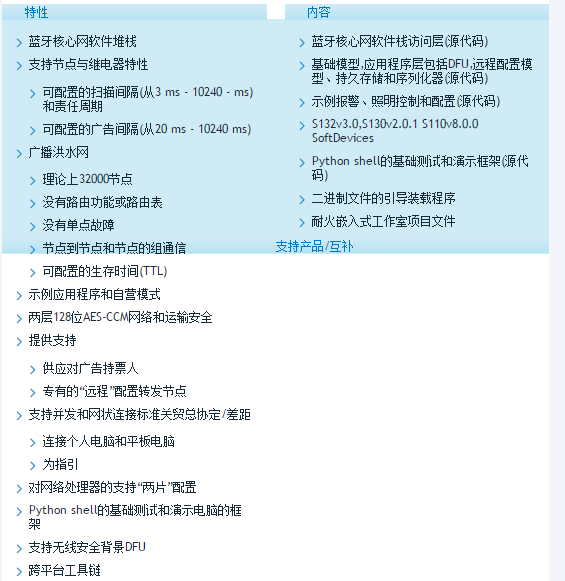
Nordic offers a complete solution for the Bluetooth mesh specification with the nRF5 SDK for Mesh and the nRF51 and nRF52 Series SoCs. It provides a powerful solution for product developers to take advantage of the new capabilities introduced by Bluetooth mesh. The nRF5 SDK for Mesh is intended to be used as a foundation for any Bluetooth mesh product development.
The addition of mesh networking capabilities to Bluetooth Low Energy enables extended range, increases the number of nodes and a many-to-many (m:m) communication topology. In a Bluetooth mesh network every received packet is broadcasted by relays, until the packet is received by the destination node (a so called managed flooding mesh.) A simple, but effective way of spreading information across the mesh network with no single point of failure. The mesh functionality is a significant update and enables new applications for Bluetooth in smart home, lighting, beaconing and asset tracking applications.
Nordic 为蓝牙网格规范提供了一个完整的解决方案,其中包括针对网格的nRF5 SDK,以及nRF51和nRF52系列的SoCs。
它为产品开发人员提供了一个强大的解决方案,可以利用蓝牙网格引入的新功能。
用于网格的nRF5 SDK是用于任何蓝牙网格产品开发的基础。
将网状网络功能添加到低功耗蓝牙技术可以扩展范围,增加节点数量和多对多(m:m)通信拓扑。
在蓝牙网络中,每一个接收到的数据包都被中继广播,直到数据包被目标节点接收(一个被称为托管的洪水网格)。
一种简单但有效的方法,可以将信息传播到整个网状网络中,而不是单点故障。
网格功能是一个重要的更新,它可以在智能家居、照明、信标和资产跟踪应用程序中支持蓝牙的新应用。
二:
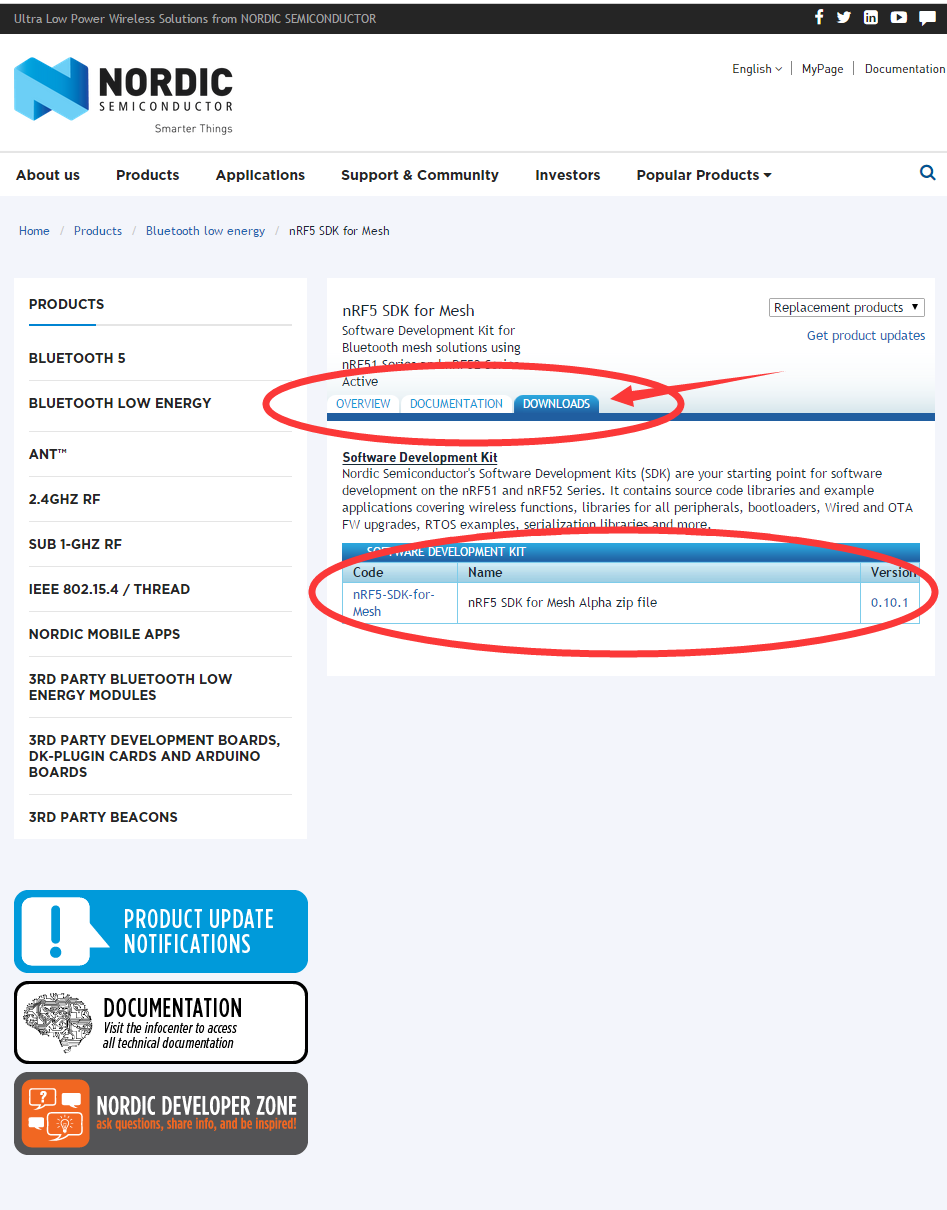
源码下载:http://www.nordicsemi.com/Products/Bluetooth-low-energy/nRF5-SDK-for-Mesh
nRF5 SDK for Mesh(一) 介绍和下载源码的更多相关文章
- nRF5 SDK for Mesh(四) 源码编译
官方文档教程编译源码: http://infocenter.nordicsemi.com/index.jsp?topic=%2Fcom.nordic.infocenter.sdk%2Fdita%2Fs ...
- nRF5 SDK for Mesh(三) Installing the mesh toolchain 安装编译工具链
Installing the mesh toolchain To build the example applications, a toolchain based on either CMake o ...
- nRF5 SDK for Mesh(二) Getting started 快速开始
Getting started To get started, take a look at the Light switch demo. It shows how a simple applicat ...
- 转-nRF5 SDK for Mesh(六) BLE MESH 的 基础概念
nRF5 SDK for Mesh(六) BLE MESH 的 基础概念 Basic Bluetooth Mesh concepts The Bluetooth Mesh is a profile s ...
- Hadoop之HDFS原理及文件上传下载源码分析(下)
上篇Hadoop之HDFS原理及文件上传下载源码分析(上)楼主主要介绍了hdfs原理及FileSystem的初始化源码解析, Client如何与NameNode建立RPC通信.本篇将继续介绍hdfs文 ...
- 查看android源码,windows环境下载源码
查看源码 参考: http://blog.csdn.net/janronehoo/article/details/8560304 步骤: 添加chrome插件 Android SDK Search 进 ...
- 上传本地代码到github&&从github下载源码
最近在玩github,下面简单介绍下githup的使用 将本地代码同步到github. 使用Git GUI同步 1,先下载git,然后安装.右键如图所示. 2,在github里新建一个 reposi ...
- maven 下载 源码和javadoc 命令
摘要:我们在写代码时候,往往是想查看一下源码,看看源码的一些细节内容.一般情况下,在IDE(如eclipse)中近仅仅只需按住ctrl+ 点击对应的方法即可进入对应的源码部分.但是有些时候很多依赖项并 ...
- Android———从GitHub上下载源码的方法【Written By KillerLegend】
首先声明,本文说的是从GitHub上下载源码而非上传源码! 1:下载tortoisegit,下载地址为: https://code.google.com/p/tortoisegit/wiki/Down ...
随机推荐
- 理解webpack4.splitChunks之其余要点
splitChunks除了之前文章提到的规则外,还有一些要点或是叫疑惑因为没有找到官方文档的明确说明,所以是通过我自己测试总结出来的,只代表我自己的测试结果,不一定正确. splitChunks.ca ...
- gulp 打包报错:Error: `libsass` bindings not found. Try reinstalling `node-sass`
看了网上很多帖子 有说切换node版本的 有说卸载重新装gulp-sass的 有说删除node_modules重新install的 但是我测试了下在我们的电脑环境下都不行,后来找到一个可以打包不报错的 ...
- 用一个div模拟textarea并实现高度自适应
1 <!DOCTYPE html> 2 <html lang="en"> 3 <head> 4 <meta charset="U ...
- css 各种常见布局整理
在学习各种布局之前我们先来认识各个关键词,理解这些关键词,然后由点到面,这样就简单多了. display属性 页面中每个元素都有一个默认的display属性,它的值与该元素的类型有关,默认值通常是 b ...
- js组件开发-移动端地区选择控件mobile-select-area
移动端地区选择控件mobile-select-area 由于之前的[js开源组件开发]js手机联动选择地区仿ios 开源git 很受欢迎,于是我又对其进行了一些优化,包括可选的范围变大了,添加了默认空 ...
- 微信开发 获取AccessToken
获取AccessToken的方法 public static Access_token GetAccessToken() { string formatString = String.Format(& ...
- C语言四舍五入算法
对h进行四舍五入 1. 网络上搜索来的: C语言取整规则: (int)(h + 0.5) 2. 二级教程: 四舍五入并精确到小数点后面的第n位: 实例:
- Codeforces Round #419 A+B
A. Karen and Morning time limit per test 2 seconds memory limit per test 512 megabytes Karen is ...
- Activity 四种launchMode
launchMode在多个Activity跳转的过程中扮演着重要的角色,它可以决定是否生成新的Activity实例,是否重用已存在的 Activity实例,是否和其他Activity实例公用一个tas ...
- C# 后台添加Log信息
我们在做项目的时候,经常会使用到Log日志,今天分享一下如何在后台添加Log信息 创建一个写Log的方法: public void WriteLog(string Action) { try { st ...