
【Jmeter测试】如何使用BeanShell断言判断请求返回的Json相应结果
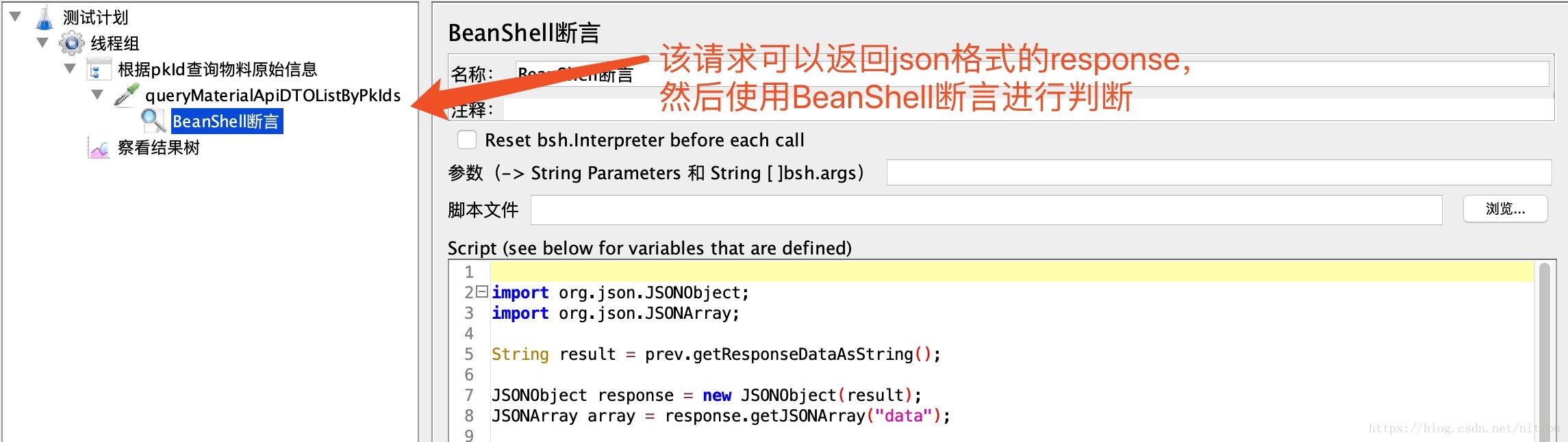
脚本结构

上图中,queryMaterialApiDTOListByPkIds是返回Json格式响应结果的请求,然后添加BeanShell断言详细判断Json结果中的值是否正确。Json格式的相应结果
 {
     "code": 0,
     "msg": "success",
     "success": true,
     "data": [
         {
             "materialCode": "6902265111719",
             "materialName": "海天蒸鱼豉油450ml*12",
             "materialType": 1,
             "sixNineCode": "6902265111719",
             "expirationDate": 720,
             "packingSpecification": 12,
             "basicUnit": "BOX",
             "minSaleUnit": "BOT",
             "importFlag": 1,
             "transportFlag": 0,
             "sourceSystem": 10,
             "createrName": "MD自动转换物料",
             "updaterName": "loms",
             "pkId": "6902265111719",
             "mdMaterialCode": "6902265111719",
             "verifyStatus": 2,
             "creater": -2,
             "createTime": 1538984955619,
             "updater": -2,
             "updateTime": 1538984955619,
             "useStatus": 1
         },
         {
             "materialCode": "6902265113003",
             "materialName": "海天特辣黄豆酱230g*15",
             "materialType": 1,
             "sixNineCode": "6902265113003",
             "expirationDate": 720,
             "packingSpecification": 15,
             "basicUnit": "BOX",
             "minSaleUnit": "BOT",
             "importFlag": 1,
             "transportFlag": 0,
             "sourceSystem": 10,
             "createrName": "MD自动转换物料",
             "updaterName": "loms",
             "pkId": "6902265113003",
             "mdMaterialCode": "6902265113003",
             "verifyStatus": 2,
             "creater": -2,
             "createTime": 1538984956726,
             "updater": -2,
             "updateTime": 1538984956726,
             "useStatus": 1
         }
     ],
     "EnumVal": {}
 }
BeanShell脚本
 import org.json.JSONObject;
 import org.json.JSONArray;

 String result = prev.getResponseDataAsString();

 JSONObject response = new JSONObject(result);
 JSONArray array = response.getJSONArray("data");

 if (array.length() != 2) {
   Failure=true ;
   FailureMessage ="array size < 2";
   return;
 }

 int count = 0;
 for (int i = 0; i < 2; i++) {
   JSONObject temp = array.getJSONObject(i);
   String pkId = temp.get("pkId").toString();
   if (pkId.equals("6902265111719")) {

       if (!temp.get("materialCode").equals("6902265111719")) {
           Failure=true ;
           FailureMessage ="pkId: " + pkId + ", material code error, code = " + temp.get("materialCode");
           return;
       }

       if (!temp.get("materialName").equals("海天蒸鱼豉油450ml*12")) {
           Failure=true ;
           FailureMessage ="pkId: " + pkId + ", material name error, name = " + temp.get("materialName");
           return;
       }
       count++;
   }

   if (pkId.equals("6902265113003")) {
       if (!temp.get("materialCode").equals("6902265113003")) {
           Failure=true ;
           FailureMessage ="pkId: " + pkId + ", material code error, code = " + temp.get("materialCode");
           return;
       }

       if (!temp.get("materialName").equals("海天特辣黄豆酱230g*15")) {
           Failure=true ;
           FailureMessage ="pkId: " + pkId + ", material name error, name = " + temp.get("materialName");
           return;
       }
       count++;
   }
 }

 if (count != 2) {
   log.info("count != 2");
   Failure=true ;
   FailureMessage ="pkId not in range";
   return;
 }

 log.info(array.toString())
1、先通过prev.getResponseDataAsString获取到响应的返回结果,然后通过org.json.JSONObject和org.json.JSONArray两个类来解析返回的相应结果。
2、解析出想要的Json对象后,在for循环中对Json对象中每一个需要检测的值和期望的进行比对,如果不正确,Failure设置为true,FailureMessage设置具体的错误信息。
3、for循环中有可能一开始的pkId取值就和期望不一致,所以这时需要计算下遍历的计数count,如果计数和期望的不一致,说明响应结果和期望结果的数量不一致。
【Jmeter测试】如何使用BeanShell断言判断请求返回的Json相应结果的更多相关文章
- 使用BeanShell断言判断请求返回的Json相应结果(不同json格式整理)
第一种json格式 { "code": 0, "msg": "success", "success": true, &q ...
- jmeter ---测试TCP服务器/模拟发送TCP请求
jmeter测试TCP服务器/模拟发送TCP请求 jmeter测试TCP服务器,使用TCP采样器模拟发送TCP请求. TCP采样器:打开一个到指定服务器的TCP / IP连接,然后发送指定文本并等待响 ...
- jmeter测试TCP服务器/模拟发送TCP请求
jmeter测试TCP服务器,使用TCP采样器模拟发送TCP请求. TCP采样器:打开一个到指定服务器的TCP / IP连接,然后发送指定文本并等待响应. jmeter模拟发送TCP请求的方法: 1. ...
- jmeter测试TCP服务器/模拟发送TCP请求 设置16进制发送(转)
转载留存:http://blog.sina.com.cn/s/blog_46d0362d0102v8ii.html 性能测试需要模拟多种场景,经常受制于资源限制,没办法建立贴近实际部署环境的场景.因而 ...
- java 接口请求返回通用json
public class BaseResponseBody { // 不能添加属性 仅做泛型使用 } public class ResponseBase<T extends BaseRespon ...
- Jmeter测试入门——带token的http请求
安装 官网下载地址:http://jmeter.apache.org/download_jmeter.cgi 下载完成后解压zip包 启动JMeter,双击JMeter解压路径bin下面的jmeter ...
- php 判断请求是否是json
$object =file_get_contents("php://input"); $arr = is_json($object); if($arr){ var_dump($ar ...
- 『动善时』JMeter基础 — 31、JMeter中BeanShell断言详解
目录 1.BeanShell简介 2.Beanshell的内置变量和方法 3.BeanShell断言界面详解 4.BeanShell断言的使用 (1)测试计划内包含的元件 (2)登陆接口请求界面内容 ...
- jmeter测试结果jtl字段分析
1 Bytes Throughput Over Time 每秒传输字节吞吐量,表明Jmeter在测试时,随着时间推移发送和接受的字节数 2 Response Codes per Second ...
随机推荐
- Css3 实现丝带效果
代码如下: <!DOCTYPE html> <html lang="en"> <head> <meta charset="UTF ...
- ArcSDE 数据迁移 Exception from HRESULT: 0x80041538问题及解决方案
一.问题描述 1.采用gdb模板文件,在ArcSDE(数据服务器)中批量创建数据库表(数据迁移)时,用到接口ESRI.ArcGIS.Geodatabase.IGeoDBDataTransfer的方法T ...
- windows下搭建nginx+php开发环境
windows下搭建nginx+php开发环境 1.前言 windows下大多我们都是下载使用集成环境,但是本地已经存在一个集成环境,但不适合项目的需求.因此准备再自己搭建一个环境. 2.准备 工具: ...
- ASP.NET Core AD 域登录 (转载)
在选择AD登录时,其实可以直接选择 Windows 授权,不过因为有些网站需要的是LDAP获取信息进行授权,而非直接依赖Web Server自带的Windows 授权功能. 当然如果使用的是Azure ...
- System.Reflection 获取描述
我们需要获取类,属性,方法的描述.这个跟获取枚举的描述一样,需要我们通过反射来做.这还需要我们的利用System.ComponentModel:Description 的属性来完成. 新建一个类:使 ...
- IOS 创建简单表视图
创建简单表视图 此实例主要实现UITableViewDataSource协议中必需要实现的两个方法tableView:numberOfRowsInSection: 和tableView:cellFor ...
- Spring 事务传播行为的使用
...
- sqlplus连接半天才连上
问题现象: 某oracle数据库服务器发现使用ssh,crt连接半天1-2分钟后才返回输入密码的提示,应用人员发现使用 sys_GUID()函数获取唯一值的时候,第一次调用需要等待很长时间,但是同一s ...
- BZOJ 1941: [Sdoi2010]Hide and Seek(k-d Tree)
Time Limit: 16 Sec Memory Limit: 162 MBSubmit: 1712 Solved: 932[Submit][Status][Discuss] Descripti ...
- Linux基础练习题(五)
1.创建一个10G分区,并格式为ext4文件系统: (1) 要求其block大小为2048, 预留空间百分比为2, 卷标为MYDATA, 默认挂载属性包含acl: [root@bj-1-142 ~]# ...