
图解Android View的scrollTo(),scrollBy(),getScrollX(), getScrollY()
https://blog.csdn.net/bigconvience/article/details/26697645
Android系统手机屏幕的左上角为坐标系,同时y轴方向与笛卡尔坐标系的y轴方向想反。通过提供的api如getLeft , getTop, getBottom, getRight可以获得控件在parent中的相对位置。同时,也可以获得控件在屏幕中的绝对位置,详细用法可参考android应用程序中获取view的位置
当我们编写一些自定义的滑动控件时,会用到一些api如scrollTo(),scrollBy(),getScrollX(), getScrollY()。由于常常会对函数getScrollX(), getScrollY()返回的值的含义产生混淆,尤其是正负关系,因此本文将使用几幅图来对这些函数进行讲解以方便大家记忆。
注意:调用View的scrollTo()和scrollBy()是用于滑动View中的内容,而不是把某个View的位置进行改变。如果想改变莫个View在屏幕中的位置,可以使用如下的方法。
调用public void offsetLeftAndRight(int offset)用于左右移动方法或public void offsetTopAndBottom(int offset)用于上下移动。
如:button.offsetLeftAndRignt(300)表示将button控件向左移动300个像素。
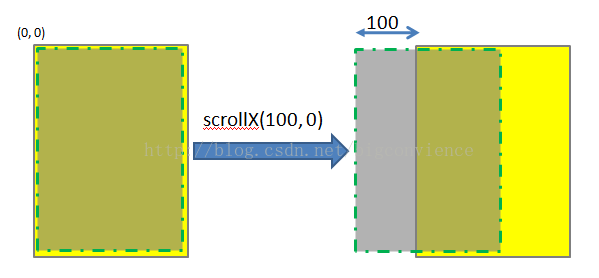
scrollTo(int x, int y) 是将View中内容滑动到相应的位置,参考的坐标系原点为parent View的左上角。
调用scrollTo(100, 0)表示将View中的内容移动到x = 100, y = 0的位置,如下图所示。注意,图中黄色矩形区域表示的是一个parent View,绿色虚线矩形为parent view中的内容。一般情况下两者的大小一致,本文为了显示方便,将虚线框画小了一点。图中的黄色区域的位置始终不变,发生位置变化的是显示的内容。
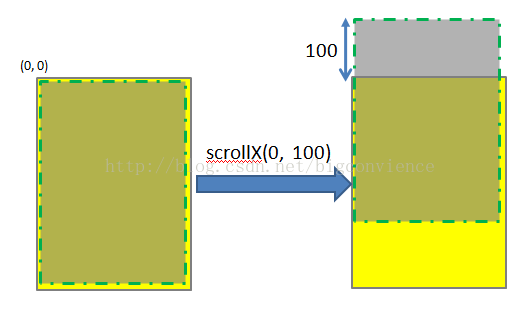
同理,scrollTo(0, 100)的效果如下图所示:
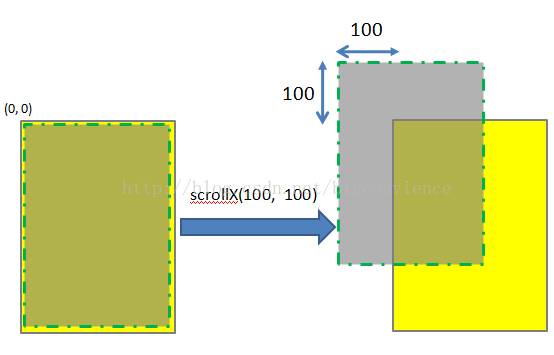
scrollTo(100, 100)的效果图如下:
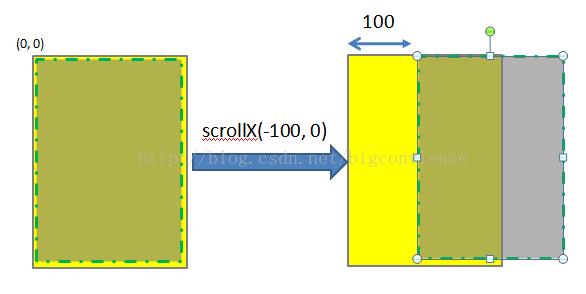
若函数中参数为负值,则子View的移动方向将相反。
scrollBy(int x, int y)其实是对scrollTo的包装,移动的是相当位置。 scrollTo(int x, int y)的源码和scrollBy(int x, int y)源码如下所示.
- /**
- * Move the scrolled position of your view. This will cause a call to
- * {@link #onScrollChanged(int, int, int, int)} and the view will be
- * invalidated.
- * @param x the amount of pixels to scroll by horizontally<pre name="code" class="java"> /**
- * Set the scrolled position of your view. This will cause a call to
- * {@link #onScrollChanged(int, int, int, int)} and the view will be
- * invalidated.
- * @param x the x position to scroll to
- * @param y the y position to scroll to
- */
- public void scrollTo(int x, int y) {
- if (mScrollX != x || mScrollY != y) {
- int oldX = mScrollX;
- int oldY = mScrollY;
- mScrollX = x;
- mScrollY = y;
- invalidateParentCaches();
- onScrollChanged(mScrollX, mScrollY, oldX, oldY);
- if (!awakenScrollBars()) {
- postInvalidateOnAnimation();
- }
- }
- }
/* @param y the amount of pixels to scroll by vertically */ public void scrollBy(int x, int y) { scrollTo(mScrollX + x, mScrollY + y); }可见,mScrollX和mScrollY是View类中专门用于记录滑动位置的变量。这两个函数最终调用onScrollChanged()函数,感兴趣者可以参考他们的源代码。
理解了scrollTo(int x, int y)和scrollBy(int x, int y)的用法,就不难理解getScrollX() 和getScrollY()。这两个函数的源码如下所示:
- /**
- * Return the scrolled left position of this view. This is the left edge of
- * the displayed part of your view. You do not need to draw any pixels
- * farther left, since those are outside of the frame of your view on
- * screen.
- *
- * @return The left edge of the displayed part of your view, in pixels.
- */
- public final int getScrollX() {
- return mScrollX;
- }
- /**
- * Return the scrolled top position of this view. This is the top edge of
- * the displayed part of your view. You do not need to draw any pixels above
- * it, since those are outside of the frame of your view on screen.
- *
- * @return The top edge of the displayed part of your view, in pixels.
- */
- public final int getScrollY() {
- return mScrollY;
- }
图解Android View的scrollTo(),scrollBy(),getScrollX(), getScrollY()的更多相关文章
- View:Android View的scrollTo(),scrollBy(),getScrollX(), getScrollY()的理解
Android系统手机屏幕的左上角为坐标系,同时y轴方向与笛卡尔坐标系的y轴方向想反.提供了 getLeft(), getTop(), getBottom(), getRight() 这些API来获取 ...
- 关于View的ScrollTo, getScrollX 和 getScrollY
下载地址:源代码 当利用 Scroller 去滑动屏幕或者扩展 ScrollView 的时候,总是会用到 getScrollX 和 getScrollY 去获取当前View 滑动到的位置,那么getS ...
- Android View 的事件体系
android 系统虽然提供了很多基本的控件,如Button.TextView等,但是很多时候系统提供的view不能满足我们的需求,此时就需要我们根据自己的需求进行自定义控件.这些控件都是继承自Vie ...
- 浅谈Android View滑动和弹性滑动
引言 View的滑动这一块在实际开发中是非常重要的,无论是优秀的用户体验还是自定义控件都是需要对这一块了解的,我们今天来谈一下View的滑动. View的滑动 View滑动功能主要可以使用3种方式来实 ...
- getX,getY,getScrollX,getScrollY,ScrollTo(),ScrollBy()辨析
前言:前两天看了自定义控件,其中有一些东西我觉得有必要深入理解一下 以下图为例: getX(),getY()返回的是触摸点A相对于view的位置 getRaw(),getRawY()返回的是触摸点B相 ...
- Android scrollTo() scrollBy() Scroller解说及应用
版本号:1.0 日期:2014.6.17 2014.6.18 版权:© 2014 kince 转载注明出处 scrollTo() .scrollBy()及 Scroller在视图滑动中常常使用 ...
- Android中的ScrollTo和ScrollBy解析
关于Android中的ScrollBy和ScrollTo方法相信大家并不陌生,这两个方法是在View中实现的.所以在各个继承了View的类都可以使用改方法. 在View中对这两个方法的源码编写是这样的 ...
- 图解Android - Android GUI 系统 (2) - 窗口管理 (View, Canvas, Window Manager)
Android 的窗口管理系统 (View, Canvas, WindowManager) 在图解Android - Zygote 和 System Server 启动分析一 文里,我们已经知道And ...
- Android -- View移动的六种方法
layout() 如果你将滑动后的目标位置的坐标传递给layout(),这样子就会把view的位置给重新布置了一下,在视觉上就是view的一个滑动的效果. public class DragView ...
随机推荐
- Backbone实践案例
By:软件11 王思伦 2013-10-4 Backbone简述: Backbone基于MVC架构,用于开发重量级Javascript应用的框架. 如上文所述,Backbone包含多种类,但主要包含了 ...
- 【SE】Week2 : 个人博客作业
1. 是否需要有代码规范 对于是否需要有代码规范,请考虑下列论点并反驳/支持: Statement1 : 这些规范都是官僚制度下产生的浪费大家的编程时间.影响人们开发效率, 浪费时间的东西. 这样的 ...
- (小组)Git 常用命令整理
Git 常用命令整理 取得Git仓库 初始化一个版本仓库 git init Clone远程版本库 git clone git@xbc.me:wordpress.git 添加远程版本库origin,语法 ...
- 05 方法与数组笔记【JAVA】
---恢复内容开始--- 1:方法(掌握) (1)方法:就是完成特定功能的代码块. 注意:在很多语言里面有函数的定义,而在Java中,函数被称为方法. (2)格式: 修饰符 返回值类型 方法名(参数类 ...
- Visual Studio 2013安装及简单的单元测试
Visual Studio 2013安装部分首先到观望下载了英文版和简体中文的语言包.但是更新语言包时总是失败,安装vs需要等待的时间也很大.后来重新装了一遍系统(这个卸载也很麻烦),从其他网站下了中 ...
- iOS国际化——通过脚本使storyboard翻译自增
一. 针对两种文件的国际化处理 代码中即.m文件的国际化 首先在你需要进行国际化处理的字符串外面加一层NSLocalizedString,注意中文也是可以的哦 textfield.text = [NS ...
- PAT 甲级 1051 Pop Sequence
https://pintia.cn/problem-sets/994805342720868352/problems/994805427332562944 Given a stack which ca ...
- IIS 下 搭建简单的FTP服务器
1. 修改用户策略, 创建简单用户密码 命令行输入 gpedit.msc 打开组策略 位置 2. 创建一个FTP使用的用户 net user zhaobsh Test6530 /add 3. 安装II ...
- 2013长春网赛1001 hdu 4759 Poker Shuffle
题目链接:http://acm.hdu.edu.cn/showproblem.php?pid=4759 题意:有一堆2^n的牌,牌原先按(1,2,....k)排序,每一次洗牌都将牌分成两种情况:(1, ...
- 随web应用启动而自启动的后台线程
当前遇到一个需求: 需要在web应用启动的时候就启动一个线程定时的来做某项工作. 有两种解决方法: 1.增加一个监听器Listener来实现相关功能. 2.增加一个随项目启动的servlet来实现相关 ...