
图解Android View的scrollTo(),scrollBy(),getScrollX(), getScrollY()
https://blog.csdn.net/bigconvience/article/details/26697645
Android系统手机屏幕的左上角为坐标系,同时y轴方向与笛卡尔坐标系的y轴方向想反。通过提供的api如getLeft , getTop, getBottom, getRight可以获得控件在parent中的相对位置。同时,也可以获得控件在屏幕中的绝对位置,详细用法可参考android应用程序中获取view的位置
当我们编写一些自定义的滑动控件时,会用到一些api如scrollTo(),scrollBy(),getScrollX(), getScrollY()。由于常常会对函数getScrollX(), getScrollY()返回的值的含义产生混淆,尤其是正负关系,因此本文将使用几幅图来对这些函数进行讲解以方便大家记忆。
注意:调用View的scrollTo()和scrollBy()是用于滑动View中的内容,而不是把某个View的位置进行改变。如果想改变莫个View在屏幕中的位置,可以使用如下的方法。
调用public void offsetLeftAndRight(int offset)用于左右移动方法或public void offsetTopAndBottom(int offset)用于上下移动。
如:button.offsetLeftAndRignt(300)表示将button控件向左移动300个像素。
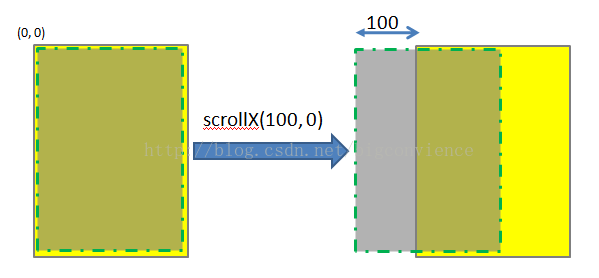
scrollTo(int x, int y) 是将View中内容滑动到相应的位置,参考的坐标系原点为parent View的左上角。
调用scrollTo(100, 0)表示将View中的内容移动到x = 100, y = 0的位置,如下图所示。注意,图中黄色矩形区域表示的是一个parent View,绿色虚线矩形为parent view中的内容。一般情况下两者的大小一致,本文为了显示方便,将虚线框画小了一点。图中的黄色区域的位置始终不变,发生位置变化的是显示的内容。
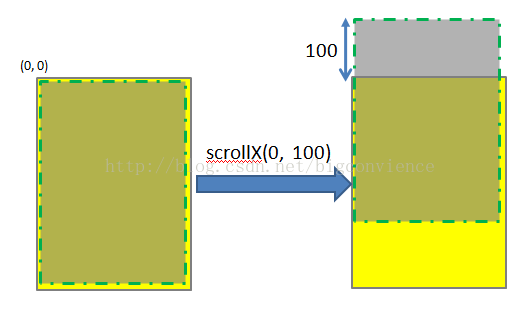
同理,scrollTo(0, 100)的效果如下图所示:
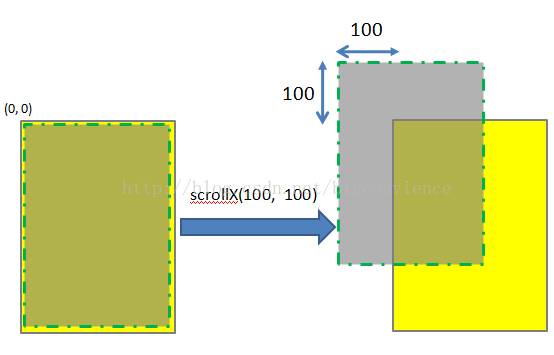
scrollTo(100, 100)的效果图如下:
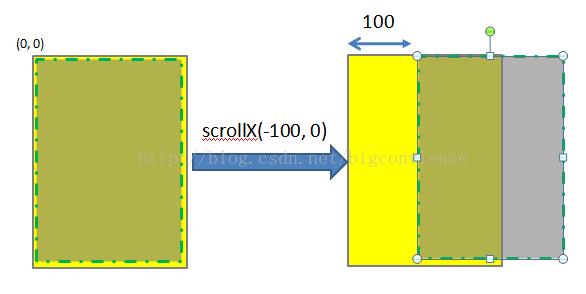
若函数中参数为负值,则子View的移动方向将相反。
scrollBy(int x, int y)其实是对scrollTo的包装,移动的是相当位置。 scrollTo(int x, int y)的源码和scrollBy(int x, int y)源码如下所示.
- /**
- * Move the scrolled position of your view. This will cause a call to
- * {@link #onScrollChanged(int, int, int, int)} and the view will be
- * invalidated.
- * @param x the amount of pixels to scroll by horizontally<pre name="code" class="java"> /**
- * Set the scrolled position of your view. This will cause a call to
- * {@link #onScrollChanged(int, int, int, int)} and the view will be
- * invalidated.
- * @param x the x position to scroll to
- * @param y the y position to scroll to
- */
- public void scrollTo(int x, int y) {
- if (mScrollX != x || mScrollY != y) {
- int oldX = mScrollX;
- int oldY = mScrollY;
- mScrollX = x;
- mScrollY = y;
- invalidateParentCaches();
- onScrollChanged(mScrollX, mScrollY, oldX, oldY);
- if (!awakenScrollBars()) {
- postInvalidateOnAnimation();
- }
- }
- }
/* @param y the amount of pixels to scroll by vertically */ public void scrollBy(int x, int y) { scrollTo(mScrollX + x, mScrollY + y); }可见,mScrollX和mScrollY是View类中专门用于记录滑动位置的变量。这两个函数最终调用onScrollChanged()函数,感兴趣者可以参考他们的源代码。
理解了scrollTo(int x, int y)和scrollBy(int x, int y)的用法,就不难理解getScrollX() 和getScrollY()。这两个函数的源码如下所示:
- /**
- * Return the scrolled left position of this view. This is the left edge of
- * the displayed part of your view. You do not need to draw any pixels
- * farther left, since those are outside of the frame of your view on
- * screen.
- *
- * @return The left edge of the displayed part of your view, in pixels.
- */
- public final int getScrollX() {
- return mScrollX;
- }
- /**
- * Return the scrolled top position of this view. This is the top edge of
- * the displayed part of your view. You do not need to draw any pixels above
- * it, since those are outside of the frame of your view on screen.
- *
- * @return The top edge of the displayed part of your view, in pixels.
- */
- public final int getScrollY() {
- return mScrollY;
- }
图解Android View的scrollTo(),scrollBy(),getScrollX(), getScrollY()的更多相关文章
- View:Android View的scrollTo(),scrollBy(),getScrollX(), getScrollY()的理解
Android系统手机屏幕的左上角为坐标系,同时y轴方向与笛卡尔坐标系的y轴方向想反.提供了 getLeft(), getTop(), getBottom(), getRight() 这些API来获取 ...
- 关于View的ScrollTo, getScrollX 和 getScrollY
下载地址:源代码 当利用 Scroller 去滑动屏幕或者扩展 ScrollView 的时候,总是会用到 getScrollX 和 getScrollY 去获取当前View 滑动到的位置,那么getS ...
- Android View 的事件体系
android 系统虽然提供了很多基本的控件,如Button.TextView等,但是很多时候系统提供的view不能满足我们的需求,此时就需要我们根据自己的需求进行自定义控件.这些控件都是继承自Vie ...
- 浅谈Android View滑动和弹性滑动
引言 View的滑动这一块在实际开发中是非常重要的,无论是优秀的用户体验还是自定义控件都是需要对这一块了解的,我们今天来谈一下View的滑动. View的滑动 View滑动功能主要可以使用3种方式来实 ...
- getX,getY,getScrollX,getScrollY,ScrollTo(),ScrollBy()辨析
前言:前两天看了自定义控件,其中有一些东西我觉得有必要深入理解一下 以下图为例: getX(),getY()返回的是触摸点A相对于view的位置 getRaw(),getRawY()返回的是触摸点B相 ...
- Android scrollTo() scrollBy() Scroller解说及应用
版本号:1.0 日期:2014.6.17 2014.6.18 版权:© 2014 kince 转载注明出处 scrollTo() .scrollBy()及 Scroller在视图滑动中常常使用 ...
- Android中的ScrollTo和ScrollBy解析
关于Android中的ScrollBy和ScrollTo方法相信大家并不陌生,这两个方法是在View中实现的.所以在各个继承了View的类都可以使用改方法. 在View中对这两个方法的源码编写是这样的 ...
- 图解Android - Android GUI 系统 (2) - 窗口管理 (View, Canvas, Window Manager)
Android 的窗口管理系统 (View, Canvas, WindowManager) 在图解Android - Zygote 和 System Server 启动分析一 文里,我们已经知道And ...
- Android -- View移动的六种方法
layout() 如果你将滑动后的目标位置的坐标传递给layout(),这样子就会把view的位置给重新布置了一下,在视觉上就是view的一个滑动的效果. public class DragView ...
随机推荐
- #个人博客作业Week1----关于软件和软件工程的出现
1.软件工程这个词如何出现的? 数学与电脑科学先锋Margaret Hamilton在开发阿波罗11号软件的期间发明的,目的是将软件与硬件还有其他工程学类做出区别,为软件以及那些发明者争取应有的正统性 ...
- Believe
虽然上了一周的软件工程,可是还是不造软件工程是干什么的.听了一节gitlab,似懂非懂,感觉很高大上的样子,自己折腾了许久,还是没有进展,真心无奈. 真是件考验耐性的事~不过,so what?会成功的 ...
- Threadlocal 传递参数(百度二面)
去百度面试,二面的时候 面试官问 如果我想跟踪一个请求,从接收请求,处理到返回的整个流程,有没有好的办法,后来面试官说了 Threadlocal 可以做到传递参数. 这是ThreadLocal的一个功 ...
- 深入理解ajax系列第二篇——请求方式
前面的话 在上一篇中,概要地介绍了XHR对象的使用.本文将详细介绍使用XHR对象发送请求的两种方式——GET和POST.下面将以实例的形式来详细说明 GET GET是最常见的请求类型,最常用于向服务器 ...
- #35 string(缩点+动态规划)
容易发现有了交换相邻字符的操作后,只要字符串所含有的字符种类和数量相同其就是等价的.这样的状态只有n^3级别,将其抽象成点子串变换抽象成边后就是求最长路径了,缩点dp解决. 码量巨大,不是很明白要怎样 ...
- 【BZOJ1089】[SCOI2003]严格n元树(高精度,动态规划)
[BZOJ1089][SCOI2003]严格n元树(高精度,动态规划) 题面 BZOJ 洛谷 题解 设\(f[i]\)表示深度为\(i\)的\(n\)元树个数.然后我们每次加入一个根节点,然后枚举它的 ...
- How to 对拍?
对拍从数学的统计学角度来说是一个好的方法,至少能在你竞赛中帮你拿回一些分--yzr大牛pas的对拍一开始还没写过,突然想学一下对拍.那么就学吧.dp水题(搜索):https://www.luogu.o ...
- 洛谷 P1412 经营与开发 解题报告
P1412 经营与开发 题目描述 \(4X\)概念体系,是指在\(PC\)战略游戏中一种相当普及和成熟的系统概念,得名自4个同样以"\(EX\)"为开头的英语单词. \(eXplo ...
- Spring Boot整合MyBatis(使用Spring Tool Suite工具)
1. 创建Spring Boot项目 通过Spring Tool Suite的Spring Starter Project对话框,其实是把项目生成的工作委托http://start.spring.io ...
- java Integer.valueOf 和 Integer.parseInt 和 new Integer区别及注意事项
先看一下下面的结果 1.System.out.println(127==127); //true , int type compare 2.System.out.println(128==128); ...