
STM32F4 External interrupts
STM32F4 External interrupts
Each STM32F4 device has 23 external interrupt or event sources.
They are split into 2 sections.
First interrupt section is for external pins (P0 to P15) on each port,
and other section is for other events, like RTC interrupt, Ethernet interrupt, USB interrupt and so on.

GPIO as Interrupt
Interrupt lines
I will show now how to configure GPIO pin to be an interrupt and how to handle it in your code with CMSIS function.
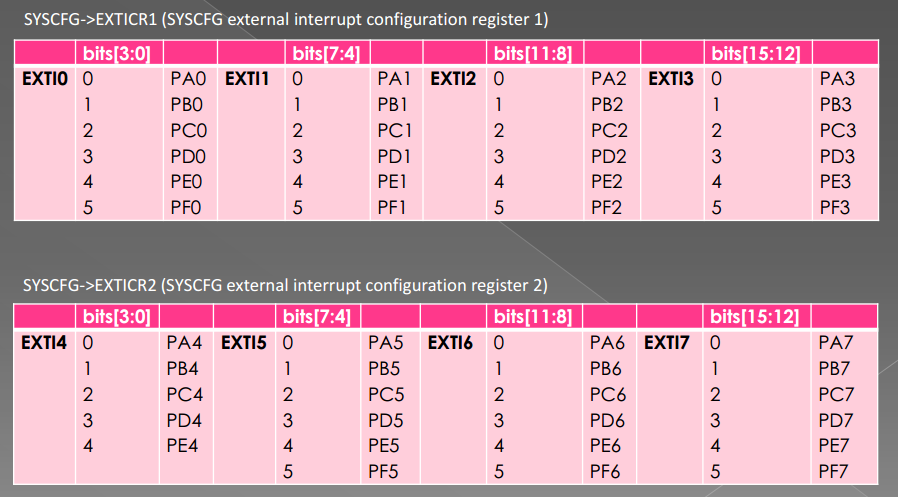
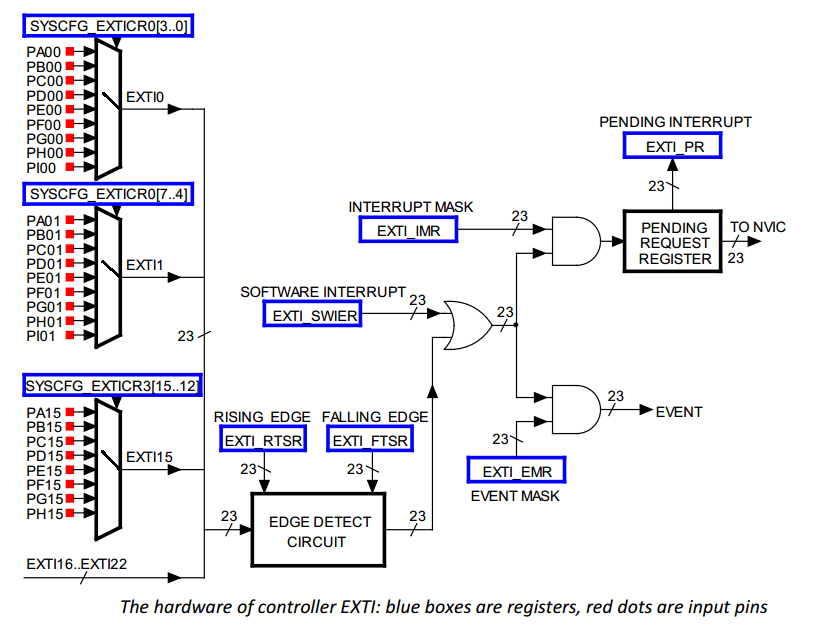
In section one (GPIOs) we have 16 interrupt lines.
They are line0 to line15 and they also represent pin number.
This means, PA0 is connected to Line0and PA13 is connected to Line13.
You have to know that PB0 is also connected to Line0 and PC0 also and so on.
This is for all pins on board, All Px0 (where x is GPIO name) pins are connected to Line0
and let’s say all Px3 are connected to Line3 on the Interrupt channel.
All pins with same number are connected to line with same number.
They are multiplexed to one line.
IMPORTANT: You can not use two pins on one line simultaneously:
- PA0 and PB0 and PC0 and so on, are connected to Line0,
so you can use only one pin at one time to handle interrupt from there. - PA0 and PA5 are connected to different lines, they can be used at the same time.
Each line can trigger an interrupt on rising, falling or rising_falling enge on signal.
Interrupt handlers
OK, now you have selected your pin you want to use.
But you have to handle interrupt somehow.
This process is described below.
STM32F4 has 7 interrupt handlers for GPIO pins.
They are in table below:
| Irq | Handler | Description |
|---|---|---|
| EXTI0_IRQn | EXTI0_IRQHandler | Handler for pins connected to line 0 |
| EXTI1_IRQn | EXTI1_IRQHandler | Handler for pins connected to line 1 |
| EXTI2_IRQn | EXTI2_IRQHandler | Handler for pins connected to line 2 |
| EXTI3_IRQn | EXTI3_IRQHandler | Handler for pins connected to line 3 |
| EXTI4_IRQn | EXTI4_IRQHandler | Handler for pins connected to line 4 |
| EXTI9_5_IRQn | EXTI9_5_IRQHandler | Handler for pins connected to line 5 to 9 |
| EXTI15_10_IRQn | EXTI15_10_IRQHandler | Handler for pins connected to line 10 to 15 |
This table show you which IRQ you have to set for NVIC (first column)
and function names to handle your interrupts (second column).
You have probably also figured, that only lines 0 to 4 have own IRQ handler.
Yes, lines 5-9 have the same interrupt handler and this is also for lines 10 to 15.
After you set settings for EXTI, you have to add them into NVIC.
Example
In this example, we will set pin PD0 and PB12 to be a GPIO interrupts.
Code below should be well documented to understand how it works.
/**

 *    External interrupts example

 *

 *    @author     Tilen Majerle

 *    @email        tilen@majerle.eu

 *    @website    http://stm32f4-discovery.com

 *    @ide        Keil uVision 5

 */

#include "stm32f4xx.h"

#include "stm32f4xx_exti.h"

#include "stm32f4xx_syscfg.h"

#include "misc.h"

/* Configure pins to be interrupts */

void Configure_PD0(void) {

    /* Set variables used */

    GPIO_InitTypeDef GPIO_InitStruct;

    EXTI_InitTypeDef EXTI_InitStruct;

    NVIC_InitTypeDef NVIC_InitStruct;

    /* Enable clock for GPIOD */

    RCC_AHB1PeriphClockCmd(RCC_AHB1Periph_GPIOD, ENABLE);

    /* Enable clock for SYSCFG */

    RCC_APB2PeriphClockCmd(RCC_APB2Periph_SYSCFG, ENABLE);

    /* Set pin as input */

    GPIO_InitStruct.GPIO_Mode = GPIO_Mode_IN;

    GPIO_InitStruct.GPIO_OType = GPIO_OType_PP;

    GPIO_InitStruct.GPIO_Pin = GPIO_Pin_0;

    GPIO_InitStruct.GPIO_PuPd = GPIO_PuPd_UP;

    GPIO_InitStruct.GPIO_Speed = GPIO_Speed_100MHz;

    GPIO_Init(GPIOD, &GPIO_InitStruct);

    /* Tell system that you will use PD0 for EXTI_Line0 */

    SYSCFG_EXTILineConfig(EXTI_PortSourceGPIOD, EXTI_PinSource0);

    /* PD0 is connected to EXTI_Line0 */

    EXTI_InitStruct.EXTI_Line = EXTI_Line0;

    /* Enable interrupt */

    EXTI_InitStruct.EXTI_LineCmd = ENABLE;

    /* Interrupt mode */

    EXTI_InitStruct.EXTI_Mode = EXTI_Mode_Interrupt;

    /* Triggers on rising and falling edge */

    EXTI_InitStruct.EXTI_Trigger = EXTI_Trigger_Rising_Falling;

    /* Add to EXTI */

    EXTI_Init(&EXTI_InitStruct);

    /* Add IRQ vector to NVIC */

    /* PD0 is connected to EXTI_Line0, which has EXTI0_IRQn vector */

    NVIC_InitStruct.NVIC_IRQChannel = EXTI0_IRQn;

    /* Set priority */

    NVIC_InitStruct.NVIC_IRQChannelPreemptionPriority = 0x00;

    /* Set sub priority */

    NVIC_InitStruct.NVIC_IRQChannelSubPriority = 0x00;

    /* Enable interrupt */

    NVIC_InitStruct.NVIC_IRQChannelCmd = ENABLE;

    /* Add to NVIC */

    NVIC_Init(&NVIC_InitStruct);

}

void Configure_PB12(void) {

    /* Set variables used */

    GPIO_InitTypeDef GPIO_InitStruct;

    EXTI_InitTypeDef EXTI_InitStruct;

    NVIC_InitTypeDef NVIC_InitStruct;

    /* Enable clock for GPIOB */

    RCC_AHB1PeriphClockCmd(RCC_AHB1Periph_GPIOB, ENABLE);

    /* Enable clock for SYSCFG */

    RCC_APB2PeriphClockCmd(RCC_APB2Periph_SYSCFG, ENABLE);

    /* Set pin as input */

    GPIO_InitStruct.GPIO_Mode = GPIO_Mode_IN;

    GPIO_InitStruct.GPIO_OType = GPIO_OType_PP;

    GPIO_InitStruct.GPIO_Pin = GPIO_Pin_12;

    GPIO_InitStruct.GPIO_PuPd = GPIO_PuPd_UP;

    GPIO_InitStruct.GPIO_Speed = GPIO_Speed_100MHz;

    GPIO_Init(GPIOB, &GPIO_InitStruct);

    /* Tell system that you will use PB12 for EXTI_Line12 */

    SYSCFG_EXTILineConfig(EXTI_PortSourceGPIOB, EXTI_PinSource12);

    /* PB12 is connected to EXTI_Line12 */

    EXTI_InitStruct.EXTI_Line = EXTI_Line12;

    /* Enable interrupt */

    EXTI_InitStruct.EXTI_LineCmd = ENABLE;

    /* Interrupt mode */

    EXTI_InitStruct.EXTI_Mode = EXTI_Mode_Interrupt;

    /* Triggers on rising and falling edge */

    EXTI_InitStruct.EXTI_Trigger = EXTI_Trigger_Rising_Falling;

    /* Add to EXTI */

    EXTI_Init(&EXTI_InitStruct);

    /* Add IRQ vector to NVIC */

    /* PB12 is connected to EXTI_Line12, which has EXTI15_10_IRQn vector */

    NVIC_InitStruct.NVIC_IRQChannel = EXTI15_10_IRQn;

    /* Set priority */

    NVIC_InitStruct.NVIC_IRQChannelPreemptionPriority = 0x00;

    /* Set sub priority */

    NVIC_InitStruct.NVIC_IRQChannelSubPriority = 0x01;

    /* Enable interrupt */

    NVIC_InitStruct.NVIC_IRQChannelCmd = ENABLE;

    /* Add to NVIC */

    NVIC_Init(&NVIC_InitStruct);

}

/* Set interrupt handlers */

/* Handle PD0 interrupt */

void EXTI0_IRQHandler(void) {

    /* Make sure that interrupt flag is set */

    if (EXTI_GetITStatus(EXTI_Line0) != RESET) {

        /* Do your stuff when PD0 is changed */

        /* Clear interrupt flag */

        EXTI_ClearITPendingBit(EXTI_Line0);

    }

}

/* Handle PB12 interrupt */

void EXTI15_10_IRQHandler(void) {

    /* Make sure that interrupt flag is set */

    if (EXTI_GetITStatus(EXTI_Line12) != RESET) {

        /* Do your stuff when PB12 is changed */

        /* Clear interrupt flag */

        EXTI_ClearITPendingBit(EXTI_Line12);

    }

}

int main(void) {

    /* System init */

    SystemInit();

    /* Configure PD0 as interrupt */

    Configure_PD0();

    /* Configure PB12 as interrupt */

    Configure_PB12();

    while () {

    }

}
软件环境:MDK470a
硬件环境:STM32F4-Discovery。按键B1连接在F4芯片的PA0引脚。当按键按下时,引脚电平被拉底。
功能描述:按压按键B1时,触发外部中断。进入中断处理函数后,通过串口发送消息。
实现步骤:
1、打开PA时钟,设置PA0引脚为输入。
void EXTI_GPIO_Congig(void)
{
GPIO_InitTypeDef GPIO_InitStructure;
RCC_AHB1PeriphClockCmd(RCC_AHB1Periph_GPIOA,ENABLE);
RCC_APB2PeriphClockCmd(RCC_APB2Periph_SYSCFG,ENABLE);
GPIO_InitStructure.GPIO_Mode = GPIO_Mode_IN;
GPIO_InitStructure.GPIO_PuPd = GPIO_PuPd_NOPULL;
GPIO_InitStructure.GPIO_Pin = GPIO_PinSource0;
GPIO_InitStructure.GPIO_Speed =GPIO_Speed_100MHz;
GPIO_Init(GPIOA,&GPIO_InitStructure);
}
2、打开系统配置控制器(System configuration controller)时钟。
RCC_APB2PeriphClockCmd(RCC_APB2Periph_SYSCFG,ENABLE);
关于系统控制寄存器(SYSCFG)的功能,是F4系列新增的。功能如下:
The system configuration controller is mainly used to remap the memory accessible in the code area,
select the Ethernet PHY interface and manage the external interrupt line connection to the GPIOs.
SYSCFG主要用于映射访问CODE区域的内存、选择以太网的什么接口,管理外部中断线到GPIO的连接。
设置外部中断,还要设置SYSCFG的外部中断配置寄存器。
3、配置外部中断EXTI的工作方式.
映射到PA0,即线0,使用中断模式下降沿触发。
设置EXTI寄存器的工作方式交给了库函数。
void EXTI_Config(void)
{
EXTI_GPIO_Congig();
RCC_APB2PeriphClockCmd(RCC_APB2Periph_SYSCFG,ENABLE);
EXTI_InitStructure.EXTI_Line = EXTI_Line0;
EXTI_InitStructure.EXTI_LineCmd = ENABLE;
EXTI_InitStructure.EXTI_Mode = EXTI_Mode_Interrupt;
EXTI_InitStructure.EXTI_Trigger = EXTI_Trigger_Falling;
EXTI_Init(&EXTI_InitStructure);
}
4、编写中断处理函数,实现向串口打印信息。
固定的函数名:void EXTI0_IRQHandler(void)。
进入中断处理函数后,首先检查是否为线0的中断。如果是,则清除这个中断标志。之后就可以发送消息了。
消息发送完成之后,清除在处理外部中断期间到来的外部中断。使用EXTI_ClearITPendingBit()完成
void EXTI0_IRQHandler(void)
{
if(SET == EXTI_GetITStatus(EXTI_Line0))
{
EXTI_ClearFlag(EXTI_Line0);
printf("i am in exti irqhandler\r\n");
printf("and the extiflag is cleared\r\n");
EXTI_ClearITPendingBit(EXTI_Line0);
}
}
Example code: configure PB1 as interrupt pin
#include <stdio.h>

#include <stm32f4xx.h>

uint32_t i=;

void EXTI1_IRQHandler(void)

{

 if(EXTI->PR & (<<))

    {

        i++; //increase value if interrupt happen

    }

 EXTI->PR=(<<); //clear interrupt flag for EXTI1

}

void exticonf(void)

{

 //Config PB1 as interrupt pin

 NVIC_EnableIRQ(EXTI1_IRQn); // Enable IRQ for ext. signals, line EXTI1_IRQn

 //NVIC_EnableIRQ(EXTI9_5_IRQn); //External Line[9:5] Interrupts

 //NVIC_EnableIRQ(EXTI15_10_IRQn); //External Line[15:10] Interrupts

 NVIC_SetPriority(EXTI1_IRQn, );

 SYSCFG->EXTICR[] = SYSCFG_EXTICR1_EXTI1_PB; // select PB to make IRQ EXTI1

 EXTI->RTSR = 0x00000002; // allow positive edge interrupt for EXTI1

 EXTI->IMR = 0x00000002; // enable interrupt on EXTI1

}

int main (void) {

 RCC->APB2ENR |= 0x00004000; // Clock SYSCFG - system configuration controller, necessary for interrupt

 exticonf();

        while() { };

}
EXTI Interrupts
/**

  * @brief  configures specified GPIO pin as output.

  * @param  GPIOx: where x can be (A..I) to select the GPIO peripheral.

  * @param  GPIO_Pin: specifies the port bit to be configured in output mode.

  *          This parameter can be any combination of GPIO_Pin_x where x can be (0..15).

  * @param  GPIO_Mode: Specify GPIO Configuration i.e. input/output/ADC/AF

  *         This parameter can be a value of @ref GPIOMode_TypeDef

  * @retval None

  */

void InitGPIO(GPIO_TypeDef* GPIOx, uint16_t GPIO_Pin, GPIOMode_TypeDef GPIO_Mode)

{

 GPIOPuPd_TypeDef PuPdMode = ;

 GPIO_InitTypeDef  GPIO_InitStructure;

 switch(GPIO_Mode)

 {

 case GPIO_Mode_OUT:

  PuPdMode = GPIO_PuPd_NOPULL; //digital output. Not using open drain mode as I do not know how that operates

  break;

 case GPIO_Mode_IN:

  PuPdMode = GPIO_PuPd_NOPULL; //digital read have Pin as input floating

  break;

 case GPIO_Mode_AN:

  PuPdMode = GPIO_PuPd_NOPULL; //for analogue read have Pin as input floating

  break;

 case GPIO_Mode_AF: //need to do a remapping if using alternate functions

  PuPdMode = GPIO_PuPd_UP; //for PWM have not looked at accounting for the various other alternate functions

  break;

 }

 GPIO_InitStructure.GPIO_Pin = GPIO_Pin;

 GPIO_InitStructure.GPIO_Mode = GPIO_Mode;

 GPIO_InitStructure.GPIO_OType = GPIO_OType_PP; //used for digital output and PWM output

               //this setting does not matter for ADC and digital read

 GPIO_InitStructure.GPIO_Speed = GPIO_Speed_25MHz;

 GPIO_InitStructure.GPIO_PuPd = PuPdMode;

 GPIO_Init(GPIOx, &GPIO_InitStructure);

}
The following function can be used to accomplish steps 2 to 5
/**

  * @brief  attach an external interrupt source to a GPIO pin.

  * @param  EXTI_PortSourceGPIOx : selects the GPIO port to be used as source for

  *          EXTI lines where x can be (A..I).

  * @param  EXTI_PinSourcex: specifies the EXTI line to be configured.

  *           This parameter can be EXTI_PinSourcex where x can be (0..15, except

  *           for EXTI_PortSourceGPIOI x can be (0..11).

  * @param  EXTI_Line: Specifies the EXTI Line to be configured.

  *     This parameter can be EXTI_LINEx where x can be (0..15)

  * @param  EXTI_Trigger: Specify whether Interrupt is generated on the rising, falling or rising and falling edges

  * @param  Priority: Priority of the Interrupt (lower the number the higher the priority)

  * @retval None

  * @NOTE: Note that there are 22 EXTI interrupt sources. This function can only be used to configure upto

  *     15 of those interrupts sources

  */

void Attach_GPIO_Interrupt(uint8_t EXTI_PortSourceGPIOx, uint8_t EXTI_PinSourcex, uint32_t EXTI_Line,

  EXTITrigger_TypeDef EXTI_Trigger, uint8_t Priority)

{

 uint8_t EXTI_IRQn = ;

 switch (EXTI_Line)

 {

 case 0x1:

  EXTI_IRQn = EXTI0_IRQn;

  break;

 case 0x2:

  EXTI_IRQn = EXTI1_IRQn;

  break;

 case 0x4:

  EXTI_IRQn = EXTI2_IRQn;

  break;

 case 0x8:

  EXTI_IRQn = EXTI3_IRQn;

  break;

 case 0x10:

  EXTI_IRQn = EXTI4_IRQn;

  break;

 case 0x20: case 0x40: case 0x80: case 0x100: case 0x200:

  EXTI_IRQn = EXTI9_5_IRQn;

  break;

 case 0x400: case 0x800: case 0x1000: case 0x2000: case 0x4000: case 0x8000:

  EXTI_IRQn = EXTI15_10_IRQn;

  break;

 }

 /* Connect EXTI Line to appropriate GPIO Pin */

 SYSCFG_EXTILineConfig(EXTI_PortSourceGPIOx, EXTI_PinSourcex);

 NVIC_InitTypeDef   NVIC_InitStructure;

 EXTI_InitTypeDef   EXTI_InitStructure;

 /* Configure EXTI Line */

 EXTI_InitStructure.EXTI_Line = EXTI_Line;

 EXTI_InitStructure.EXTI_Mode = EXTI_Mode_Interrupt;

 EXTI_InitStructure.EXTI_Trigger = EXTI_Trigger;

 EXTI_InitStructure.EXTI_LineCmd = ENABLE;

 EXTI_Init(&EXTI_InitStructure);

 /* Enable and set EXTI Line Interrupt */

 NVIC_InitStructure.NVIC_IRQChannel = EXTI_IRQn;

 NVIC_InitStructure.NVIC_IRQChannelPreemptionPriority = Priority;

 NVIC_InitStructure.NVIC_IRQChannelSubPriority = 0x01;

 NVIC_InitStructure.NVIC_IRQChannelCmd = ENABLE;

 NVIC_Init(&NVIC_InitStructure);

}
void Peripheral_Init()

{

 //enable clock for GPIOA

 RCC_AHB1PeriphClockCmd(RCC_AHB1Periph_GPIOA, ENABLE);

 InitGPIO(GPIOA, GPIO_Pin_0, GPIO_Mode_IN); //initialise PA0 is input

 //attach interrupt to GPIO

 Attach_GPIO_Interrupt(EXTI_PortSourceGPIOA, EXTI_PinSource0, EXTI_Line0 ,EXTI_Trigger_Rising, );

}
the Interrupt Service Routine (the function that executes should an EXTI event occur) is
void EXTI0_IRQHandler(void) //EXTI0 ISR

{

 if(EXTI_GetITStatus(EXTI_Line0) != RESET) //check if EXTI line is asserted

 {

  EXTI_ClearFlag(EXTI_Line0); //clear interrupt

  //Enter your code here

 }

}
#include "stm32f4xx.h"

#include "stm32f4xx_syscfg.h"

#include "stm32f4xx_rcc.h"

#include "stm32f4xx_gpio.h"

#include "stm32f4xx_exti.h"

#include "misc.h"

EXTI_InitTypeDef EXTI_InitStructure;

void EXTILine0_Config( void );

void LEDInit( void );

void ExtInt( void )

{

  LEDInit( );

  /* Configure EXTI Line0 (connected to PA0 pin) in interrupt mode */

  EXTILine0_Config( );

  /* Generate software interrupt: simulate a rising edge applied on EXTI0 line */

  EXTI_GenerateSWInterrupt( EXTI_Line0 );

  while (  )

  {

  }

}

/**

 * @brief  Configures LED GPIO.

 * @param  None

 * @retval None

 */

void LEDInit( )

{

  GPIO_InitTypeDef GPIO_InitStructure;

  /* Enable the GPIO_LED Clock */

  RCC_AHB1PeriphClockCmd( RCC_AHB1Periph_GPIOD, ENABLE );

  /* Configure the GPIO_LED pin */

  GPIO_InitStructure.GPIO_Pin = GPIO_Pin_12;

  GPIO_InitStructure.GPIO_Mode = GPIO_Mode_OUT;

  GPIO_InitStructure.GPIO_OType = GPIO_OType_PP;

  GPIO_InitStructure.GPIO_PuPd = GPIO_PuPd_UP;

  GPIO_InitStructure.GPIO_Speed = GPIO_Speed_50MHz;

  GPIO_Init( GPIOD, &GPIO_InitStructure );

}

/**

 * @brief  Configures EXTI Line0 (connected to PA0 pin) in interrupt mode

 * @param  None

 * @retval None

 */

void EXTILine0_Config( void )

{

  GPIO_InitTypeDef GPIO_InitStructure;

  NVIC_InitTypeDef NVIC_InitStructure;

  /* Enable GPIOA clock */

  RCC_AHB1PeriphClockCmd( RCC_AHB1Periph_GPIOA, ENABLE );

  /* Enable SYSCFG clock */

  RCC_APB2PeriphClockCmd( RCC_APB2Periph_SYSCFG, ENABLE );

  /* Configure PA0 pin as input floating */

  GPIO_InitStructure.GPIO_Mode = GPIO_Mode_IN;

  GPIO_InitStructure.GPIO_PuPd = GPIO_PuPd_NOPULL;

  GPIO_InitStructure.GPIO_Pin = GPIO_Pin_0;

  GPIO_Init( GPIOA, &GPIO_InitStructure );

  /* Connect EXTI Line0 to PA0 pin */

  SYSCFG_EXTILineConfig( EXTI_PortSourceGPIOA, EXTI_PinSource0 );

  /* Configure EXTI Line0 */

  EXTI_InitStructure.EXTI_Line = EXTI_Line0;

  EXTI_InitStructure.EXTI_Mode = EXTI_Mode_Interrupt;

  EXTI_InitStructure.EXTI_Trigger = EXTI_Trigger_Rising;

  EXTI_InitStructure.EXTI_LineCmd = ENABLE;

  EXTI_Init( &EXTI_InitStructure );

  /* Enable and set EXTI Line0 Interrupt to the lowest priority */

  NVIC_InitStructure.NVIC_IRQChannel = EXTI0_IRQn;

  NVIC_InitStructure.NVIC_IRQChannelPreemptionPriority = 0x01;

  NVIC_InitStructure.NVIC_IRQChannelSubPriority = 0x01;

  NVIC_InitStructure.NVIC_IRQChannelCmd = ENABLE;

  NVIC_Init( &NVIC_InitStructure );

}

/**

 * @brief  This function handles External line 0 interrupt request.

 * @param  None

 * @retval None

 */

void EXTI0_IRQHandler( void )

{

  if ( EXTI_GetITStatus( EXTI_Line0 ) != RESET )

  {

    /* Toggle LED1 */

    GPIO_ToggleBits( GPIOD, GPIO_Pin_12 );

    /* Clear the EXTI line 0 pending bit */

    EXTI_ClearITPendingBit( EXTI_Line0 );

  }

}

int main( void )

{

  ExtInt( );

  while (  )

  {

  }

}
STM32F4 External interrupts的更多相关文章
- (STM32F4) External Interrupt
外部中斷(External Interupt) 在MCU中是很常見而且很常用到的基本function,所以就不多做解釋.不過因為每顆MCU的配置都不太一樣所以在此記錄下來. External Inte ...
- STM32F4 External event -- WFE 待机模式
The STM32F4xx are able to handle external or internal events in order to wake up the core (WFE). The ...
- PatentTips - Posting interrupts to virtual processors
BACKGROUND Generally, the concept of virtualization in information processing systems allows multipl ...
- STM32F4XX devices vector table for EWARM toolchain.
;/******************** (C) COPYRIGHT 2015 STMicroelectronics ******************** ;* File Name : sta ...
- STM32启动文件详细解析(V3.5.0) 以:startup_stm32f10x_hd.s为例
我用的是IAR,这个貌似是MDK的,不过很有用,大家可以看一下 ;* 文件名 : startup_stm32f10x_hd.s ;* 库版本 : V3.5.0 ;* 说明: 此文件为STM32F10x ...
- Assembly - Registers
Processor operations mostly involve processing data. This data can be stored in memory and accessed ...
- stm32 中断几个库函数实现过程分析
感谢原文作者:鱼竿的传说,这篇文章写得不错,转载自 http://www.cnblogs.com/chineseboy/archive/2013/03/14/2956782.html 前题: 闭门造车 ...
- Cortex-M0(NXP LPC11C14)启动代码分析
作者:刘老师,华清远见嵌入式学院讲师. 启动代码的一般作用 1.堆和栈的初始化: 2.向量表定义: 3.地址重映射及中断向量表的转移: 4.初始化有特殊要求的断口: 5.处理器模式: 6.进入C应用程 ...
- STM32学习笔记(六) SysTick系统时钟滴答实验(stm32中断入门)
系统时钟滴答实验很不难,我就在面简单说下,但其中涉及到了STM32最复杂也是以后用途最广的外设-NVIC,如果说RCC是实时性所必须考虑的部分,那么NVIC就是stm32功能性实现的基础,NVIC的难 ...
随机推荐
- 非常有助于理解二极管PN结原理的资料
https://www.zhihu.com/question/60053574/answer/174137061 我理解的半导体 pn 结的原理,哪里错了? https://blog.csdn.net ...
- 大数据系列之并行计算引擎Spark介绍
相关博文:大数据系列之并行计算引擎Spark部署及应用 Spark: Apache Spark 是专为大规模数据处理而设计的快速通用的计算引擎. Spark是UC Berkeley AMP lab ( ...
- TypeError: Object of type 'int64' is not JSON serializable
错误类型:TypeError: Object of type 'int64' is not JSON serializable 错误场景:对Numpy和Pandas结果进行json.dumps报错 错 ...
- _findfirst和_findnext
1.首先是_finddata结构体,用于存储文件信息的结构体. 2._findfirst函数:long _findfirst(const char *, struct _finddata_t *); ...
- Java ListIterator(迭代器)
LIstIterator是一个更加强大的Iterator的子类型,它只能用于各种List类的访问,尽管Iterator只能向前移动,但是ListIterator可以双向移动,它还可以产生相对于迭代器在 ...
- 在shell脚本中调用另一个脚本的三种不同方法(fork, exec, source)——转载
原文链接:http://blog.chinaunix.net/uid-22548820-id-3181798.html fork ( /directory/script.sh) :如果shell中包含 ...
- [转] HTML5中meta属性的使用详解
meta属性在HTML中占据了很重要的位置.如:针对搜索引擎的SEO,文档的字符编码,设置刷新缓存等.虽然一些网页可能没有使用meta,但是作为正规军,我们还是有必要了解一些meta的属性,并且能够熟 ...
- Angular 快速学习笔记(1) -- 官方示例要点
创建组件 ng generate component heroes {{ hero.name }} {{}}语法绑定数据 管道pipe 格式化数据 <h2>{{ hero.name | u ...
- Codeforces 291 E Tree-String Problem AC自动机
Tree-String Problem 网上的dfs + kmp 复杂度就是错的, 除非算出根据下一个字符直接转移Next数组直接转移, 而求出Next[ i ][ 26 ]数组和丢进AC自动机里面没 ...
- 安装m4,autoconf,automake
###安装m4 wget http://mirrors.kernel.org/gnu/m4/m4-1.4.13.tar.gz \ && tar -xzvf m4-1.4.13.tar. ...