
apache(httpd)配置
1.简单配置
1 监听地址
2 主页目录
3 别名
4 目录访问的身份验证
5 https
6 MPM(under linux)
* 配置文件中路径、文件名均不支持中文。
《《《《《《《《《《《《《《《《
1 监听地址
| #Listen 12.34.56.78:80 |
本地检测的时候可以使用“localhost”来查看页面。客户端可以随便使用服务端的 IP 地址查看。
| Listen 10.97.57.2:80 |
本地或远程查看就只能使用这个 IP 地址了。
2 主页目录
|
DocumentRoot "D:/htdocs" |
|
<Directory "D:/htdocs"> Options Indexes FollowSymLinks AllowOverride None Order allow,deny Allow from all </Directory> |
3 别名
|
Alias /download "d:/ruan/l" |
|
<Directory "d:/ruan/l"> Order allow,deny Allow from all </Directory> |
|
要是没有对应的页面,而想以 ftp 一样列出该目录下的文件,这样就不行了。添加下面行: |
| Options Indexes FollowSymLinks |
4 目录访问的身份验证
配置文件如下:
|
<Directory> ... AuthName "runndy authname" AuthType basic AuthUserFile /opt/http-server/conf/mmb Require valid-user ... </Directory> |
用户名密码文件的加密方式可以同时为不同用户采用不同的加密算法。
5 https
yum install -y mod_ssl
vi ssl.conf
|
LoadModule ssl_module modules/mod_ssl.so Listen 192.168.136.11:443 <VirtualHost *:443> ErrorLog logs/ssl_error_log TransferLog logs/ssl_access_log LogLevel warn SSLEngine on SSLProtocol all -SSLv2 SSLCertificateFile /etc/pki/tls/certs/localhost.crt SSLCertificateKeyFile /etc/pki/tls/private/localhost.key </VirtualHost> |
6 MPM
prefork
|
<IfModule prefork.c> |
||
| ⑴ |
StartServers |
启动时“服务进程”① 数目 |
| ⑵ |
MinSpareServers |
“服务进程”最小空闲数目 |
| ⑶ |
MaxSpareServers |
“服务进程”最大空闲数目 |
| ⑷ |
ServerLimit |
“服务进程”最大数目 |
| ⑸ |
MaxClients |
“服务进程”同时提供服务最大数目(并发连接数量② ) |
| ⑹ |
MaxRequestsPerChild |
“服务进程”的最大服务次数 |
| </IfModule> |
① 对应“管理进程”
② 限制“服务进程”响应请求时的最大值。
worker
|
<IfModule worker.c> |
||
| ⑴ | StartServers | |
| ⑵ | MaxClients | |
| ⑶ | MinSpareThreads | /线程 |
| ⑷ | MaxSpareThreads | /线程 |
| ⑸ | ThreadsPerChild | “服务进程”产生的“线程”数目 |
| ⑹ | MaxRequestsPerChild | “服务进程”的最大服务次数 |
| </IfModule> |
2.apache的虚拟主机
1 基于名称的虚拟主机
2 基于 IP 的虚拟主机
3 默认主机
4 主机解析简析
* httpd-2.2.15
^-^ | ^-^ | ^-^ | ^-^ | ^-^ | ^-^ | ^-^ |
1 基于名称的虚拟主机
cat httpd.conf
|
# NameVirtualHost *:80 NameVirtualHost 127.0.0.1 <VirtualHost *:80> ServerName www.sunny.com ServerAlias sunny.com *.sunny.com DocumentRoot /www/sunny </VirtualHost> <VirtualHost *:80> ServerName www.lucy.com DocumentRoot /www/lucy </VirtualHost> |
| 指令 | 意义 |
|---|---|
| NameVirtualHost | 指定由多个 apache 虚拟主机共享的 IP 地址。 |
| * | 表示在所有的 IP 地址上运行,包括回环地址。 |
| ServerAlias |
对虚拟主机设定多个名字。 |
| DocumentRoot |
指定的目录必须是显示允许访问、或者父目录显示允许访问 ①。 |
| ① 允许访问: |
|---|
|
<Directory "/dinglicom/httpd/vhosts/htdocs"> Order allow,deny Allow from all </Directory> |
2 基于 IP 的虚拟主机
|
<VirtualHost 192.168.136.111:80> ServerAdmin itxiaocui@163.com DocumentRoot /www/sunny ServerName www.sunny.com ErrorLog /www/sunny/error_log TransferLog /www/sunny/access_log </VirtualHost> <VirtualHost 192.168.136.112:80> ServerAdmin itxiaocui@163.com DocumentRoot /www/lucy ServerName www.lucy.com ErrorLog /www/lucy/error_log TransferLog /www/lucy/access_log </VirtualHost> |
* 没有明确指定那个虚拟主机,会显示上边的那个虚拟主机页面。
3 默认主机
以一台虚拟主机作为默认服务器。并且放置在其他虚拟主机的前面。
| 虚拟主机类型 | 配置方法 |
|---|---|
| 基于名称 |
<VirtualHost *:80> ServerName default # Any names you like. DocumentRoot /var/www/html </VirtualHost> |
| 基于 ip |
<VirtualHost _default_:80> DocumentRoot /var/www/html </VirtualHost> |
4 主机解析简析
| 地址解析如下: |
|
192.168.136.11 www.sunny.com 192.168.136.11 www.lucy.com 192.168.136.11 www.h1.com 192.168.136.11 h1 |
| 配置内容 |
|
ServerName www.h1.com Listen 10.12.12.11:80 Listen 192.168.136.11:80 DocumentRoot /var/www/html NameVirtualHost *:80 <VirtualHost *:80> ServerName www.lucy.com DocumentRoot /data01/www/lucy </VirtualHost> <VirtualHost *:80> ServerName www.sunny.com ServerAlias sunny.com *.sunny.com DocumentRoot /data01/www/sunny </VirtualHost> <VirtualHost _default_:80> DocumentRoot /var/www/html </VirtualHost> |
|
如果在地址栏输入 h1 还是会显示在上边的虚拟主机。(因为默认主机没有放在最上边。) 要让地址栏输入 h1 显示 [ |
|
ServerName www.h1.com Listen 10.12.12.11:80 Listen 192.168.136.11:80 DocumentRoot /var/www/html ServerName h1:80 |
| 这样是可以显示目录“/var/www/html”下的主页,可是不是默认虚拟主机生效的结果。 |
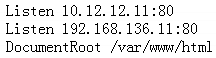 ] 指定的目录里的网页,需要修改配置如下:
apache(httpd)配置的更多相关文章
- apache httpd配置ajp报错:ap_proxy_connect_backend disabling worker for (localhost)
报错信息: (13)Permission denied: proxy: AJP: attempt to connect to 127.0.0.1:9019 (localhost) failed[Wed ...
- Mac下配置Apache Httpd的Https/SSL
Mac下配置Apache Httpd的Https/SSL httpd版本: httpd-2.4.17 jdk版本: jdk1.8.0_65 参考来源: Mac下安装Apache Httpd Mac O ...
- Apache Httpd 反向代理配置 (笔记)
Apache Httpd 配置Http反向代理 打开配置文件 httpd.conf 先启动相关模块(去掉前面的注释#)LoadModule proxy_module modules/mod_proxy ...
- 在Fedora8上配置Apache Httpd
原以为Fedora8我安装的是最简版本,于是去Apache Httpd官网下一个httpd,但是速度很成问题,现在还没有下完. 打开Fedora8的光盘,里面有httpd-2.2.6.3-3.i386 ...
- 使用mod_cluster进行apache httpd server和jboss eap 6.1集群配置
本文简单介绍,使用mod_cluster进行apache httpd server和jboss eap 6.1集群配置.本配置在windows上测试通过,linux下应该是一样的.可能要稍作调整.后面 ...
- apache环境配置 | httpd Could not reliably determine the server's fully qualified domain name
apache环境配置 | httpd Could not reliably determine the server's fully qualified domain name 转 https: ...
- 【高可用HA】Apache (4) —— Mac下配置Apache Httpd负载均衡(Load Balancer)之mod_jk
Mac下配置Apache Httpd负载均衡(Load Balancer)之mod_jk httpd版本: httpd-2.4.17 jk版本: tomcat-connectors-1.2.41 参考 ...
- 【高可用HA】Apache (3) —— Mac下配置Apache Httpd负载均衡(Load Balancer)之mod_proxy
Mac下配置Apache Httpd负载均衡(Load Balancer)之mod_proxy httpd版本: httpd-2.4.17 参考来源: Apache (1) -- Mac下安装Apac ...
- Linux中基于apache httpd的svn服务器搭建与配置
mod_dav_svn是apache连接svn的模块 yum install subversion mod_dav_svn httpd 配置文件简单说明, SVNParentPath 说明可以在指定的 ...
- Apache httpd Server 配置正向代理
背景 代理(Proxy),位于客户端与实际服务端之间,当客户端需要请求服务端内容时,先向代理发起请求,代理将请求转发到实际的服务器,再原路返回.也可以在代理服务器设置缓存,将实际服务器上不常变化的内容 ...
随机推荐
- ASP.NET AJAX入门系列(11):在多个UpdatePanle中使用Timer控件
本文将使用Timer控件更新两个UpdatePanel控件,Timer控件将放在UpdatePanel控件的外面,并将它配置为UpdatePanel的触发器,翻译自官方文档. 主要内容 在多个Upda ...
- PICT测试工具的安装及使用
PICT工具就是在微软公司出品一款成对组合的命令行生成工具,现在已经对外提供,可以在互联网上下载到 .PICT 可以有效地按照两两测试的原理,进行测试用例设计.在使用PICT时,需要输入与测试用例相关 ...
- 一:elasticsearch常用操作总结
索引 搜索 mapping 分词器 1.创建索引 http://192.168.65.131:9200/smartom_index 2.查看索引: http://192.168.65.131:9200 ...
- TextBox限制输入字母、数字、退格键
公共方法如下: /// <summary> /// 正则表达式验证只能输入数字或字母 /// </summary> /// <param name="pendi ...
- php中的this,self,parent
this就是指向当前对象实例的指针,不指向任何其他对象或类 如$this->fun1(); self:指向类本身,也就是self是不指向任何已经实例化的对象 ,self使用来指向类中的静态属性或 ...
- 黄聪:保持web页面生成的app一直处于用户登录状态不退出
用户登录了会员中心,怎么保持登录状态! 由于封壳的内核及组件肯定没有浏览器APP应用那么强大,所以目前暂时的解决方案是: jquery.cookie.js 本文转载至:https://www.cnb ...
- centos 7 服务管理
启动一个服务:systemctl start firewalld.service关闭一个服务:systemctl stop firewalld.service重启一个服务:systemctl rest ...
- Java判断两个List是否相同
1.利用Java中为List提供的方法retainAll() /** * 判断两个List内的元素是否相同 * <p> * 此方法有bug 见Food.class * * @param l ...
- [LeedCode]921. 使括号有效的最少添加
题目描述: 给定一个由 '(' 和 ')' 括号组成的字符串 S,我们需要添加最少的括号( '(' 或是 ')',可以在任何位置),以使得到的括号字符串有效. 从形式上讲,只有满足下面几点之一,括号字 ...
- webscoket通信初步(一)
只要动手做起来,多投入时间和精力.耐心去研究,以大多人的智商加google,平时遇到的大部分问题我们都是可以自己解决的,大部分的知识我们都是可以掌握的. 我们都知道http协议是单向请求的,无法实现双 ...