
【代码笔记】iOS-FMDBDemo
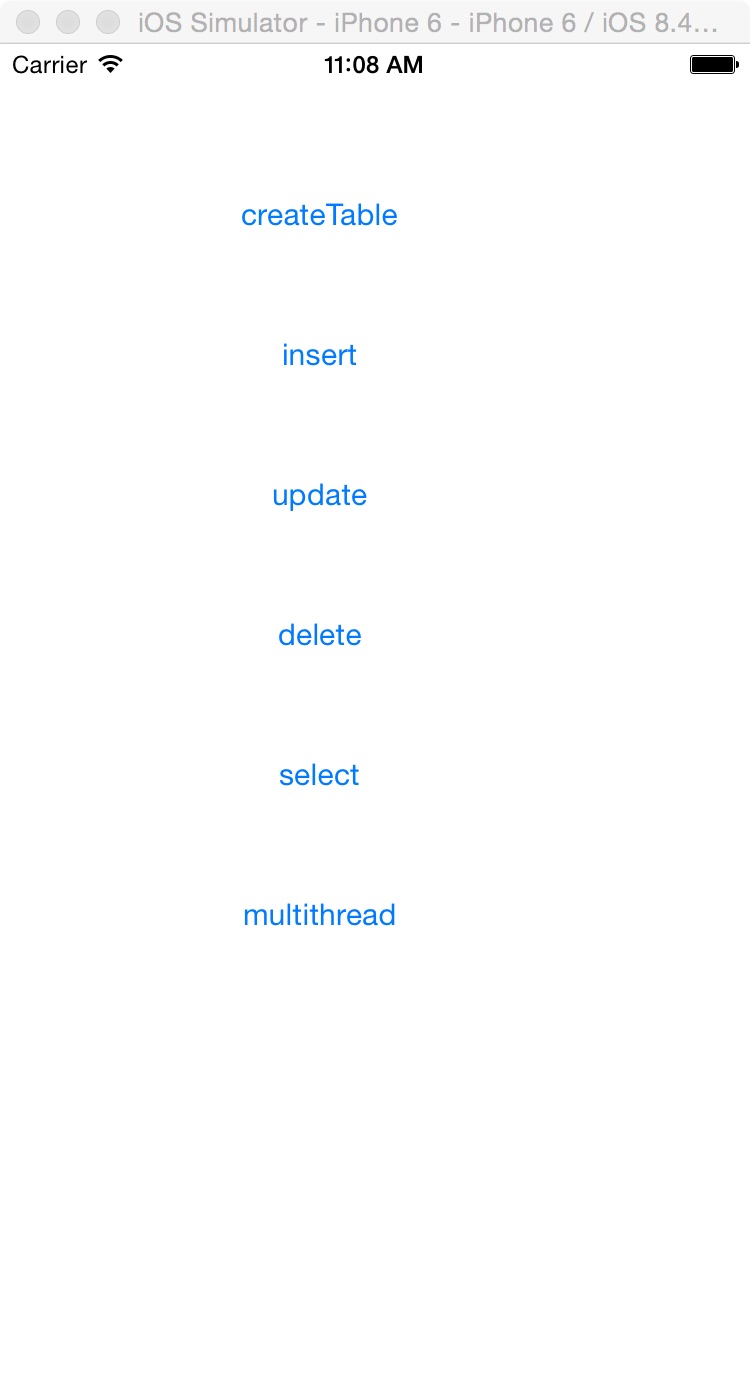
一,效果图。
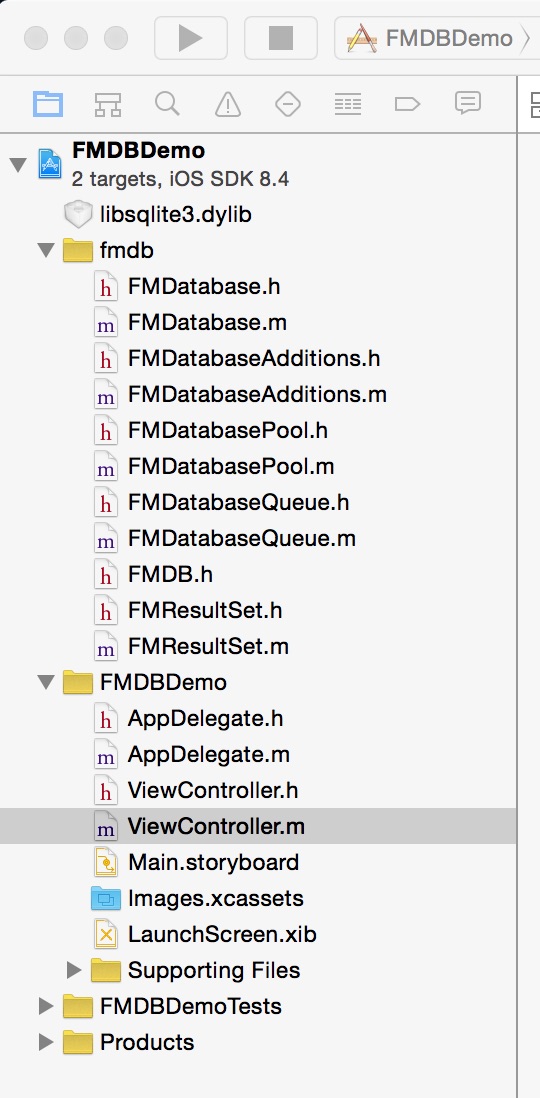
二,工程图。
三,代码。
ViewController.h

#import <UIKit/UIKit.h>

#import "FMDatabase.h"

#import "FMDatabaseQueue.h"

@interface ViewController : UIViewController

{

    FMDatabase *db;

    NSString *database_path;

}

@end
ViewController.m
#import "ViewController.h"

#define DBNAME    @"personinfo.sqlite"

#define ID        @"id"

#define NAME      @"name"

#define AGE       @"age"

#define ADDRESS   @"address"

#define TABLENAME @"PERSONINFO"

@interface ViewController ()

@end

@implementation ViewController

- (void)viewDidLoad {

    [super viewDidLoad];

    // Do any additional setup after loading the view, typically from a nib.

    //初始化数据库存放目录

    [self addDocumentPath];

    //初始化界面

    [self addView];

    [super viewDidLoad];

}

#pragma -mark -functions

//初始化数据库存放目录

-(void)addDocumentPath

{

    //获得Documents目录

    NSArray *paths = NSSearchPathForDirectoriesInDomains(NSDocumentDirectory, NSUserDomainMask, YES);

    NSString *documents = [paths objectAtIndex:0];

    NSLog(@"--documents--%@",documents);

    //添加/号,使之变成一个完整的路径

    database_path = [documents stringByAppendingPathComponent:DBNAME];

    NSLog(@"--database_path---%@",database_path);

    db = [FMDatabase databaseWithPath:database_path];

}

//初始化用户界面

-(void)addView

{

    //新建数据库

    UIButton *createBtn=[UIButton buttonWithType:UIButtonTypeRoundedRect];

    createBtn.frame=CGRectMake(60, 60, 200, 50);

    [createBtn addTarget:self action:@selector(doClickCreateButton) forControlEvents:UIControlEventTouchUpInside];

    [createBtn setTitle:@"createTable" forState:UIControlStateNormal];

    [self.view addSubview:createBtn];

    //插入数据库

    UIButton *insterBtn=[UIButton buttonWithType:UIButtonTypeRoundedRect];

    insterBtn.frame=CGRectMake(60, 130, 200, 50);

    [insterBtn addTarget:self action:@selector(doClickInsertButton) forControlEvents:UIControlEventTouchUpInside];

    [insterBtn setTitle:@"insert" forState:UIControlStateNormal];

    [self.view addSubview:insterBtn];

    //更新数据库

    UIButton *updateBtn=[UIButton buttonWithType:UIButtonTypeRoundedRect];

    updateBtn.frame=CGRectMake(60, 200, 200, 50);

    [updateBtn addTarget:self action:@selector(doClickUpdateButton) forControlEvents:UIControlEventTouchUpInside];

    [updateBtn setTitle:@"update" forState:UIControlStateNormal];

    [self.view addSubview:updateBtn];

    //删除数据库

    UIButton *deleteBtn=[UIButton buttonWithType:UIButtonTypeRoundedRect];

    deleteBtn.frame=CGRectMake(60, 270, 200, 50);

    [deleteBtn addTarget:self action:@selector(doClickDeleteButton) forControlEvents:UIControlEventTouchUpInside];

    [deleteBtn setTitle:@"delete" forState:UIControlStateNormal];

    [self.view addSubview:deleteBtn];

    //查看数据库

    UIButton *selectBtn=[UIButton buttonWithType:UIButtonTypeRoundedRect];

    selectBtn.frame=CGRectMake(60, 340, 200, 50);

    [selectBtn addTarget:self action:@selector(doClickSelectButton) forControlEvents:UIControlEventTouchUpInside];

    [selectBtn setTitle:@"select" forState:UIControlStateNormal];

    [self.view addSubview:selectBtn];

    //多线程

    UIButton *multithreadBtn=[UIButton buttonWithType:UIButtonTypeRoundedRect];

    multithreadBtn.frame=CGRectMake(60, 410, 200, 50);

    [multithreadBtn addTarget:self action:@selector(doClickMultithreadButton) forControlEvents:UIControlEventTouchUpInside];

    [multithreadBtn setTitle:@"multithread" forState:UIControlStateNormal];

    [self.view addSubview:multithreadBtn];

}

#pragma -mark -doClickAction

//新建数据库

- (void)doClickCreateButton{

    //sql 语句

    if ([db open]) {

        NSString *sqlCreateTable =  [NSString stringWithFormat:@"CREATE TABLE IF NOT EXISTS '%@' ('%@' INTEGER PRIMARY KEY AUTOINCREMENT, '%@' TEXT, '%@' INTEGER, '%@' TEXT)",TABLENAME,ID,NAME,AGE,ADDRESS];

        BOOL res = [db executeUpdate:sqlCreateTable];

        if (!res) {

            NSLog(@"error when creating db table");

        } else {

            NSLog(@"success to creating db table");

        }

        [db close];

    }

}

//插入数据库

-(void)doClickInsertButton{

    if ([db open]) {

        NSString *insertSql1= [NSString stringWithFormat:

                               @"INSERT INTO '%@' ('%@', '%@', '%@') VALUES ('%@', '%@', '%@')",

                               TABLENAME, NAME, AGE, ADDRESS, @"张三", @"13", @"济南"];

        BOOL res = [db executeUpdate:insertSql1];

        if (!res) {

            NSLog(@"error when insert db table");

        } else {

            NSLog(@"success to insert db table");

        }

        NSString *insertSql2 = [NSString stringWithFormat:

                                @"INSERT INTO '%@' ('%@', '%@', '%@') VALUES ('%@', '%@', '%@')",

                                TABLENAME, NAME, AGE, ADDRESS, @"李四", @"12", @"济南"];

        BOOL res2 = [db executeUpdate:insertSql2];

        if (!res2) {

             NSLog(@"error when insert db table");

        }else{

             NSLog(@"success to insert db table");

        }

        [db close];

    }

}

//修改数据库

-(void)doClickUpdateButton{

    if ([db open]) {

        NSString *updateSql = [NSString stringWithFormat:

                               @"UPDATE '%@' SET '%@' = '%@' WHERE '%@' = '%@'",

                               TABLENAME,   AGE,  @"15" ,AGE,  @"13"];

        BOOL res = [db executeUpdate:updateSql];

        if (!res) {

            NSLog(@"error when update db table");

        } else {

            NSLog(@"success to update db table");

        }

        [db close];

    }

}

//删除数据库

-(void)doClickDeleteButton{

    if ([db open]) {

        NSString *deleteSql = [NSString stringWithFormat:

                               @"delete from %@ where %@ = '%@'",

                               TABLENAME, NAME, @"张三"];

        BOOL res = [db executeUpdate:deleteSql];

        if (!res) {

            NSLog(@"error when delete db table");

        } else {

            NSLog(@"success to delete db table");

        }

        [db close];

    }

}

//查看数据库

-(void)doClickSelectButton{

    if ([db open]) {

        NSString * sql = [NSString stringWithFormat:

                          @"SELECT * FROM %@",TABLENAME];

        FMResultSet * rs = [db executeQuery:sql];

        while ([rs next]) {

            int Id = [rs intForColumn:ID];

            NSString * name = [rs stringForColumn:NAME];

            NSString * age = [rs stringForColumn:AGE];

            NSString * address = [rs stringForColumn:ADDRESS];

            NSLog(@"id = %d, name = %@, age = %@  address = %@", Id, name, age, address);

        }

        [db close];

    }

}

//多线程操作数据库

-(void)doClickMultithreadButton{

    FMDatabaseQueue * queue = [FMDatabaseQueue databaseQueueWithPath:database_path];

    dispatch_queue_t q1 = dispatch_queue_create("queue1", NULL);

    dispatch_queue_t q2 = dispatch_queue_create("queue2", NULL);

    dispatch_async(q1, ^{

        for (int i = 0; i < 50; ++i) {

            [queue inDatabase:^(FMDatabase *db2) {

                NSString *insertSql1= [NSString stringWithFormat:

                                       @"INSERT INTO '%@' ('%@', '%@', '%@') VALUES (?, ?, ?)",

                                       TABLENAME, NAME, AGE, ADDRESS];

                NSString * name = [NSString stringWithFormat:@"jack %d", i];

                NSString * age = [NSString stringWithFormat:@"%d", 10+i];

                BOOL res = [db2 executeUpdate:insertSql1, name, age,@"济南"];

                if (!res) {

                    NSLog(@"error to inster data: %@", name);

                } else {

                    NSLog(@"succ to inster data: %@", name);

                }

            }];

        }

    });

    dispatch_async(q2, ^{

        for (int i = 0; i < 50; ++i) {

            [queue inDatabase:^(FMDatabase *db2) {

                NSString *insertSql2= [NSString stringWithFormat:

                                       @"INSERT INTO '%@' ('%@', '%@', '%@') VALUES (?, ?, ?)",

                                       TABLENAME, NAME, AGE, ADDRESS];

                NSString * name = [NSString stringWithFormat:@"lilei %d", i];

                NSString * age = [NSString stringWithFormat:@"%d", 10+i];

                BOOL res = [db2 executeUpdate:insertSql2, name, age,@"北京"];

                if (!res) {

                    NSLog(@"error to inster data: %@", name);

                } else {

                    NSLog(@"succ to inster data: %@", name);

                }

            }];

        }

    });

}

- (void)didReceiveMemoryWarning {

    [super didReceiveMemoryWarning];

    // Dispose of any resources that can be recreated.

}

@end
【代码笔记】iOS-FMDBDemo的更多相关文章
- IOS开发笔记 IOS如何访问通讯录
IOS开发笔记 IOS如何访问通讯录 其实我是反对这类的需求,你说你读我的隐私,我肯定不愿意的. 幸好ios6.0 以后给了个权限控制.当打开app的时候你可以选择拒绝. 实现方法: [plain] ...
- 【hadoop代码笔记】Mapreduce shuffle过程之Map输出过程
一.概要描述 shuffle是MapReduce的一个核心过程,因此没有在前面的MapReduce作业提交的过程中描述,而是单独拿出来比较详细的描述. 根据官方的流程图示如下: 本篇文章中只是想尝试从 ...
- 【hadoop代码笔记】hadoop作业提交之汇总
一.概述 在本篇博文中,试图通过代码了解hadoop job执行的整个流程.即用户提交的mapreduce的jar文件.输入提交到hadoop的集群,并在集群中运行.重点在代码的角度描述整个流程,有些 ...
- 【Hadoop代码笔记】目录
整理09年时候做的Hadoop的代码笔记. 开始. [Hadoop代码笔记]Hadoop作业提交之客户端作业提交 [Hadoop代码笔记]通过JobClient对Jobtracker的调用看详细了解H ...
- 笔记-iOS 视图控制器转场详解(上)
这是一篇长文,详细讲解了视图控制器转场的方方面面,配有详细的示意图和代码,为了使得文章在微信公众号中易于阅读,seedante 辛苦将大量长篇代码用截图的方式呈现,另外作者也在 Github 上附上了 ...
- <Python Text Processing with NLTK 2.0 Cookbook>代码笔记
如下是<Python Text Processing with NLTK 2.0 Cookbook>一书部分章节的代码笔记. Tokenizing text into sentences ...
- [学习笔记] SSD代码笔记 + EifficientNet backbone 练习
SSD代码笔记 + EifficientNet backbone 练习 ssd代码完全ok了,然后用最近性能和速度都非常牛的Eifficient Net做backbone设计了自己的TinySSD网络 ...
- DW网页代码笔记
DW网页代码笔记 1.样式. class 插入类样式 标签技术(html)解决页面的内容样式技术(css)解决页面的外观脚本技术 解决页面动态交互问题<form> ...
- 前端学习:JS(面向对象)代码笔记
前端学习:JS(面向对象)代码笔记 前端学习:JS面向对象知识学习(图解) 创建类和对象 创建对象方式1调用Object函数 <body> </body> <script ...
- 离屏渲染学习笔记 /iOS圆角性能问题
离屏渲染学习笔记 一.概念理解 OpenGL中,GPU屏幕渲染有以下两种方式: On-Screen Rendering 意为当前屏幕渲染,指的是GPU的渲染操作是在当前用于显示的屏幕缓冲区中进行. O ...
随机推荐
- cookie和session的区别,分布式环境怎么保存用户状态
cookie和session的区别,分布式环境怎么保存用户状态 1.cookie数据存放在客户的浏览器上,session数据放在服务器上. 2.cookie不是很安全,别人可以分析存放在本地的COOK ...
- 【xsy2274】 平均值 线段树
题目大意:给你一个长度为$n$的序列$a$,请你求: $\sum\limits_{l=1}^{n}\sum\limits_{r=l}^{n}\dfrac{mex(a_l,a_{l+1},...,a_r ...
- 同时绑定onpropertychange 和 oninput 事件,实时检测 input、textarea输入改变事件,支持低版本IE,支持复制粘贴
实时检测 input.textarea输入改变事件,支持低版本IE,支持复制粘贴 检测input.textarea输入改变事件有以下几种: 1.onkeyup/onkeydown 捕获用户键盘输入事件 ...
- c++中文件读取
对于C++编译运行文件,我使用过两个编译器,一个是visual studio 2013,另外一个是devcpp,推荐使用devcpp. vs的特点是界面整洁清晰,但是需要收费,这是微软的,并且在电脑上 ...
- JavaScript -- Window-Focus
-----034-Window-Focus.html----- <!DOCTYPE html> <html> <head> <meta http-equiv= ...
- 2015年第六届蓝桥杯C/C++程序设计本科B组决赛 完美正方形
完美正方形 如果一些边长互不相同的正方形,可以恰好拼出一个更大的正方形,则称其为完美正方形.历史上,人们花了很久才找到了若干完美正方形.比如:如下边长的22个正方形 2 3 4 6 7 8 12 13 ...
- org.hibernate.NonUniqueObjectException:a different object with the same identifier value was alread
转自: http://blog.csdn.net/zzzz3621/article/details/9776539 看异常提示意思已经很明显了,是说主键不唯一,在事务的最后执行SQL时,session ...
- VGG 论文研读
VERY DEEP CONVOLUTIONAL NETWORKS FOR LARGE-SCALE IMAGE RECOGNITION 论文地址 摘要 研究主要贡献是通过非常小的3x3卷积核的神经网络架 ...
- wamp3.1.0 X64下载链接
Wamp3.1.0 X64下载 链接:https://pan.baidu.com/s/1UUU62whfUtiH2_nGFKdQAg 密码:h92l
- Ubuntu16.04安装mac主题(转载)
Ubuntu16.04配置Mac主题 作者:tongqingliu 转载请注明出处:http://www.cnblogs.com/liutongqing/p/7072878.html 觉得有帮助?欢迎 ...