
(Nagios)-check_openmanage[Dell]
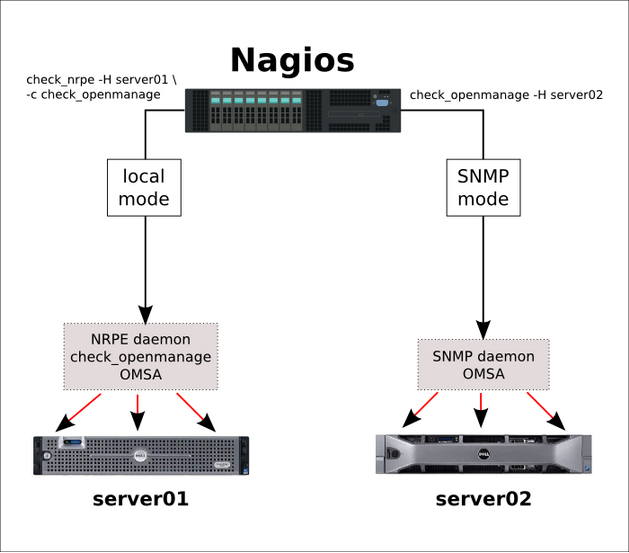
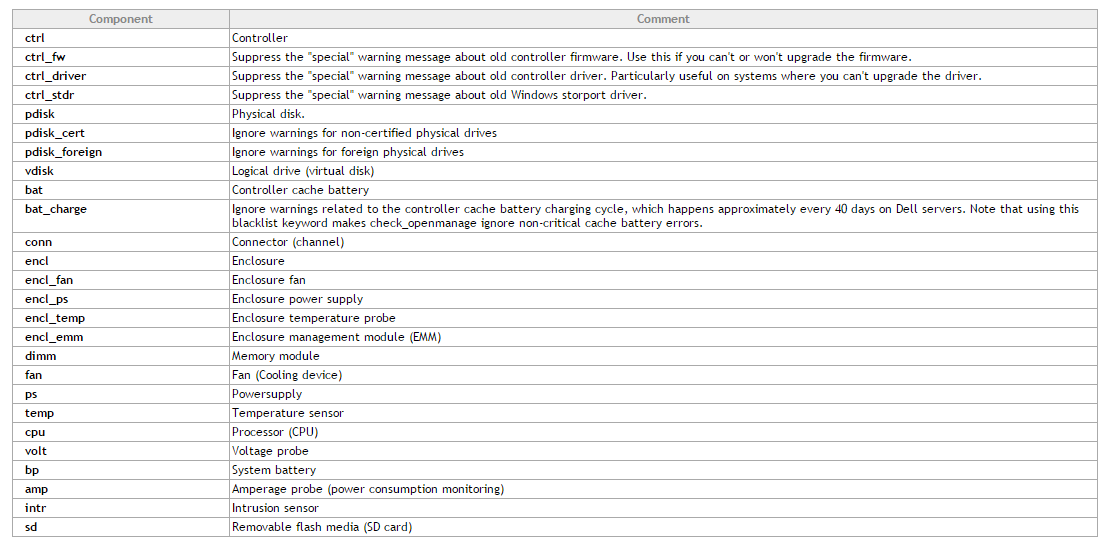
插件下载地址:http://folk.uio.no/trondham/software/check_openmanage.html
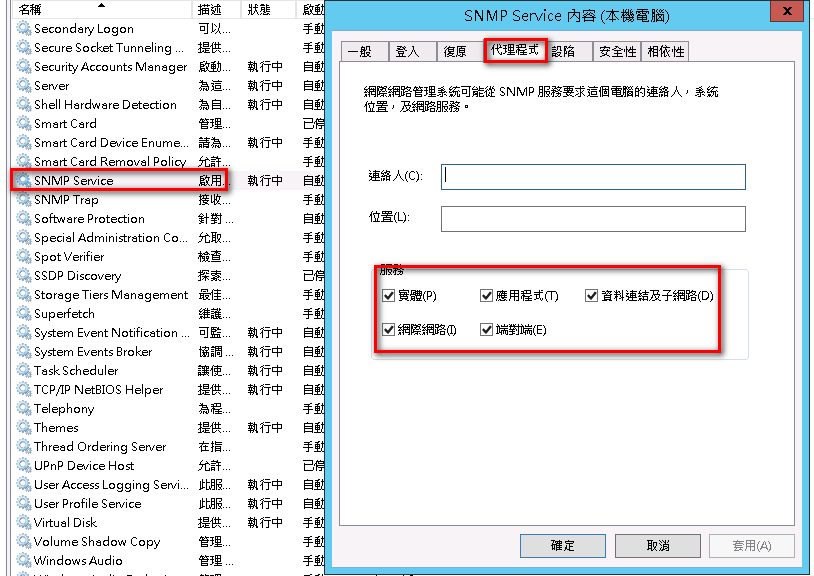
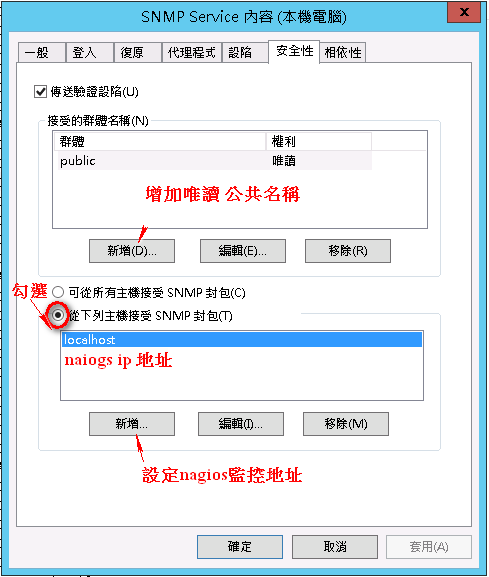
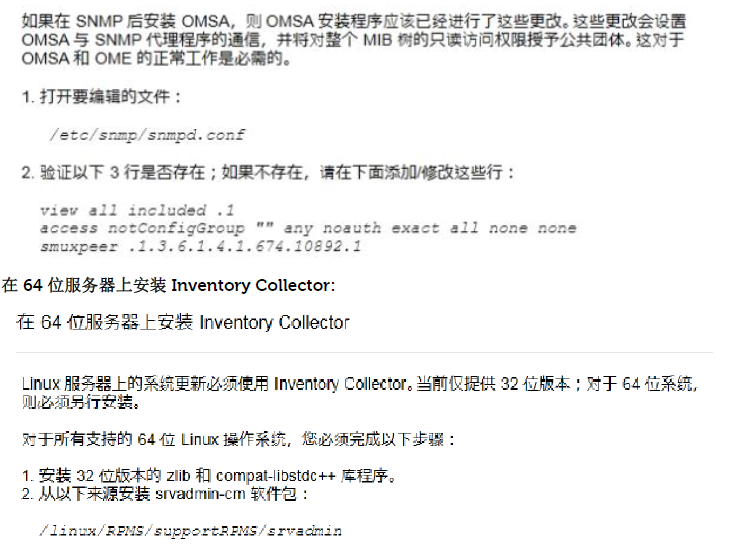
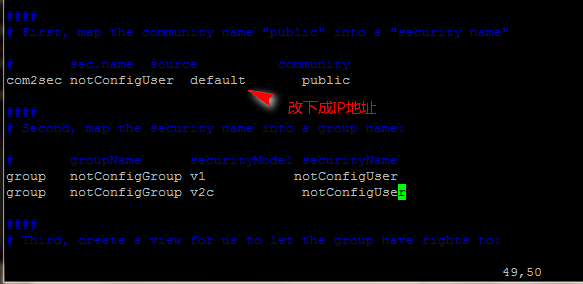
SNMP服务设定公共名称和Nagios监控主机地址,提高安全性
安装Dell Openmanage(默认端口1311)
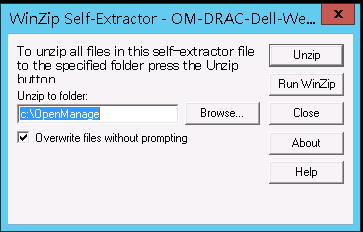
解压后安装Openmanage
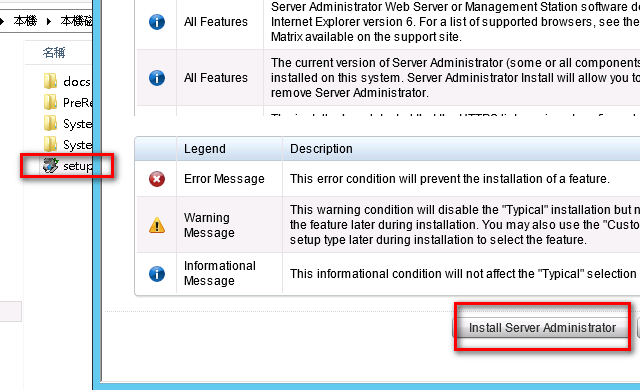
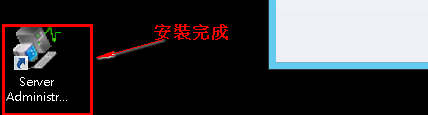
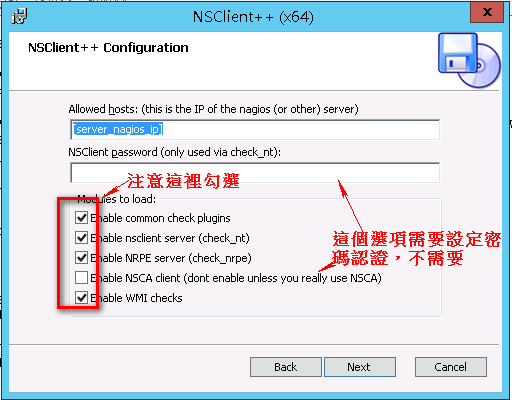
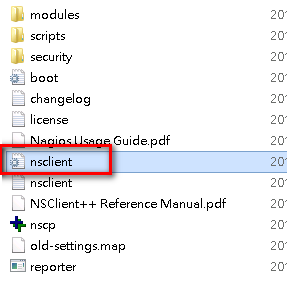
[/settings/NRPE/server]

; COMMAND ARGUMENT PROCESSING - This option determines whether or not the we will allow clients to specify arguments to commands that are executed.

allow arguments = true

; COMMAND ALLOW NASTY META CHARS - This option determines whether or not the we will allow clients to specify nasty (as in |`&><'"\[]{}) characters in arguments.

allow nasty characters = true

allow_nasty_meta_chars = 1

; ALLOWED HOSTS - A comaseparated list of allowed hosts. You can use netmasks (/ syntax) or * to create ranges. parent for this key is found under: /settings/default this is marked as advanced in favour of the parent.

;allowed hosts = 192.168.xx.xx/24(可以限制访问网段)

; PORT NUMBER - Port to use for NRPE.

port = 5666

[/settings/NRPE/server]

allow arguments=true

[/settings/external scripts]

allow arguments=true

;(这里也可以自己设定脚本 如vbs)

[/settings/external scripts/scripts]

timevbs = cscript.exe //T:30 //NoLogo scripts\\lib\\check_time.vbs $ARG1$ $ARG2$ $ARG3$
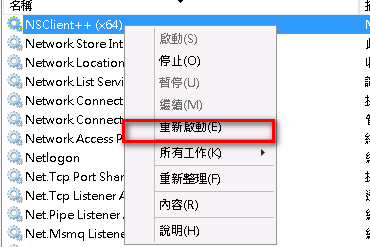
重启nagios代理服务
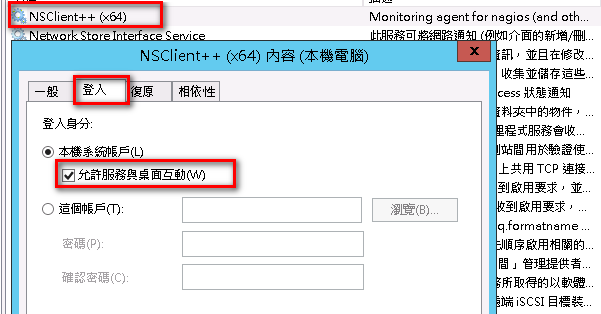
重启服务
- Make sure ESXi has patch 1 installed (at least build 175625)…if not, update it.
- Make sure the root user has a password.
- Download and install vSphere remote CLI from VMware’s website.
- Download oem-dell-openmanage-esxi_6.1-0000.zip from the Dell Support web site and copy it to C:\Program Files\VMware\VMware vSphere CLI\bin on the system you installed the vSphere remote CLI.
- On the system where you installed the vSphere remote CLI, open a command prompt and change directory to C:\Program Files\VMware\VMware vSphere CLI\bin
- Type the following command:
- vihostupdate.pl --server <esxhost> --username root -i -b c:\oem-dell-openmanage-esxi_6.1-0000.zip
- Enter the root password at the prompt and after a few minutes you should see "Host updated successfully".
- Reboot the server.
- From the vSphere client:
- Choose the Configuration tab on the host
- Click Advanced Settings under the Software section
- In the dialog that appears click "UserVars" on the left
- Change the value of CIMOEMProvidersEnabled to 1
- Click OK.
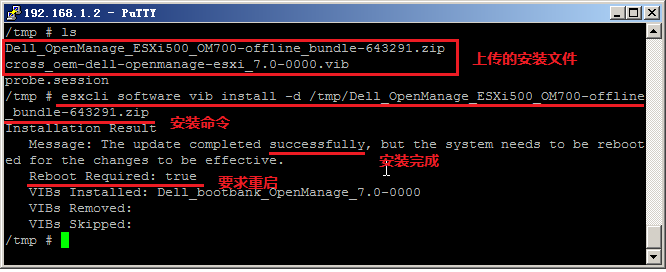
- From the DCUI: Restart Management Agents
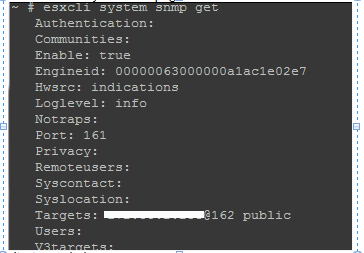
~ # esxcli system snmp set -e true
(Nagios)-check_openmanage[Dell]的更多相关文章
- nagios监控安装esxi的服务器(宿主机)
首先,该博文大部分内容来自网络,少部分是自己监控过程中遇到的问题.如果有侵权,请联系告知!!! 现在互联网公司,有能力的都是自己研发监控系统,要么就是zabbix或者小米的监控,还都二次开发等等,可能 ...
- nagios监控实用教程
nagios监控实用教程 Nagios作为开源网络监视工具,它不但可以有效的监控内存.流量.数据库使用情况.它还可以Windows.Linux主机状态.本专题收录了有关Nagios监控相关文章,供大家 ...
- 【硬件】DELLserver硬件监控及DELL系统管理工具OMSA介绍
1.1.1. DELLserver硬件监控及DELL系统管理工具OMSA介绍 本文介绍採用使用Nagios和OMSA监控DELLserver的硬件健康状态,Nagios监控的方式是NRPE模式,须要配 ...
- 【硬件】DELLserver硬件监控和DELL系统管理工具OMSA介绍
1.1.1. DELLserver硬件监控和DELL系统管理工具OMSA介绍 本文介绍了利用使用Nagios和OMSA显示器DELLserver硬件健康状况,Nagios监控的方式是NRPE模式,须要 ...
- Dell服务器安装OpenManage(OMSA)
公司上架了一批戴尔服务器,公司要求对这些服务器的硬件做一系列的监控,如CPU的温度,内存,风扇的状态,转速,磁盘等硬件的监控. 在对服务器的硬件监控上,目前业界主要基于如下两种: 1.服务器自带的工具 ...
- Zabbix使用Omsa来监控Dell服务器的硬件状态
OMSA(Open Manage Server Administrator)是Dell主机的硬件检测和维护软件 OpenManage系统管理方案是戴尔公司基于自主研发力量开发的IT系统管理解决方案,通 ...
- 监控部署nagios+snmp
参看是否有安装:rpm -q gcc glibc glibc-common gd gd-devel xinetd openssl-devel 未安装基础支持套件的先安装: yum install -y ...
- Nagios
什么是Nagios? Nagios是一款用于系统和网络监控的应用程序.它可以在你设定的条件下对主机和服务进行监控, 在状态变差和变好的时候给出告警信息. Nagios更进一步的特征包括: 1. 监控网 ...
- Nagios安装
在做安装之前确认要对该机器拥有root权限. 确认你安装好的Fedora系统上已经安装如下软件包再继续: Apache GCC编译器 GD库与开发库 可以用yum命令来安装这些软件包: yum ins ...
随机推荐
- wampserver 点击跳转localhost变0.0.0.0的解决方法!
最近下载新版本wampserver发现点击项目不会自动添加localhost了,导致访问项目很麻烦. 修改如下 修改wamp根目录下的wampmanager.conf urlAddLocalhost ...
- C语言——栈的基本运算在顺序栈上的实现
头文件 Seqstack.h #define maxsize 6 //const int maxsize = 6; // 顺序栈 typedef struct seqstack { int data[ ...
- Codeforces Round #415 (Div. 2) B. Summer sell-off
B. Summer sell-off time limit per test 1 second memory limit per test 256 megabytes Summer hol ...
- Ubuntu上如何搭建Android开发环境
1.以下是开始Android应用程序编程之前需要的软件列表: a.Java JDK5 及以后版本 b.Java运行环境 c.Android Studio 2.安装Android Studio: x64 ...
- 二十三、css如何实现锯齿形---border-image
css如何实现这样的样式: 解决方案: 这里需要用到的技术是border-image的灵活运用,首先需要一张图片,这里我选中的是这样子的,此后 的图片可以拿这个更改圆形的颜色以更改锯齿颜色: 底部透明 ...
- update_dctcp_alpha
/* + * Update dctcp alpha based on the ecn bit in the received packet. + * This procedure is called ...
- linux 下apche无法监听端口解决办法(Permission denied: make_sock: could not bind to address)
想建立一个测试用的虚拟主机,遇到了这个问题:[root@localhost html]# service httpd startStarting httpd: httpd: Could not rel ...
- Jenkins安装 CentOS 7上安装Jenkins
CentOS 7上安装Jenkins Jenkins 安装 只安装不介绍 步骤1:更新CentOS 7 Linux系统管理员的最佳做法之一是使系统保持最新.安装最新的稳定包,然后重新启动. 1 2 ...
- yii2.0里自己写的源码上传图片
在做项目过程中,用了源码表单上传, <form action="?r=pre/create" method="post" enctype="mu ...
- July 01st 2017 Week 26th Saturday
Kind hearts are more than coronets. 善良的心灵胜于显贵的地位. Some people say that this is a dog-eat-dog world, ...