
Python的scrapy之爬取顶点小说网的所有小说
闲来无事用Python的scrapy框架练练手,爬取顶点小说网的所有小说的详细信息。
看一下网页的构造:
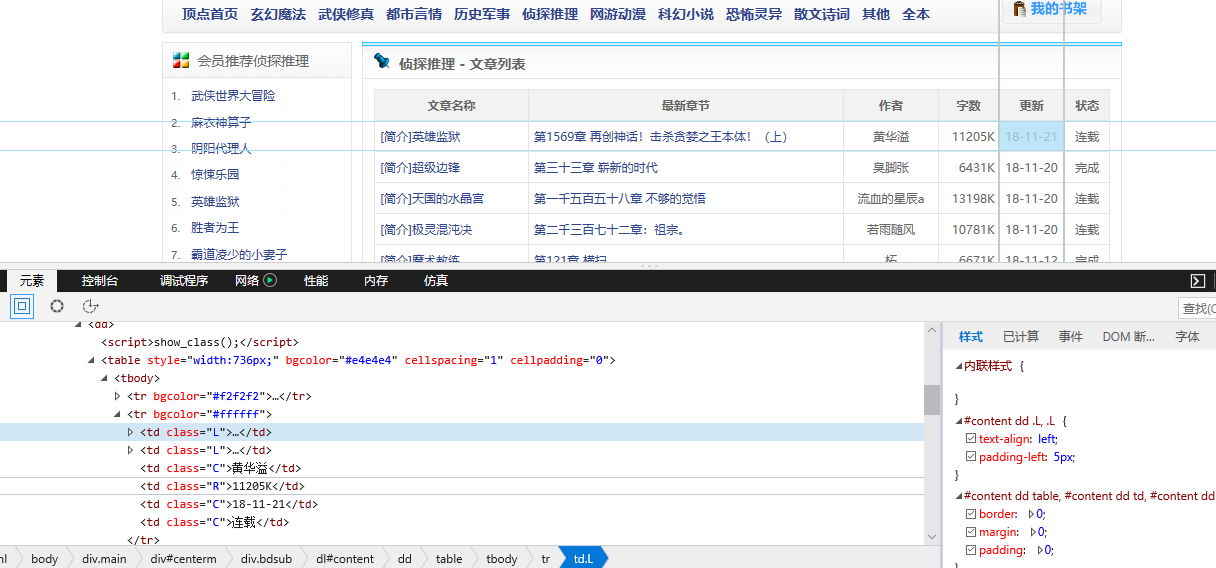
tr标签里面的 td 使我们所要爬取的信息
下面是我们要爬取的二级页面 小说的简介信息:
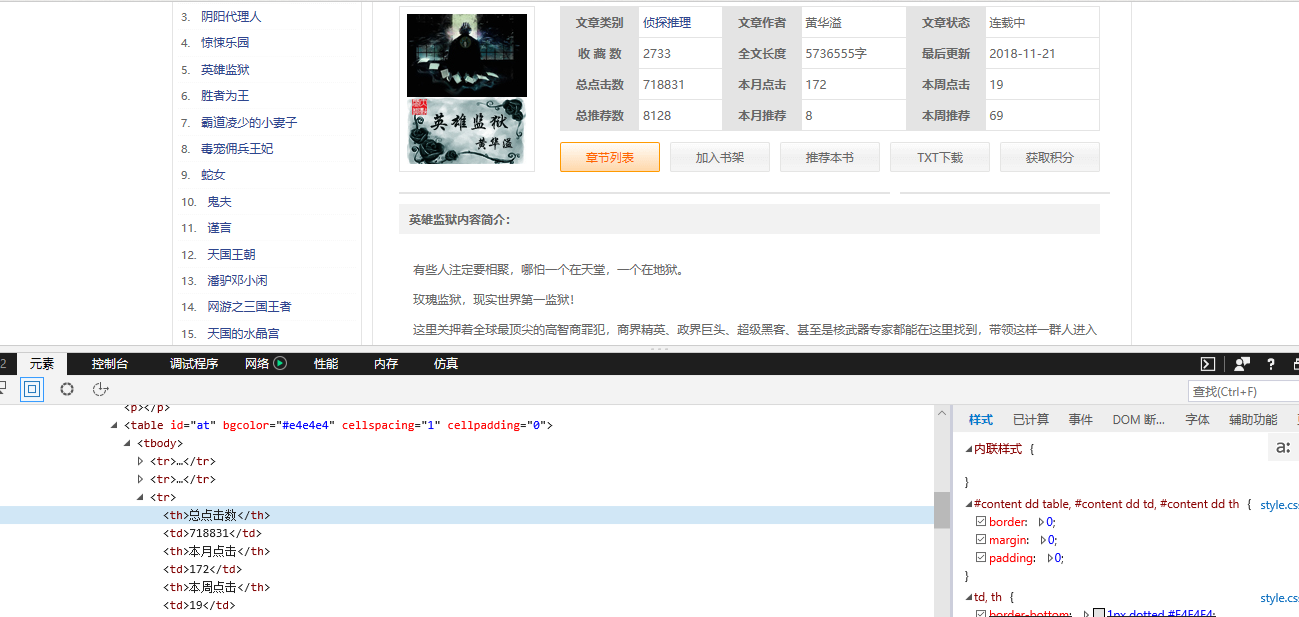
下面上代码:
mydingdian.py
import scrapy

from scrapy.http import Request

from ..items import DingdianItem

class MydingdianSpider(scrapy.Spider):

    name = 'mydingdian'

    allowed_domains = ['www.x23us.com/']

    start_url = ['https://www.x23us.com/class/']

    starturl=['.html']

    def start_requests(self):

        # for i in range(1,11):

        for i in range(5, 6):

            #print(i)

            url_con=str(i)+'_1'

            #print(url_con)

            url1 = self.start_url+list(url_con)+self.starturl

            #print(url1)

            url=''

            for j in url1:

                url+=j+''

            #print(url)

            yield Request(url, self.parse)

    def parse(self, response):

        baseurl=response.url #真正的url链接

        #print(baseurl)

        max_num = response.xpath('//*[@id="pagelink"]/a[14]/text()').extract_first()  # 获取当前页面的最大页码数

        #print(max_num) #页码数

        baseurl = baseurl[:-7]

        #print(baseurl)

        for num in range(1,int(max_num)+1):

        #for num in range(1, 5):

            #print(list("_" + str(num)))

            newurl1 = list(baseurl) + list("_" + str(num)) + self.starturl

            #print(newurl1)

            newurl=''

            for j in newurl1:

                newurl+=j+''

            print(newurl)

            # 此处使用dont_filter和不使用的效果不一样,使用dont_filter就能够抓取到第一个页面的内容,不用就抓不到

            # scrapy会对request的URL去重(RFPDupeFilter),加上dont_filter则告诉它这个URL不参与去重。

            yield Request(newurl, dont_filter=True, callback=self.get_name)  # 将新的页面url的内容传递给get_name函数去处理

    def get_name(self,response):

        item=DingdianItem()

        for nameinfo in response.xpath('//tr'):

            #print(nameinfo)

            novelurl = nameinfo.xpath('td[1]/a/@href').extract_first()  # 小说地址

            #print(novelurl)

            name = nameinfo.xpath('td[1]/a[2]/text()').extract_first()  # 小说名字

            #print(name)

            newchapter=nameinfo.xpath('td[2]/a/text()').extract_first()   #最新章节

            #print(newchapter)

            date=nameinfo.xpath('td[5]/text()').extract_first()    #更新日期

            #print(date)

            author = nameinfo.xpath('td[3]/text()').extract_first()  # 小说作者

            #print(author)

            serialstatus = nameinfo.xpath('td[6]/text()').extract_first()  # 小说状态

            #print(serialstatus)

            serialsize = nameinfo.xpath('td[4]/text()').extract_first()  # 小说大小

            #print(serialnumber)

            #print('--==--'*10)

            if novelurl:

                item['novel_name'] = name

                #print(item['novel_name'])

                item['author'] = author

                item['novelurl'] = novelurl

                #print(item['novelurl'])

                item['serialstatus'] = serialstatus

                item['serialsize'] = serialsize

                item['date']=date

                item['newchapter']=newchapter

                print('小说名字:', item['novel_name'])

                print('小说作者:', item['author'])

                print('小说地址:', item['novelurl'])

                print('小说状态:', item['serialstatus'])

                print('小说大小:', item['serialsize'])

                print('更新日期:', item['date'])

                print('最新章节:', item['newchapter'])

                print('===='*5)

                #yield Request(novelurl,dont_filter=True,callback=self.get_novelcontent,meta={'item':item})

                yield item

                '''

    def get_novelcontent(self,response):

        #print(123124)  #测试调用成功url

        item=response.meta['item']

        novelurl=response.url

        #print(novelurl)

        serialnumber = response.xpath('//tr[2]/td[2]/text()').extract_first()  # 连载字数

        #print(serialnumber)

        category = response.xpath('//tr[1]/td[1]/a/text()').extract_first()  # 小说类别

        #print(category)

        collect_num_total = response.xpath('//tr[2]/td[1]/text()').extract_first()  # 总收藏

        #print(collect_num_total)

        click_num_total = response.xpath('//tr[3]/td[1]/text()').extract_first()  # 总点击

        novel_breif = response.xpath('//dd[2]/p[2]').extract_first()        #小说简介

        # item['serialnumber'] = serialnumber

        # item['category'] = category

        # item['collect_num_total']=collect_num_total

        # item['click_num_total']=click_num_total

        # item['novel_breif']=novel_breif

        #

        # print('小说字数:', item['serialnumber'])

        # print('小说类别:', item['category'])

        # print('总收藏:', item['collect_num_total'])

        # print('总点击:', item['click_num_total'])

        # print('小说简介:', item['novel_breif'])

        # print('===='*10)

        yield item
items.py
# -*- coding: utf-8 -*-

# Define here the models for your scraped items

#

# See documentation in:

# https://doc.scrapy.org/en/latest/topics/items.html

import scrapy

class DingdianItem(scrapy.Item):

    # define the fields for your item here like:

    # name = scrapy.Field()

    novel_name = scrapy.Field()  # 小说名字

    author = scrapy.Field()  # 作者

    novelurl = scrapy.Field()  # 小说地址

    serialstatus = scrapy.Field()  # 状态

    serialsize = scrapy.Field()  # 连载大小

    date=scrapy.Field()        #小说日期

    newchapter=scrapy.Field()   #最新章节

    serialnumber = scrapy.Field()  # 连载字数

    category = scrapy.Field()  # 小说类别

    collect_num_total = scrapy.Field()  # 总收藏

    click_num_total = scrapy.Field()  # 总点击

    novel_breif = scrapy.Field()  # 小说简介
插入数据库的管道 iopipelines.py
from 爬虫大全.dingdian.dingdian import dbutil

# 作业: 自定义的管道,将完整的爬取数据,保存到MySql数据库中

class DingdianPipeline(object):

    def process_item(self, item, spider):

        dbu = dbutil.MYSQLdbUtil()

        dbu.getConnection()  # 开启事物

        # 1.添加

        try:

            #sql = "insert into movies (电影排名,电影名称,电影短评,评价分数,评价人数)values(%s,%s,%s,%s,%s)"

            sql = "insert into ebook (novel_name,author,novelurl,serialstatus,serialsize,ebookdate,newchapter)values(%s,%s,%s,%s,%s,%s,%s)"

            #date = [item['rank'],item['title'],item['quote'],item['star']]

            #dbu.execute(sql, date, True)

            dbu.execute(sql, (item['novel_name'],item['author'],item['novelurl'],item['serialstatus'],item['serialsize'],item['date'],item['newchapter']),True)

            #dbu.execute(sql,True)

            dbu.commit()

            print('插入数据库成功!!')

        except:

            dbu.rollback()

            dbu.commit()  # 回滚后要提交

        finally:

            dbu.close()

        return item
settings.py
# -*- coding: utf-8 -*-

# Scrapy settings for dingdian project

#

# For simplicity, this file contains only settings considered important or

# commonly used. You can find more settings consulting the documentation:

#

#     https://doc.scrapy.org/en/latest/topics/settings.html

#     https://doc.scrapy.org/en/latest/topics/downloader-middleware.html

#     https://doc.scrapy.org/en/latest/topics/spider-middleware.html

BOT_NAME = 'dingdian'

SPIDER_MODULES = ['dingdian.spiders']

NEWSPIDER_MODULE = 'dingdian.spiders'

# Crawl responsibly by identifying yourself (and your website) on the user-agent

#USER_AGENT = 'dingdian (+http://www.yourdomain.com)'

# Obey robots.txt rules

ROBOTSTXT_OBEY = True

# Configure maximum concurrent requests performed by Scrapy (default: 16)

CONCURRENT_REQUESTS = 2

# Configure a delay for requests for the same website (default: 0)

# See https://doc.scrapy.org/en/latest/topics/settings.html#download-delay

# See also autothrottle settings and docs

DOWNLOAD_DELAY = 3

# The download delay setting will honor only one of:

#CONCURRENT_REQUESTS_PER_DOMAIN = 16

#CONCURRENT_REQUESTS_PER_IP = 16

# Disable cookies (enabled by default)

#COOKIES_ENABLED = False

# Disable Telnet Console (enabled by default)

#TELNETCONSOLE_ENABLED = False

# Override the default request headers:

#DEFAULT_REQUEST_HEADERS = {

#   'Accept': 'text/html,application/xhtml+xml,application/xml;q=0.9,*/*;q=0.8',

#   'Accept-Language': 'en',

#}

# Enable or disable spider middlewares

# See https://doc.scrapy.org/en/latest/topics/spider-middleware.html

SPIDER_MIDDLEWARES = {

    'dingdian.middlewares.DingdianSpiderMiddleware': 543,

}

# Enable or disable downloader middlewares

# See https://doc.scrapy.org/en/latest/topics/downloader-middleware.html

DOWNLOADER_MIDDLEWARES = {

    'dingdian.middlewares.DingdianDownloaderMiddleware': 543,

    'scrapy.contrib.downloadermiddleware.useragent.UserAgentMiddleware' : None,

    'dingdian.rotate_useragent.RotateUserAgentMiddleware' :400

}

# Enable or disable extensions

# See https://doc.scrapy.org/en/latest/topics/extensions.html

#EXTENSIONS = {

#    'scrapy.extensions.telnet.TelnetConsole': None,

#}

# Configure item pipelines

# See https://doc.scrapy.org/en/latest/topics/item-pipeline.html

ITEM_PIPELINES = {

    #'dingdian.pipelines.DingdianPipeline': 300,

    #'dingdian.iopipelines.DingdianPipeline': 301,

}

# Enable and configure the AutoThrottle extension (disabled by default)

# See https://doc.scrapy.org/en/latest/topics/autothrottle.html

#AUTOTHROTTLE_ENABLED = True

# The initial download delay

#AUTOTHROTTLE_START_DELAY = 5

# The maximum download delay to be set in case of high latencies

#AUTOTHROTTLE_MAX_DELAY = 60

# The average number of requests Scrapy should be sending in parallel to

# each remote server

#AUTOTHROTTLE_TARGET_CONCURRENCY = 1.0

# Enable showing throttling stats for every response received:

#AUTOTHROTTLE_DEBUG = False

# Enable and configure HTTP caching (disabled by default)

# See https://doc.scrapy.org/en/latest/topics/downloader-middleware.html#httpcache-middleware-settings

HTTPCACHE_ENABLED = True

HTTPCACHE_EXPIRATION_SECS = 0

HTTPCACHE_DIR = 'httpcache'

HTTPCACHE_IGNORE_HTTP_CODES = []

HTTPCACHE_STORAGE = 'scrapy.extensions.httpcache.FilesystemCacheStorage'

LOG_LEVEL='INFO'

LOG_FILE='dingdian.log'
在往数据库插入数据的时候 ,我遇到了
pymysql.err.InterfaceError: (0, '') 这种问题,百度了好久才解决。。。
那是因为scrapy异步的存储的原因,太快。
解决方法:只要放慢爬取速度就能解决,setting.py中设置 DOWNLOAD_DELAY = 2
详细代码 附在Github上了
tyutltf/dingdianbook: 爬取顶点小说网的所有小说信息 https://github.com/tyutltf/dingdianbook
Python的scrapy之爬取顶点小说网的所有小说的更多相关文章
- Python的scrapy之爬取链家网房价信息并保存到本地
因为有在北京租房的打算,于是上网浏览了一下链家网站的房价,想将他们爬取下来,并保存到本地. 先看链家网的源码..房价信息 都保存在 ul 下的li 里面 爬虫结构: 其中封装了一个数据库处理模 ...
- python爬虫基础应用----爬取校花网视频
一.爬虫简单介绍 爬虫是什么? 爬虫是首先使用模拟浏览器访问网站获取数据,然后通过解析过滤获得有价值的信息,最后保存到到自己库中的程序. 爬虫程序包括哪些模块? python中的爬虫程序主要包括,re ...
- 初识python 之 爬虫:爬取中国天气网数据
用到模块: 获取网页并解析:import requests,html5lib from bs4 import BeautifulSoup 使用pyecharts的Bar可视化工具"绘制图表& ...
- Python爬虫训练:爬取酷燃网视频数据
前言 本文的文字及图片来源于网络,仅供学习.交流使用,不具有任何商业用途,版权归原作者所有,如有问题请及时联系我们以作处理 项目目标 爬取酷燃网视频数据 https://krcom.cn/ 环境 Py ...
- Python的scrapy之爬取6毛小说网的圣墟
闲来无事想看个小说,打算下载到电脑上看,找了半天,没找到可以下载的网站,于是就想自己爬取一下小说内容并保存到本地 圣墟 第一章 沙漠中的彼岸花 - 辰东 - 6毛小说网 http://www.6ma ...
- python利用scrapy框架爬取起点
先上自己做完之后回顾细节和思路的东西,之后代码一起上. 1.Mongodb 建立一个叫QiDian的库,然后建立了一个叫Novelclass(小说类别表)Novelclass(可以把一级类别二级类别都 ...
- Python使用Scrapy框架爬取数据存入CSV文件(Python爬虫实战4)
1. Scrapy框架 Scrapy是python下实现爬虫功能的框架,能够将数据解析.数据处理.数据存储合为一体功能的爬虫框架. 2. Scrapy安装 1. 安装依赖包 yum install g ...
- 基于python的scrapy框架爬取豆瓣电影及其可视化
1.Scrapy框架介绍 主要介绍,spiders,engine,scheduler,downloader,Item pipeline scrapy常见命令如下: 对应在scrapy文件中有,自己增加 ...
- python爬虫scrapy框架——爬取伯乐在线网站文章
一.前言 1. scrapy依赖包: 二.创建工程 1. 创建scrapy工程: scrapy staratproject ArticleSpider 2. 开始(创建)新的爬虫: cd Artic ...
随机推荐
- Asp.net让某一页设置成gb2312或utf-8的方法
有些需求,一定要用到utf-8格式,在web.config里面设置<globalization requestEncoding="utf-8" ...
- Hadoop学习---Hadoop的深入学习
Hadoop生态圈 存储数据HDFS(Hadoop Distributed File System),运行在通用硬件上的分布式文件系统.具有高度容错性.高吞吐量的的特点. 处理数据MapReduce, ...
- Python+Selenium2自动化测试之IE、chrome浏览器启动
构建Python+Selenium2自动化测试环境完成之后,就需要测试支持python的selenium的版本是否都支持在不同浏览器上运行,当前我们分别在三个最通用的浏览器上通过脚本来测试. 1.在I ...
- CentOS 6 网络yum源配置
# CentOS-Base.repo## The mirror system uses the connecting IP address of the client and the# update ...
- PhoneGap 的文件 api
一. 文件系统的请求 请求文件系统通过 window.requestFileSystem 来完函数声明如下: window.requestFileSystem(type, size, successC ...
- iOS学习笔记09-核心动画CoreAnimation
http://www.cnblogs.com/liutingIOS/p/5368536.html 一.CALayer CALayer包含在QuartzCore框架中,具有跨平台性,在iOS中使用Cor ...
- 【转】2013 PHP技术峰会《Bug Free的PHP开发实践分享》摘录
要想代码写的好,前提配置做的好 error_reporting = E_ALL | E_STRICT display_errors = 测试机设置为 On,生产机设置为 Off display_s ...
- gluoncv 目标检测,训练自己的数据集
https://gluon-cv.mxnet.io/build/examples_datasets/detection_custom.html 官方提供两种方案,一种是lst文件,一种是xml文件(v ...
- 【[TJOI2014]上升子序列】
这本质上是一个\(dp\) 如果没有"两个上升子序列相同,那么只需要计算一次"这一个性质,那么就很好做了,我们用\(dp[i]\)表示以\(i\)结尾的上升子序列个数,那么就有\( ...
- es6之数组方法
//兼容插件 babel-polyfill values()等存在兼容问题,需要加载babel-polyfill插件 .keys() 获取数组的key值 .values() 获取数组的value值 ...