
Unable to handle kernel NULL pointer dereference at virtual address 00000000【转】
本文转载自:https://blog.csdn.net/hpu11/article/details/72628052
这说明是非法指针的使用,才导致系统出错。
[ 1023.510000] Unable to handle kernel NULL pointer dereference at virtual address 00000000
[ 1023.520000] pgd = c0004000
[ 1023.520000] [00000000] *pgd=00000000
[ 1023.520000] Internal error: Oops: 17 [#1]
[ 1023.520000] last sysfs file: /sys/devices/virtual/misc/at91flash/dev
[ 1023.520000] Modules linked in: at91flash at91gpio at91mc323 ds18b20 at91adc
[ 1023.520000] CPU: 0 Tainted: G W (2.6.39 #35)
[ 1023.520000] PC is at atmel_tasklet_func+0x104/0x690
[ 1023.520000] LR is at atmel_tasklet_func+0x10/0x690
[ 1023.520000] pc : [<c01a33ac>] lr : [<c01a32b8>] psr: 20000013
[ 1023.520000] sp : c7825f58 ip : 60000093 fp : 00000000
[ 1023.520000] r10: 00000006 r9 : 00000000 r8 : 0000000a
[ 1023.520000] r7 : 00000000 r6 : c7824000 r5 : c78a2484 r4 : c03c0cb8
[ 1023.520000] r3 : 0000004c r2 : 0000004c r1 : 60000013 r0 : 00000001
[ 1023.520000] Flags: nzCv IRQs on FIQs on Mode SVC_32 ISA ARM Segment kernel
[ 1023.520000] Control: 0005317f Table: 27b40000 DAC: 00000017
[ 1023.520000] Process ksoftirqd/0 (pid: 3, stack limit = 0xc7824270)
[ 1023.520000] Stack: (0xc7825f58 to 0xc7826000)
[ 1023.520000] 5f40: 00000001 c7824000
[ 1023.520000] 5f60: 00000100 0000000a 00000000 00000006 c7825f8c 00000000 00000001 c7824000
[ 1023.520000] 5f80: 00000100 0000000a 00000006 c0045cf8 c03b995c c00461d8 c7aa6ae0 00000000
[ 1023.520000] 5fa0: 60000093 00000000 c7824000 c0046274 00000013 00000000 00000000 c00462e0
[ 1023.520000] 5fc0: 00000000 c7819f70 00000000 c00570e0 00000000 00000000 00000000 00000000
[ 1023.520000] 5fe0: c7825fe0 c7825fe0 c7819f70 c0057060 c0030b14 c0030b14 ffffffff ffffffff
[ 1023.520000] [<c01a33ac>] (atmel_tasklet_func+0x104/0x690) from [<c0045cf8>] (tasklet_action+0x84/0xe
[ 1023.520000] [<c0045cf8>] (tasklet_action+0x84/0xe from [<c00461d8>] (__do_softirq+0x88/0x124)
[ 1023.520000] [<c00461d8>] (__do_softirq+0x88/0x124) from [<c00462e0>] (run_ksoftirqd+0x6c/0x12
[ 1023.520000] [<c00462e0>] (run_ksoftirqd+0x6c/0x12 from [<c00570e0>] (kthread+0x80/0x8
[ 1023.520000] [<c00570e0>] (kthread+0x80/0x8 from [<c0030b14>] (kernel_thread_exit+0x0/0x
[ 1023.520000] Code: 1a000002 e59f057c e59f157c ebfa3d49 (e5973000)
[ 1023.710000] ---[ end trace 786b41cd25d3b661 ]---
[ 1023.710000] Kernel panic - not syncing: Fatal exception in interrupt
[ 1023.720000] [<c0034b10>] (unwind_backtrace+0x0/0xe0) from [<c02a8af8>] (panic+0x50/0x170)
[ 1023.720000] [<c02a8af8>] (panic+0x50/0x170) from [<c0032e00>] (die+0x184/0x1c4)
[ 1023.730000] [<c0032e00>] (die+0x184/0x1c4) from [<c0035aa8>] (__do_kernel_fault+0x64/0x84)
[ 1023.740000] [<c0035aa8>] (__do_kernel_fault+0x64/0x84) from [<c0035c7c>] (do_page_fault+0x1b4/0x1c
[ 1023.750000] [<c0035c7c>] (do_page_fault+0x1b4/0x1c from [<c002a240>] (do_DataAbort+0x30/0x9
[ 1023.760000] [<c002a240>] (do_DataAbort+0x30/0x98) from [<c002f86c>] (__dabt_svc+0x4c/0x60)
[ 1023.770000] Exception stack(0xc7825f10 to 0xc7825f58)
[ 1023.770000] 5f00: 00000001 60000013 0000004c 0000004c
[ 1023.780000] 5f20: c03c0cb8 c78a2484 c7824000 00000000 0000000a 00000000 00000006 00000000
[ 1023.790000] 5f40: 60000093 c7825f58 c01a32b8 c01a33ac 20000013 ffffffff
[ 1023.790000] [<c002f86c>] (__dabt_svc+0x4c/0x60) from [<c01a33ac>] (atmel_tasklet_func+0x104/0x690)
[ 1023.800000] [<c01a33ac>] (atmel_tasklet_func+0x104/0x690) from [<c0045cf8>] (tasklet_action+0x84/0xe8)
[ 1023.810000] [<c0045cf8>] (tasklet_action+0x84/0xe8) from [<c00461d8>] (__do_softirq+0x88/0x124)
[ 1023.820000] [<c00461d8>] (__do_softirq+0x88/0x124) from [<c00462e0>] (run_ksoftirqd+0x6c/0x128)
[ 1023.830000] [<c00462e0>] (run_ksoftirqd+0x6c/0x128) from [<c00570e0>] (kthread+0x80/0x88)
[ 1023.840000] [<c00570e0>] (kthread+0x80/0x88) from [<c0030b14>] (kernel_thread_exit+0x0/0x8)
注意上述红色的地方。
下面就来显示如何定位出出错代码行:
1.首先,编译时打开complie with debug info选项,步则如下
make ARCH=arm CROSS_COMPILE=arm-none-linux-gnueabi- menuconfig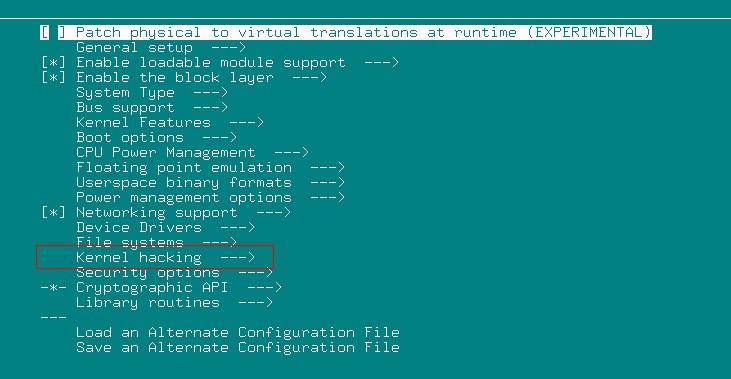
进入 Kernel hacking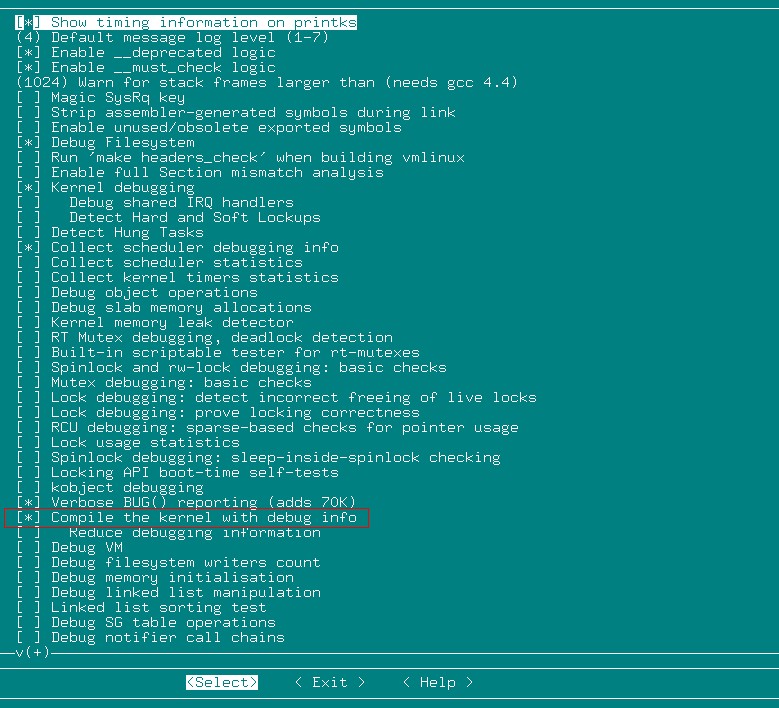
选择 Compile the kernel with debug info
然后,保存,退出。
接着 make ARCH=arm CROSS_COMPILE=arm-none-linux-gnueabi-
编译, 等编译完成。
2.利用arm-none-linux-gnueabi-gdb 调试,如下:
arm-none-linux-gnueabi-gdb vmlinux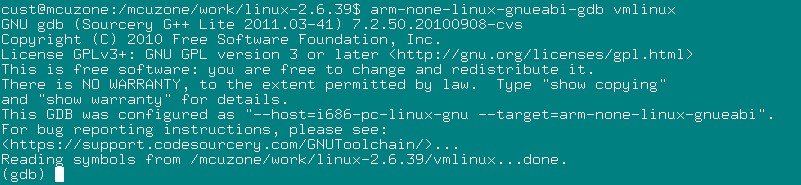
对应着Oops 消息里面的这一行
[ 1023.520000] PC is at atmel_tasklet_func+0x104/0x690
在gdb下键入命令 : l *(at atmel_tasklet_func+0x104)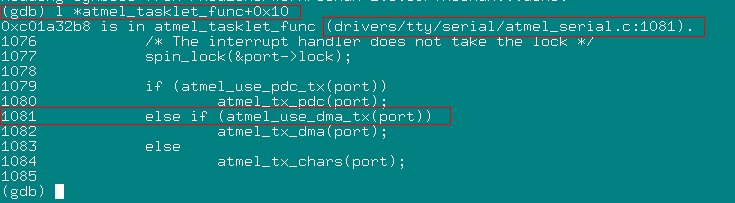
这样就找到了出错的代码行。
去掉之后还没有发现上述的Oops出现。
转载:http://bbs.chinaunix.net/forum.php?mod=viewthread&tid=3744197
Unable to handle kernel NULL pointer dereference at virtual address 00000000【转】的更多相关文章
- Unable to handle kernel NULL pointer dereference at virtual address 00000000问题的解决
今天在编译好内核模块后,安装内核模块memdev.ko的时候,出现了Unable to handle kernel NULL pointer dereference at virtual addres ...
- [轉]Exploit The Linux Kernel NULL Pointer Dereference
Exploit The Linux Kernel NULL Pointer Dereference Author: wztHome: http://hi.baidu.com/wzt85date: 20 ...
- Unable to handle kernel paging request at virtual address
1.Unable to handle kernel paging request at virtual address 00000000 =====>越出内核地址空间范围,原因是由于使用空NUL ...
- NULL Pointer Dereference(转)
0x00 漏洞代码 null_dereference.c: #include <linux/init.h> #include <linux/module.h> #include ...
- Solution for NULL pointer dereference
•mmap_min_addr forbids users from mapping low addresses 1. First available in July 2007 2. Several c ...
- ARM64 Linux kernel virtual address space
墙外通道:http://thinkiii.blogspot.com/2014/02/arm64-linux-kernel-virtual-address-space.html Now let's ta ...
- c/c++ 重载 数组 操作符[] operator[ is ambiguous, as 0 also mean a null pointer of const char* type.
// Note: //int x = a[0].GetInt(); // Error: operator[ is ambiguous, as 0 also mean a null pointer of ...
- Null Pointer --设计模式
在Joshua Bloch很有名的一本书<Effective in java>中建议不要在代码中返回空的collection/map/array,就像下面的代码一样: public Lis ...
- (转载)不能启动虚拟机 Unable to open kernel device "\\.\Global\vmx86
(转载)http://blog.csdn.net/shenghuiping2001/article/details/7083153 今天系统加了内存条,设置变了一下: 就启动不起虚拟机了,报错: Un ...
随机推荐
- asscert断言的几种方法
一.什么是断言 执行完测试用例后,最后一步是判断测试结果是通过还是失败,在自动化脚本中一般把这种生成测试结果的方法叫做断言 它用来检查一个条件,如果它为真,则不做任何事,如果它为假,则会跑出Asser ...
- JavaScript关于闭包
在学习JavaScript这条路上,对于闭包这个JS中极其重要的应用技巧或者说是一个语言特性一直停留在最最表层的: 函数α内部的函数β被函数外部所调用,然后内部的函数β因为被调用使得其生存周期得以延长 ...
- Redis性能调优
Redis性能调优 尽管Redis是一个非常快速的内存数据存储媒介,也并不代表Redis不会产生性能问题.前文中提到过,Redis采用单线程模型,所有的命令都是由一个线程串行执行的,所以当某个命令执行 ...
- 使用JMAP dump及分析dump文件
查看整个JVM内存状态 jmap -heap [pid]要注意的是在使用CMS GC 情况下,jmap -heap的执行有可能会导致JAVA 进程挂起 查看JVM堆中对象详细占用情况jmap -his ...
- $routeParams传递路由参数
$routeParams传的值是一个对象数组. 案例: index.html <!DOCTYPE html> <html lang="zh-cn" data-ng ...
- 如何利用jQuery检查浏览器是否是IE6-8
$.support.leadingWhitespace是IE特有的属性,用来检查浏览器是否是IE6-8
- delphi ---ttoolbar,ttoolbutton
1.button style:tbsButton,tbsCheck,tbsDivider,tbsDropDown,tbsSeparator,tbsTextButton tbsButton:普通的控件 ...
- mysql_系统数据库认识
show databases:查看mysql自带数据库有information_schema,mysql, performance_schema, test information_schema数据库 ...
- javascript中innerHTML的问题
获取document.getElementById()时,使用innerHTML获取标签获取内容,要注意: 1.要让内容先加载完,才可以使用,不然获取的是空,使用:window.onload = .. ...
- hdu 3047 Zjnu Stadium 并查集高级应用
Zjnu Stadium Time Limit: 2000/1000 MS (Java/Others) Memory Limit: 32768/32768 K (Java/Others) Tot ...