
上拉、下拉UITableView,交互式 模态弹出(自定义弹出动画)
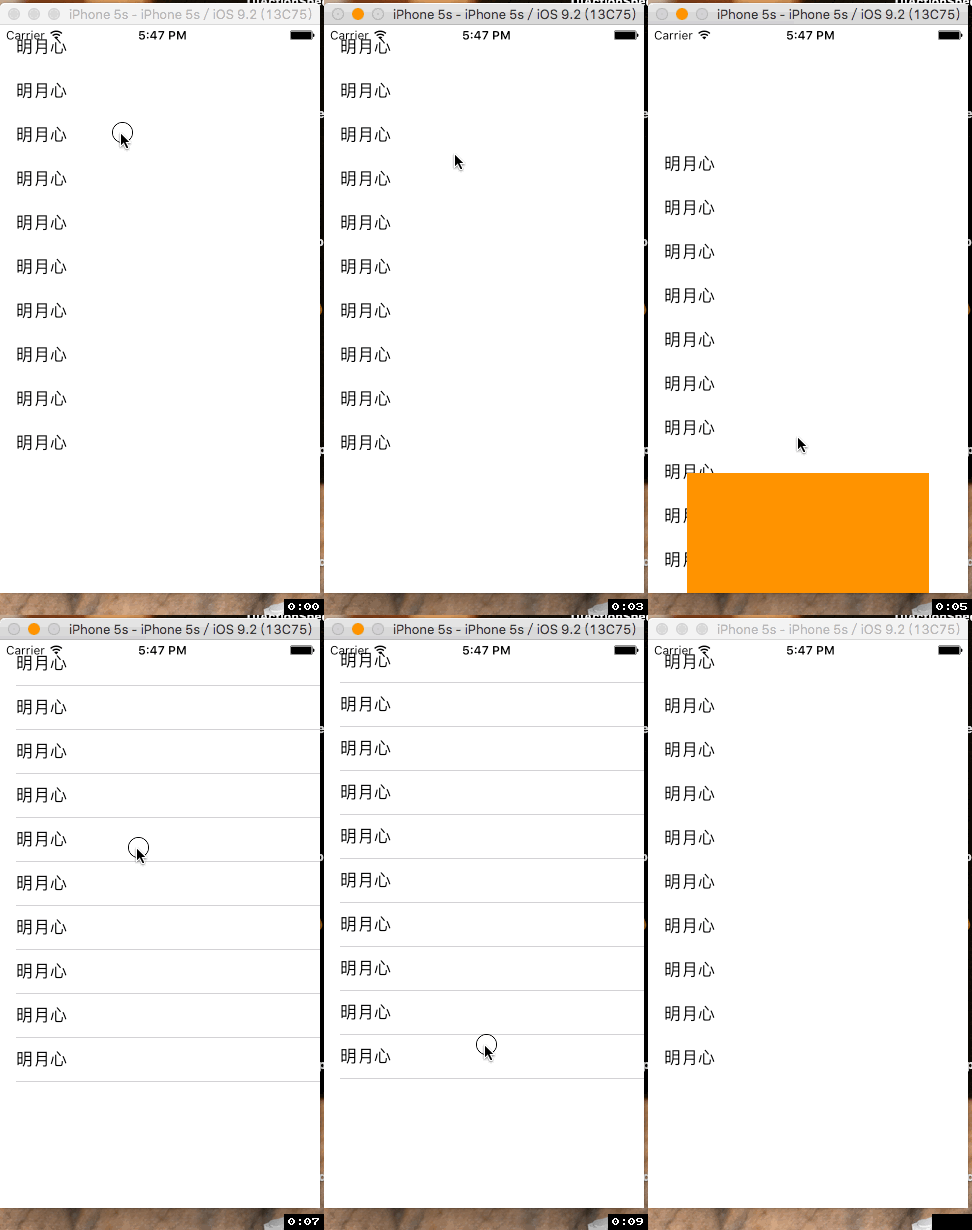
部分代码 InteractiveTransition 类继承NSObject:
- (instancetype)initWithPresentingController:(UITableViewController *)presentingVc presentedController:(UIViewController *)presentedVc {

    self = [super init];

    if (self) {

        self.vc = presentedVc;

        self.vc.transitioningDelegate =self;

        self.presentingVc = presentingVc;

    }

    return self;

}

- (void)new_scrollViewWillBeginDragging:(UIScrollView *)scrollView {

    self.interactiveTransition = [[UIPercentDrivenInteractiveTransition alloc]init];

    [self.presentingVc presentViewController:self.vc animated:YES completion:nil];

}

- (void)new_scrollViewDidScroll:(UIScrollView *)scrollView {

    CGFloat offsetY = fabs(scrollView.contentOffset.y);

    CGFloat screenH = [UIScreen mainScreen].bounds.size.height / 3.0;

    progress = offsetY / screenH;

    progress = progress-0.3;

    if (progress > ) {

        [self.interactiveTransition updateInteractiveTransition:progress];

    }

}

- (void)new_scrollViewWillEndDragging {

    if (progress < 0.4) {

        [self.interactiveTransition cancelInteractiveTransition];

    }else {

        [self.interactiveTransition finishInteractiveTransition];

    }

    self.interactiveTransition = nil;

}

- (nullable id <UIViewControllerAnimatedTransitioning>)animationControllerForPresentedController:(UIViewController *)presented presentingController:(UIViewController *)presenting sourceController:(UIViewController *)source {

    return self.animation;

}

- (id<UIViewControllerInteractiveTransitioning>)interactionControllerForPresentation:(id<UIViewControllerAnimatedTransitioning>)animator {

    return self.interactiveTransition;

}
PresentAnimation 类继承NSObject 实现 UIViewControllerAnimatedTransitioning协议
- (NSTimeInterval)transitionDuration:(id<UIViewControllerContextTransitioning>)transitionContext {

    return 1.0;

}

- (void)animateTransition:(id<UIViewControllerContextTransitioning>)transitionContext {

    UIView *toView = [transitionContext viewForKey:UITransitionContextToViewKey];

    UIView *containerView = [transitionContext containerView];

    [containerView addSubview:toView];

    toView.frame = CGRectMake(, containerView.bounds.size.height, containerView.bounds.size.width - , containerView.bounds.size.height - );

    [UIView animateWithDuration:[self transitionDuration:transitionContext] animations:^{

        toView.frame = containerView.bounds;

    }completion:^(BOOL finished) {

        [transitionContext completeTransition:![transitionContext transitionWasCancelled]];

    }];

}
控制器:
- (InteractiveTransition *)interactive {

    if (!_interactive) {

        _interactive = [[InteractiveTransition alloc]initWithPresentingController:self presentedController:[[TwoViewController alloc]init]];

    }

    return _interactive;

}

- (void)scrollViewWillBeginDragging:(UIScrollView *)scrollView {

    [self.interactive new_scrollViewWillBeginDragging:scrollView];

}

- (void)scrollViewWillEndDragging:(UIScrollView *)scrollView withVelocity:(CGPoint)velocity targetContentOffset:(inout CGPoint *)targetContentOffset {

    [self.interactive new_scrollViewWillEndDragging];

}

- (void)scrollViewDidScroll:(UIScrollView *)scrollView {

    [self.interactive new_scrollViewDidScroll:scrollView];

}
完整代码:http://pan.baidu.com/s/1i3Uewip
上拉、下拉UITableView,交互式 模态弹出(自定义弹出动画)的更多相关文章
- [BS-23] AFN网络请求上拉/下拉刷新的细节问题总结
上拉/下拉刷新的细节问题总结 1.如果导航栏有透明色,则也需要设置header自动改变透明度 self.tableView.mj_header.automaticallyChangeAlpha = Y ...
- Swiper 判断上滑下拉操作
onTouchMove: function(swiper){ //手动滑动中触发//判断上滑下拉var i = mySwiper.translate;setTimeout(function() {va ...
- ios position:fixed 上滑下拉抖动
ios position:fixed 上滑下拉抖动 最近呢遇到一个ios的兼容问题,界面是需要一个头底部的固定的效果,用的position:fixed定位布局,写完测试发现安卓手机正常的,按时ios上 ...
- 浅谈对MJRefresh(上)下拉刷新控件的理解
MJRefresh GitHub地址:https://github.com/CoderMJLee/MJRefresh 利用业余时间研究了一下iOS的开发,发现OC特定的语法方式吸引了我,而且iOS开发 ...
- jsp页面上的下拉框案例(Struts2)
<s:select></s:select>包含的属性有:list="" :name="" :value="" ...
- 160823、ionic上拉/下拉更新数据
<!DOCTYPE html> <html ng-app="myApp"> <head> <meta charset="UTF- ...
- js实现页面的上滑下拉功能
这两天做项目,用到了上滑和下拉的功能,主要是通过监听touchmove,touchstart,touchend三个事件去判断页面上滑状态还是下拉状态. 同时加一个知识点:有时在监听时会报错,这个错是这 ...
- SDI在自定义的工具栏上添加下拉控件
0.首先到自己的工具条上新建一个控件,并命名新ID 1.拷贝FlatComboBox.h和FlatComboBox.cpp到工程目录下 2.建立新类 class CTrackerToolBar : p ...
- 小程序 上啦下拉刷新window配置
"enablePullDownRefresh": "true" /** * 页面相关事件处理函数--监听用户下拉动作 */ onPullDownRefres ...
- git过期后,如何将新建的项目push到码云上而且下拉成功
1.在码云上创建一个项目: 2.打开STS(spring Tool Suite) 新建一个Maven(webapp)项目: 3.打开你的码云账号,把码云上的工程的URL复制: 4.重新在另一个目录 ...
随机推荐
- unity音频组件
unity 支持的四种音频格式: .AIFF 适用于较短的音乐文件可用作游戏打斗音效 .WAV 适用于较短的音乐文件可用作游戏打斗音效 .MP3 适用于较长的音乐文件可用作游戏背景音乐 .OGG ...
- C#holle world
using System; using System.Collections.Generic; using System.Linq; using System.Text; using System.T ...
- JS常用的方法
1.时间戳转换 //时间戳(有Date和无Date的都可)转换为日期 “2016年5月30日 10:29:30 2016-05-20 09:11” function TimeConversion(ti ...
- SQl 判断 表 视图 临时表等 是否存在
1.判断是否存在addOneArticle这个存储过程 if Exists(select name from sysobjects where NAME = 'addOneArticle' and t ...
- windows安装composer方法和使用方法
最近在学习yii2的框架的相关知识,对于yii2的许多新特性,最好还是去查看官网文档最好,如果有中文翻译的网站就更好了. 学习yii2的第一个门槛就是得安装composer这个依赖管理工具(但目前我认 ...
- R语言的数据结构
首先声明,R语言对大小写敏感. 一.向量 vector类型可以存储数字.字符和逻辑类型.构建函数为C(): > a <- c(1,2,3,4) > b <- c('dau',' ...
- 单片微机原理P3:80C51外部拓展系统
外部拓展其实是个相对来说很好玩的章节,可以真正开始用单片机写程序了,比较重要的是外部存储器拓展,81C55拓展,矩阵键盘,动态显示,DAC和ADC. 0. IO接口电路概念与存储器拓展 1. 为什 ...
- 双人贪吃蛇小游戏C++原创
大家好,我是小鸭酱,博客地址为:http://www.cnblogs.com/xiaoyajiang /*贪吃蛇*/ #include<stdio.h> #include<time. ...
- WordPress插件开发记录
1.a标签在新的网页中打开内容 <a href="网址" target="_blank"></a> 2.PDO的$re ...
- ZOJ3229 Shoot the Bullet
http://acm.hust.edu.cn/vjudge/problem/viewProblem.action?id=20756 思路:就讲一下有源汇上下界最大流的做法吧!对于所有的边,就按照无源汇 ...