
使用接口的方式调用远程服务 ------ 利用动态调用服务,实现.net下类似Dubbo的玩法。
分布式微服务现在成为了很多公司架构首先项,据我了解,很多java公司架构都是 Maven+Dubbo+Zookeeper基础上扩展的。
Dubbo是Alibaba开源的分布式服务框架,它最大的特点是按照分层的方式来架构,使用这种方式可以使各个层之间解耦合(或者最大限度地松耦合)。从服务模型的角度来看,Dubbo采用的是一种非常简单的模型,要么是提供方提供服务,要么是消费方消费服务,所以基于这一点可以抽象出服务提供方(Provider)和服务消费方(Consumer)两个角色。
关于更多Dubbo更多资料,可以查看Dubbo官方文档。值得一提的是,Dubbo官方文档也是一份非常好的分布式学习资料。
那么.net下能不能类似dubbo那样玩呢?目前好像没有找到.net下类似的实现。感觉很多公司应该有自己类似实现,但是没有开源出来吧。
我这里先做一个类似的基于接口的远程调用的实现,项目的服务实现使用WCF,IOC注入使用Autofac。
一,解决方案整体设计
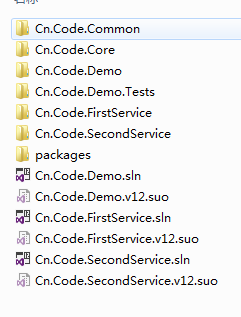
(一)Cn.Code.Demo
如上图,Cn.Code.Demo 解决方案包含了所有的项目。
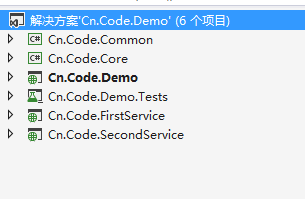
如上图:1 Cn.Code.Common 是项目一些公共方法的实现。
2 Cn.Code.Core 是项目所有的对外接口,此项目只包含接口。
3 Cn.Code.Demo 是一个MVC项目,用于测试我们的接口调用。
4 Cn.Code.FirstService 第一个服务实现,实现了Cn.Code.Core 部分接口。
5 Cn.Code.SecondService 第二个服务实现,实现了Cn.Code.Core 部分接口。
(二)Cn.Code.FirstService
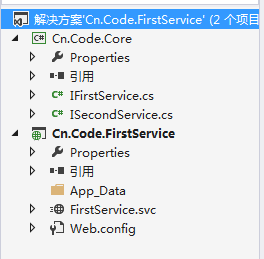
此解决方案只包含 Cn.Code.Core 和Cn.Code.FirstService 。
(三)Cn.Code.SecondService
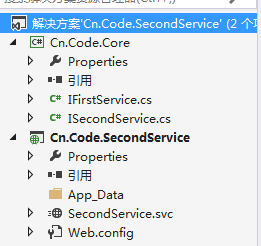
此解决方案只包含 Cn.Code.Core 和Cn.Code.SecondService 。
二,接口层 --Cn.Code.Core
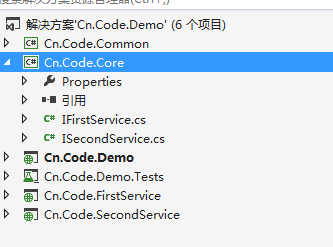
接口层只包含如下2个接口,这里我使用WCF进行测试,所以需要添加System.ServiceModel 模块引用。
IFirstService 接口如下:
     [ServiceContract]

     public interface IFirstService

     {

         [OperationContract]

         string GetData();

     }
ISecondService接口如下:
     [ServiceContract]

     public interface ISecondService

     {

         [OperationContract]

         string GetData();

     }
三,服务实现 --Cn.Code.FirstService 和Cn.Code.SecondService
为了方便测试,这里的服务实现都非常简单。
     public class FirstService :IFirstService

     {

         public string GetData()

         {

             return string.Format("您调用了 FirstService !");

         }

     }
     public class SecondService :ISecondService

     {

         public string GetData()

         {

             return string.Format("您调用了 SecondService !");

         }

     }
四,公共方法实现 --Cn.Code.Common
首先是WCF动态调用的构建工厂。
    /// <summary>

     /// Wcf动态调用构建

     /// </summary>

     public class WcfInvokeFactory

     {

         #region WCF服务工厂

         public static T GetService<T>(string url)

         {

             return GetService<T>(url, "basicHttpBinding");

         }

         public static T GetService<T>(string url, string bing)

         {

             try

             {

                 if (string.IsNullOrEmpty(url)) throw new NotSupportedException("This url is not Null or Empty!");

                 EndpointAddress address = new EndpointAddress(url);

                 Binding binding = CreateBinding(bing);

                 ChannelFactory<T> factory = new ChannelFactory<T>(binding, address);

                 return factory.CreateChannel();

             }

             catch (Exception ex)

             {

                 throw new Exception("创建服务工厂出现异常.");

             }

         }

         #endregion

         #region 创建传输协议

         /// <summary>

         /// 创建传输协议

         /// </summary>

         /// <param name="binding">传输协议名称</param>

         /// <returns></returns>

         private static Binding CreateBinding(string binding)

         {

             Binding bindinginstance = null;

             if (binding.ToLower() == "basichttpbinding")

             {

                 BasicHttpBinding ws = new BasicHttpBinding();

                 ws.MaxBufferSize = ;

                 ws.MaxBufferPoolSize = ;

                 ws.MaxReceivedMessageSize = ;

                 ws.ReaderQuotas.MaxStringContentLength = ;

                 ws.CloseTimeout = new TimeSpan(, , );

                 ws.OpenTimeout = new TimeSpan(, , );

                 ws.ReceiveTimeout = new TimeSpan(, , );

                 ws.SendTimeout = new TimeSpan(, , );

                 bindinginstance = ws;

             }

             else if (binding.ToLower() == "nettcpbinding")

             {

                 NetTcpBinding ws = new NetTcpBinding();

                 ws.MaxReceivedMessageSize = ;

                 ws.Security.Mode = SecurityMode.None;

                 bindinginstance = ws;

             }

             else if (binding.ToLower() == "wshttpbinding")

             {

                 WSHttpBinding ws = new WSHttpBinding(SecurityMode.None);

                 ws.MaxReceivedMessageSize = ;

                 ws.Security.Message.ClientCredentialType = System.ServiceModel.MessageCredentialType.Windows;

                 ws.Security.Transport.ClientCredentialType = System.ServiceModel.HttpClientCredentialType.Windows;

                 bindinginstance = ws;

             }

             return bindinginstance;

         }

         #endregion

     }
WcfInvokeFactory
其次是扩展Autofac一个注册接口的方法。
     /// <summary>

     /// Autofac 扩展注入方法

     /// </summary>

     public static class RegistExtensions

     {

         /// <summary>

         ///

         /// </summary>

         /// <typeparam name="T">需要注入的接口类型</typeparam>

         /// <param name="builder"></param>

         /// <param name="url">接口服务调用URL</param>

         /// <returns></returns>

         public static IRegistrationBuilder<T, SimpleActivatorData, SingleRegistrationStyle> RegisterService<T>(this ContainerBuilder builder, string url)

         {

             return builder.Register(c => WcfInvokeFactory.GetService<T>(url)).As<T>();

         }

     }
RegistExtensions
五,MVC项目测试 --Cn.Code.Demo
首先运行2个解决方案Cn.Code.FirstService与Cn.Code.SecondService,得到2个服务地址,将地址配置到项目的web.config中。
    <add key="FirstService" value="http://localhost:9970/FirstService.svc"/>

    <add key="SecondService" value="http://localhost:10014/SecondService.svc"/>
其次在全局文件Global.asax中,利用自定义Autofac注册扩展,分别注入不同的服务地址。
 using Autofac;

 using Autofac.Integration.Mvc;

 using System;

 using System.Collections.Generic;

 using System.Linq;

 using System.Reflection;

 using System.Web;

 using System.Web.Http;

 using System.Web.Mvc;

 using System.Web.Optimization;

 using System.Web.Routing;

 using System.Web.Security;

 using System.Web.SessionState;

 using System.Configuration;

 using Cn.Code.Core;

 using Cn.Code.Common;

 namespace Cn.Code.Demo

 {

     public class MvcApplication : System.Web.HttpApplication

     {

         protected void Application_Start()

         {

             var builder = new ContainerBuilder();

             SetupResolveRules(builder);

             builder.RegisterControllers(Assembly.GetExecutingAssembly()).PropertiesAutowired();

             builder.RegisterAssemblyTypes(Assembly.GetExecutingAssembly()).AsImplementedInterfaces();

             var container = builder.Build();

             DependencyResolver.SetResolver(new AutofacDependencyResolver(container));

             AreaRegistration.RegisterAllAreas();

             GlobalConfiguration.Configure(WebApiConfig.Register);

             FilterConfig.RegisterGlobalFilters(GlobalFilters.Filters);

             RouteConfig.RegisterRoutes(RouteTable.Routes);

             BundleConfig.RegisterBundles(BundleTable.Bundles);

         }

         private void SetupResolveRules(ContainerBuilder builder)

         {

             //利用自定义注册扩展,分别注入不同的服务地址

             builder.RegisterService<IFirstService>(ConfigurationManager.AppSettings["FirstService"]);

             builder.RegisterService<ISecondService>(ConfigurationManager.AppSettings["SecondService"]);

         }

     }

 }
Global.asax
接下来就是调用我们的接口了。
 using Cn.Code.Core;

 using System;

 using System.Collections.Generic;

 using System.Linq;

 using System.Web;

 using System.Web.Mvc;

 namespace Cn.Code.Demo.Controllers

 {

     public class HomeController : Controller

     {

         private IFirstService _iFirstService;

         private ISecondService _iSecondService;

         public HomeController() { }

         public HomeController(IFirstService iFirstService, ISecondService iSecondService)

         {

             this._iFirstService = iFirstService;

             this._iSecondService = iSecondService;

         }

         public ActionResult Index()

         {

             //第一个接口

             ViewBag.FirstText = _iFirstService.GetData();

             //第二个接口

             ViewBag.SecondText = _iSecondService.GetData();

             return View();

         }

     }

 }
HomeController
视图页面输出结果。
@{

    ViewBag.Title = "Home Page";

}

<div class="row">

    @ViewBag.FirstText

    <br />

    @ViewBag.SecondText

</div>
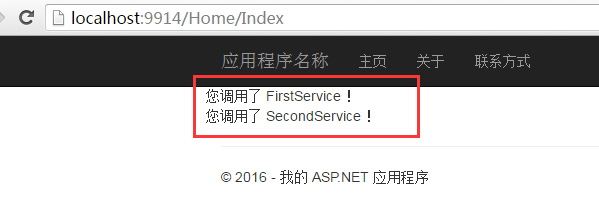
调用成功。
五,总结
这样的话,我们的远程调用服务接口就和平时正常调用使用项目内接口方法一样了。同时这样拆分,可以将不同的服务注册到不同的节点。这个节点也可以是一个集群。
当然,这里只是个测试小demo,后续应该结合Zookeeper或者其他的分布式服务框架,实现均衡负载的管理。
注:代码比较low,望见谅。代码下载地址Cn.Code.Demo.zip
使用接口的方式调用远程服务 ------ 利用动态调用服务,实现.net下类似Dubbo的玩法。的更多相关文章
- MyBatis进阶--接口代理方式实现Dao 和动态SQL
MyBatis接口代理方式实现Dao层 接口代理方式-实现规则 传统方式实现Dao层,我们既要写接口.还要写实现类.而MyBatis框架可以帮助我们省略写Dao层接口实现类的步骤.程序员只需要编写接口 ...
- SOA 下实现分布式 调用 cxf+ webService +动态调用
近期项目间隙 自学了 webservice 一下 是我写的 一个demo 首先我们在web.xml 里配置如下 <servlet> <servlet-name>CXFS ...
- Spring学习总结(8)-接口多个实现类的动态调用
需求描述:当一个接口有2个以上的实现类时,调用方需要根据参数选择只其中一个实现类 Spring版本:5.1.8.RELEASE 1. 接口和实现类 /** * 接口 */ public interfa ...
- C# .NET 动态调用webservice的三种方式
转载自 百度文库 http://wenku.baidu.com/link?url=Q2q50wohf5W6UX44zqotXFEe_XOMaib4UtI3BigaNwipOHKNETloMF4ax4W ...
- .net WebServer示例及调用(接口WSDL动态调用 JAVA)
新建.asmx页面 using System; using System.Collections.Generic; using System.Linq; using System.Web; using ...
- c# 动态调用.net编写的webservices接口
创建类WebServiceHelper: public class WebServiceHelper { #region 动态调用WebService动态调用地址 /// < summary&g ...
- 调用webservice服务(通过反射的方式动态调用)
调用 ";//系统类别 var jkxlh = "";//接口序列号 var jkid = "68W05";//接口id string WriteXm ...
- Web Service学习笔记:动态调用WebService
原文:Web Service学习笔记:动态调用WebService 多数时候我们通过 "添加 Web 引用..." 创建客户端代理类的方式调用WebService,但在某些情况下我 ...
- Delphi DLL的创建、静态及动态调用
转载:http://blog.csdn.net/welcome000yy/article/details/7905463 结合这篇博客:http://www.cnblogs.com/xumenger/ ...
随机推荐
- Linux里面怎样修改主机名
第一步:hostname 修改后的主机名 第二步:修改/etc/sysconfig/network中的hostname第三步:修改/etc/hosts文件 示例: 我机器现在的主机名是pc,想修改成t ...
- 读UNDO引发的db file sequential read
SQL> select * from (select SESSION_ID, NAME, P1, P2, P3, WAIT_TIME, CURRENT_OBJ#, CURRENT_FILE#, ...
- 笔记:java并发编程实践1
Java 5.0 adds ConcurrentHashMap, a replacement for synchronized hash-based Map implementations, and ...
- 美国易安信公司 EMC
EMC 提供了帮助您利用这一资产的工具.凭着我们的系统.软件.服务和解决方案,我们能够与您一道为您的公司打造一个综合性的信息基础架构.我们帮助客户设计.构建和管理智能.灵活而且安全的信息基础架构.这些 ...
- 在JavaScript函数式编程里使用Map和Reduce方法
所有人都谈论道workflows支持ECMAScript6里出现的令人吃惊的新特性,因此我们很容易忘掉ECMAScript5带给我们一些很棒的工具方法来支持在JavaScript里进行函数编程,这些工 ...
- javascript表单验证-邮箱验证
<!DOCTYPE html><html lang="en"><head> <meta charset="UTF-8" ...
- JS浏览器对象-History对象
<!DOCTYPE html> <html> <head> <meta charset="UTF-8"> <title> ...
- 【转】asp.net mvc webapi+angular.js案例
参考地址:http://www.mamicode.com/info-detail-892383.html 大家好,本文用一个简单的demo演示AngularJS在MVC中的使用,在学习这个demo之前 ...
- Vbox中Ubuntu的安装和共享文件夹设置
1. 选择版本 1.1 Ubuntu桌面版与服务器版的区别 桌面版与服务器版,只要发布版本号一致,这两者从核心来说也就是相同的,唯一的差别在于它们的预期用途.桌面版面向个人电脑使用者,可以进行文字处理 ...
- [原创作品] web项目构建(一)
今天开始,将推出web项目构建教程,与<javascript精髓整理篇>一并更新.敬请关注. 这篇作为这一系列开头,主要讲述web项目的构建技术大全.在众多人看来,web前端开发无非就是写 ...