
spring中添加google的guava缓存(demo)
1.pom文件中配置
    <dependencies>

        <dependency>

            <groupId>org.springframework</groupId>

            <artifactId>spring-context-support</artifactId>

            <version>4.2.4.RELEASE</version>

        </dependency>

        <dependency>

            <groupId>org.springframework</groupId>

            <artifactId>spring-beans</artifactId>

            <version>4.2.4.RELEASE</version>

        </dependency>

        <dependency>

            <groupId>com.google.guava</groupId>

            <artifactId>guava</artifactId>

            <version>19.0</version>

        </dependency>

        <dependency>

            <groupId>junit</groupId>

            <artifactId>junit</artifactId>

            <version>4.12</version>

        </dependency>

        <dependency>

            <groupId>org.projectlombok</groupId>

            <artifactId>lombok</artifactId>

            <version>1.16.20</version>

        </dependency>

    </dependencies>
2.GuavaCacheManagerConfig配置类
package com.zy;

import com.google.common.cache.CacheBuilder;

import com.google.common.collect.Maps;

import org.springframework.cache.Cache;

import org.springframework.cache.guava.GuavaCache;

import org.springframework.cache.transaction.AbstractTransactionSupportingCacheManager;

import java.util.Collection;

import java.util.Map;

import java.util.concurrent.ConcurrentMap;

public class GuavaCacheManagerConfig extends AbstractTransactionSupportingCacheManager {

    private final ConcurrentMap<String, Cache> cacheMap = Maps.newConcurrentMap();

    private Map<String, CacheBuilder> builderMap = Maps.newHashMap();

    @Override

    protected Collection<? extends Cache> loadCaches() {

        return cacheMap.values();

    }

    //获取缓存单例

    @Override

    public Cache getCache(String name) {

        Cache cache = this.cacheMap.get(name);

        if (null == cache) {

            synchronized (this.cacheMap) {

                cache = this.cacheMap.get(name);

                if (null == cache && this.builderMap.containsKey(name)) {

                    CacheBuilder builder = this.builderMap.get(name);

                    cache = createGuavaCache(name, builder);

                    this.cacheMap.put(name, cache);

                }

            }

        }

        return cache;

    }

    private Cache createGuavaCache(String name, CacheBuilder builder) {

        com.google.common.cache.Cache<Object, Object> cache;

        if(builder == null){

            cache = CacheBuilder.newBuilder().build();

        }else{

            cache = builder.build();

        }

        return new GuavaCache(name, cache, isAllowNullValues());

    }

    private boolean isAllowNullValues() {

        return true;

    }

    //配置中多组缓存池注入

    public void setConfigMap(Map<String, CacheBuilder> configMap) {

        this.builderMap = configMap;

    }

}
3.applicationContext-cache-guava.xml配置文件
<?xml version="1.0" encoding="UTF-8"?>

<beans xmlns="http://www.springframework.org/schema/beans"

       xmlns:xsi="http://www.w3.org/2001/XMLSchema-instance"

       xmlns:cache="http://www.springframework.org/schema/cache"

       xsi:schemaLocation="http://www.springframework.org/schema/beans

                           http://www.springframework.org/schema/beans/spring-beans.xsd

                           http://www.springframework.org/schema/cache

                           http://www.springframework.org/schema/cache/spring-cache.xsd">

    <!-- 1.将需要加入缓存的类注册进来 -->

    <bean id="guavaService" class="com.zy.GuavaServiceImpl"/>

    <!-- ==========================2.开启guava缓存开始==================== -->

    <!-- 声明缓存注解的开启 -->

    <cache:annotation-driven cache-manager="cacheManager" proxy-target-class="true"/>

    <!-- 声明使用spring管理缓存组 -->

    <bean id="cacheManager" class="org.springframework.cache.support.CompositeCacheManager">

        <property name="cacheManagers">

            <list>

                <ref bean="guavaCacheManager"/>

            </list>

        </property>

        <property name="fallbackToNoOpCache" value="true"/>

    </bean>

    <!-- 缓存的创建的具体实现类注入 class为自定义的类 -->

    <bean id="guavaCacheManager" class="com.zy.GuavaCacheManagerConfig">

        <!-- 此处可以配置一组缓存池对应不同的业务类型 这里实现了一个"guava"的默认缓存并构建 -->

        <property name="configMap">

            <map key-type="java.lang.String" value-type="com.google.common.cache.CacheBuilder">

                <!-- 该缓存与service层实现类上注解上的value相等 -->

                <entry key="guava" value-ref="defaultCacheBuilder"/>

            </map>

        </property>

    </bean>

    <!-- 此处直接构建"guava"默认缓存 -->

    <bean id="defaultCacheBuilder"

          class="com.google.common.cache.CacheBuilder"

          factory-method="from">

        <!-- 缓存池大小 时间(定时回收 缓存项在给定时间内没有被'写'访问 回收 还有refreshAfterWrite expireAfterAccess可供使用) 当然还有一些其他可选组件(weakKeys,removalListener and so on!) -->

        <constructor-arg value="maximumSize=10000, expireAfterAccess=5s"/>

    </bean>

    <!-- ==========================2.开启guava缓存结束==================== -->

</beans>
4.GuavaDTO
package com.zy;

import lombok.AllArgsConstructor;

import lombok.Builder;

import lombok.Data;

import lombok.NoArgsConstructor;

@Data

@NoArgsConstructor

@AllArgsConstructor

@Builder

public class GuavaDTO {

    private Integer id;

    private String name;

}
5.GuavaServiceImpl的实现类
package com.zy;

import org.springframework.cache.annotation.Cacheable;

public class GuavaServiceImpl {

    // spring EL

    // GuavaDTO 普通的DTO

    // @Cacheable(value = "guava", key = "'testGuavaCache:' + #guavaDTO.id + #guavaDTO.name")

    // value 为配置文件中的缓存池名称 key 为键名

    @Cacheable(value = "guava", key = "'testGuavaCache:' + #guavaDTO.id + #guavaDTO.name")

    public void testGuavaCache(GuavaDTO guavaDTO) {

        System.out.println("=======缓存中没有,进入方法来查询了=========");

    }

}
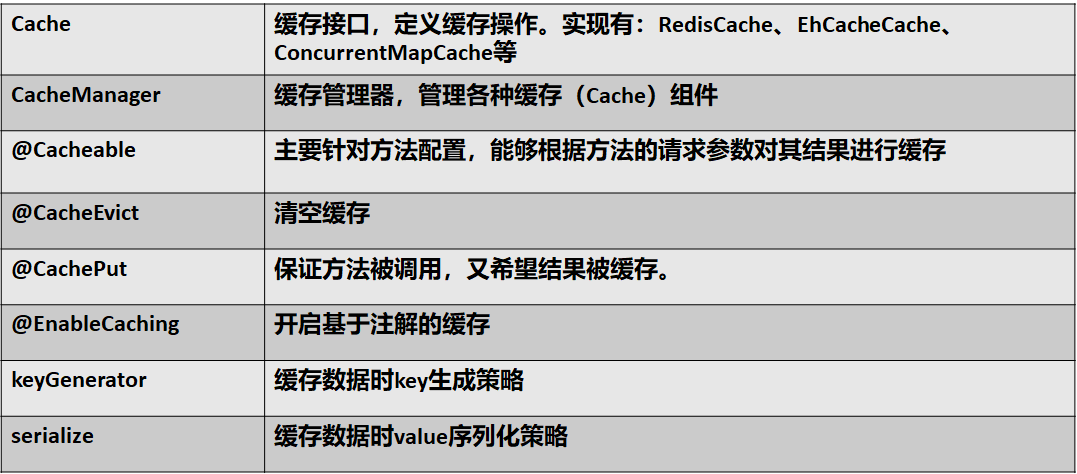
如果service的实现类是删除方法,则在方法上,加上@CacheEvict注解
如果service的实现类是更新方法,则在方法上,加上@CachePut注解(每次执行,都会进入方法)
6.测试类GuavaTest
package com.zy;

import org.junit.Test;

import org.springframework.context.support.ClassPathXmlApplicationContext;

public class GuavaTest {

    @Test

    public void fn() throws InterruptedException {

        ClassPathXmlApplicationContext applicationContext = new ClassPathXmlApplicationContext("applicationContext-cache-guava.xml");

        GuavaServiceImpl guavaService = (GuavaServiceImpl) applicationContext.getBean("guavaService");

        System.out.println("第1次访问:1号tom==========================");

        guavaService.testGuavaCache(new GuavaDTO(1, "tom"));

        System.out.println("第2次访问:1号tom==========================");

        guavaService.testGuavaCache(new GuavaDTO(1, "tom"));

        guavaService.testGuavaCache(new GuavaDTO(1, "tom"));

        System.out.println("第1次访问:2号jerry==========================");

        guavaService.testGuavaCache(new GuavaDTO(2, "jerry"));

        Thread.sleep(5000);

        /**

         * 此时配置文件中的失效时间是5000ms

         * */

        System.out.println("第3次访问:1号tom==========================");

        guavaService.testGuavaCache(new GuavaDTO(1, "tom"));

    }

}
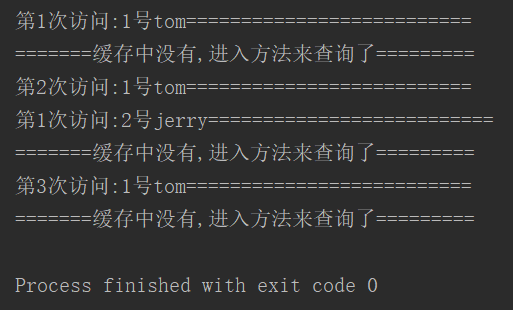
7.测试结果如下:
spring中添加google的guava缓存(demo)的更多相关文章
- Spring中添加新的配置表,并对新的配置表进行处理
实习过程中boss交代的任务(以下出现的代码以及数据只给出小部分,提供一个思路) 目的:Spring中添加新的配置表,并对新的配置表进行处理:替换的新的配置表要友好,同时保证替换前后功能不能发生变化. ...
- 百家搜索:在网站中添加Google、百度等搜索引擎
来源:http://www.ido321.com/1143.html 看到一些网站上添加了各种搜索引擎.如Google.百度.360.有道等,就有点好奇,这个怎么实现?研究了一各个搜索引擎怎么传送关键 ...
- spring中添加redis缓存
1.单机版的添加 spring里面配置 <bean id="redisClient" class="redis.clients.jedis.JedisPool&qu ...
- 在网页中添加google搜索
网页中插入谷歌搜索,至于怎么上谷歌,后面有时间会更,推荐百度 <form method="GET" action="http://www.google.com.hk ...
- spring boot使用guava缓存
1.pom中插入依赖: <!--guava缓存cache--> <dependency> <groupId>com.google.guava</groupId ...
- SpringBoot 结合 Spring Cache 操作 Redis 实现数据缓存
系统环境: Redis 版本:5.0.7 SpringBoot 版本:2.2.2.RELEASE 参考地址: Redus 官方网址:https://redis.io/ 博文示例项目 Github 地址 ...
- Spring框架学习(10)Spring中如何使用事务?
内容源自:Spring中如何使用事务? 一.为什么要使用事务? 如果我们一个业务逻辑只执行一次sql,是不需要使用事务的.但如果要执行多条sql语句才能完成一个业务逻辑的话,这个时候就要使用事务了. ...
- Spring源码学习:第1步--在Spring源码中添加最简单的Demo代码
为了最大程度地贴近Spring源码并进行学习,一种比较直接的做法是:直接在Spring源码中加入Demo代码,并进行调试. 参照以前使用Spring的经验,Spring最简单的使用方法是:一个实体类. ...
- spring中的缓存--Caching
1.spring从3.1开始支持缓存功能.spring 自带的缓存机制它只在方法上起作用,对于你使用其他持久化层的框架来讲,是没有影响的,相对来讲这种缓存方式还是不错的选择. 2.提供缓存的接口:or ...
随机推荐
- bzoj1503[NOI2004]郁闷的出纳员——Splay
题目:https://www.lydsy.com/JudgeOnline/problem.php?id=1503 好奇怪呀!为什么而TLE? 各种修改终于卡时过了.可是大家比我快多了呀?难道是因为自己 ...
- apache编译参数详解
常用编译参数: ./configure //配置源代码树–prefix=/usr/local/apache //体系无关文件的顶级安装目录PREFIX ,也就Apache的安装目录.–e ...
- 解决Oracle的http://localhost:1158/em页面打不开的问题
https://localhost:1158/em 无法显示页面,在网上查阅资料以后发现这个页面时由服务:OracleDBConsoleoracl控制的,所以到管理界面打开服务:OracleDBCon ...
- ConcurrentLinkedQueue 模拟火车售票过程
火车票类 public class Ticket { private String NO; // 车票编号 private double price; // 票价 public Ticket(Stri ...
- 将xml转为array
/** * 将xml转为array * @param string $xml * @throws Exception */ public function FromXml($xml) { if (!$ ...
- java web 程序---登陆的验证码实现显示
是一个java文件 package com.sss; import java.awt.Color; import java.awt.Font; import java.awt.Graphics; im ...
- Java-Runoob-面向对象:Java 接口
ylbtech-Java-Runoob-面向对象:Java 接口 1.返回顶部 1. Java 接口 接口(英文:Interface),在JAVA编程语言中是一个抽象类型,是抽象方法的集合,接口通常以 ...
- ProducerConsumerQueue
folly/ProducerConsumerQueue.h The folly::ProducerConsumerQueue class is a one-producer one-consumer ...
- bbbbb
- [Python] Regular Expressions
1. regular expression Regular expression is a special sequence of characters that helps you match or ...