
vue-router(一)
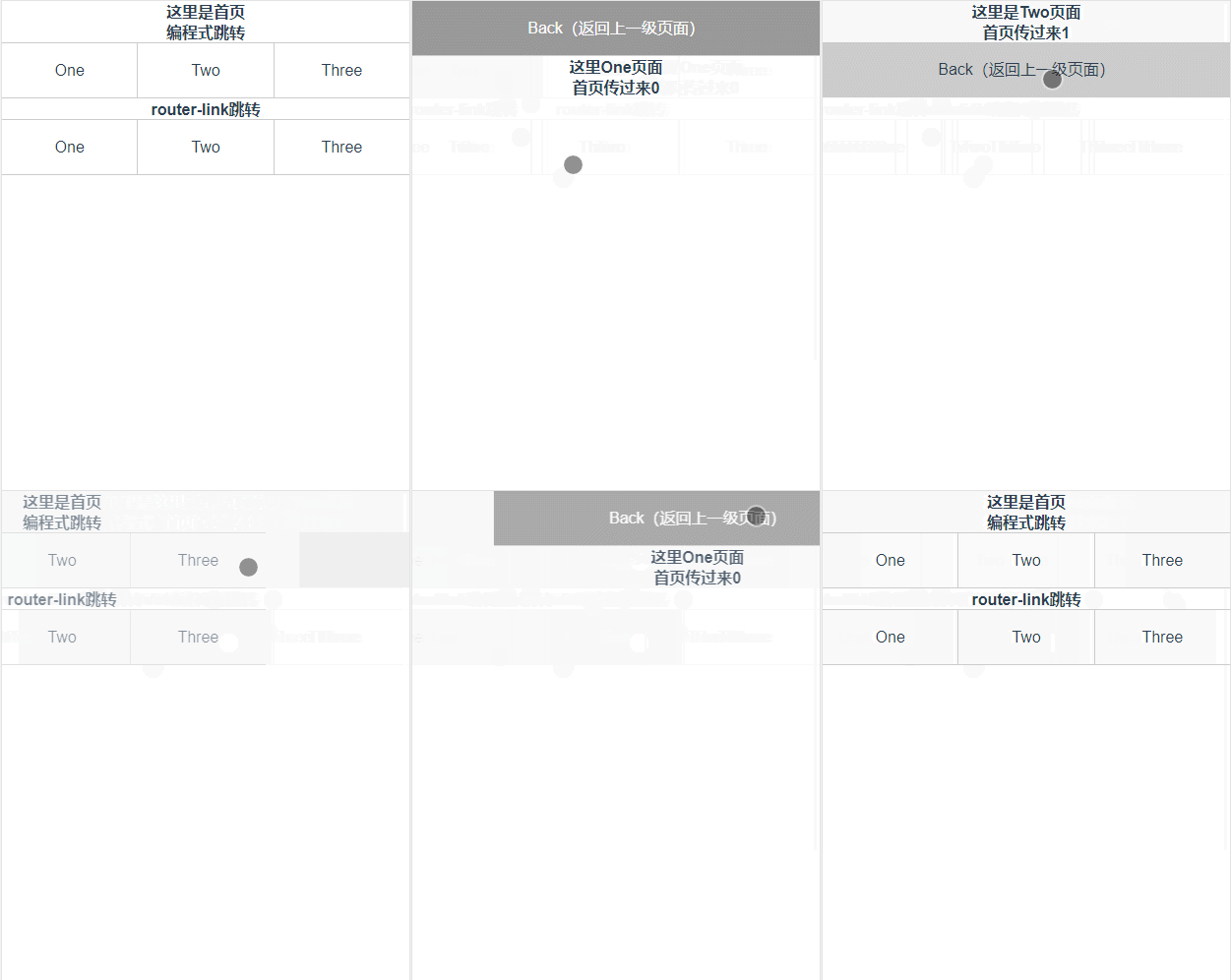
<div class="li" @click="One()">One</div>

One: function () {

    this.$router.push({

        name:"one",

        params:{

            id:""

        }

    })

}
<router-link class="li" :to="{name:'one',params:{id:'0'}}" tag="div">One</router-link>

<router-link class="li" :to="{path:'/two',query:{id:'1'}}" tag="div">Two</router-link>

<router-link class="li" :to="{path:'/three',query:{id:'2'}}" tag="div">Three</router-link>
router:new VueRouter({

            routes:[

              {path:'/myLogin',component:testLogin},

      {path:'/myRegister',component:testRegister}

            ]

        })
跳转过度动画:
<template>

<div id="app">

<transition :name="animate">

<router-view id="view"></router-view>

</transition>

</div>

</template>

<script>

export default {

name: 'App',

data () {

return {

animate: "",

}

},

watch: {

//to为下个页面,from为源路由。通过再路由的配置中将页面的入栈方式设置为1.再页面出栈的时候设置为2

$route: function(to,from) {

/*

0: 不做动画

1: 左切换

2: 右切换

3: 上切换

4: 下切换

*/

let animate = this.$router.animate || to.meta.slide;

if(!animate) {

this.animate = ""

} else {

this.animate =

animate === ? "slide-left":

animate === ? "slide-right":

animate === ? "slide-top":

animate === ? "slide-bottom":""

}

//当animate为1的时候页面想左滑动,2为右,3为上,4为下,0没有动画,

this.$router.animate = ;//恢复状态

// console.log(this.animate);

}

}

}

</script>

<style>

* {

margin: ;

padding: ;

}

html,body {

width: %;

height: %;

font-size: .67vw;

}

.wraper {

width: %;

height: %;

}

.container {

width: %;

height: %;

display: flex;

flex-direction: column;

overflow: hidden;

background-color: #ffff;

}

#app {

font-family: 'Avenir', Helvetica, Arial, sans-serif;

-webkit-font-smoothing: antialiased;

-moz-osx-font-smoothing: grayscale;

text-align: center;

color: #2c3e50;

width: %;

height: %;

}

//不同动画的c3样式

#view {

position: absolute;

left: ;

top: ;

width: %;

height: %;

transition: all .5s cubic-bezier(0.55, , 0.1, );

}

.slide-left-enter,

.slide-right-leave-active {

opacity: ;

transform: translate(%, );

}

.slide-left-leave-active,

.slide-right-enter {

opacity: ;

transform: translate(-%, );

}

.slide-top-enter,

.slide-bottom-leave-active {

opacity: ;

transform: translate(, %);

}

.slide-top-leave-active,

.slide-bottom-enter {

opacity: ;

transform: translate(, -%);

}

</style>
// The Vue build version to load with the `import` command

// (runtime-only or standalone) has been set in webpack.base.conf with an alias.

import Vue from 'vue'

import App from './App'

import router from './router'

// 全局路由返回,再页面返回上级页面时,可以通过调用back方法返回上级页面

Vue.prototype.back = (route) =>{

route.animate = ;//设置路由返回页面的动画方式

window.history.go(-);//返回一级页面

}

Vue.config.productionTip = false

/* eslint-disable no-new */

new Vue({

el: '#app',

router,

components: { App },

template: '<App/>'

})
import Vue from 'vue'

import Router from 'vue-router'

// import HelloWorld from '@/components/HelloWorld'

import Home from "@/views/home/index"

import One from "@/views/one/index"

import Two from "@/views/two/index"

import Three from "@/views/three/index"

Vue.use(Router);

Router.prototype.animate = ;//给所有的路由设置动画初始化为0,无动画效果

//通过给不同的路由设置不同的slide来实现页面不同入栈方式为1,2,3,4

export default new Router({

routes: [

{

path: '/',

name: '/',

component: Home

},

{

path: "/one",

name: "one",

meta: {

slide: ,

},

component: One,

},

{

path: "/two",

name: "two",

meta: {

slide: ,

},

component: Two

},

{

path: "/three",

name: "three",

meta: {

slide: ,

},

component: Three

}

]

})
home/index.vue

<template>

<div class="wraper">

<div class="container">

<div class="section">

<h3>这里是首页</h3>

<h3>编程式跳转</h3>

<div class="main">

<!--编程式路由跳转-->

<div class="li" @click="One()">One</div>

<div class="li" @click="Two()">Two</div>

<div class="li" @click="Three()">Three</div>

</div>

<h3>router-link跳转</h3>

<div class="main">

<!--编程式路由跳转-->

<router-link class="li" :to="{name:'one',params:{id:'0'}}" tag="div">One</router-link>

<router-link class="li" :to="{path:'/two',query:{id:'1'}}" tag="div">Two</router-link>

<router-link class="li" :to="{path:'/three',query:{id:'2'}}" tag="div">Three</router-link>

</div>

</div>

</div>

</div>

</template>

<script>

export default {

methods: {

One: function () {

this.$router.push({

name:"one",

params:{

id:""

}

})

},

Two: function () {

this.$router.push({

path:"/two",

query:{

id:""

}

})

},

Three: function () {

this.$router.push({

path:"/three",

query:{

id:""

}

})

},

}

}

</script>

<style scoped>

.section {

width: %;

flex: ;

overflow-y: auto;

overflow-x: hidden;

}

* {

font-size: 16px;

}

.main {

width: %;

height: .5rem;

display: flex;

align-items: center;

border-bottom: 1px solid #ccc;

border-top: 1px solid #ccc;

}

.main div {

flex: ;

height: .5rem;

line-height: .5rem;

}

.main div:hover {

background-color: #;

}

.main div:nth-of-type() {

box-sizing: border-box;

border-left: 1px solid #ccc;

border-right: 1px solid #ccc;

}

</style>
<template>

<div class="wraper">

<div class="container">

<div class="back" @click="back($router)">Back(返回上一级页面)</div>

<h3>这里One页面</h3>

<h3>首页传过来{{msg}}</h3>

</div>

</div>

</template>

<script>

export default {

data () {

return {

msg: ""

}

},

methods: {

getParams() {

this.msg = this.$route.params.id;

}

},

mounted() {

this.getParams();

},

watch: {

'$route': 'getParams'

}

}

</script>

<style scoped>

* {

font-size: 16px;

}

.back {

height: .5rem;

line-height: .5rem;

border-bottom: 1px solid #ccc;

background-color: #;

color: #fff;

}

.back:hover {

background-color: #;

}

</style>
<template>

<div class="wraper">

<div class="container">

<h3>这里是Two页面</h3>

<h3>首页传过来{{msg}}</h3>

<div class="back" @click="back($router)">Back(返回上一级页面)</div>

</div>

</div>

</template>

<script>

export default {

data () {

return {

msg: ""

}

},

methods: {

getParams() {

this.msg = this.$route.query.id;

}

},

mounted() {

this.getParams();

},

watch: {

'$route': 'getParams'

}

}

</script>

<style scoped>

* {

font-size: 16px;

}

.back {

width: %;

height: .5rem;

line-height: .5rem;

background-color: #ccc;

border-bottom: 1px solid #ccc;

}

</style>
<template>

<div class="wraper">

<div class="container">

<h3>这里是Two页面</h3>

<h3>首页传过来{{msg}}</h3>

<div class="back" @click="back($router)">Back(返回上一级页面)</div>

</div>

</div>

</template>

<script>

export default {

data () {

return {

msg: ""

}

},

methods: {

getParams() {

this.msg = this.$route.query.id;

}

},

mounted() {

this.getParams();

},

watch: {

'$route': 'getParams'

}

}

</script>

<style scoped>

* {

font-size: 16px;

}

.back {

width: %;

height: .5rem;

line-height: .5rem;

background-color: #ccc;

border-bottom: 1px solid #ccc;

}

</style>
params传参和接受参数
vue-router(一)的更多相关文章
- Vue 2.0 + Vue Router + Vuex
用 Vue.js 2.x 与相配套的 Vue Router.Vuex 搭建了一个最基本的后台管理系统的骨架. 当然先要安装 node.js(包括了 npm).vue-cli 项目结构如图所示: ass ...
- vue router 只需要这么几步
<!DOCTYPE html><html lang="en"><head> <meta charset="UTF-8" ...
- Vue.js 2.x笔记:路由Vue Router(6)
1. Vue Router简介与安装 1.1 Vue Router简介 Vue Router 是 Vue.js 官方的路由管理器.它和 Vue.js 的核心深度集成,构建单页面应用. Vue Rout ...
- Vue Router学习笔记
前端的路由:一个地址对应一个组件 Vue Router中文文档 一.路由基本使用 第1步:导入Vue Router: <script src="https://unpkg.com/vu ...
- vue router.push(),router.replace(),router.go()和router.replace后需要返回两次的问题
转载:https://www.cnblogs.com/lwwen/p/7245083.html https://blog.csdn.net/qq_15385627/article/details/83 ...
- 前端MVC Vue2学习总结(八)——Vue Router路由、Vuex状态管理、Element-UI
一.Vue Router路由 二.Vuex状态管理 三.Element-UI Element-UI是饿了么前端团队推出的一款基于Vue.js 2.0 的桌面端UI框架,手机端有对应框架是 Mint U ...
- 深入浅出的webpack4构建工具---webpack+vue+router 按需加载页面(十五)
1. 为什么需要按需加载? 对于vue单页应用来讲,我们常见的做法把页面上所有的代码都打包到一个bundle.js文件内,但是随着项目越来越大,文件越来越多的情况下,那么bundle.js文件也会越来 ...
- 深入浅出的webpack构建工具--webpack4+vue+router项目架构(十四)
阅读目录 一:vue-router是什么? 二:vue-router的实现原理 三:vue-router使用及代码配置 四:理解vue设置路由导航的两种方法. 五:理解动态路由和命名视图 六:理解嵌套 ...
- python 全栈开发,Day91(Vue实例的生命周期,组件间通信之中央事件总线bus,Vue Router,vue-cli 工具)
昨日内容回顾 0. 组件注意事项!!! data属性必须是一个函数! 1. 注册全局组件 Vue.component('组件名',{ template: `` }) var app = new Vue ...
- vue router 跳转到新的窗口方法
在CreateSendView2.vue 组件中的方法定义点击事件,vue router 跳转新的窗口通过采用如下的方法可以实现传递参数跳转相应的页面goEditor: function (index ...
随机推荐
- ThreadPoolExecutor源码浅析
目录 初始化 ctl变量 添加任务 addWorker方法 worker实现 执行任务 关闭连接池 参考 初始化 ThreadPoolExecutor重载了多个构造方法,不过最终都是调用的同一个: p ...
- hadoop的安装配置
资源下载路径:https://archive.cloudera.com/cdh5/cdh/5/:https://archive.cloudera.com/cdh5/cdh/5/hadoop-2.6.0 ...
- 【边框回归】边框回归(Bounding Box Regression)详解(转)
转自:打开链接 Bounding-Box regression 最近一直看检测有关的Paper, 从rcnn, fast rcnn, faster rcnn, yolo, r-fcn, ssd,到今年 ...
- Markdown锚点使用
为了使得博客看起来更加美观,我更倾向于使用索引,但是如何在Markdown使用索引跳到指定位置呢?以下是使用方法: 具体应用场景: (1)文献列表中链接--可以通过锚实现页面内的链接:引用文献中可能需 ...
- jQuery实际案例⑥——图片跟随鼠标、五角星评分案例
一.图片跟随鼠标移动 1.要求:鼠标移动到哪,图片就要跟到哪 2.用到的事件:首先监听鼠标:$(document).mousemove(function(event){ }); //此时可以获取鼠标距 ...
- C#显示接口实现和隐式接口实现
在项目中可能会遇到显示接口实现和隐式接口实现.什么意思呢?简单来说使用接口名作为方法名的前缀,这称为“显式接口实现”:传统的实现方式,称为“隐式接口实现”.隐式接口实现如下: interface IS ...
- 分布式系统理论:一致性协议Paxos
Paxos算法是莱斯利·兰伯特(Leslie Lamport)于1990年提出的一种基于消息传递的一致性算法. Paxos 算法是一个解决分布式系统中,多个节点之间就某个值(注意是某一个值,不是一系列 ...
- Shell date 命令详解
格式: date [选项] ... [+格式] 选项说明: -d ,--date=字符串 显示指定字符串所描述的时间 格式说明: 例子1: #!/bin/bash ##. 获取当前系统时间 YYYY- ...
- spring mvc: rss(xml)输出
准备: rss包插件 Rome 库及其依赖项rome-utils,jdom和slf4j <!-- rss源依赖 --> <!-- https://mvnrepository.com/ ...
- Linux网络编程--进程间通信(一)
进程间通信简介(摘自<Linux网络编程>p85) AT&T 在 UNIX System V 中引入了几种新的进程通讯方式,即消息队列( MessageQueues),信号量( s ...