
WPF 自定义消息框(转)
相信很多人用过MessageBox.show(),是不是觉得这个消息框有点丑呢,反正我是觉得有点丑的,所以我自己重写了一个。先不说,上两幅图对比先:
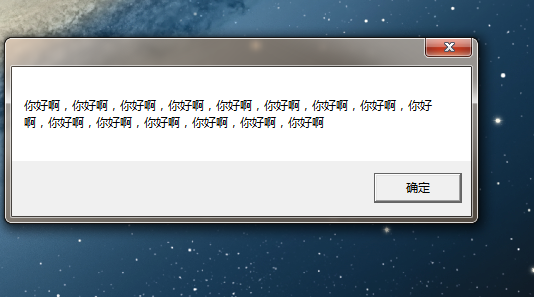

当然,也不是很好看,不过比原有的好多了。
不多说了,先上xmal代码:

 1 <Window x:Class="MESBox.MEGBox"

 2         xmlns="http://schemas.microsoft.com/winfx/2006/xaml/presentation"

 3         xmlns:x="http://schemas.microsoft.com/winfx/2006/xaml"

 4         Title="MEGBox"  MinWidth="200"  WindowStyle="None"

 5         AllowsTransparency="True" Background="#AA000000"

 6         WindowStartupLocation="CenterScreen" Window.SizeToContent="WidthAndHeight"

 7         MouseLeftButtonDown="DragWindow"  ShowInTaskbar="False">

 8     <Window.Resources>

 9         <Style x:Key="ButtonStyle" TargetType="{x:Type Button}">

10             <Setter Property="Foreground" Value="White"/>

11             <Setter Property="Template">

12                 <Setter.Value>

13                     <!--设置样式 -->

14                     <ControlTemplate TargetType="{x:Type Button}">

15                         <Grid>

16                             <Rectangle x:Name="Rectangle" Stroke="#FFFFFFFF" StrokeMiterLimit="1.000000" StrokeThickness="0.500000" RadiusX="12.5" RadiusY="12.5" Fill="#FF777777">

17                             </Rectangle>

18                             <ContentPresenter x:Name="ContentPresenter" SnapsToDevicePixels="{TemplateBinding SnapsToDevicePixels}" HorizontalAlignment="{TemplateBinding HorizontalContentAlignment}"

19                          VerticalAlignment="{TemplateBinding VerticalContentAlignment}" RecognizesAccessKey="True"/>

20                         </Grid>

21                         <!-- 设置鼠标移到关闭按钮上的效果 -->

22                         <ControlTemplate.Triggers>

23                             <Trigger Property="IsMouseOver" Value="true">

24                                 <Setter Property="Fill" TargetName="Rectangle">

25                                     <Setter.Value>

26                                         <SolidColorBrush Color="White"></SolidColorBrush>

27                                     </Setter.Value>

28                                 </Setter>

29                                 <Setter Property="Foreground" Value="Black"></Setter>

30                             </Trigger>

31                         </ControlTemplate.Triggers>

32                     </ControlTemplate>

33                 </Setter.Value>

34             </Setter>

35         </Style>

36     </Window.Resources>

37

38     <Grid  Height="Auto">

39         <Grid.RowDefinitions>

40             <RowDefinition Height="Auto"></RowDefinition>

41             <RowDefinition Height="Auto"></RowDefinition>

42             <RowDefinition Height="Auto" ></RowDefinition>

43         </Grid.RowDefinitions>

44         <DockPanel Grid.Row="0">

45             <Button DockPanel.Dock="Right" Style="{StaticResource ButtonStyle}"

46                     Width="25" Height="25" Content="X"

47                     HorizontalAlignment="Right" VerticalAlignment="Top"

48                     Margin="3,3,3,3"

49                     Click="CloseWindow" >

50             </Button>

51         </DockPanel>

52         <TextBlock Padding="10,15,10,15" Grid.Row="1" x:Name="content"

53                    Foreground="White" FontSize="18"

54                    MaxWidth="500" TextWrapping="Wrap"/>

55

56         <StackPanel Orientation="Horizontal"  FlowDirection="RightToLeft"  Grid.Row="2">

57             <Button Content="确定" Width="80"   Click="CloseWindow" Height="30" Margin="10,0,0,0" ></Button>

58         </StackPanel>

59     </Grid>

60 </Window>
其中,window 的属性里WindowStyle="None",AllowsTransparency="True"是设置window无边框的关键,WindowStartupLocation="CenterScreen",使窗口初始化时在屏幕正中央出现,Background="#AA000000",#AA000000是具有半透明的颜色,另外,由于消息框的大小是随着内容的多少来变化的,所以并没有设置窗口的长和宽,因此设置Window.SizeToContent="WidthAndHeight",为的是使消息框能自适应内容。
另外,还要注意的是,因为window失去了边框和它的头部,所以是不能够对它进行拖拽的,这就很别扭了,所以我给MouseLeftButtonDown设置了一个DragWindow处理方法。
具体的cs代码如下:
 1 using System;

 2 using System.Collections.Generic;

 3 using System.Linq;

 4 using System.Text;

 5 using System.Windows;

 6 using System.Windows.Controls;

 7 using System.Windows.Data;

 8 using System.Windows.Documents;

 9 using System.Windows.Input;

10 using System.Windows.Media;

11 using System.Windows.Media.Imaging;

12 using System.Windows.Shapes;

13

14 namespace MESBox

15 {

16     /// <summary>

17     /// MEGBox.xaml 的交互逻辑

18     /// </summary>

19     public partial class MEGBox : Window

20     {

21         private static MEGBox _Instance;

22         public static MEGBox Instance

23         {

24             get

25             {

26                 if (_Instance == null)

27                 {

28                     _Instance = new MEGBox();

29                 }

30                 return _Instance;

31             }

32         }

33         public MEGBox()

34         {

35             InitializeComponent();

36         }

37         public void Show(string content)

38         {

39             this.content.Text = "       " + content;

40             this.ShowDialog();

41         }

42         private void DragWindow(object sender, MouseButtonEventArgs e)

43         {

44             this.DragMove();

45         }

46         public void CloseWindow(object sender, RoutedEventArgs args)

47         {

48

49             this.Close();

50             _Instance = null;

51         }

52

53     }

54 }
代码简单易懂,也不详细说了。
WPF 自定义消息框(转)的更多相关文章
- wpf 自定义消息框
相信很多人用过MessageBox.show(),是不是觉得这个消息框有点丑呢,反正我是觉得有点丑的,所以我自己重写了一个.先不说,上两幅图对比先: 当然,也不是很好看,不过比原有的好多了. 不多说了 ...
- WPF 文本框添加水印效果
有的时候我们需要为我们的WPF文本框TextBox控件添加一个显示水印的效果来增强用户体验,比如登陆的时候提示输入用户名,输入密码等情形.如下图所示: 这个时候我们除了可以修改TextBox控件的控件 ...
- WPF文本框密码框添加水印效果
WPF文本框密码框添加水印效果 来源: 阅读:559 时间:2014-12-31 分享: 0 按照惯例,先看下效果 文本框水印 文本框水印相对简单,不需要重写模板,仅仅需要一个VisualBrush ...
- WPF提示框效果
WPF提示框效果 1,新建WPF应用程序 2,添加用户控件Message 3,在Message中编写如下代码 <Border x:Name="border" BorderTh ...
- WPF 提示框、确认框、确认输入框
1.提示框 分为提示.异常.失败.成功几种类型 方法: /// <summary> /// 弹出提示 /// 标题:提示 /// </summary> /// <para ...
- 【Unity技巧】自定义消息框(弹出框)
写在前面 这一篇我个人认为还是很常用的,一开始也是实习的时候学到的,所以我觉得实习真的是一个快速学习工程技巧的途径. 提醒:这篇教程比较复杂,如果你不熟悉NGUI.iTween.C#的回调函数机制,那 ...
- WPF 文本框设置了阴影效果后,因左右的transform变化引发的拉伸渲染问题
背景 最近遇到一个动画执行时,文本位置变化的问题.如下图: 如果你仔细看的话,当星星变小时,文本往下降了几个像素. 貌似有点莫名其妙,因为控件之间并不在同一个Panel布局控件中,不存在高度限制变化引 ...
- WPF 矩形框8个控制点伸缩及拖拽
最近在研发图片控件矩形框8个控制点进行控制边框的大小.位置等信息,之前查阅了相关的信息,比如别人整合的类:ControlResizer 这个类虽然是好,但是很大程度上是有限制,换句话说,它需要你二次更 ...
- WPF密码框中禁止复制、粘贴
如题: " Margin="215,32,151,0" > <PasswordBox.CommandBindings> <CommandBindi ...
随机推荐
- 个人待办事项工具的设计和搭建(IFE前端2015春季 任务3)
这是我几个月之前的项目作品,花了相当的时间去完善.博客人气不高,但拿代码的人不少,所以一直处于保密状态.没有公开代码.但如果对你有帮助,并能提出指导意见的,我将十分感谢. IFE前端2015春季 任务 ...
- pandas的常用函数
1.DataFrame的常用函数: (1)np.abs(frame) 绝对值, (2)apply function, lambda f= lambda x: x.max()-x.min(),frame ...
- Kotlin------类和对象(二)
get/set方法 声明一个属性的完整语法是 var <propertyName>[: <PropertyType>] [= <property_initializer& ...
- Dubbo + Zookeeper 简单配置
Dubbo + Zookeeper Zookeeper 下载及配置 下载到本机/usr/local目录 wget https://mirrors.tuna.tsinghua.edu.cn/apache ...
- Linux命令 ls -l 输出内容含义详解
Linux命令 ls -l s输出内容含义详解 1. ls 只显示文件名或者文件目录 2. ls -l(这个参数是字母L的小写,不是数字1) 用来查看详细的文件资料 在某个目录下键入ls -l可 ...
- Highcharts 基本区域图;Highcharts 使用负数区域图;Highcharts 堆叠区域图;Highcharts 百分比堆叠区域图
Highcharts 基本区域图 配置 chart chart.type 配置项用于设定图表类型,默认为 "line",本章节我们使用 'area'. var chart = { ...
- 使用wepy框架搭建微信小程序采坑记(一)
1.什么是wepy 这个框架是腾讯内部出的一个类MVVM的小程序开发框架.大体上来说语法是类VUE的,所以如果有VUE开发经验的话迁移成本会低一些.至于具体的怎么使用我就不赘言了,有问题查文档(官方文 ...
- 关于vue+element-ui的table多选禁用某个按钮
在我做的项目中,有这样一个需求:当table多选没有勾选数据的时候禁用掉导出按钮 效果如图: 当选择一个时候可以导出这行的数据 在按钮定义 :disabled="selected ...
- 2018.11.15 RF antenna impedance-matching
We have studied the impedance-matching of RF transmission line between the antenna and the RX / TX m ...
- Composer介绍
Composer介绍 简单的说Composer就是一个PHP的组件包的依赖管理器.早年间PHP其实是有自己的包管理器的,叫PEAR.PEAR就介绍到这里,你只要知道这是一个狗屎一般的管理器就行了.在N ...