
wpf 自定义消息框
相信很多人用过MessageBox.show(),是不是觉得这个消息框有点丑呢,反正我是觉得有点丑的,所以我自己重写了一个。先不说,上两幅图对比先:
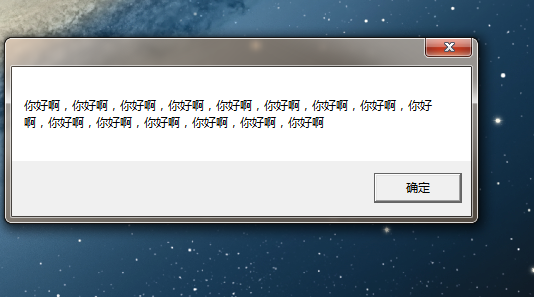

当然,也不是很好看,不过比原有的好多了。
不多说了,先上xmal代码:
 <Window x:Class="MESBox.MEGBox"

         xmlns="http://schemas.microsoft.com/winfx/2006/xaml/presentation"

         xmlns:x="http://schemas.microsoft.com/winfx/2006/xaml"

         Title="MEGBox"  MinWidth=""  WindowStyle="None"

         AllowsTransparency="True" Background="#AA000000"

         WindowStartupLocation="CenterScreen" Window.SizeToContent="WidthAndHeight"

         MouseLeftButtonDown="DragWindow"  ShowInTaskbar="False">

     <Window.Resources>

         <Style x:Key="ButtonStyle" TargetType="{x:Type Button}">

             <Setter Property="Foreground" Value="White"/>

             <Setter Property="Template">

                 <Setter.Value>

                     <!--设置样式 -->

                     <ControlTemplate TargetType="{x:Type Button}">

                         <Grid>

                             <Rectangle x:Name="Rectangle" Stroke="#FFFFFFFF" StrokeMiterLimit="1.000000" StrokeThickness="0.500000" RadiusX="12.5" RadiusY="12.5" Fill="#FF777777">

                             </Rectangle>

                             <ContentPresenter x:Name="ContentPresenter" SnapsToDevicePixels="{TemplateBinding SnapsToDevicePixels}" HorizontalAlignment="{TemplateBinding HorizontalContentAlignment}"

                          VerticalAlignment="{TemplateBinding VerticalContentAlignment}" RecognizesAccessKey="True"/>

                         </Grid>

                         <!-- 设置鼠标移到关闭按钮上的效果 -->

                         <ControlTemplate.Triggers>

                             <Trigger Property="IsMouseOver" Value="true">

                                 <Setter Property="Fill" TargetName="Rectangle">

                                     <Setter.Value>

                                         <SolidColorBrush Color="White"></SolidColorBrush>

                                     </Setter.Value>

                                 </Setter>

                                 <Setter Property="Foreground" Value="Black"></Setter>

                             </Trigger>

                         </ControlTemplate.Triggers>

                     </ControlTemplate>

                 </Setter.Value>

             </Setter>

         </Style>

     </Window.Resources>

     <Grid  Height="Auto">

         <Grid.RowDefinitions>

             <RowDefinition Height="Auto"></RowDefinition>

             <RowDefinition Height="Auto"></RowDefinition>

             <RowDefinition Height="Auto" ></RowDefinition>

         </Grid.RowDefinitions>

         <DockPanel Grid.Row="">

             <Button DockPanel.Dock="Right" Style="{StaticResource ButtonStyle}"

                     Width="" Height="" Content="X"

                     HorizontalAlignment="Right" VerticalAlignment="Top"

                     Margin="3,3,3,3"

                     Click="CloseWindow" >

             </Button>

         </DockPanel>

         <TextBlock Padding="10,15,10,15" Grid.Row="" x:Name="content"

                    Foreground="White" FontSize=""

                    MaxWidth="" TextWrapping="Wrap"/>

         <StackPanel Orientation="Horizontal"  FlowDirection="RightToLeft"  Grid.Row="">

             <Button Content="确定" Width=""   Click="CloseWindow" Height="" Margin="10,0,0,0" ></Button>

         </StackPanel>

     </Grid>

 </Window>
其中,window 的属性里WindowStyle="None",AllowsTransparency="True"是设置window无边框的关键,WindowStartupLocation="CenterScreen",使窗口初始化时在屏幕正中央出现,Background="#AA000000",#AA000000是具有半透明的颜色,另外,由于消息框的大小是随着内容的多少来变化的,所以并没有设置窗口的长和宽,因此设置Window.SizeToContent="WidthAndHeight",为的是使消息框能自适应内容。
另外,还要注意的是,因为window失去了边框和它的头部,所以是不能够对它进行拖拽的,这就很别扭了,所以我给MouseLeftButtonDown设置了一个DragWindow处理方法。
具体的cs代码如下:
 using System;

 using System.Collections.Generic;

 using System.Linq;

 using System.Text;

 using System.Windows;

 using System.Windows.Controls;

 using System.Windows.Data;

 using System.Windows.Documents;

 using System.Windows.Input;

 using System.Windows.Media;

 using System.Windows.Media.Imaging;

 using System.Windows.Shapes;

 namespace MESBox

 {

     /// <summary>

     /// MEGBox.xaml 的交互逻辑

     /// </summary>

     public partial class MEGBox : Window

     {

         private static MEGBox _Instance;

         public static MEGBox Instance

         {

             get

             {

                 if (_Instance == null)

                 {

                     _Instance = new MEGBox();

                 }

                 return _Instance;

             }

         }

         public MEGBox()

         {

             InitializeComponent();

         }

         public void Show(string content)

         {

             this.content.Text = "       " + content;

             this.ShowDialog();

         }

         private void DragWindow(object sender, MouseButtonEventArgs e)

         {

             this.DragMove();

         }

         public void CloseWindow(object sender, RoutedEventArgs args)

         {

             this.Close();

             _Instance = null;

         }

     }

 }
代码简单易懂,也不详细说了。
wpf 自定义消息框的更多相关文章
- WPF 自定义消息框(转)
相信很多人用过MessageBox.show(),是不是觉得这个消息框有点丑呢,反正我是觉得有点丑的,所以我自己重写了一个.先不说,上两幅图对比先: 当然,也不是很好看,不过比原有的好多了. 不多说了 ...
- WPF 文本框添加水印效果
有的时候我们需要为我们的WPF文本框TextBox控件添加一个显示水印的效果来增强用户体验,比如登陆的时候提示输入用户名,输入密码等情形.如下图所示: 这个时候我们除了可以修改TextBox控件的控件 ...
- WPF文本框密码框添加水印效果
WPF文本框密码框添加水印效果 来源: 阅读:559 时间:2014-12-31 分享: 0 按照惯例,先看下效果 文本框水印 文本框水印相对简单,不需要重写模板,仅仅需要一个VisualBrush ...
- WPF提示框效果
WPF提示框效果 1,新建WPF应用程序 2,添加用户控件Message 3,在Message中编写如下代码 <Border x:Name="border" BorderTh ...
- WPF 提示框、确认框、确认输入框
1.提示框 分为提示.异常.失败.成功几种类型 方法: /// <summary> /// 弹出提示 /// 标题:提示 /// </summary> /// <para ...
- 【Unity技巧】自定义消息框(弹出框)
写在前面 这一篇我个人认为还是很常用的,一开始也是实习的时候学到的,所以我觉得实习真的是一个快速学习工程技巧的途径. 提醒:这篇教程比较复杂,如果你不熟悉NGUI.iTween.C#的回调函数机制,那 ...
- WPF 文本框设置了阴影效果后,因左右的transform变化引发的拉伸渲染问题
背景 最近遇到一个动画执行时,文本位置变化的问题.如下图: 如果你仔细看的话,当星星变小时,文本往下降了几个像素. 貌似有点莫名其妙,因为控件之间并不在同一个Panel布局控件中,不存在高度限制变化引 ...
- WPF 矩形框8个控制点伸缩及拖拽
最近在研发图片控件矩形框8个控制点进行控制边框的大小.位置等信息,之前查阅了相关的信息,比如别人整合的类:ControlResizer 这个类虽然是好,但是很大程度上是有限制,换句话说,它需要你二次更 ...
- WPF密码框中禁止复制、粘贴
如题: " Margin="215,32,151,0" > <PasswordBox.CommandBindings> <CommandBindi ...
随机推荐
- WPF 模板
一.DataTemplate(数据模板)1.引用命名空间xmlns:别名="clr-namespace:命名空间" 2.调用命名空间下的类别和属性<Window.Resour ...
- 正则指引-量词demo
class Program { static void Main(string[] args) { string str = "1\"3"; var re1 = Rege ...
- JPA与Hibernate的关系
1.JPA JPA全称: Java Persistence API JPA通过JDK 5.0注解或XML描述对象-关系表的映射关系,并将运行期的实体对象持久化到数据库中. JPA的出现? JPA ...
- Intellij idea 乱码问题(英文操作系统)
英文操作系统导致 Debug 下的变量查看时显示乱码,可通过改变字体解决此问题.
- visual studio 2013使用技巧
去掉 引用提示 文本编辑器=>所有语言=>codelens visual studio 由于以前的函数求值超时,函数求值被禁用.必须继续执行才能重新启用函数求值 visual studio ...
- Android Studio开发JNI工程
转:http://www.2cto.com/kf/201412/361768.html 使用Android Sutdio创建一个新的工程后,接下来记录创建NDK工程的基本步骤. 本文将达到: 1. 创 ...
- WinStore控件之TextBox
1 TextBox简单实例 内容摘要:包含文本的选中,弹出什么类型的键盘,回车隐藏键盘, <Grid Name="root" Background="Transpa ...
- SSAS:菜鸟摸门
官方:SSAS 多维模型 Analysis Services 多维解决方案使用多维数据集结构来分析多个维度之间的业务数据. 多维模式是 Analysis Services 的默认服务器模式. 它包括针 ...
- U3D包大小优化之microlib
当迩想把最小类库发上来,迩需要把Stripping Level设置为Use micro mscorlib 这里是MICROLIB所能使用的包的类库列表:http://docs.unity3d.com/ ...
- JRE和JDK
转自:http://www.cnblogs.com/myitm/archive/2011/05/03/2035942.html 很多程序员已经干了一段时间java了依然不明白jdk与jre的区别. ...