
Centos6和7的区别
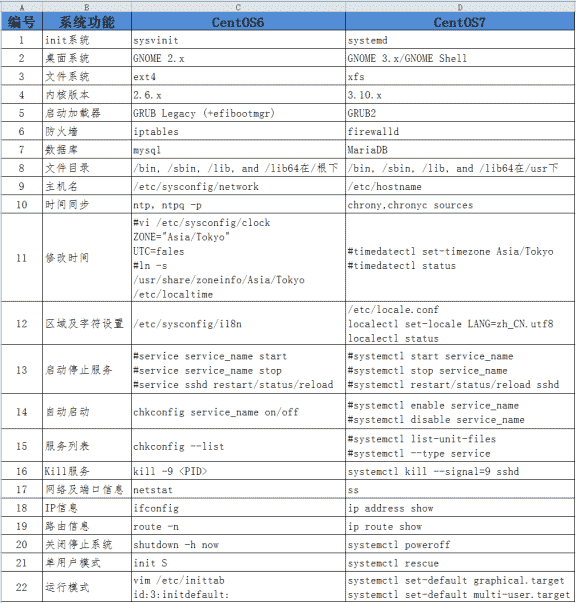
1、init系统
Linux 操作系统的启动首先从 BIOS 开始,接下来进入 boot loader,由 bootloader 载入内核,进行内核初始化。内核初始化的最后一步就是启动 pid 为 1 的 init 进程。这个进程是系统的第一个进程。它负责产生其他所有用户进程。init 以守护进程方式存在,是所有其他进程的祖先。init 进程非常独特,能够完成其他进程无法完成的任务。
Sysvinit就是 system V 风格的 init 系统,Sysvinit 用术语 runlevel 来定义"预订的运行模式"。Sysvinit 检查 '/etc/inittab' 文件中是否含有 'initdefault' 项。 这告诉 init 系统是否有一个默认运行模式。Sysvinit 使用脚本,文件命名规则和软链接来实现不同的 runlevel,串行启动各个进程及服务。
Systemd 是 Linux 系统中最新的初始化系统(init),它主要的设计目标是克服 sysvinit 固有的缺点,提高系统的启动速度。systemd 和 ubuntu 的 upstart 是竞争对手,预计会取代 UpStart。Systemd的目标就是尽可能启动更少的进程,尽可能将更多进程并行启动。
2、桌面系统升级,从gnome2.x----->gnome3.x
3、文件系统由原来的ext4升级到xfs格式
EXT4是第四代文件系统,是Linux下的日志文件系统。
xfs是一个64位文件系统,对于一个32位Linuix系统,文件和文件系统的大小被限制在16TB。
4、内核版本升级,由2.6.x--------->3.10.x
5、防火墙iptables---->firewalld
[root@centos7 ~]# systemctl status firewalld

● firewalld.service - firewalld - dynamic firewall daemon

   Loaded: loaded (/usr/lib/systemd/system/firewalld.service; disabled; vendor preset: enabled)  已经关闭

   Active: inactive (dead)  开机不启动

     Docs: man:firewalld(1)
[root@centos7 ~]# systemctl stop firewalld    #关闭firewalld

[root@centos7 ~]# systemctl disable firewalld.service  #关闭开机启动
安装iptables服务并配置
[root@centos7 ~]# yum install iptables-services -y

[root@centos7 ~]# systemctl status iptables

● iptables.service - IPv4 firewall with iptables

   Loaded: loaded (/usr/lib/systemd/system/iptables.service; disabled; vendor preset: disabled)

   Active: inactive (dead)

[root@centos7 ~]# systemctl start iptables

[root@centos7 ~]# systemctl enable iptables.service

Created symlink from /etc/systemd/system/basic.target.wants/iptables.service to /usr/lib/systemd/system/iptables.service.

[root@centos7 ~]# systemctl status iptables.service

● iptables.service - IPv4 firewall with iptables

   Loaded: loaded (/usr/lib/systemd/system/iptables.service; enabled; vendor preset: disabled)

   Active: active (exited) since Sun 2018-03-25 14:07:03 CST; 44s ago

 Main PID: 9727 (code=exited, status=0/SUCCESS)

Mar 25 14:07:03 centos7 systemd[1]: Starting IPv4 firewall with iptables...

Mar 25 14:07:03 centos7 iptables.init[9727]: iptables: Applying firewall rules: [  OK  ]

Mar 25 14:07:03 centos7 systemd[1]: Started IPv4 firewall with iptables.

[root@centos7 ~]# systemctl restart iptables.service

[root@centos7 ~]# iptables -L -n

Chain INPUT (policy ACCEPT)

target     prot opt source               destination

ACCEPT     all  --  0.0.0.0/0            0.0.0.0/0            state RELATED,ESTABLISHED

ACCEPT     icmp --  0.0.0.0/0            0.0.0.0/0

ACCEPT     all  --  0.0.0.0/0            0.0.0.0/0

ACCEPT     tcp  --  0.0.0.0/0            0.0.0.0/0            state NEW tcp dpt:22

REJECT     all  --  0.0.0.0/0            0.0.0.0/0            reject-with icmp-host-prohibited

Chain FORWARD (policy ACCEPT)

target     prot opt source               destination

REJECT     all  --  0.0.0.0/0            0.0.0.0/0            reject-with icmp-host-prohibited

Chain OUTPUT (policy ACCEPT)

target     prot opt source               destination
[root@centos7 ~]# cat /etc/sysconfig/iptables  #iptables配置文件

# sample configuration for iptables service

# you can edit this manually or use system-config-firewall

# please do not ask us to add additional ports/services to this default configuration

*filter

:INPUT ACCEPT [0:0]

:FORWARD ACCEPT [0:0]

:OUTPUT ACCEPT [0:0]

-A INPUT -m state --state RELATED,ESTABLISHED -j ACCEPT

-A INPUT -p icmp -j ACCEPT

-A INPUT -i lo -j ACCEPT

-A INPUT -p tcp -m state --state NEW -m tcp --dport 22 -j ACCEPT

-A INPUT -j REJECT --reject-with icmp-host-prohibited

-A FORWARD -j REJECT --reject-with icmp-host-prohibited

COMMIT
6、6---->7 默认数据库Mysql---->MariaDB
Centos6和7的区别的更多相关文章
- Linux运维:CentOS6和7的区别
Liunx笔记:CentOS6和CentOS7的区别 路飞学城运维人员 在线流程图软件 Ago linux运维群: 93324526 笔者QQ:578843228 常用安装包下载 yum instal ...
- Linux启动流程CentOS6和7的区别
目 录 Linux启动流程 I 第1章 CentOS6启动流程 1 1.1 BIOS 1 1.2 MBR 1 1.3 GRUB 1 1.4 kernel(加载内核) ...
- 2、centos6和centos7的区别
services使用了systemd来代替sysvinit管理. systemd是Linux下的一种init软件,由Lennart Poettering带头开发,并在LGPL 2.1及其后续版本许可证 ...
- Centos6与Centos7的区别
前言 centos7与6之间最大的差别就是初始化技术的不同,7采用的初始化技术是Systemd,并行的运行方式,除了这一点之外,服务启动.开机启动文件.网络命令方面等等,都说6有所不同.让我们先来了解 ...
- centos6和centos7的区别和常用的简单配置优化
- 本节主要介绍centos6和centos7的区别和常用的简单配置优化:- 第一部分: - 1.对比文件系统 - 2.对比防火墙,内核版本,默认数据库 - 3.对比时间同步,修改时区,修改语言 - ...
- CentOS6跟CentOS7的区别
1.CentOS6在/etc/profile配置环境变量是JAVAHOME,CentOS7是{JAVA_HOME} 2.
- CentOS7中systemctl的使用与CentOS6中service的区别
https://blog.csdn.net/u012834750/article/details/80501440 从CentOS 7.x开始,CentOS开始使用systemd服务来代替daemon ...
- Linux系统发行版本及其区别
1 Linux系统组成 Linux操作系统=Linux内核+GNU软件及系统软件+必要的应用程序.下表为Linux系统各组成部分的贡献人员: Linux内核 GNU组件(gcc.bash) 其他必要应 ...
- RAID磁盘阵列及CentOS7系统启动流程(week2_day3)--技术流ken
RAID概念 磁盘阵列(Redundant Arrays of Independent Disks,RAID),有“独立磁盘构成的具有冗余能力的阵列”之意. 磁盘阵列是由很多价格较便宜的磁盘,以硬件( ...
随机推荐
- iPhone与Android手机 各个型号的UserAgent
摘要:userAgent 属性是一个只读的字符串,声明了浏览器用于 HTTP 请求的用户代理头的值.一般来讲,它是在navigator.appCodeName 的值之后加上斜线和navigator.a ...
- java算法 第七届 蓝桥杯B组(题+答案) 8.四平方和
8.四平方和 (程序设计) 四平方和定理,又称为拉格朗日定理:每个正整数都可以表示为至多4个正整数的平方和.如果把0包括进去,就正好可以表示为4个数的平方和. 比如:5 = 0^2 + 0^2 + ...
- jQuery autocomplete -默认
<!doctype html> <html> <head> <meta name="content-type" content=" ...
- Maven详解【面试+工作】 各种安装 没用
1 Maven介绍1.1 项目开发中遇到的问题 1.都是同样的代码,为什么在我的机器上可以编译执行,而在他的机器上就不行? 2.为什么在我的机器上可以正常打包,而配置管理员却打不出来? 3.项目组加入 ...
- redis高可用 - 主从复制
工作需要,调研了一下redis的复制实现.在2.8版本之前和之后,复制方式有所不同.2.8之前的复制方式对于初次复制数据没有问题,对于断连接重新复制比较耗性能,因为都是全量复制.2.8之后对断线重连做 ...
- leetcode - database - 177. Nth Highest Salary (Oracle)
题目链接:https://leetcode.com/problems/nth-highest-salary/description/ 题意:查询出表中工资第N高的值 思路: 1.先按照工资从高到低排序 ...
- [Training Video - 3] [Groovy in Detail] Non-static and Static functions, initializing log inside class
log.info "starting" // we use class to create objects of a class Planet p1 = new Planet() ...
- System.Reflection.Emit摘记
动态类型在.net中都是用什么类型来表示的.程序集:System.Reflection.Emit.AssemblyBuilder(定义并表示动态程序集)构造函数:System.Reflection.E ...
- 1056 IMMEDIATE DECODABILITY
题目链接: http://poj.org/problem?id=1056 题意: 给定编码集, 判断它是否为可解码(没有任何一个编码是其他编码的前缀). 分析: 简单题目, 遍历一遍即可, 只需判断两 ...
- 使用Selenium&PhantomJS的方式爬取代理
前面已经爬取了代理,今天我们使用Selenium&PhantomJS的方式爬取快代理 :快代理 - 高速http代理ip每天更新. 首先分析一下快代理,如下 使用谷歌浏览器,检查,发现每个代理 ...