
最受欢迎的5款Node.js端到端测试框架
|
casper.test.begin('Github Search', function suite(test) {
casper.start('https://github.com', function () { // 打开首页
test.assertVisible('.js-site-search-form', 'should search input visible');
this.fill('.js-site-search-form', { q: 'casperjs' }, true); // 键入搜索词、并提交
});
casper.then(function () {
test.assertEval(function() { // 确认搜索结果是 10
return __utils__.findAll('.repo-list-item').length >= 10;
}, 'should show 10 results');
});
casper.then(function () {
this.click('.repo-list-item h3 a'); // 点击第1条结果
});
var location = null;
casper.then(function () { // 这里是取环境变量
test.assertVisible('.repository-content', 'should repo detail visible');
location = this.evaluate(function () {
return window.location;
});
});
casper.then(function () { // 确认目前跳转到了 casperjs 官方仓库
test.assertEquals(location.pathname, '/casperjs/casperjs', 'should casperjs repo found');
});
casper.run(function () {
test.done();
});
});
|
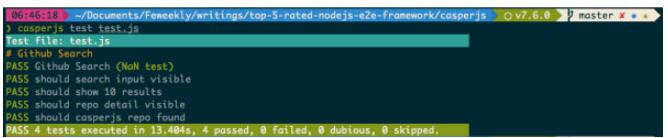
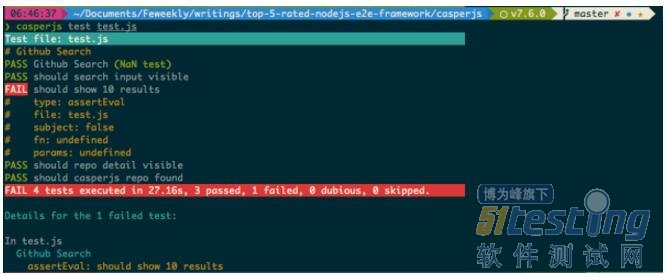
|
describe('angularjs homepage todo list', function () {
browser.ignoreSynchronization = true; // 不启用智能等待,因为 github 不是用 angluar 编写的
browser.get('https://github.com');
it('should search input visible', function () {
var searchInput = element(by.className('js-site-search-focus'));
var searchForm = element(by.className('js-site-search-form'));
expect(searchInput.isDisplayed()).toEqual(true);
searchInput.sendKeys('protractor');
searchForm.submit();
});
it('should show 10 results', function () {
var searchList = element.all(by.className('repo-list-item'));
expect(searchList.count()).toEqual(10);
element(by.css('.repo-list-item h3 a')).click();
});
it('should repo detail visible', function () {
var repoContent = element.all(by.className('repository-content'));
expect(repoContent.isDisplayed()).toEqual([true]);
});
it('should protractor repo found', function (done) {
browser.executeScript(function () {
return window.location;
}).then(function (location) {
expect(location.pathname).toEqual('/angular/protractor');
done();
});
});
});
|
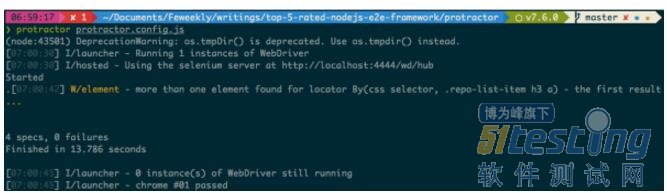
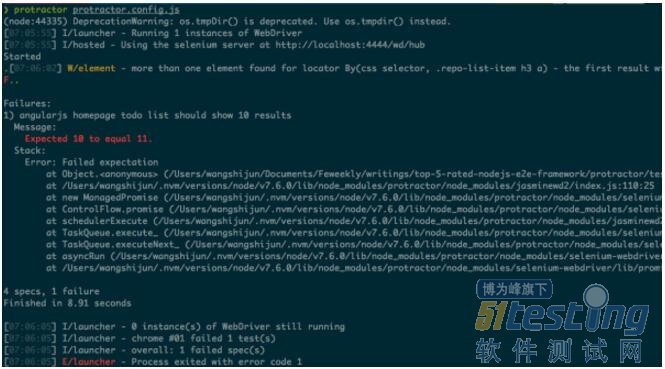
|
module.exports = {
'Github Search': function (browser) {
browser // 打开首页、填写搜索词、提交搜索表单
.url('https://github.com')
.assert.visible('.js-site-search-focus', 'should search input visible')
.setValue('.js-site-search-focus', 'nightwatch')
.submitForm('.js-site-search-form')
.pause(1000);
browser.execute(function () { // 确认展示 10 条搜索结果
return document.querySelectorAll('.repo-list-item').length;
}, function (args) {
browser.assert.equal(args.value, 10, 'should show 10 results');
});
browser.click('.repo-list-item h3 a').pause(1000);
browser.assert.visible('.repository-content', 'should repo detail visible');
browser.execute(function () {
return window.location;
}, function (args) { // 确认打开了 nightwatch 官网
browser.assert.equal(args.value.pathname, '/nightwatchjs/nightwatch', 'should nightwatch repo found');
});
browser.end();
}
};
|
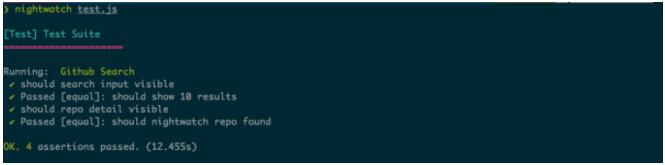
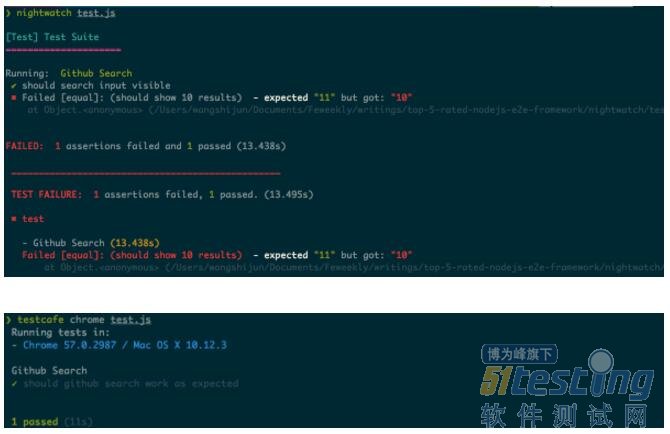
|
import { Selector } from 'testcafe';
fixture `Github Search`
.page `https://github.com`;
test('should github search work as expected', async t => {
const searchInput = Selector('.js-site-search-focus');
const searchList = Selector('.repo-list-item');
const resultItem = Selector('.repo-list-item h3 a');
const repoContent = Selector('.repository-content');
await t.setTestSpeed(0.8);
await t.expect(searchInput.exists).eql(true, 'should search input visible');
await t.typeText(searchInput, 'testcafe');
await t.pressKey('enter');
await t.expect(searchList.count).eql(10, 'should show 10 results');
await t.click(resultItem);
await t.expect(repoContent.exists).eql(true, 'should repo detail visible');
const location = await t.eval(() => window.location);
await t.expect(location.pathname).eql('/DevExpress/testcafe', 'should testcafe repo found');
});
|

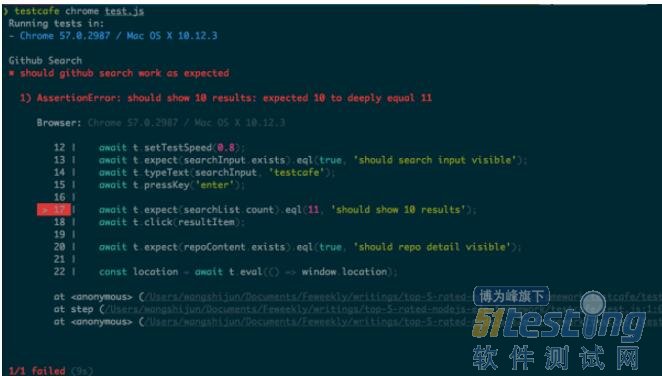
|
Feature('Github Search');
Scenario('search codecept repo', (I) => {
I.amOnPage('https://github.com');
I.seeElement('.js-site-search-focus');
I.fillField('.js-site-search-focus', 'codeceptjs');
I.pressKey('Enter');
I.seeElement('.repo-list-item');
I.click('.repo-list-item h3 a');
I.seeElement('.repository-content');
I.seeInCurrentUrl('/Codeception/CodeceptJS');
});
|

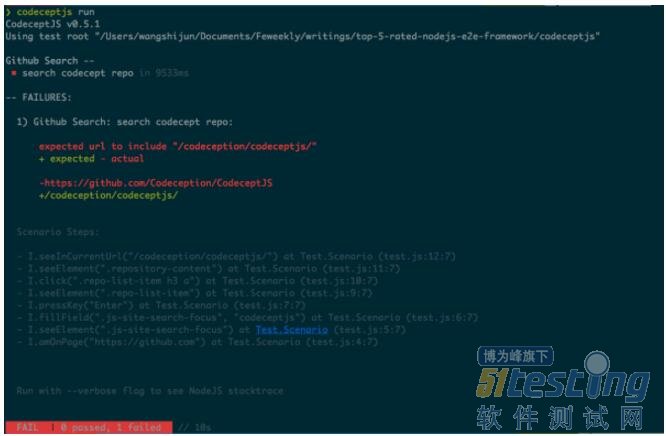
最受欢迎的5款Node.js端到端测试框架的更多相关文章
- node.js之十大Web框架
之前接触过Node.js是因为好奇大前端越来越能干了,连我后台的饭碗都要抢了,太嚣张了,于是我想打压打压它,然后就这样接触它了.再到后来是因为Settings-Sync插件二次开发,我需要用node. ...
- 教你通过Node.js漏洞完成渗透测试
本篇文章较为详细的讲述了通过node.js的已知漏洞来完成渗透测试的过程,介绍了node.js存在的漏洞可以在多种工具下的不同利用方式.因为我认为会对论坛部分web安全新手有所帮助,所以整理到论坛中. ...
- Node.js+Protractor+vscode搭建测试环境(1)
1.protractor简介 官网地址:http://www.protractortest.org/ Protractor是一个end-to-end的测试框架,从网络上得到的答案是Protractor ...
- [Node.js] OAuth 2 和 passport框架
原文地址:http://www.moye.me/?p=592 OAuth是什么 OAuth(开放授权)是一个开放标准,允许用户让第三方应用访问该用户在某一网站上存储的私密的资源(如照片,视频,联系人列 ...
- Node.js实现PC端类微信聊天软件(四)
Github StackChat 学习回顾 React和Electron结合 TypeError: fs.existsSync is not a function 在React组件里引入electro ...
- node.js创建简单服务测试请求数据
工具:安装node: 1,创建文件夹 server, 2 ,在server文件夹下分别创建server.js 和 package.json 文件 3,server.js 代码: var express ...
- Node.js实现PC端类微信聊天软件(一)
Github StackChat 技术栈 写这个软件StackChat的主要目的是巩固练习Node和对React的实践,也是为了学习东西,所以选用了这些自己还没在项目里使用过的技术,边学变写 Elec ...
- node.js安装express模块应用服务框架
1.创建工程文件夹case-04 2.在终端窗口进入文件夹目录,并输入:npm init,并一路回车,最后看到在case-04文件夹里自动生成了package.json 文件 3.打开vscode,进 ...
- Vue3+Typescript+Node.js实现微信端公众号H5支付(JSAPI v3)教程--各种填坑
----微信支付文档,不得不说,挺乱!(吐槽截止) 功能背景 微信公众号中,点击菜单或者扫码,打开公众号中的H5页面,进行支付. 一.技术栈 前端:Vue:3.0.0,typescript:3.9.3 ...
随机推荐
- 配置GIT DIFF/MERGE TOOL
关闭prompt backup git config --global difftool.prompt false git config --global mergetool.prompt false ...
- struts2标签使用详解
Struts2常用标签总结一 介绍1.Struts2的作用 Struts2标签库提供了主题.模板支持,极大地简化了视图页面的编写,而且,struts2的主题.模板都提供了很好的扩展性.实现了更好的代码 ...
- Primer 三四五章
序言 看了看表,再看了看书,2个小时就没啦(又到了吃中饭的时间,O(∩_∩)O哈哈~).一个上午感觉啥也没干呢,不过还是从书上看到了一些东西,对于这些基础的知识,还是有些东西没有记得很深,所以还是花了 ...
- Redis实现高并发下的抢购、秒杀功能
博主最近在项目中遇到了抢购问题!现在分享下.抢购.秒杀是如今很常见的一个应用场景,主要需要解决的问题有两个:1 高并发对数据库产生的压力2 竞争状态下如何解决库存的正确减少("超卖" ...
- C# 释放资源的规范写法
static class CSharp_3 { /* ---------------------------------------- * 以下学习资源的释放:IDispose和析构函数 * 1.ID ...
- Matlab图像处理教程
虽然典型算法的开发是基于理论支持的,但这些算法的实现几乎总是要求参数估计,并常常进行算法修正与候选求解方案的比较. MATLAB由LINPACK和EISPACK项目开发,最初用于矩阵处理.今天,MAT ...
- ASP.NET Identity + Entity Framework 6 注意
最近一个项目使用ASP.NET Identity + Entity Framework 6开发,本来一切正常. 某时注意到,更改密码功能程序执行起来没有问题,界面上也报修改密码成功,但实际上密码并没有 ...
- Vue.js的库,包,资源的列表大全。
官方资源 外部资源 社区 播客 官方示例 入门 开发工具 语法高亮 代码片段 自动补全 组件集合 库和插件 路由 ajax/数据 状态管理 校验 UI组件 i18n 示例 模板 脚手架 整合 插件/指 ...
- 浅谈HTTPS以及Fiddler抓取HTTPS协议(摘抄)
一.浅谈HTTPS 我们都知道HTTP并非是安全传输,在HTTPS基础上使用SSL协议进行加密构成的HTTPS协议是相对安全的.目前越来越多的企业选择使用HTTPS协议与用户进行通信,如百度.谷歌等. ...
- Android-ContentProvider简单的增删改查
注意:在ContentProvider里面写对数据库增删改查的时候,千万不能 db.close(); cursor.close(); 等操作,不然其他应用访问不到数据,也没有必要写isOpen(); ...