
.Net DI(Dependency Injection)依赖注入机制
1、简介
DI:Dependency Injection,即依赖注入,他是IOC的具体实现。
在DI中,底层服务对象不再负责依赖关系的创建,而是交由顶端调用进行管理注入
好处:降低组件之间的耦合度,使代码更加灵活
2、实例
我们举个例子,有个User Login的功能,Login需要通过DB验证,DB需要读取Config和进行Log记录
依赖关系如图
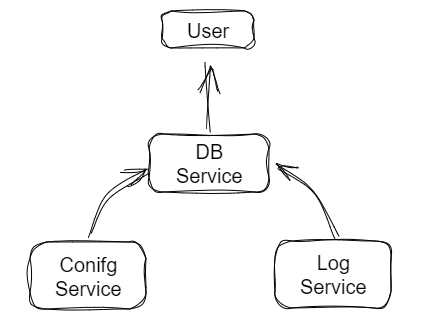
DI的概念,就是把DB的依赖(Config&Log)提到User层,该怎么实现呢?
接着往下走...
3、代码结构
通过代码我们来看一下原理。
框架说明:
1)Service类库:Standard2.1,类库推荐都使用Standard,这样可以在Framework、core、net之间通用
2)UserSite:Net5 控制台程序
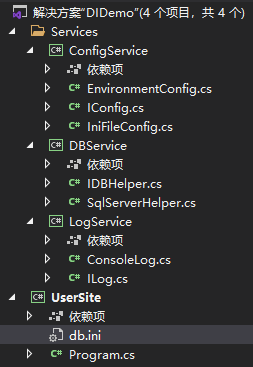
编码内容:
ConfigService,包含两种实现方式
namespace ConfigService

{

    public interface IConfig

    {

        public string GetValue(string key);//获取name的值

    }

}

using System;

namespace ConfigService

{

    public class EnvironmentConfig : IConfig //从环境变量里面读取配置信息,自行添加到电脑User里面

    {

        public string GetValue(string key)

        {

            return Environment.GetEnvironmentVariable(key, EnvironmentVariableTarget.User);

        }

    }

}

using System.IO;

using System.Linq;

namespace ConfigService

{

    public class IniFileConfig : IConfig //从ini文件读取配置信息,UserSite如果注入此服务,需要创建ini文件

    {

        string _filePath;

        public IniFileConfig(string filePath)

        {

            this._filePath = filePath;

        }

        public string GetValue(string key)

        {

            string str = "";

            var kv = File.ReadAllLines(_filePath)

                .Select(x => x.Split("="))

                .Select(x => new { key = x[0], value = x[1] })

                .SingleOrDefault(x => x.key == key);

            return kv?.value;

        }

    }

}
LogService,简单实现
namespace LogService

{

    public interface ILog

    {

        public void LogInfo(string msg);

        public void LogError(string msg);

    }

}

using System;

namespace LogService

{

    public class ConsoleLog : ILog

    {

        public void LogInfo(string msg)

        {

            Console.WriteLine($"Info:{msg}");

        }

        public void LogError(string msg)

        {

            Console.WriteLine($"Error:{msg}");

        }

    }

}
DBService,只是做思路演示,这边只要读取到dblink就算访问数据库成功
namespace DBService

{

    public interface IDBHelper

    {

        public bool CheckUser(string acc, string pwd);

    }

}

using LogService;

using ConfigService;

namespace DBService

{

    public class SqlServerHelper : IDBHelper

    {

        private IConfig _config;

        private ILog _log;

        public SqlServerHelper(IConfig config,ILog log) //Net默认从构造函数进行以来注入

        {

            this._config = config;

            this._log = log;

        }

        public bool CheckUser(string acc, string pwd)

        {

            var dblink = this._config.GetValue("dblink");

            this._log.LogInfo($"获取数据库链接={dblink}");

            if (string.IsNullOrWhiteSpace(dblink))

            {

                this._log.LogError($"登录失败");

                return false;

            }

            this._log.LogInfo($"登录成功-{acc}-{pwd}");

            return true;

        }

    }

}
主题来了,UserSite Program代码如下:
我们需要注入SqlServerHelper服务,就需要将其依赖项一同注入,这样就将具体实现类提到了顶端注入,从而进行解耦
比如:读取配置文件,我希望从哪读取,就注入哪一个(注意,都注入的话,IConfig会以后注入的为准)
using System;

using ConfigService;

using LogService;

using DBService;

using Microsoft.Extensions.DependencyInjection;

namespace UserSite

{

    class Program

    {

        static void Main(string[] args)

        {

            ServiceCollection services = new ServiceCollection();

            services.AddScoped<ILog, ConsoleLog>();

            services.AddScoped<IConfig, EnvironmentConfig>(); //1、我希望从环境变量读取配置

            services.AddScoped(typeof(IConfig), x => new IniFileConfig("db.ini")); //2、我希望从ini读取配置

            services.AddScoped<IDBHelper, SqlServerHelper>();

            using (var sp = services.BuildServiceProvider())

            {

                var service = sp.GetRequiredService<IDBHelper>();

                service.CheckUser("kxy", "123");

            };

            Console.ReadLine();

        }

    }

}
DI的简单原理就是这样。。
.Net DI(Dependency Injection)依赖注入机制的更多相关文章
- spring in action学习笔记一:DI(Dependency Injection)依赖注入之CI(Constructor Injection)构造器注入
一:这里先说一下DI(Dependency Injection)依赖注入有种表现形式:一种是CI(Constructor Injection)构造方法注入,另一种是SI(Set Injection) ...
- Spring框架xml配置文件 复杂类型属性注入——数组 list map properties DI dependency injection 依赖注入——属性值的注入依赖于建立的对象(堆空间)
Person类中的各种属性写法如下: package com.swift.person; import java.util.Arrays; import java.util.List; import ...
- Spring4 -03 -Dependency Injection (依赖注入) : 代码体现/配置xml/测试
DI:中文名称:依赖注入 英文名称((Dependency Injection) DI 是什么? 3.1 DI 和IoC 是一样的,差不多一样的技术和模板! 3.2 当一个类(A)中需要依赖另一个类( ...
- asp.net core 系列之Dependency injection(依赖注入)
这篇文章主要讲解asp.net core 依赖注入的一些内容. ASP.NET Core支持依赖注入.这是一种在类和其依赖之间实现控制反转的一种技术(IOC). 一.依赖注入概述 1.原始的代码 依赖 ...
- Benefits of Using the Spring Framework Dependency Injection 依赖注入 控制反转
小结: 1. Dependency Injection is merely one concrete example of Inversion of Control. 依赖注入是仅仅是控制反转的一个具 ...
- 基于注解的DI(DI:Dependency Injection 依赖注入)
注解方式xml里面就不需要注册bean了. 构建注解需要 1.导入spring-aop-4.2.1.RELEASE.jar 包 2.需要更换配置文件头,即添加相应的约束. 现在的Student类就要 ...
- 理解依赖注入(DI - Dependency Injection)
系列教程 Spring 框架介绍 Spring 框架模块 Spring开发环境搭建(Eclipse) 创建一个简单的Spring应用 Spring 控制反转容器(Inversion of Contro ...
- ASP.NET Core Web 应用程序系列(一)- 使用ASP.NET Core内置的IoC容器DI进行批量依赖注入(MVC当中应用)
在正式进入主题之前我们来看下几个概念: 一.依赖倒置 依赖倒置是编程五大原则之一,即: 1.上层模块不应该依赖于下层模块,它们共同依赖于一个抽象. 2.抽象不能依赖于具体,具体依赖于抽象. 其中上层就 ...
- 基于.NET平台的分层架构实战(六)——依赖注入机制及IoC的设计与实现[转]
原文:http://www.cnblogs.com/leoo2sk/archive/2008/06/19/1225223.html 我们设计的分层架构,层与层之间应该是松散耦合的.因为是单向单一调用, ...
- ASP.NET Core Web 应用程序系列(二)- 在ASP.NET Core中使用Autofac替换自带DI进行批量依赖注入(MVC当中应用)
在上一章中主要和大家分享在MVC当中如何使用ASP.NET Core内置的DI进行批量依赖注入,本章将继续和大家分享在ASP.NET Core中如何使用Autofac替换自带DI进行批量依赖注入. P ...
随机推荐
- Semaphore信号量源码解析(基于jdk11)
目录 1.Semaphore信号量源码解析(基于jdk11) 1.1 Semaphore概述 1.2 Semaphore的原理 1.2.1 基本结构(jdk11) 1.2.2 可中断获取信号量 1.2 ...
- 关于解决pip安装python第三方库超时的问题
直接换源下载 1. 设置超时时间,安装txt 文件内安装包 pip install -i https://pypi.tuna.tsinghua.edu.cn/simple --default-time ...
- CTF隐写术总结
CTF隐写术总结 1.查看图像属性及详细信息 或者查看图像的高度,利用winhex等工具改变图像宽度或高度,查看是否有隐藏信息. 2.利用winhex或nodepad++打开搜索ctf,flag,ke ...
- python2和python3的区别(1)
1.python2和python3的解释器的默认编码不同 python2解释器的编码默认用的是 ascii python3解释器的编码默认用的 utf-8 2.python2和python3输入的表示 ...
- ChatGPT杀疯了,这人工智能也太离谱了吧
转载请注明出处️ 作者:测试蔡坨坨 原文链接:caituotuo.top/2ac8440d.html 你好,我是测试蔡坨坨. 这几天被ChatGPT刷屏,各大网站平台都能看到关于它的文章和视频,上线短 ...
- 自定义RBAC(4)
您好,我是湘王,这是我的博客园,欢迎您来,欢迎您再来- 前面把RBAC的权限系统设计过程都讲清楚了,现在就来实现它.大致分这么几个步骤: 1.先定义出完整的权限系统表结构: 2.实现Entity.Da ...
- MySQL事务(四大特性)-存储过程
目录 一:事务 1.四大特性(ACID) 2.事物存在的必要性(真实比喻) 3.如何使用事务 4.开启事务-回滚-确认 二:事务案例实战 1.模拟消费 2.创建 3.插入数据 4.开启事务 5.修改操 ...
- 第一篇:前端基础之HTML
HTML介绍 Web服务本质 import socket sk = socket.socket() sk.bind(("127.0.0.1", 8080)) sk.listen(5 ...
- 1+x初级Web的关键词填写
H5+CSS: 声明HTML网页标准:<!DOCTYPE> 图片标签 img css颜色样式color 定位 position 绝对absolute 相对 relative 外边距:mar ...
- netcore下死RabbitMQ队列、死信队列、延时队列及小应用
关于安装rabbitmq这里一笔掠过了. 下面进入正题: 1.新建aspnetcorewebapi空项目,NormalQueue,删除controllers文件夹已经无关的文件,这里为了偷懒不用con ...