
What?JMeter做UI自动化!
JMeter做UI自动化
不推荐,好别扭,但可行
插件安装
- 搜插件selenium,安装

添加config
- 添加线程组
- 右键线程组->添加->配置元件->jp@gc - Chrome Driver Config

- option和proxy不解释了
添加Sampler
右键线程组->添加->取样器->jp@gc - WebDriver Sampler
script language 选择:JavaScript(可惜没有python)
界面说明
- Name - for the test that each Web Driver Sampler will have. This is used by the reports.
- Parameters - is optional and allows the reader to inject variables used in the script section.
- Script - allows the scripter to control the Web Driver and capture times and success/failure outcomes
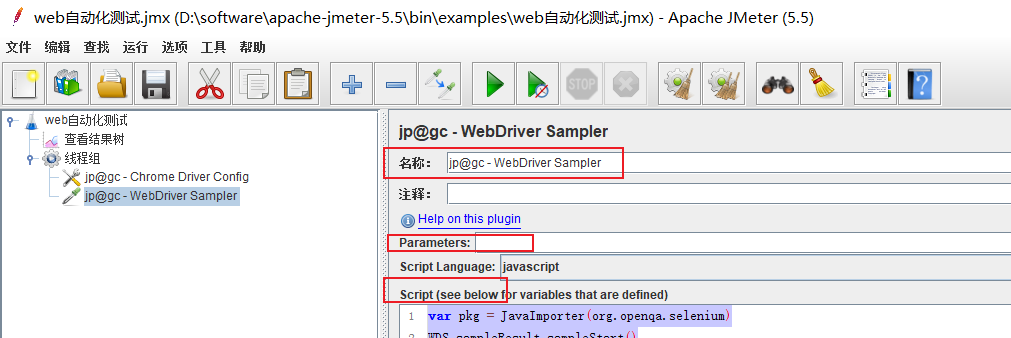
DEMO代码及解释
- 示例代码
// 相当于python的from  import   java的import

var pkg = JavaImporter(org.openqa.selenium)

// Start capturing the sampler timing 开始捕获取样

WDS.sampleResult.sampleStart()

// 代码块

WDS.browser.get('http://114.116.2.138:8090/forum.php')

WDS.browser.findElement(pkg.By.id('ls_username')).sendKeys('admin')

// 等价于 WDS.browser.findElement(org.openqa.selenium.By.id('ls_username')).sendKeys('admin')

WDS.browser.findElement(pkg.By.id('ls_password')).sendKeys('123456')

// js语法定义了一个 sleep函数 ,让你从python平滑过渡到 js

var sleep = function(time) {

    var timeOut = new Date().getTime() + parseInt(time, 10);

    while(new Date().getTime() <= timeOut) {}

}

WDS.browser.findElement(pkg.By.cssSelector('.pn.vm')).click()

sleep(3000)

// 断言部分

if(WDS.browser.getCurrentUrl() != 'http://114.116.2.138:8090/forum.php') {

    WDS.sampleResult.setSuccessful(false)

    WDS.sampleResult.setResponseMessage('Expected url to be XXX')

}

else{

	WDS.sampleResult.setSuccessful(true)

}

// Stop the sampler timing 停止取样

WDS.sampleResult.sampleEnd()
WDS就是Web Driver Sampler
麻烦的是你可能并没有自动补齐(好像可以出来,但没研究),这个对象有哪些属性方法
深入的研究要看
https://www.selenium.dev/selenium/docs/api/java/org/openqa/selenium/package-summary.html
比如显式等待的一个应用
var pkg = JavaImporter(org.openqa.selenium, org.openqa.selenium.support.ui)

var wait = new pkg.WebDriverWait(WDS.browser, 5, 0.5)

wait.until(pkg.ExpectedConditions.presenceOfElementLocated(pkg.By.cssSelector('ul.suggestions')))
关于WDS的一些属性
- WDS.name - is the value provided in the Name field (above).
- WDS.vars - JMeterVariables - e.g.
vars.get("VAR1"); vars.put("VAR2","value"); vars.remove("VAR3"); vars.putObject("OBJ1",new Object());
- WDS.props - JMeterProperties (class
java.util.Properties) - e.g.
props.get("START.HMS"); props.put("PROP1","1234");
- WDS.ctx - JMeterContext
- WDS.parameters - is the value provided in the Parameters field (above).
- WDS.args - is an array of the strings provided in the Parameters field, but split by the space ' ' character. This allows the scripter to provide a number of strings as input and access each one by position.
- WDS.log - is a Logger instance to allow the scripter to debug their scripts by writing information to the jmeter log file (JMeter provides a GUI for its log entries)
- WDS.browser - is the configured Web Driver browser that the scripter can script and control. There is detailed documentation on this object on the Selenium Javadocs page.
- WDS.sampleResult - is used to log when the timing should start and end. Furthermore, the scripter can set success/failure state on this object, and this SampleResult is then used by the JMeter reporting suite. The JMeter javadocs provide more information on the API of this object
What?JMeter做UI自动化!的更多相关文章
- 使用appium+python做UI自动化的demo
使用appium+python做UI自动化的demo 案例使用的知乎app,下载最新的知乎apk,存在了电脑上,只需要配置本机上app目录,不需要再配置appPackage和appActivity # ...
- 小心!做 UI 自动化一定要跨过这些坑
一 .引子 UI自动化,在移动互联网时代的今天,一直都是在各大测试社区最为火爆的一个TOPIC.甚至在测试同行面前一提起自动化,大家就会自然而然的问:“恩,你们是用的什么框架?appium?还是rob ...
- 如何做ui自动化---步骤详解
第一步: 得到功能测试的常规用例,查看是否可以进行自动化,要明确,自动化不是为了自动化而自动化,自动化是节省人力,主要做回归测试,如果变动性特别大,不建议做自动化,具体可查看其它文章“什么适合做自动化 ...
- selenium做UI自动化时,模拟鼠标各种操作的ActionChains的用法
1.selenium做自动化的时候,需要模拟鼠标进行单击.双击.右键.拖拽等操作,selenium提供了ActionChains类来进行处理. 2.执行原理:当你调用ActionChains的方法时, ...
- UI自动化,你值得拥有
去年春节联欢晚会,为了那张“敬业福”,全家都卯足了劲儿“咻一咻”,连节目都顾不上看了.当时我就想,要是能自动化该多好,不停点击屏幕,屏幕不疼手还疼呢,何况还不好分心,生怕错过了“敬业福”.玩“咻一咻” ...
- UI自动化测试之Jenkins配置
前一段时间帮助团队搭建了UI自动化环境,这里将Jenkins环境的一些配置分享给大家. 背景: 团队下半年的目标之一是实现自动化测试,这里要吐槽一下,之前开发的测试平台了,最初的目的是用来做接口自动化 ...
- java -ui自动化初体验
本文来讲一下ui自动化的环境搭建,以及最初级的打开网页操作 说起ui自动化,想想大概是前年的时候我开始接触和学习的吧,怎么说呢无论是pc还是app,ios还是android,确实很神奇而且很华丽,但是 ...
- UI自动化(七)selenium简述
1.什么是ui自动化模拟人用代码的方式去操作页面2.为什么要做ui自动化后期迭代的时候,老功能比较多,人工维护成本大这时候考虑引入ui自动化3.什么时候做ui自动化项目稳定,不在修改的某些老功能,为这 ...
- UI自动化selenium
1.什么是UI自动化?模拟人用代码的方式去操作页面2.为什么要做UI自动化?后期迭代的时候,老功能比较多,人工维护成本较大,重复性工作较多,这个时候就考虑因为UI自动化3.什么时候做UI自动化?项目稳 ...
- WebDriver基本操作入门及UI自动化练手页面
在这里集中了我们在做UI自动化时常见的一些控件操作.希望能对新手有帮助. 下载地址:http://files.cnblogs.com/zhangfei/demo.rar package com.tes ...
随机推荐
- day23 JDBC(Java Database Connection)连接 与 通配符与插入返回主键
JDBC配置connector的jar包 1.项目下新建lib文件夹 2.将mysql-connector-java-版本号.jar复制到lib目录下 3.右键项目名,选择Properties选项 4 ...
- 一图看懂Hadoop中的MapReduce与Spark的区别:从单机数据系统到分布式数据系统经历了哪些?
今日博主思考了一个问题:Hadoop中的MapReduce与Spark他们之间到底有什么关系? 直到我看到了下面这张图 废话不多说先上图 我们知道,单机数据系统,在本地主机上针对数据有单机本地存储操作 ...
- Mac系统下word论文参考文献更新域
写论文的时候可能会遇到后续要增加文献的情况 在参考文献增加后会发现文章中的交叉引用的序号并没有更新 下面分享两种情况的处理方法 一.更新全部域 首先确认自己的打印️项是选中的 2. 打开word偏好 ...
- JS切换图片
用js,做图片切换 <!DOCTYPE html> <html> <head> <meta charset="UTF-8"> < ...
- apt install protobuf
protobuf介绍:https://www.cnblogs.com/niuben/p/14212711.html protobuf利用源码编译安装已经看到过很多方法,这里总结下用apt安装的方法. ...
- 数值计算:前向和反向自动微分(Python实现)
1 自动微分 我们在<数值分析>课程中已经学过许多经典的数值微分方法.许多经典的数值微分算法非常快,因为它们只需要计算差商.然而,他们的主要缺点在于他们是数值的,这意味着有限的算术精度和不 ...
- Netty-架构设计及入门程序-3
一.原生 NIO 存在的问题 1.NIO 的类库和 API 繁杂,使用麻烦:需要熟练掌握 Selector.ServerSocketChannel.SocketChannel.ByteBuffer等. ...
- 真正“搞”懂HTTP协议07之body的玩法(实践篇)
我真没想到这篇文章竟然写了将近一个月,一方面我在写这篇文章的时候阳了,所以将近有两周没干活,另外一方面,我发现在写基于Node的HTTP的demo的时候,我不会Node,所以我又要一边学学Node,一 ...
- 10分钟做好 Bootstrap Blazor 的表格组件导出 Excel/Word/Html/Pdf
上篇: Bootstrap Blazor 实战 通用导入导出服务(Table组件) 1.新建工程 新建工程b14table dotnet new blazorserver -o b14table 将项 ...
- springcloud与微服务
springcloud 与 微服务 父工程(按需导入依赖) <!--打包--> <packaging>pom</packaging> <properties& ...