
Jetpack compose学习笔记之ConstraintLayout(布局)
一,简介
Jetpack compose中没有提供ConstraintLayout支持,所以需要添加下面的依赖来导入。
// build.gradle

implementation "androidx.constraintlayout:constraintlayout-compose:1.0.0-alpha07"
在Compose中,ConstraintLayout需要通过DSL来使用。
- createRefs()或者createRef()创建references,ConstraintLayout中的每一个composable都需要创建(guidelines,barriers不需要)
- constrainAs可以把reference当作参数,然后在lambda中设置约束关系
- linkTo来表明约束关系
- parent是已经存在的reference,标识ConstraintLayout本身
二,示例
效果一:约束Button和Text的关系
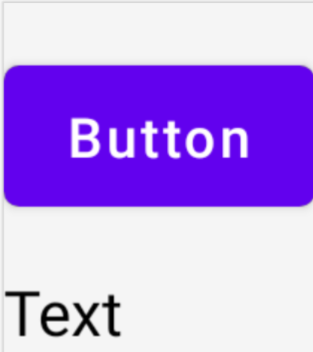
@Composable

fun ConstraintLayoutContent() {

    ConstraintLayout {

        // 创建references

        val (button, text) = createRefs()

        Button(

            onClick = {},

            // reference "button"相当于原来的id

            // 约束在constraintlayout的top,margin为16dp

            modifier = Modifier.constrainAs(button) {

                top.linkTo(parent.top, margin = 16.dp)

            }

        ) {

            Text("Button")

        }

        // reference "text"

        // 约束Text在Button的下面,margin为16dp

        Text("Text", Modifier.constrainAs(text) {

            top.linkTo(button.bottom, margin = 16.dp)

        })

    }

}
效果二:Text在parent中居中显示
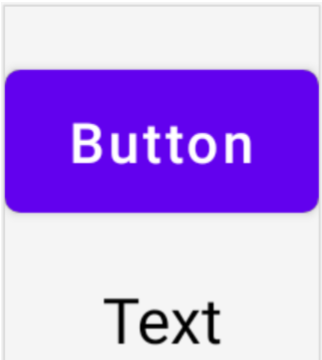
@Composable

fun ConstraintLayoutContent() {

    ConstraintLayout {

        // 和上面的例子一致

         ...

        // reference "text"

        // 约束Text在Button的下面,margin为16dp

        Text("Text", Modifier.constrainAs(text) {

            top.linkTo(button.bottom, margin = 16.dp)

            // Text在parent居中

            // ConstraintLayout默认是wrap_content的

            centerHorizontallyTo(parent)

        })

    }

}
效果三:创建Barrier
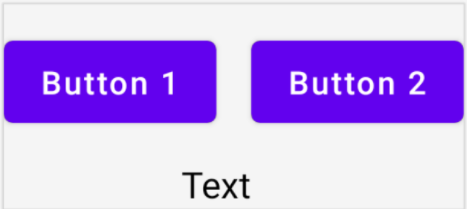
@Composable

fun ConstraintLayoutContent() {

    ConstraintLayout {

        // 创建references

        val (button1, button2, text) = createRefs()

        Button(

            onClick = {},

            modifier = Modifier.constrainAs(button1) {

                top.linkTo(parent.top, margin = 16.dp)

            }

        ) {

            Text("Button1")

        }

        // Text显示在Button1的下方,Text的中线和Button1的end对齐

        Text("Text", Modifier.constrainAs(text) {

            top.linkTo(button1.bottom, margin = 16.dp)

            centerAround(button1.end)

        })

        // 根据button1和text的end(取其长)创建barrier

        val barrier = createEndBarrier(button1, text)

        // Button2显示在barrier开始处

        Button(

            onClick = {},

            modifier = Modifier.constrainAs(button2) {

                top.linkTo(parent.top, margin = 16.dp)

                start.linkTo(barrier)

            }

        ) {

            Text("Button2")

        }

    }

}
效果四:创建guideline

@Composable

fun LargeConstraintLayout() {

    ConstraintLayout {

        val text = createRef()

        // 设置为屏幕宽度的一半

        val guideline = createGuidelineFromStart(fraction = 0.5f)

        Text(

            "This is a very very very very very very long text",

            Modifier.constrainAs(text) {

                linkTo(start = guideline, end = parent.end)

            }

        )

    }

}
效果五:设置Text的宽度为wrap_content

@Composable

fun LargeConstraintLayout() {

    ConstraintLayout {

        val text = createRef()

        val guideline = createGuidelineFromStart(fraction = 0.5f)

        Text(

            "This is a very very very very very very long text",

            Modifier.constrainAs(text) {

                linkTo(start = guideline, end = parent.end)

                width = Dimension.preferredWrapContent

            }

        )

    }

}
除了preferredWrapContent,还有其他几个设置项
| preferredWrapContent | the layout is wrap content, subject to the constraints in that dimension. |
| wrapContent | the layout is wrap content even if the constraints would not allow it. |
| fillToConstraints | the layout will expand to fill the space defined by its constraints in that dimension. |
| preferredValue | the layout is a fixed dp value, subject to the constraints in that dimension. |
| value | the layout is a fixed dp value, regardless of the constraints in that dimension. |
也可以设置在固定值范围内,如
width = Dimension.preferredWrapContent.atLeast(100.dp)
效果六:横屏和纵屏的情况下,margin不一样
在ConstraintSet中通过createRefFor创建reference,创建不同的ConstraintSet,传递给ConstraintLayout。
@Composable

fun DecoupledConstraintLayout() {

    BoxWithConstraints {

        val constraints = if (maxWidth < maxHeight) {

            // 竖屏

            decoupledConstraints(margin = 16.dp)

        } else {

            // 横屏

            decoupledConstraints(margin = 32.dp)

        }

        ConstraintLayout(constraints) {

            Button(

                onClick = {},

                modifier = Modifier.layoutId("button")

            ) {

                Text("Button")

            }

            Text("Text", Modifier.layoutId("text"))

        }

    }

}

private fun decoupledConstraints(margin: Dp): ConstraintSet {

    return ConstraintSet {

        val button = createRefFor("button")

        val text = createRefFor("text")

        constrain(button) {

            top.linkTo(parent.top, margin = margin)

        }

        constrain(text) {

            top.linkTo(button.bottom, margin)

        }

    }

}
更多内容请参看Layouts in Jetpack Compose (google.cn)
Jetpack compose学习笔记之ConstraintLayout(布局)的更多相关文章
- Jetpack Compose学习(5)——从登录页美化开始学习布局组件使用
原文:Jetpack Compose学习(5)--从登录页美化开始学习布局组件使用 | Stars-One的杂货小窝 本篇主要讲解常用的布局,会与原生Android的布局控件进行对比说明,请确保了解A ...
- Jetpack Compose学习(1)——从登录页开始入门
原文地址:Jetpack Compose学习(1)--从登录页开始入门 | Stars-One的杂货小窝 Jetpack Compose UI在前几天出了1.0正式版,之前一直还在观望,终于是出了正式 ...
- Jetpack Compose学习(2)——文本(Text)的使用
原文: Jetpack Compose学习(2)--文本(Text)的使用 | Stars-One的杂货小窝 对于开发来说,文字最为基础的组件,我们先从这两个使用开始吧 本篇涉及到Kotlin和DSL ...
- Jetpack Compose学习(3)——图标(Icon) 按钮(Button) 输入框(TextField) 的使用
原文地址: Jetpack Compose学习(3)--图标(Icon) 按钮(Button) 输入框(TextField) 的使用 | Stars-One的杂货小窝 本篇分别对常用的组件:图标(Ic ...
- Jetpack Compose学习(6)——关于Modifier的妙用
原文: Jetpack Compose学习(6)--关于Modifier的妙用 | Stars-One的杂货小窝 之前学习记录中也是陆陆续续地将常用的Modifier的方法穿插进去了,本期就来详细的讲 ...
- Jetpack Compose学习(7)——MD样式架构组件Scaffold及导航底部菜单
Jetpack Compose学习(7)--MD样式架构组件Scaffold及导航底部菜单 | Stars-One的杂货小窝 Compose给我们提供了一个Material Design样式的首页组件 ...
- Jetpack Compose学习(9)——Compose中的列表控件(LazyRow和LazyColumn)
原文:Jetpack Compose学习(9)--Compose中的列表控件(LazyRow和LazyColumn) - Stars-One的杂货小窝 经过前面的学习,大致上已掌握了compose的基 ...
- 微信小程序开发:学习笔记[4]——样式布局
微信小程序开发:学习笔记[4]——样式布局 Flex布局 新的布局方式 在小程序开发中,我们需要考虑各种尺寸终端设备上的适配.在传统网页开发,我们用的是盒模型,通过display:inline | b ...
- amazeui学习笔记--css(布局相关1)--网格Grid
amazeui学习笔记--css(布局相关1)--网格Grid 一.总结 基本使用 1.div+class布局:amaze里面采取的就是div+class的布局方式 <div class=&q ...
- amazeui学习笔记--css(布局相关3)--辅助类Utility
amazeui学习笔记--css(布局相关3)--辅助类Utility 一.总结 1.元素清除浮动: 添加 am-cf 这个 class 即可 2.水平滚动: .am-scrollable-horiz ...
随机推荐
- jekins 入门
环境安装 gitlab 安装 使用 docker 安装 gitlab docker run -d --name gitlab --restart always --hostname gitlab.zd ...
- reduce()
from functools import reducea=[10,11,22,33]b=reduce(lambda x,y:x+y,a)<===>sum(a)print(b)
- PHP 静态延迟绑定 static
PHP (self static parent 区别) self调用的方法和属性始终表示当前类的方法和属性 static调用的方法和属性为当前执行的类的方法和属性 parent调用的方法和属性为父类的 ...
- secret或configmap对象key名称带点,env命令不显示分析
分享一个最近在排查的问题: k8s的 secret 或 configmap 对象,如果 key 名称是带[.]的,比如[a.b.c .db.host]这种名称,注入到POD后,使用env等命令查看不到 ...
- 设置NTP校时
设置NTP校时-作为客户端 @echo off rem 以管理员身份执行文件 rem 适用于域控PDC主机,对于未加域的计算机可直接使用Internet时间同步 rem 获取管理员权限 %1 msht ...
- django 事务踩坑
with transaction.atomic(): save_id = transaction.savepoint() #xx.字段A ormg更新操作 #提交事务 transaction.save ...
- CAD安装失败,如何才能删除(卸载)CAD?三步完美卸载CAD软件
CAD安装失败,怎么样才能彻底删除CAD各种残留注册表?有时候我们想将CAD重新安装,但却显示CAD已经安装,但又不见CAD软件程序文件,然后我们就会产生这样的疑问:CAD无法重新安装是怎么一回事?下 ...
- 综合java admin后台记录
在新冠将来未来的气氛下,做一些年终封箱吧,这个事没做完,但暂时可能也没时间做,待来年了 https://hooray.gitee.io/fantastic-admin/ https://github. ...
- C++11 mutex unique_lock condition_variable 互斥锁 条件变量
创建项目再进行测试比较麻烦,可以使用这个在线编译器进行验证,快速方便 C++11在线编译器 mutex是互斥锁,互斥量 condition_variable是条件变量 std::mutex m; vo ...
- C++ NRV优化
NRV,named return value 某个函数返回一个对象时,在外部接收 A a = Fun(); 会调用复制构造函数 会损失性能 为何不能将函数Fun定义成传入引用a,然后直接在a上进行操作 ...