
3.联合索引、覆盖索引及最左匹配原则|MySQL索引学习
- GreatSQL社区原创内容未经授权不得随意使用,转载请联系小编并注明来源。
导语
在数据检索的过程中,经常会有多个列的匹配需求,今天介绍下联合索引的使用以及最左匹配原则的案例。
最左匹配原则作用在联合索引中,假如表中有一个联合索引(tcol01,tcol02,tcol03),只有当SQL使用到tcol01、tcol02索引的前提下,tcol03的索引才会被使用;同理只有tcol01的索引被使用的前提下,tcol02的索引才会被使用。
下面我们来列举几个例子来说明。
步骤
使用 mysql_random_data_load 创建测试数据
建库和建表
CREATE DATABASE IF NOT EXISTS test;

CREATE TABLE `test`.`t3` (

  `id` int(11) NOT NULL AUTO_INCREMENT,

  `tcol01` tinyint(4) DEFAULT NULL,

  `tcol02` smallint(6) DEFAULT NULL,

  `tcol03` mediumint(9) DEFAULT NULL,

  `tcol04` int(11) DEFAULT NULL,

  `tcol05` bigint(20) DEFAULT NULL,

  `tcol06` float DEFAULT NULL,

  `tcol07` double DEFAULT NULL,

  `tcol08` decimal(10,2) DEFAULT NULL,

  `tcol09` date DEFAULT NULL,

  `tcol10` datetime DEFAULT NULL,

  `tcol11` timestamp NOT NULL DEFAULT CURRENT_TIMESTAMP ON UPDATE CURRENT_TIMESTAMP,

  `tcol12` time DEFAULT NULL,

  `tcol13` year(4) DEFAULT NULL,

  `tcol14` varchar(100) DEFAULT NULL,

  `tcol15` char(2) DEFAULT NULL,

  `tcol16` blob,

  `tcol17` text,

  `tcol18` mediumtext,

  `tcol19` mediumblob,

  `tcol20` longblob,

  `tcol21` longtext,

  `tcol22` mediumtext,

  `tcol23` varchar(3) DEFAULT NULL,

  `tcol24` varbinary(10) DEFAULT NULL,

  `tcol25` enum('a','b','c') DEFAULT NULL,

  `tcol26` set('red','green','blue') DEFAULT NULL,

  `tcol27` float(5,3) DEFAULT NULL,

  `tcol28` double(4,2) DEFAULT NULL,

  PRIMARY KEY (`id`)

) ENGINE=InnoDB;
建联合索引
CREATE INDEX idx_tcol123 ON t1(`tcol01`,`tcol02`,`tcol03`);
写入100w条测试数据
./mysql_random_data_load test t1 1000000 --user=root --password=GreatSQL --config-file=/data/GreatSQL/my.cnf
联合索引数据存储方式
先对索引中第一列的数据进行排序,而后在满足第一列数据排序的前提下,再对第二列数据进行排序,以此类推。
如下图:
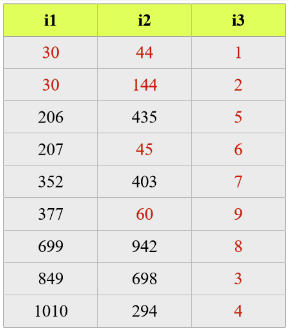
索引最左原则案例
情况1:三个索引都能使用上
实验1:仅有where子句
# 三个条件都使用上,优化器可以自己调整顺序满足索引要求

[root@GreatSQL][test]>explain SELECT /* NO_CACHE */ * FROM t1 WHERE tcol02=167 AND tcol03=202019 AND tcol01=1;

+----+-------------+-------+------------+------+---------------+-------------+---------+-------------------+------+----------+-------+

| id | select_type | table | partitions | type | possible_keys | key         | key_len | ref               | rows | filtered | Extra |

+----+-------------+-------+------------+------+---------------+-------------+---------+-------------------+------+----------+-------+

|  1 | SIMPLE      | t1    | NULL       | ref  | idx_tcol123   | idx_tcol123 | 9       | const,const,const |    1 |   100.00 | NULL  |

+----+-------------+-------+------------+------+---------------+-------------+---------+-------------------+------+----------+-------+

1 row in set, 1 warning (0.11 sec)

[root@GreatSQL][test]>explain SELECT /* NO_CACHE */ * FROM t1 WHERE tcol02=167 AND tcol01=1 AND tcol03=202019 ;

+----+-------------+-------+------------+------+---------------+-------------+---------+-------------------+------+----------+-------+

| id | select_type | table | partitions | type | possible_keys | key         | key_len | ref               | rows | filtered | Extra |

+----+-------------+-------+------------+------+---------------+-------------+---------+-------------------+------+----------+-------+

|  1 | SIMPLE      | t1    | NULL       | ref  | idx_tcol123   | idx_tcol123 | 9       | const,const,const |    1 |   100.00 | NULL  |

+----+-------------+-------+------------+------+---------------+-------------+---------+-------------------+------+----------+-------+
实验2:WHERE 加 order by子句
# 解析出来只有用到tcol01,tcol02索引,由于`explain`不会统计`order by`索引的信息,所有看起来`key_len`长度只有5;当tcol03倒序的时候就会用到`Backward index scan`功能

[test]>explain SELECT /* NO_CACHE */ * FROM t1 WHERE tcol01=1 AND tcol02=167 order by tcol03;

+----+-------------+-------+------------+------+---------------+-------------+---------+-------------+------+----------+-------+

| id | select_type | table | partitions | type | possible_keys | key         | key_len | ref         | rows | filtered | Extra |

+----+-------------+-------+------------+------+---------------+-------------+---------+-------------+------+----------+-------+

|  1 | SIMPLE      | t1    | NULL       | ref  | idx_tcol123   | idx_tcol123 | 5       | const,const |  269 |   100.00 | NULL  |

+----+-------------+-------+------------+------+---------------+-------------+---------+-------------+------+----------+-------+

1 row in set, 1 warning (0.01 sec)

[test]>explain SELECT /* NO_CACHE */ * FROM t1 WHERE tcol01=1 AND tcol02=167 order by tcol03 desc;

+----+-------------+-------+------------+------+---------------+-------------+---------+-------------+------+----------+---------------------+

| id | select_type | table | partitions | type | possible_keys | key         | key_len | ref         | rows | filtered | Extra               |

+----+-------------+-------+------------+------+---------------+-------------+---------+-------------+------+----------+---------------------+

|  1 | SIMPLE      | t1    | NULL       | ref  | idx_tcol123   | idx_tcol123 | 5       | const,const |  269 |   100.00 | Backward index scan |

+----+-------------+-------+------------+------+---------------+-------------+---------+-------------+------+----------+---------------------+

1 row in set, 1 warning (0.00 sec)

# 当order by中的字段不包含在联合索引中的时候,就会用到`Using filesort`

[root@GreatSQL][test]>EXPLAIN SELECT /* NO_CACHE */ * FROM t1 WHERE tcol01=1 AND tcol02=167 order by tcol04;

+----+-------------+-------+------------+------+---------------+-------------+---------+-------------+------+----------+----------------+

| id | select_type | table | partitions | type | possible_keys | key         | key_len | ref         | rows | filtered | Extra          |

+----+-------------+-------+------------+------+---------------+-------------+---------+-------------+------+----------+----------------+

|  1 | SIMPLE      | t1    | NULL       | ref  | idx_tcol123   | idx_tcol123 | 5       | const,const |  269 |   100.00 | Using filesort |

+----+-------------+-------+------------+------+---------------+-------------+---------+-------------+------+----------+----------------+

1 row in set, 1 warning (0.00 sec)
实验3:仅order by子句
# 优化器默认采取全部扫描了,因为是查询出所有数据,所以全表扫描回比索引更快,节省回表的时间

[root@GreatSQL][test]>explain SELECT /* NO_CACHE */ * FROM t1 ORDER BY tcol01,tcol02,tcol03;

+----+-------------+-------+------------+------+---------------+------+---------+------+--------+----------+----------------+

| id | select_type | table | partitions | type | possible_keys | key  | key_len | ref  | rows   | filtered | Extra          |

+----+-------------+-------+------------+------+---------------+------+---------+------+--------+----------+----------------+

|  1 | SIMPLE      | t1    | NULL       | ALL  | NULL          | NULL | NULL    | NULL | 941900 |   100.00 | Using filesort |

+----+-------------+-------+------------+------+---------------+------+---------+------+--------+----------+----------------+

1 row in set, 1 warning (0.00 sec)

[root@GreatSQL][test]>explain SELECT /* NO_CACHE */ * FROM t1 force index(`idx_tcol123`) ORDER BY tcol01,tcol02,tcol03;

+----+-------------+-------+------------+-------+---------------+-------------+---------+------+--------+----------+-------+

| id | select_type | table | partitions | type  | possible_keys | key         | key_len | ref  | rows   | filtered | Extra |

+----+-------------+-------+------------+-------+---------------+-------------+---------+------+--------+----------+-------+

|  1 | SIMPLE      | t1    | NULL       | index | NULL          | idx_tcol123 | 9       | NULL | 941900 |   100.00 | NULL  |

+----+-------------+-------+------------+-------+---------------+-------------+---------+------+--------+----------+-------+

1 row in set, 1 warning (0.00 sec)

# 只筛选索引列,也会使用到索引,也就是所谓的覆盖索引

[root@GreatSQL][test]>explain  SELECT /* NO_CACHE */ tcol01,tcol02,tcol03 FROM t1  ORDER BY tcol01,tcol02,tcol03;

+----+-------------+-------+------------+-------+---------------+-------------+---------+------+--------+----------+-------------+

| id | select_type | table | partitions | type  | possible_keys | key         | key_len | ref  | rows   | filtered | Extra       |

+----+-------------+-------+------------+-------+---------------+-------------+---------+------+--------+----------+-------------+

|  1 | SIMPLE      | t1    | NULL       | index | NULL          | idx_tcol123 | 9       | NULL | 941900 |   100.00 | Using index |

+----+-------------+-------+------------+-------+---------------+-------------+---------+------+--------+----------+-------------+

1 row in set, 1 warning (0.00 sec)

# 如果是筛选部分数据,那么就会使用到索引而不会全表扫描

[root@GreatSQL][test]>explain SELECT /* NO_CACHE */ * FROM t1 ORDER BY tcol01,tcol02,tcol03 limit 10000,11110;

+----+-------------+-------+------------+-------+---------------+-------------+---------+------+-------+----------+-------+

| id | select_type | table | partitions | type  | possible_keys | key         | key_len | ref  | rows  | filtered | Extra |

+----+-------------+-------+------------+-------+---------------+-------------+---------+------+-------+----------+-------+

|  1 | SIMPLE      | t1    | NULL       | index | NULL          | idx_tcol123 | 9       | NULL | 21110 |   100.00 | NULL  |

+----+-------------+-------+------------+-------+---------------+-------------+---------+------+-------+----------+-------+

1 row in set, 1 warning (0.00 sec)

# 调整字段顺序后,就变成`Using filesort`且没有用到索引,所以当使用order by语句,确保与联合索引的顺序要一致

[root@GreatSQL][test]>explain SELECT /* NO_CACHE */ * FROM t1  ORDER BY tcol02,tcol01,tcol03 limit 10000,11110;

+----+-------------+-------+------------+------+---------------+------+---------+------+--------+----------+----------------+

| id | select_type | table | partitions | type | possible_keys | key  | key_len | ref  | rows   | filtered | Extra          |

+----+-------------+-------+------------+------+---------------+------+---------+------+--------+----------+----------------+

|  1 | SIMPLE      | t1    | NULL       | ALL  | NULL          | NULL | NULL    | NULL | 941900 |   100.00 | Using filesort |

+----+-------------+-------+------------+------+---------------+------+---------+------+--------+----------+----------------+

1 row in set, 1 warning (0.00 sec)
情况2:下面的SQL最多只能用到索引tcol1,tcol2部分
# tcol02范围查找后,导致数据乱序,于是tcol03索引条件用不上,同时回出现`Using index condition`和 `Using MRR`。

[root@GreatSQL][test]>explain SELECT /* NO_CACHE */ * FROM t1  WHERE tcol01=1 AND tcol02>100 AND tcol03=202019;

+----+-------------+-------+------------+-------+---------------+-------------+---------+------+-------+----------+----------------------------------+

| id | select_type | table | partitions | type  | possible_keys | key         | key_len | ref  | rows  | filtered | Extra                            |

+----+-------------+-------+------------+-------+---------------+-------------+---------+------+-------+----------+----------------------------------+

|  1 | SIMPLE      | t1    | NULL       | range | idx_tcol123   | idx_tcol123 | 5       | NULL | 77976 |    10.00 | Using index condition; Using MRR |

+----+-------------+-------+------------+-------+---------------+-------------+---------+------+-------+----------+----------------------------------+

1 row in set, 1 warning (0.00 sec)

[root@GreatSQL][test]>explain SELECT /* NO_CACHE */ * FROM t1  WHERE tcol01=1 AND tcol02>100;

+----+-------------+-------+------------+-------+---------------+-------------+---------+------+-------+----------+----------------------------------+

| id | select_type | table | partitions | type  | possible_keys | key         | key_len | ref  | rows  | filtered | Extra                            |

+----+-------------+-------+------------+-------+---------------+-------------+---------+------+-------+----------+----------------------------------+

|  1 | SIMPLE      | t1    | NULL       | range | idx_tcol123   | idx_tcol123 | 5       | NULL | 77976 |   100.00 | Using index condition; Using MRR |

+----+-------------+-------+------------+-------+---------------+-------------+---------+------+-------+----------+----------------------------------+

1 row in set, 1 warning (0.00 sec)

[root@GreatSQL][test]>explain SELECT /* NO_CACHE */ * FROM t1  WHERE tcol01=1 AND tcol03=202019 ORDER BY tcol02;

+----+-------------+-------+------------+------+---------------+-------------+---------+-------+--------+----------+-----------------------+

| id | select_type | table | partitions | type | possible_keys | key         | key_len | ref   | rows   | filtered | Extra                 |

+----+-------------+-------+------------+------+---------------+-------------+---------+-------+--------+----------+-----------------------+

|  1 | SIMPLE      | t1    | NULL       | ref  | idx_tcol123   | idx_tcol123 | 2       | const | 126670 |    10.00 | Using index condition |

+----+-------------+-------+------------+------+---------------+-------------+---------+-------+--------+----------+-----------------------+

1 row in set, 1 warning (0.00 sec)

# 关掉`Using index condition`和`Using MRR`后再看一下执行计划,实际测试效率要高很多。

# 这是因为ICP减少了引擎层和server层之间的数据传输和回表请求,不满足条件的请求,直接过滤无需回表

# 实际上开启ICP后上面语句有用到tcol03的索引部分。

[root@GreatSQL][test]>SET optimizer_switch = 'MRR=off';

[root@GreatSQL][test]>SET optimizer_switch = 'index_condition_pushdown=off';

[root@GreatSQL][test]>explain SELECT /* NO_CACHE */ * FROM t1  WHERE tcol01=1 AND tcol02>100 AND tcol03=202019;

+----+-------------+-------+------------+-------+---------------+-------------+---------+------+-------+----------+-------------+

| id | select_type | table | partitions | type  | possible_keys | key         | key_len | ref  | rows  | filtered | Extra       |

+----+-------------+-------+------------+-------+---------------+-------------+---------+------+-------+----------+-------------+

|  1 | SIMPLE      | t1    | NULL       | range | idx_tcol123   | idx_tcol123 | 5       | NULL | 77976 |    10.00 | Using where |

+----+-------------+-------+------------+-------+---------------+-------------+---------+------+-------+----------+-------------+

1 row in set, 1 warning (0.00 sec)

1 row in set (1.81 sec) /* 关闭ICP和MRR后执行时间 */

1 row in set (0.01 sec) /* 开启ICP和MRR后执行时间 */

[root@GreatSQL][test]>explain SELECT /* NO_CACHE */ * FROM t1  WHERE tcol01=1 AND tcol02>100;

+----+-------------+-------+------------+-------+---------------+-------------+---------+------+-------+----------+-------------+

| id | select_type | table | partitions | type  | possible_keys | key         | key_len | ref  | rows  | filtered | Extra       |

+----+-------------+-------+------------+-------+---------------+-------------+---------+------+-------+----------+-------------+

|  1 | SIMPLE      | t1    | NULL       | range | idx_tcol123   | idx_tcol123 | 5       | NULL | 77976 |   100.00 | Using where |

+----+-------------+-------+------------+-------+---------------+-------------+---------+------+-------+----------+-------------+

1 row in set, 1 warning (0.00 sec)

40252 rows in set (2.04 sec) /* 关闭ICP和MRR后执行时间 */

40252 rows in set (1.58 sec) /* 开启ICP和MRR后执行时间 */

[root@GreatSQL][test]>explain SELECT /* NO_CACHE */ * FROM t1  WHERE tcol01=1 AND tcol03=202019 ORDER BY tcol02;

+----+-------------+-------+------------+------+---------------+-------------+---------+-------+--------+----------+-------------+

| id | select_type | table | partitions | type | possible_keys | key         | key_len | ref   | rows   | filtered | Extra       |

+----+-------------+-------+------------+------+---------------+-------------+---------+-------+--------+----------+-------------+

|  1 | SIMPLE      | t1    | NULL       | ref  | idx_tcol123   | idx_tcol123 | 2       | const | 126670 |    10.00 | Using where |

+----+-------------+-------+------------+------+---------------+-------------+---------+-------+--------+----------+-------------+

1 row in set, 1 warning (0.00 sec)

1 row in set (1.99 sec) /* 关闭ICP和后执行时间 */

1 row in set (0.01 sec) /* 开启ICP和后执行时间 */
Using index condition 请看文章 https://mp.weixin.qq.com/s/pt6mr3Ge1ya2aa6WlrpIvQ
Using MRR 后面再介绍。
情况3:下面的SQL用不到索引
[root@GreatSQL][test]>explain SELECT /* NO_CACHE */ * FROM t1 WHERE tcol02=167;

+----+-------------+-------+------------+------+---------------+------+---------+------+--------+----------+-------------+

| id | select_type | table | partitions | type | possible_keys | key  | key_len | ref  | rows   | filtered | Extra       |

+----+-------------+-------+------------+------+---------------+------+---------+------+--------+----------+-------------+

|  1 | SIMPLE      | t1    | NULL       | ALL  | NULL          | NULL | NULL    | NULL | 941900 |    10.00 | Using where |

+----+-------------+-------+------------+------+---------------+------+---------+------+--------+----------+-------------+

1 row in set, 1 warning (0.00 sec)

[root@GreatSQL][test]>explain SELECT /* NO_CACHE */ * FROM t1 WHERE tcol02=167 AND tcol03 >=1;

+----+-------------+-------+------------+------+---------------+------+---------+------+--------+----------+-------------+

| id | select_type | table | partitions | type | possible_keys | key  | key_len | ref  | rows   | filtered | Extra       |

+----+-------------+-------+------------+------+---------------+------+---------+------+--------+----------+-------------+

|  1 | SIMPLE      | t1    | NULL       | ALL  | NULL          | NULL | NULL    | NULL | 941900 |     3.33 | Using where |

+----+-------------+-------+------------+------+---------------+------+---------+------+--------+----------+-------------+

1 row in set, 1 warning (0.01 sec)

[root@GreatSQL][test]>explain SELECT /* NO_CACHE */ * FROM t1 ORDER BY tcol02 limit 10000,11000;

+----+-------------+-------+------------+------+---------------+------+---------+------+--------+----------+----------------+

| id | select_type | table | partitions | type | possible_keys | key  | key_len | ref  | rows   | filtered | Extra          |

+----+-------------+-------+------------+------+---------------+------+---------+------+--------+----------+----------------+

|  1 | SIMPLE      | t1    | NULL       | ALL  | NULL          | NULL | NULL    | NULL | 941900 |   100.00 | Using filesort |

+----+-------------+-------+------------+------+---------------+------+---------+------+--------+----------+----------------+

1 row in set, 1 warning (0.00 sec)
联合索引有哪些好处
- 1.减少开销。建一个联合索引
(tcol01, tcol02, tcol03),相当于建立三个索引(tcol01),(tcol01,tcol02),(tcol01,tcol02,tcol03)的功能。每个索引都会占用写入开销和磁盘开销,对于大量数据的表,使用联合索引会大大的减少开销。 - 2.覆盖索引。对联合索引
(tcol01, tcol02, tcol03),如果有如下的SQL:select tcol01,tcol02,tcol03 from t1 where tcol01=? and tcol02=? and tcol03=?那么就可以使用到覆盖索引的功能,查询数据无需回表,减少随机IO。 - 3.效率高。多列条件的查询下,索引列越多,通过索引筛选出的数据就越少。
联合索引使用建议
- 1.查询条件中的
where、order by、group by涉及多个字段,一般需要创建多列索引,比如前面的select * from t1 where tcol01=100 and tcol02=50; - 2.创建联合索引的时候,要将区分度高的字段放在前面,假如有一张学生表包含学号和姓名,那么在建立联合索引的时候,学号放在姓名前面,因为学号是唯一性的,能过滤更多的数据。
- 3.尽量避免
>、<、between、or、like首字母为%的范围查找,范围查询可能导致无法使用索引。 - 4.只筛选需要的数据字段,满足覆盖索引的要求,不要用
select *筛选所有列数据。
Enjoy GreatSQL
文章推荐:
面向金融级应用的GreatSQL正式开源
https://mp.weixin.qq.com/s/cI_wPKQJuXItVWpOx_yNTg
Changes in GreatSQL 8.0.25 (2021-8-18)
https://mp.weixin.qq.com/s/qcn0lmsMoLtaGO9hbpnhVg
MGR及GreatSQL资源汇总
https://mp.weixin.qq.com/s/qXMct_pOVN5FGoLsXSD0MA
GreatSQL MGR FAQ
https://mp.weixin.qq.com/s/J6wkUpGXw3YkyEUJXiZ9xA
在Linux下源码编译安装GreatSQL/MySQL
https://mp.weixin.qq.com/s/WZZOWKqSaGSy-mpD2GdNcA
关于 GreatSQL
GreatSQL是由万里数据库维护的MySQL分支,专注于提升MGR可靠性及性能,支持InnoDB并行查询特性,是适用于金融级应用的MySQL分支版本。
Gitee:
https://gitee.com/GreatSQL/GreatSQL
GitHub:
https://github.com/GreatSQL/GreatSQL
Bilibili:
https://space.bilibili.com/1363850082/video
微信&QQ群:
可搜索添加GreatSQL社区助手微信好友,发送验证信息“加群”加入GreatSQL/MGR交流微信群
QQ群:533341697
微信小助手:wanlidbc
本文由博客一文多发平台 OpenWrite 发布!
3.联合索引、覆盖索引及最左匹配原则|MySQL索引学习的更多相关文章
- 你真的理解索引吗?从数据结构层面解析mysql索引原理
从<mysql存储引擎InnoDB详解,从底层看清InnoDB数据结构>中,我们已经知道了数据页内各个记录是按主键正序排列并组成了一个单向链表的,并且各个数据页之间形成了双向链表.在数据页 ...
- Mysql最左匹配原则实践(原创)
mysql最左匹配原则 什么叫最左匹配原则 最左匹配原则的误区 实战 结论: 1 条件查询中条件顺序没有关系 2 在最左匹配原则中,有如下说明: 最左前缀匹配原则,非常重要的原则,mysql会一直向右 ...
- (MYSQL)回表查询原理,利用联合索引实现索引覆盖
一.什么是回表查询? 这先要从InnoDB的索引实现说起,InnoDB有两大类索引: 聚集索引(clustered index) 普通索引(secondary index) InnoDB聚集索引和普通 ...
- MySQL组合索引最左匹配原则
几个重要的概念 1.对于mysql来说,一条sql中,一个表无论其蕴含的索引有多少,但是有且只用一条. 2.对于多列索引来说(a,b,c)其相当于3个索引(a),(a,b),(a,b,c)3个索引,又 ...
- MySQL优化:如何避免回表查询?什么是索引覆盖? (转)
数据库表结构: create table user ( id int primary key, name varchar(20), sex varchar(5), index(name) )engin ...
- MySQL索引覆盖
什么是“索引覆盖”? 简单来的说,就是让查询的字段(包括where子句中的字段),都是索引字段.索引覆盖的好处是什么?好处是极大的.极大的.极大的提高查询的效率!重要的说三遍! 特别说明: 1.whe ...
- MySQL索引及查询优化总结 专题
小结:db名与应用名相同,表名:业务名_此表的作用 ,表名表示内容,不体现数量,如果表示boolean概念,表名需要使用is_业务含义来表示,但POJO中不应该出现isXXX,因为不方便序列化,中间的 ...
- 知识点:Mysql 索引原理完全手册(1)
知识点:Mysql 索引原理完全手册(1) 知识点:Mysql 索引原理完全手册(2) 知识点:Mysql 索引优化实战(3) 知识点:Mysql 数据库索引优化实战(4) Mysql-索引原理完全手 ...
- MySQL 索引与查询优化
本文介绍一些优化 MySQL 索引设计和查询的建议.在进行优化工作前,请务必了解MySQL EXPLAIN命令: 查看执行计划 索引 索引在逻辑上是指从索引列(关键字)到数据的映射,通过索引可以快速的 ...
随机推荐
- Linux详解(基础、环境配置、项目部署入门)
Linux(CentOS 7)操作系统 消息队列(Kafka.RabbitMQ.RocketMQ),缓存(Redis),搜索引擎(ES),集群分布式(需要购买多台服务器,如果没有服务器我们就只能使用虚 ...
- Spring Authorization Server(AS)从 Mysql 中读取客户端、用户
Spring AS 持久化 jdk version: 17 spring boot version: 2.7.0 spring authorization server:0.3.0 mysql ver ...
- 从单例谈double-check必要性,多种单例各取所需
theme: fancy 前言 前面铺掉了那么多都是在讲原则,讲图例.很多同学可能都觉得和设计模式不是很搭边.虽说设计模式也是理论的东西,但是设计原则可能对我们理解而言更加的抽象.不过好在原则东西不是 ...
- python:selenium测试登录在chrome中闪退
问题描述:使用selenium.webdriver时测试网页,进行自动登录测试总是在登录成功时闪退.使用指定驱动器位置的方式chrome也会闪退 1.正常使用chrome驱动打开一个网页,正常访问 f ...
- npm切换到国内华为云的镜像
npm下载包很慢?不能忍,切换到国内华为云的镜像吧. npm config set registry https://repo.huaweicloud.com/repository/npm/ npm ...
- [自制操作系统] 第04回 完善MBR
目录 一.前景回顾 二.改写MBR 三.实现loader 一.前景回顾 在之前我们说到,MBR的作用便是加载操作系统内核到指定位置.而MBR需要通过读取硬盘来获得操作系统内核.在上一回我们已经讲解了硬 ...
- 基于bat脚本的前端发布流程的优化
背景介绍 前面在基于bat脚本的前端发布流程设计与实现中,我已经介绍了设计与实现,这一篇主要是针对其的一个优化折腾(分两步走,第一步先搞出来,第二步再想着怎么去优化它),我主要做了以下几件事. &qu ...
- 在两台配置了Win10操作系统的电脑之间直接拷贝文件
前提条件:需要一根网线 每台电脑需手动设置IP地址 设置IP地址随意,示例为:10.10.2.11 和 10.10.2.12 每台电脑需关闭Windows防火墙 测试网络是否连通 方式一 远程桌面连接 ...
- RocketMQ 集群的搭建部署 以及rocketmq-console-ng仪表台的安装部署
在 RocketMQ 主要的组件如下. NameServerNameServer 集群,Topic 的路由注册中心,为客户端根据 Topic 提供路由服务,从而引导客户端向 Broker 发送消息.N ...
- File类的概述和File类的静态成员变量
File类概述:java.io.File类 文件和目录路径名的抽象表示形式 java把电脑中的文件和文件夹(目录)封账为了一个File类,我们可以使用File类对文件和文件夹进行操作 默认情况下,ja ...