
【随笔记】NDK 编译开源库 nghttp2/openssl/curl
工作中有遇到需要使用支持 http2 访问的 https 安全加密的开源库,便于使用 http2 与云端通信,经过调研发现 libcurl 可以满足需求,但是 libcurl 本身也是需要依赖于 nghttp2 来支持 http2 通信,以及需要 openssl 来实现安全加密的通信(访问带 https 的连接)。
编译第三方开源库,主要的原理是在于通过设置环境变量,来指明编译工具链和头文件所在的位置,再通过 configure 生成合适的 makefile。
一、环境准备
官方网站下载 NDK:
wget https://dl.google.com/android/repository/android-ndk-r19c-linux-x86_64.zip解压并拷贝到指定目录:
unzip android-ndk-r19c-linux-x86_64.zip

sudo mkdir /opt/ndk

sudo cp -r android-ndk-r19c /opt/ndk
额外知识记录:(本文未使用此方法)
NDK 目录中有一个脚本可以创建独立编译工具链,具体可以参考:独立工具链(已弃用) | Android NDK | Android Developers
./make-standalone-toolchain.sh --install-dir=指定独立编译工具链存放的路径二、编译 nghttp2
源码下载和解压:
wget https://github.com/nghttp2/nghttp2/releases/download/v1.44.0/nghttp2-1.44.0.tar.gz

tar -zxvf nghttp2-1.44.0.tar.gz
编写编译脚本,并放置到 nghttp2 源码根目录:android_build_nghttp2.sh
#!/bin/sh

export PREFIX=`pwd`/../build/nghttp2

export TOOLCHAIN=/opt/ndk/android-ndk-r19c/toolchains/llvm/prebuilt/linux-x86_64

export PATH="$TOOLCHAIN"/bin:"$PATH"

export CC="$TOOLCHAIN"/bin/armv7a-linux-androideabi19-clang

export CXX="$TOOLCHAIN"/bin/armv7a-linux-androideabi19-clang++

export CPPFLAGS="-fPIE -I$PREFIX/include"

export PKG_CONFIG_LIBDIR="$PREFIX/lib/pkgconfig"

export LDFLAGS="-fPIE -pie -L$PREFIX/lib"

export TOOL=arm-linux-androideabi

export LD=$TOOLCHAIN/bin/${TOOL}-ld

export AR=$TOOLCHAIN/bin/${TOOL}-ar

export RANLIB=$TOOLCHAIN/bin/${TOOL}-ranlib

export STRIP=$TOOLCHAIN/bin/${TOOL}-strip

./configure \

    --enable-shared \

    --host=arm-linux-androideabi \

    --build=`dpkg-architecture -qDEB_BUILD_GNU_TYPE` \

    --prefix="$PREFIX" \

    --without-libxml2 \

    --disable-python-bindings \

    --disable-examples \

    --disable-threads

if [ $? -eq 0 ]; then

	make -j16 && make install

fi
执行编译脚本后会在源码外层目录 build/nghttp2 生成编译的动态库、静态库、头文件:
./android_build_nghttp2.sh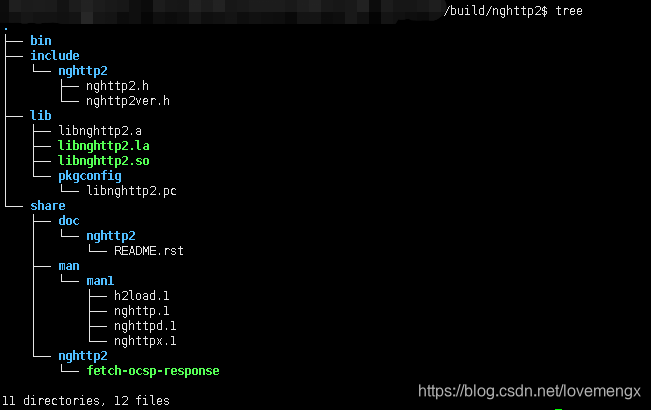
三、编译 openssl
源码下载和解压:
wget https://www.openssl.org/source/openssl-1.1.1k.tar.gz

tar -zxvf openssl-1.1.1k.tar.gz
修改编译配置脚本,并放置到 openssl 源码根目录,该编译脚本同时适用于目前最新版的 3.0.0 :android_build_openssl.sh
配置脚本修改自官方的配置脚本(其实可以精简):https://wiki.openssl.org/images/7/70/Setenv-android.sh
#!/bin/bash

# Cross-compile environment for Android on ARMv7 and x86

#

# Contents licensed under the terms of the OpenSSL license

# http://www.openssl.org/source/license.html

#

# See http://wiki.openssl.org/index.php/FIPS_Library_and_Android

#   and http://wiki.openssl.org/index.php/Android

#####################################################################

export ANDROID_NDK_HOME=/opt/ndk/android-ndk-r19c

export ANDROID_NDK_ROOT=/opt/ndk/android-ndk-r19c

export PATH=$PATH:$ANDROID_NDK_ROOT/toolchains/llvm/prebuilt/linux-x86_64/bin:$ANDROID_NDK_ROOT/toolchains/arm-linux-androideabi-4.9/prebuilt/linux-x86_64/bin

# Set ANDROID_NDK_ROOT to you NDK location. For example,

# /opt/android-ndk-r8e or /opt/android-ndk-r9. This can be done in a

# login script. If ANDROID_NDK_ROOT is not specified, the script will

# try to pick it up with the value of _ANDROID_NDK_ROOT below. If

# ANDROID_NDK_ROOT is set, then the value is ignored.

# _ANDROID_NDK="android-ndk-r8e"

_ANDROID_NDK="android-ndk-r19c"

# _ANDROID_NDK="android-ndk-r10"

# Set _ANDROID_EABI to the EABI you want to use. You can find the

# list in $ANDROID_NDK_ROOT/toolchains. This value is always used.

# _ANDROID_EABI="x86-4.6"

# _ANDROID_EABI="arm-linux-androideabi-4.6"

_ANDROID_EABI="arm-linux-androideabi-4.9"

# Set _ANDROID_ARCH to the architecture you are building for.

# This value is always used.

# _ANDROID_ARCH=arch-x86

_ANDROID_ARCH=arch-arm

# Set _ANDROID_API to the API you want to use. You should set it

# to one of: android-14, android-9, android-8, android-14, android-5

# android-4, or android-3. You can't set it to the latest (for

# example, API-17) because the NDK does not supply the platform. At

# Android 5.0, there will likely be another platform added (android-22?).

# This value is always used.

# _ANDROID_API="android-14"

_ANDROID_API="android-19"

# _ANDROID_API="android-19"

#####################################################################

# If the user did not specify the NDK location, try and pick it up.

# We expect something like ANDROID_NDK_ROOT=/opt/android-ndk-r8e

# or ANDROID_NDK_ROOT=/usr/local/android-ndk-r8e.

if [ -z "$ANDROID_NDK_ROOT" ]; then

  _ANDROID_NDK_ROOT=""

  if [ -z "$_ANDROID_NDK_ROOT" ] && [ -d "/usr/local/$_ANDROID_NDK" ]; then

    _ANDROID_NDK_ROOT="/usr/local/$_ANDROID_NDK"

  fi

  if [ -z "$_ANDROID_NDK_ROOT" ] && [ -d "/opt/$_ANDROID_NDK" ]; then

    _ANDROID_NDK_ROOT="/opt/$_ANDROID_NDK"

  fi

  if [ -z "$_ANDROID_NDK_ROOT" ] && [ -d "$HOME/$_ANDROID_NDK" ]; then

    _ANDROID_NDK_ROOT="$HOME/$_ANDROID_NDK"

  fi

  if [ -z "$_ANDROID_NDK_ROOT" ] && [ -d "$PWD/$_ANDROID_NDK" ]; then

    _ANDROID_NDK_ROOT="$PWD/$_ANDROID_NDK"

  fi

  # If a path was set, then export it

  if [ ! -z "$_ANDROID_NDK_ROOT" ] && [ -d "$_ANDROID_NDK_ROOT" ]; then

    export ANDROID_NDK_ROOT="$_ANDROID_NDK_ROOT"

  fi

fi

# Error checking

# ANDROID_NDK_ROOT should always be set by the user (even when not running this script)

# http://groups.google.com/group/android-ndk/browse_thread/thread/a998e139aca71d77

if [ -z "$ANDROID_NDK_ROOT" ] || [ ! -d "$ANDROID_NDK_ROOT" ]; then

  echo "Error: ANDROID_NDK_ROOT is not a valid path. Please edit this script."

  # echo "$ANDROID_NDK_ROOT"

  # exit 1

fi

# Error checking

if [ ! -d "$ANDROID_NDK_ROOT/toolchains" ]; then

  echo "Error: ANDROID_NDK_ROOT/toolchains is not a valid path. Please edit this script."

  # echo "$ANDROID_NDK_ROOT/toolchains"

  # exit 1

fi

# Error checking

if [ ! -d "$ANDROID_NDK_ROOT/toolchains/$_ANDROID_EABI" ]; then

  echo "Error: ANDROID_EABI is not a valid path. Please edit this script."

  # echo "$ANDROID_NDK_ROOT/toolchains/$_ANDROID_EABI"

  # exit 1

fi

#####################################################################

# Based on ANDROID_NDK_ROOT, try and pick up the required toolchain. We expect something like:

# /opt/android-ndk-r83/toolchains/arm-linux-androideabi-4.7/prebuilt/linux-x86_64/bin

# Once we locate the toolchain, we add it to the PATH. Note: this is the 'hard way' of

# doing things according to the NDK documentation for Ice Cream Sandwich.

# https://android.googlesource.com/platform/ndk/+/ics-mr0/docs/STANDALONE-TOOLCHAIN.html

ANDROID_TOOLCHAIN=""

for host in "linux-x86_64" "linux-x86" "darwin-x86_64" "darwin-x86"

do

  if [ -d "$ANDROID_NDK_ROOT/toolchains/$_ANDROID_EABI/prebuilt/$host/bin" ]; then

    ANDROID_TOOLCHAIN="$ANDROID_NDK_ROOT/toolchains/$_ANDROID_EABI/prebuilt/$host/bin"

    break

  fi

done

# Error checking

if [ -z "$ANDROID_TOOLCHAIN" ] || [ ! -d "$ANDROID_TOOLCHAIN" ]; then

  echo "Error: ANDROID_TOOLCHAIN is not valid. Please edit this script."

  # echo "$ANDROID_TOOLCHAIN"

  # exit 1

fi

case $_ANDROID_ARCH in

	arch-arm)

      ANDROID_TOOLS="arm-linux-androideabi-ranlib arm-linux-androideabi-ld"

	  ;;

	arch-x86)

      ANDROID_TOOLS="i686-linux-android-gcc i686-linux-android-ranlib i686-linux-android-ld"

	  ;;

	*)

	  echo "ERROR ERROR ERROR"

	  ;;

esac

for tool in $ANDROID_TOOLS

do

  # Error checking

  if [ ! -e "$ANDROID_TOOLCHAIN/$tool" ]; then

    echo "Error: Failed to find $tool. Please edit this script."

    # echo "$ANDROID_TOOLCHAIN/$tool"

    # exit 1

  fi

done

# Only modify/export PATH if ANDROID_TOOLCHAIN good

if [ ! -z "$ANDROID_TOOLCHAIN" ]; then

  export ANDROID_TOOLCHAIN="$ANDROID_TOOLCHAIN"

  export PATH="$ANDROID_TOOLCHAIN":"$PATH"

fi

#####################################################################

# For the Android SYSROOT. Can be used on the command line with --sysroot

# https://android.googlesource.com/platform/ndk/+/ics-mr0/docs/STANDALONE-TOOLCHAIN.html

export ANDROID_SYSROOT="$ANDROID_NDK_ROOT/platforms/$_ANDROID_API/$_ANDROID_ARCH"

export CROSS_SYSROOT="$ANDROID_SYSROOT"

export NDK_SYSROOT="$ANDROID_SYSROOT"

# Error checking

if [ -z "$ANDROID_SYSROOT" ] || [ ! -d "$ANDROID_SYSROOT" ]; then

  echo "Error: ANDROID_SYSROOT is not valid. Please edit this script."

  # echo "$ANDROID_SYSROOT"

  # exit 1

fi

#####################################################################

# If the user did not specify the FIPS_SIG location, try and pick it up

# If the user specified a bad location, then try and pick it up too.

if [ -z "$FIPS_SIG" ] || [ ! -e "$FIPS_SIG" ]; then

  # Try and locate it

  _FIPS_SIG=""

  if [ -d "/usr/local/ssl/$_ANDROID_API" ]; then

    _FIPS_SIG=`find "/usr/local/ssl/$_ANDROID_API" -name incore`

  fi

  if [ ! -e "$_FIPS_SIG" ]; then

    _FIPS_SIG=`find $PWD -name incore`

  fi

  # If a path was set, then export it

  if [ ! -z "$_FIPS_SIG" ] && [ -e "$_FIPS_SIG" ]; then

    export FIPS_SIG="$_FIPS_SIG"

  fi

fi

# Error checking. Its OK to ignore this if you are *not* building for FIPS

if [ -z "$FIPS_SIG" ] || [ ! -e "$FIPS_SIG" ]; then

  echo "Error: FIPS_SIG does not specify incore module. Please edit this script."

  # echo "$FIPS_SIG"

  # exit 1

fi

#####################################################################

# Most of these should be OK (MACHINE, SYSTEM, ARCH). RELEASE is ignored.

export MACHINE=armv7

export RELEASE=2.6.37

export SYSTEM=android

export ARCH=arm

export CROSS_COMPILE="arm-linux-androideabi-"

if [ "$_ANDROID_ARCH" == "arch-x86" ]; then

	export MACHINE=i686

	export RELEASE=2.6.37

	export SYSTEM=android

	export ARCH=x86

	export CROSS_COMPILE="i686-linux-android-"

fi

# For the Android toolchain

# https://android.googlesource.com/platform/ndk/+/ics-mr0/docs/STANDALONE-TOOLCHAIN.html

export ANDROID_SYSROOT="$ANDROID_NDK_ROOT/platforms/$_ANDROID_API/$_ANDROID_ARCH"

export SYSROOT="$ANDROID_SYSROOT"

export NDK_SYSROOT="$ANDROID_SYSROOT"

export ANDROID_NDK_SYSROOT="$ANDROID_SYSROOT"

export ANDROID_API="$_ANDROID_API"

# CROSS_COMPILE and ANDROID_DEV are DFW (Don't Fiddle With). Its used by OpenSSL build system.

# export CROSS_COMPILE="arm-linux-androideabi-"

export ANDROID_DEV="$ANDROID_NDK_ROOT/platforms/$_ANDROID_API/$_ANDROID_ARCH/usr"

export HOSTCC=gcc

VERBOSE=1

if [ ! -z "$VERBOSE" ] && [ "$VERBOSE" != "0" ]; then

  echo "ANDROID_NDK_ROOT: $ANDROID_NDK_ROOT"

  echo "ANDROID_ARCH: $_ANDROID_ARCH"

  echo "ANDROID_EABI: $_ANDROID_EABI"

  echo "ANDROID_API: $ANDROID_API"

  echo "ANDROID_SYSROOT: $ANDROID_SYSROOT"

  echo "ANDROID_TOOLCHAIN: $ANDROID_TOOLCHAIN"

  echo "FIPS_SIG: $FIPS_SIG"

  echo "CROSS_COMPILE: $CROSS_COMPILE"

  echo "ANDROID_DEV: $ANDROID_DEV"

  ./Configure android-arm --prefix=`pwd`/../build/openssl -D__ANDROID_API__=19 && make -j16 && make install

fi
执行编译脚本后会在源码外层目录中的 build/openssl 生成编译的动态库和头文件:./android_build_openssl.sh
./android_build_openssl.sh
四、编译 curl
源码下载和解压:
wget https://curl.se/download/curl-7.78.0.tar.gz

tar -zxvf curl-7.78.0.tar.gz
编写支持 http2 和 ssl 的编译配置脚本:android_build_curl.sh
#!/bin/bash

export TOOLCHAIN=/opt/ndk/android-ndk-r19c/toolchains/llvm/prebuilt/linux-x86_64

export CC="$TOOLCHAIN"/bin/armv7a-linux-androideabi19-clang

export CXX="$TOOLCHAIN"/bin/armv7a-linux-androideabi19-clang++

export TOOL=arm-linux-androideabi

export LD=$TOOLCHAIN/bin/${TOOL}-ld

export AR=$TOOLCHAIN/bin/${TOOL}-ar

export RANLIB=$TOOLCHAIN/bin/${TOOL}-ranlib

export STRIP=$TOOLCHAIN/bin/${TOOL}-strip

export PATH="$TOOLCHAIN"/bin:"$PATH"

export ARCH_FLAGS="-mthumb"

export CFLAGS="${ARCH_FLAGS} -fpic -ffunction-sections -funwind-tables -fstack-protector-all -fno-strict-aliasing -finline-limit=64"

export CXXFLAGS="${CFLAGS} -frtti -fexceptions"

./configure --prefix=`pwd`/../build/libcurl/ \

       --with-sysroot=$TOOLCHAIN/sysroot \

       --host=arm-linux-androideabi \

       --with-ssl=`pwd`/../build/openssl/ \

       --with-nghttp2=`pwd`/../build/nghttp2/ \

       --enable-ipv6 \

       --enable-static \

       --enable-threaded-resolver \

       --disable-dict \

       --disable-gopher \

       --disable-ldap --disable-ldaps \

       --disable-manual \

       --disable-pop3 --disable-smtp --disable-imap \

       --disable-rtsp \

       --disable-shared \

       --disable-smb \

       --disable-telnet \

       --disable-verbose

if [ $? -eq 0 ]; then

	make -j16 && make install

fi
执行编译脚本后会在源码外层目录中的 build/libcurl 生成编译的动态库和头文件:./android_build_curl.sh
./android_build_curl.sh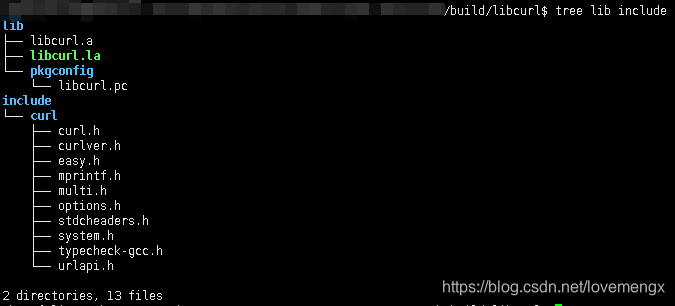
将 nghttp2 和 openssl 以及 curl 相关的库文件推入到 /system/lib,并执行 curl --version,即可检查 curl 是否支持 HTTP2 和 SSL:

实测访问网站:(证书文件从这里下载 https://curl.se/ca/cacert.pem)
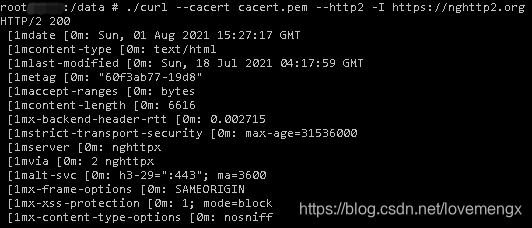
注意:记得要同步系统时间,如果系统时间没有同步,会出现验证失败无法访问的情况。
五、综合下载并编译脚本
#!/bin/bash

echo -----------------------------------------------

echo build nghttp2 ......

echo -----------------------------------------------

wget https://github.com/nghttp2/nghttp2/releases/download/v1.44.0/nghttp2-1.44.0.tar.gz

if [ $? -ne 0 ]; then

	echo download failed .......

	exit -1

fi

tar -zxvf nghttp2-1.44.0.tar.gz

cp android_build_nghttp2.sh nghttp2-1.44.0/

cd nghttp2-1.44.0

./android_build_nghttp2.sh

if [ $? -ne 0 ]; then

	echo build error .......

	exit -1

fi

echo -----------------------------------------------

echo build openssl ......

echo -----------------------------------------------

cd ..

wget https://www.openssl.org/source/openssl-1.1.1k.tar.gz

if [ $? -ne 0 ]; then

	echo download failed .......

	exit -1

fi

tar -zxvf openssl-1.1.1k.tar.gz

cp android_build_openssl.sh openssl-1.1.1k/

cd openssl-1.1.1k

./android_build_openssl.sh

if [ $? -ne 0 ]; then

	echo build error .......

	exit -1

fi

echo -----------------------------------------------

echo build curl ......

echo -----------------------------------------------

cd ..

wget https://curl.se/download/curl-7.78.0.tar.gz

if [ $? -ne 0 ]; then

	echo download failed .......

	exit -1

fi

tar -zxvf curl-7.78.0.tar.gz

cp android_build_curl.sh curl-7.78.0/

cd curl-7.78.0

./android_build_curl.sh
【随笔记】NDK 编译开源库 nghttp2/openssl/curl的更多相关文章
- 无法链接glew的解决办法-编译开源库出现: error LNK2001: 无法解析的外部符号
无法链接glew的解决办法-编译开源库出现: error LNK2001: 无法解析的外部符号 参考官方配置指南:http://glew.sourceforge.net/install.html 1. ...
- cocos2dx通过ndk编译c++库
ndk编译c++库,然后通过jni调用实现重要代码封装,是安卓应用中最常用的技术,一方面可以将重要的代码实现隐藏,防止泄漏,也可以提高打包速度. ndk里面的sample文件夹中有很多实用的例子,其中 ...
- ndk 编译 boost 库,支持serialization
Boost库是一个可移植.提供源代码的C++库,作为标准库的后备,是C++标准化进程的开发引擎之一. Boost库由C++标准委员会库工作组成员发起,其中有些内容有望成为下一代C++标准库内容.在C+ ...
- 10.29 工作笔记 ndk编译C++,提示找不到头文件(ndk-build error: string: No such file or directory)
ndk编译C++.提示找不到头文件(ndk-build error: string: No such file or directory) 被这个问题弄得愁眉苦脸啊.心想为啥一个string都找不到呢 ...
- Win7 + VS2015 + CMake3.6.1-GUI + Makefile 编译开源库
CMake生成Unicode版本VC工程 Just add this line in your top CMakeLists.txt file: add_definitions(-DUNICO ...
- ndk编译protobuf库
ndk_r9编译通过,里面带了自动生成代码的脚本(tool/createPBFile.bat). 下载地址
- 用NDK编译lua库
Android.mk是这样的 LOCAL_PATH := $(call my-dir) include $(CLEAR_VARS) LOCAL_MODULE := lua LOCAL_SRC_FILE ...
- 使用javah生成jni 头文件和使用ndk编译so库
1.jni 首先clean Project,在makeProject生成对应的class文件 然后点出命名框,输入命令: cd app/build/intermediates/classes/debu ...
- protobuf使用NDK编译Android的静态库(工作记录)
1.protobuf 编译过程 前提: 确保自己电脑上已经安装了cygwin + ndk, 并且NDK能够编译hello-jni成功 1.1 把protobuf 压缩包解压到protobuf文件夹下 ...
- [转]NDK编译库运行时报dlopen failed: cannot locate symbol "__exidx_end" 解决办法
原文链接:http://blog.csdn.net/acm2008/article/details/41040015 当用NDK编译的库在运行加载时报如下错: dlopen("/data/d ...
随机推荐
- excel公式与快捷操作
将首行的公式,运用到这一整列 1.选中要输入公式的第一个单元格,SHIFT+CTRL+方向键下,在编辑栏中输入公式,按下CTRL+回车: 2.先输入要填充的公式,按下SHIFT+CTRL+方向键下,再 ...
- java学习之SpringMVC
0x00前言 Spring MVC 是 Spring 提供的一个基于 MVC 设计模式的轻量级 Web 开发框架,本质上相当于 Servlet. Spring MVC 是结构最清晰的 Servlet+ ...
- C++初阶(命名空间+缺省参数+const总结+引用总结+内联函数+auto关键字)
命名空间 概述 在C/C++中,变量.函数和后面要学到的类都是大量存在的,这些变量.函数和类的名称将都存在于全局作用域中,可能会导致很多冲突.使用命名空间的目的是对标识符的名称进行本地化,以避免命名冲 ...
- Aspose.Cells实现excel预览
在WEB项目中经常遇到excel文档在线预览的需求,基本的解决思路有以下几大类:excel文档转PDF.excel文档直接转html.后台读取excel数据返回给前端利用Excel效果的表格插件如 ...
- 规则引擎Drools在贷后催收业务中的应用
作者:vivo 互联网服务器团队- Feng Xiang 在日常业务开发工作中我们经常会遇到一些根据业务规则做决策的场景.为了让开发人员从大量的规则代码的开发维护中释放出来,把规则的维护和生成交由业务 ...
- MySQL进阶实战1,数据类型与三范式
一.选择优化的数据类型 MySQL支持的数据类型非常多,选择正确的数据类型对于获得高性能至关重要. 1.更小的 一般情况下,应该尽量使用较小的数据类型,更小的数据类型通常更快,因为占用更少的磁盘.内存 ...
- 【CDH数仓】Day01:概念、环境搭建、CDH数仓搭建、用户行为数仓搭建
一.数仓之Cloudera Manager 1.CM简介 拥有集群自动化安装.中心化管理.集群监控.报警功能的一个工具 快速安装,快速运维,提高集群的效率 CM架构 2.阿里云服务器准备 注册账号 购 ...
- JavaScript入门⑧-事件总结大全
JavaScript入门系列目录 JavaScript入门①-基础知识筑基 JavaScript入门②-函数(1)基础{浅出} JavaScript入门③-函数(2)原理{深入}执行上下文 JavaS ...
- 《HTTP权威指南》– 16.重定向与负载均衡
重定向 重定向 的目标是尽快地将HTTP报文发送到可用的Web服务器上去.在穿过因特网的路径上,HTTP报文传输的方向会受到HTTP应用程序和报文经由的路由设备的影响: 配置创建客户端报文的浏览器应用 ...
- docker 第二课
构建nginx镜像 Dockerfile 指令: FROM centos:7.9.2009 #在整个dockfile文件中除了注释之外的第一行,要是FROM ,FROM 指令当前镜像的用于指定父镜像( ...