
Android 网络HTML查看器
本文实现一个基于Android的网络HTML查看器
新建项目,项目布局文件如下:
<LinearLayout xmlns:android="http://schemas.android.com/apk/res/android"

    xmlns:tools="http://schemas.android.com/tools"

    android:layout_width="match_parent"

    android:layout_height="match_parent"

    android:orientation="vertical"

    tools:context=".MainActivity" >

    <EditText

        android:id="@+id/et_path"

        android:layout_width="fill_parent"

        android:layout_height="wrap_content"

        android:hint="请输入html路径" />

    <Button

        android:layout_width="fill_parent"

        android:layout_height="wrap_content"

        android:onClick="click"

        android:text="查看" />

    <ScrollView

        android:layout_width="fill_parent"

        android:layout_height="fill_parent" >

        <TextView

            android:id="@+id/tv_content"

            android:layout_width="fill_parent"

            android:layout_height="fill_parent" >

        </TextView>

    </ScrollView>

</LinearLayout>
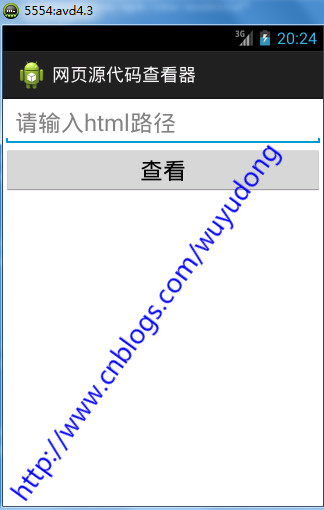
新建工具类StreamTools.java:
package com.wuyudong.htmlviewer.utils;

import java.io.ByteArrayOutputStream;

import java.io.InputStream;

public class StreamTools {

    /**

     * 把输入流的内容转化成字符串

     *

     * @param is

     * @return

     */

    public static String readInputStream(InputStream is) {

        try {

            ByteArrayOutputStream baos = new ByteArrayOutputStream();

            int len = 0;

            byte[] buffer = new byte[1024];

            while ((len = is.read(buffer)) != -1) {

                baos.write(buffer, 0, len);

            }

            is.close();

            baos.close();

            byte[] result = baos.toByteArray();

            return new String(result);

        } catch (Exception e) {

            e.printStackTrace();

            return null;

        }

    }

}
完整代码如下:
package com.wuyudong.htmlviewer;

import java.io.InputStream;

import java.io.StreamCorruptedException;

import java.net.HttpURLConnection;

import java.net.URL;

import com.wuyudong.htmlviewer.utils.StreamTools;

import android.os.Bundle;

import android.os.Handler;

import android.os.Message;

import android.app.Activity;

import android.text.TextUtils;

import android.view.Menu;

import android.view.View;

import android.widget.EditText;

import android.widget.TextView;

import android.widget.Toast;

public class MainActivity extends Activity {

    protected static final int ERROR = 1;

    protected static final int SHOW_TEXT = 2;

    private TextView tv_content;

    private EditText et_path;

    // 定义一个消息处理器

    private Handler handler = new Handler() {

        public void handleMessage(android.os.Message msg) {

            switch (msg.what) {

            case ERROR:

                Toast.makeText(MainActivity.this, "获取数据失败", 0).show();

                break;

            case SHOW_TEXT:

                String text = (String) msg.obj;

                tv_content.setText(text);

                break;

            }

        };

    };

    @Override

    protected void onCreate(Bundle savedInstanceState) {

        super.onCreate(savedInstanceState);

        setContentView(R.layout.activity_main);

        tv_content = (TextView) findViewById(R.id.tv_content);

        et_path = (EditText) findViewById(R.id.et_path);

    }

    public void click(View view) {

        final String path = et_path.getText().toString().trim();

        if (TextUtils.isEmpty(path)) {

            Toast.makeText(this, "路径不能为空", 0).show();

        } else {

            new Thread() {

                public void run() {

                    try {

                        URL url = new URL(path);

                        HttpURLConnection conn = (HttpURLConnection) url

                                .openConnection();

                        conn.setRequestMethod("GET");

                        conn.setConnectTimeout(5000);

                        conn.setReadTimeout(5000);

                        conn.setRequestProperty(

                                "User-Agent",

                                "Mozilla/5.0 (Windows NT 6.1; WOW64) AppleWebKit/537.36 (KHTML, like Gecko) Chrome/45.0.2454.101 Safari/537.36");

                        int code = conn.getResponseCode();

                        if (code == 200) {

                            InputStream is = conn.getInputStream();

                            String result = StreamTools.readInputStream(is);

                            // tv_content.setText(result);

                            Message msg = new Message();

                            msg.what = SHOW_TEXT;

                            msg.obj = result;

                            handler.sendMessage(msg);

                        } else {

                            Message msg = new Message();

                            msg.what = ERROR;

                            handler.sendMessage(msg);

                        }

                    } catch (Exception e) {

                        e.printStackTrace();

                        Message msg = new Message();

                        msg.what = ERROR;

                        handler.sendMessage(msg);

                    }

                };

            }.start();

        }

    }

}
Android 网络HTML查看器的更多相关文章
- 无废话Android之内容观察者ContentObserver、获取和保存系统的联系人信息、网络图片查看器、网络html查看器、使用异步框架Android-Async-Http(4)
1.内容观察者ContentObserver 如果ContentProvider的访问者需要知道ContentProvider中的数据发生了变化,可以在ContentProvider 发生数据变化时调 ...
- Android -- 网络图片查看器,网络html查看器, 消息机制, 消息队列,线程间通讯
1. 原理图 2. 示例代码 (网络图片查看器) (1) HttpURLConnection (2) SmartImageView (开源框架:https://github.com/loopj/an ...
- 网络延迟查看器 Network latency view 1.4
这是个用于查看网络延迟/ip/主机/地区的工具,内外网通吃,外网可通过这里下载csv以显示国家(地区) 可以自己决定winpcap或者原始套接字进行捕捉 如果只扫描内网推荐angryip 这是款发布在 ...
- 网络html查看器
1)演示效果:
- Android项目——网络图片查看器
效果-=-------------->加入包 <LinearLayout xmlns:android="http://schemas.android.com/apk/res/an ...
- Android smartimageview网络图片查看器
调用代码: SmartImageView siv = (SmartImageView) findViewById(R.id.siv);siv.setImageUrl(et_path.getText() ...
- android 网络_网络图片查看器
xml <?xml version="1.0"?> -<LinearLayout tools:context=".MainActivity" ...
- android 网络_网络源码查看器
xml设计 <?xml version="1.0"?> -<LinearLayout tools:context=".MainActivity" ...
- Android 网络图片查看器
今天来实现一下android下的一款简单的网络图片查看器 界面如下: 代码如下: <LinearLayout xmlns:android="http://schemas.android ...
随机推荐
- jQuery 简介和安装
什么是jQuery jQuery是一个轻量级的"写的少,做的多"的JavaScript库. jQuery库包含以下功能: HTML 元素选取 HTML 元素操作 CSS 操作 HT ...
- mvc url 伪静态
WebConfig配置 <system.webServer> <validation validateIntegratedModeConfiguration="false& ...
- ASP.NET Core 开发-中间件(StaticFiles)使用
ASP.NET Core 开发,中间件(StaticFiles)的使用,我们开发一款简易的静态文件服务器. 告别需要使用文件,又需要安装一个web服务器.现在随时随地打开程序即可使用,跨平台,方便快捷 ...
- C# 如何调用WebServer函数
WebServer(ASMX)服务程序网站的编写简单总结. WebServer中遇到的问题 编写WebServer程序VS运行调试时如果出现 System.Data.OracleClient.Orac ...
- Java初识
基础概念 特点: 完全面向对象,动态 解释性,简单.易移植,跨平台 安全健壮,高性能 多线程,分布式 三种核心机制: Java虚拟机 Java Virtual Machine 垃圾收集机制 Garba ...
- C#中使用Sql对Excel条件查询
如何在C#中实现对Excel的条件查询呢? 在使用Sql条件语句对Excel进行查询时,遇到"至少一个参数没有被指定值"的问题,如何解决? 使用OleDbConnection对象创 ...
- 修复一个吉日嘎拉MSSQL数据库版中的分页存储过程bug
这个存储过程是3.7以来一直存在,并未针对MSSQL2005以上版本进行ROW_NUMBER() OVER升级,还是延续TOP的写法.这并非是我所谓的bug,我所说的bug是指执行了排序的字段,如果字 ...
- 修正 ColorPanel 选色缓慢问题
问题:TColorPanel 在运行时,选取颜色都会重绘,造成选色缓慢. 适用:Delphi XE5 修正:找出 FMX.Colors.pas 档案,并复制到自己的 Project 路径里,找到 TC ...
- PHP与MySQL的交互(mysqli)
近期在学习PHP,这里总结一下PHP与MySQL的交互. 这里我们使用mysqli进行连接. mysqli扩展允许我们访问MySQL 4.1及以上版本提供的功能. 想深入了解mysqli的信息可以访问 ...
- Atitit.提升语言可读性原理与实践
Atitit.提升语言可读性原理与实践 表1-1 语言评价标准和影响它们的语言特性1 1.3.1.2 正交性2 1.3.2.2 对抽象的支持3 1.3.2.3 表达性3 .6 语言设计中的权 ...