
Android 网络图片查看器
今天来实现一下android下的一款简单的网络图片查看器
界面如下:
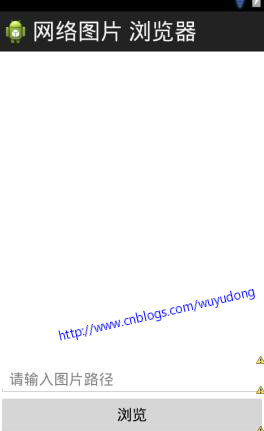
代码如下:
<LinearLayout xmlns:android="http://schemas.android.com/apk/res/android"

    xmlns:tools="http://schemas.android.com/tools"

    android:layout_width="match_parent"

    android:layout_height="match_parent"

    android:orientation="vertical"

    tools:context=".MainActivity" >

    <ImageView

        android:id="@+id/iv"

        android:layout_width="fill_parent"

        android:layout_height="fill_parent"

        android:layout_weight="1000" />

    <EditText

        android:singleLine="true"

        android:text="http://img01.sogoucdn.com/app/a/100540002/1047586.jpg"

        android:id="@+id/et_path"

        android:layout_width="fill_parent"

        android:layout_height="wrap_content"

        android:hint="请输入图片路径" />

    <Button

        android:layout_width="fill_parent"

        android:layout_height="wrap_content"

        android:onClick="click"

        android:text="浏览" />

</LinearLayout>
代码如下:
package com.wuyudong.imagesviewer;

import java.io.InputStream;

import java.net.HttpURLConnection;

import java.net.MalformedURLException;

import java.net.URL;

import org.apache.http.HttpConnection;

import android.os.Bundle;

import android.app.Activity;

import android.graphics.Bitmap;

import android.graphics.BitmapFactory;

import android.text.TextUtils;

import android.view.Menu;

import android.view.View;

import android.widget.EditText;

import android.widget.ImageView;

import android.widget.Toast;

public class MainActivity extends Activity {

    private EditText et_path;

    private ImageView iv;

    @Override

    protected void onCreate(Bundle savedInstanceState) {

        super.onCreate(savedInstanceState);

        setContentView(R.layout.activity_main);

        et_path = (EditText) findViewById(R.id.et_path);

        iv = (ImageView) findViewById(R.id.iv);

    }

    public void click(View view) {

        String path = et_path.getText().toString().trim();

        if (TextUtils.isEmpty(path)) {

            Toast.makeText(this, "图片路径不能为空", 0).show();

        } else {

            // 连接服务器get请求获取图片

            try {

                URL url = new URL(path);

                // 根据url发送http的请求

                HttpURLConnection conn = (HttpURLConnection) url

                        .openConnection();

                // 设置请求的方式

                conn.setRequestMethod("GET");

                conn.setConnectTimeout(5000);

                conn.setReadTimeout(5000);

                conn.setRequestProperty(

                        "User-Agent",

                        "Mozilla/5.0 (Windows NT 6.1; WOW64) AppleWebKit/537.36 (KHTML, like Gecko) Chrome/45.0.2454.101 Safari/537.36");

                int code = conn.getResponseCode();

                if (code == 200) {

                    InputStream is = conn.getInputStream();

                    Bitmap bitmap = BitmapFactory.decodeStream(is);

                    iv.setImageBitmap(bitmap);

                } else {

                    Toast.makeText(this, "显示图片失败", 0).show();

                }

            } catch (Exception e) {

                // TODO Auto-generated catch block

                e.printStackTrace();

                Toast.makeText(this, "访问获取图片失败", 0).show();

            }

        }

    }

}
添加权限:android.permission.INTERNET
运行后报错:android.os.NetworkOnMainThreadException
解释一下,从Honeycomb SDK(3.0)开始,google不再允许网络请求(HTTP、Socket)等相关操作直接在Main Thread类中,其实本来就不应该这样做,直接在UI线程进行网络操作,会阻塞UI、用户体验相当差!
所以,在Honeycomb SDK(3.0)以下的版本,你还可以继续在Main Thread里这样做,在3.0以上,就不行了
具体解决办法见后文
Android 网络图片查看器的更多相关文章
- Android -- 网络图片查看器,网络html查看器, 消息机制, 消息队列,线程间通讯
1. 原理图 2. 示例代码 (网络图片查看器) (1) HttpURLConnection (2) SmartImageView (开源框架:https://github.com/loopj/an ...
- Android 网络图片查看器与网页源码查看器
在AndroidManifest.xml里面先添加访问网络的权限: <uses-permission android:name="android.permission.INTERNET ...
- android网络图片查看器
package com.itheima.netimageviewer; import java.io.BufferedReader; import java.io.File; import java. ...
- 无废话Android之内容观察者ContentObserver、获取和保存系统的联系人信息、网络图片查看器、网络html查看器、使用异步框架Android-Async-Http(4)
1.内容观察者ContentObserver 如果ContentProvider的访问者需要知道ContentProvider中的数据发生了变化,可以在ContentProvider 发生数据变化时调 ...
- android 网络_网络图片查看器
xml <?xml version="1.0"?> -<LinearLayout tools:context=".MainActivity" ...
- Android简易实战教程--第二十六话《网络图片查看器在本地缓存》
本篇接第二十五话 点击打开链接 http://blog.csdn.net/qq_32059827/article/details/52389856 上一篇已经把王略中的图片获取到了.生活中有这么 ...
- Android简易实战教程--第二十五话《网络图片查看器》
访问网络已经有了很成熟的框架.这一篇只是介绍一下HttpURLConnection的简单用法,以及里面的"注意点".这一篇可以复习或者学习HttpURLConnection.han ...
- Android项目——网络图片查看器
效果-=-------------->加入包 <LinearLayout xmlns:android="http://schemas.android.com/apk/res/an ...
- Android smartimageview网络图片查看器
调用代码: SmartImageView siv = (SmartImageView) findViewById(R.id.siv);siv.setImageUrl(et_path.getText() ...
随机推荐
- Elasticsearch聚合 之 Date Histogram聚合
Elasticsearch的聚合主要分成两大类:metric和bucket,2.0中新增了pipeline还没有研究.本篇还是来介绍Bucket聚合中的常用聚合--date histogram.参考: ...
- Elasticsearch Span Query跨度查询
ES基于Lucene开发,因此也继承了Lucene的一些多样化的查询,比如本篇说的Span Query跨度查询,就是基于Lucene中的SpanTermQuery以及其他的Query封装出的DSL,接 ...
- 语义化HTML:p、h1-6、q、blockquote、hr、address、code、pre、var、cite、dfn和samp
一.元素语义 p标签 W3C草案: The p element represents a paragraph.W3C specification 语义化的 <p>元素 表示:文章中的段落. ...
- C++ - unordered_map 源码解析
转自:http://zrj.me/archives/1248,转载请注明.(分析得不错) 主要尝试回答下面几个问题: 一般情况下,使用 hash 结构,需要有桶的概念,那么 unordered_map ...
- T-SQL 查询出某个列总值大于X的数据
原文: https://www.lesg.cn/netdaima/sqlservert-sql/2016-459.html 今天操作查询的时候遇见一个这样的要求: 有一张表 用户ID 购买日期 购买金 ...
- html5学习笔记6-- canvas
绘制普通直线,先看效果图: 实现代码如下: <!DOCTYPE html> <html> <head lang="en"> <meta c ...
- C#通用类Helper整理
★前言 最近下载了tita_chou在CSDN上传的一个资源,是在工作中整理的C#帮助类,里面包含了很多实用的类,想到我之前收集过自己用到少的可怜的类,心生敬意啊.当粗略的查看了那个资源,发现 ...
- 孙鑫MFC学习笔记16:异步套接字
16 1.事件对象 2.CreateEvent创建事件对象 3.SetEvent设置事件对象为通知状态 4.ResetEvent设置事件对象为非通知状态 5.InitializeCriticalSec ...
- Android接收短信
Android收到短信时会广播android.provider.Telephony.SMS_RECEIVED消息,因此只要定义一个Receiver,收听该消息,就能接收短信. <receiver ...
- 自行实现PHP代码注解特性
PHP 注解 到目前为止,PHP的反射特性中是不支持注解Annotation的,但是可以支持基本的文档注释内容的获取 ReflectionMethod::getDocComment() - 从5.1. ...