
好脑袋不如烂笔头-Quartz使用总结
Quartz是Java平台的一个开源的作业调度框架。Quartz.net是从java版本移植到.net版本的。.net项目使用Quartz来执行批处理等定时任务非常方便。
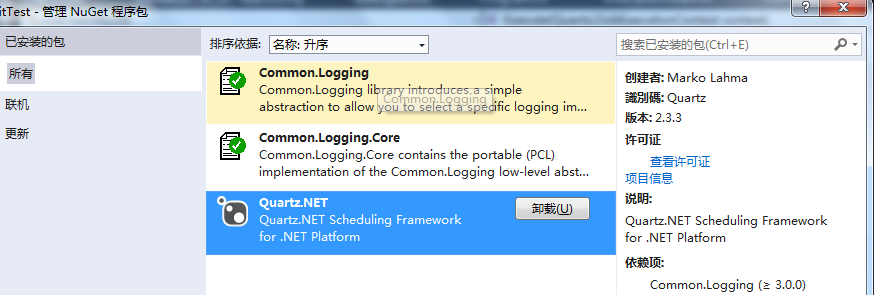
(1)从nuget上可以安装Quartz.net
(2)quartz配置:
<configSections>

  <section name="quartz" type="System.Configuration.NameValueSectionHandler, System, Version=1.0.5000.0,Culture=neutral, PublicKeyToken=b77a5c561934e089"/>

</configSections>

<quartz>

  <add key="quartz.scheduler.instanceName" value="ExampleDefaultQuartzScheduler"/>

  <add key="quartz.threadPool.type" value="Quartz.Simpl.SimpleThreadPool, Quartz"/>

  <add key="quartz.threadPool.threadCount" value="10"/>

  <add key="quartz.threadPool.threadPriority" value="2"/>

  <add key="quartz.jobStore.misfireThreshold" value="60000"/>

  <add key="quartz.jobStore.type" value="Quartz.Simpl.RAMJobStore, Quartz"/>

</quartz>

<appSettings>

  <!--cronexpression表达式:从每分钟的第2秒开始,每间隔5秒执行-->

  <add key="cronExpr" value="2/5 * * * * ?"/>

</appSettings>
(3)创建一个普通类,实现Quartz.IJob接口
接口很简单,只有一个Execute()方法(跟java里一样),在这个方法里写你要做的处理逻辑。
public class MyJob : Quartz.IJob

{

    public void Execute(Quartz.IJobExecutionContext context)

    {

        // 你的处理逻辑,也就是“工作”

        Console.WriteLine(DateTime.Now);

    }

}
(4)启动工作调度
using Quartz;
using Quartz.Impl;
using Quartz.Impl.Triggers;
class Program

{

    static void Main(string[] args)

    {

            // Initializes a new instance of the Quartz.Impl.StdSchedulerFactory class.

            ISchedulerFactory sf = new Quartz.Impl.StdSchedulerFactory();

            // Returns a client-usable handle to a Quartz.IScheduler.

            IScheduler sched = sf.GetScheduler();

            // 定义一个Job(即你的处理逻辑,也就是“工作”)

            IJobDetail job = new JobDetailImpl("job1", "group1", typeof(MyJob));

            // 定义触发器(读取AppSettings)

            string cronExpr = ConfigurationManager.AppSettings["cronExpr"];

            ITrigger trigger = new CronTriggerImpl("trigger1", "group1", "job1", "group1", cronExpr);

            // 将给定的Job添加到调度器里

            sched.AddJob(job, true, true);

            // 为Job指派触发器

            sched.ScheduleJob(trigger);

            // 启动调度器线程

            sched.Start();

            Console.Read();

    }

}
我这里是一个控制台程序。对于web程序或服务程序,当Application_End的时候,需要调用Scheduler的Shutdown()方法来关闭Quartz的工作。
注意IScheduler有两个重载的AddJob方法:
namespace Quartz

{

    public interface IScheduler

    {

        //

        // 摘要:

        //     Add the given Quartz.IJob to the Scheduler - with no associated Quartz.ITrigger.

        //     The Quartz.IJob will be 'dormant' until it is scheduled with a Quartz.ITrigger,

        //     or Quartz.IScheduler.TriggerJob(Quartz.JobKey) is called for it.

        //

        // 备注:

        //     The Quartz.IJob must by definition be 'durable', if it is not, SchedulerException

        //     will be thrown.

        void AddJob(IJobDetail jobDetail, bool replace);

        //

        // 摘要:

        //     Add the given Quartz.IJob to the Scheduler - with no associated Quartz.ITrigger.

        //     The Quartz.IJob will be 'dormant' until it is scheduled with a Quartz.ITrigger,

        //     or Quartz.IScheduler.TriggerJob(Quartz.JobKey) is called for it.

        //

        // 备注:

        //     With the storeNonDurableWhileAwaitingScheduling parameter set to true, a

        //     non-durable job can be stored. Once it is scheduled, it will resume normal

        //     non-durable behavior (i.e. be deleted once there are no remaining associated

        //     triggers).

        void AddJob(IJobDetail jobDetail, bool replace, bool storeNonDurableWhileAwaitingScheduling);

    }

}
上面的AddJob要调用void AddJob(IJobDetail jobDetail, bool replace, bool storeNonDurableWhileAwaitingScheduling);把storeNonDurableWhileAwaitingScheduling参数设置为true。否则会抛出SchedulerException异常:
未处理Quartz.SchedulerException

  HResult=-

  Message=Jobs added with no trigger must be durable.

  Source=Quartz

  StackTrace:

       在 Quartz.Core.QuartzScheduler.AddJob(IJobDetail jobDetail, Boolean replace, Boolean storeNonDurableWhileAwaitingScheduling) 位置 c:\Program Files (x86)\Jenkins\workspace\Quartz.NET\src\Quartz\Core\QuartzScheduler.cs:行号

       在 Quartz.Core.QuartzScheduler.AddJob(IJobDetail jobDetail, Boolean replace) 位置 c:\Program Files (x86)\Jenkins\workspace\Quartz.NET\src\Quartz\Core\QuartzScheduler.cs:行号

       在 Quartz.Impl.StdScheduler.AddJob(IJobDetail jobDetail, Boolean replace) 位置 c:\Program Files (x86)\Jenkins\workspace\Quartz.NET\src\Quartz\Impl\StdScheduler.cs:行号

       在 UnitTest.Program.Main(String[] args) 位置 d:\SourceProject\infrastructure.sms\trunk\UnitTest\Program.cs:行号

       在 System.AppDomain._nExecuteAssembly(RuntimeAssembly assembly, String[] args)

       在 System.AppDomain.ExecuteAssembly(String assemblyFile, Evidence assemblySecurity, String[] args)

       在 Microsoft.VisualStudio.HostingProcess.HostProc.RunUsersAssembly()

       在 System.Threading.ThreadHelper.ThreadStart_Context(Object state)

       在 System.Threading.ExecutionContext.RunInternal(ExecutionContext executionContext, ContextCallback callback, Object state, Boolean preserveSyncCtx)

       在 System.Threading.ExecutionContext.Run(ExecutionContext executionContext, ContextCallback callback, Object state, Boolean preserveSyncCtx)

       在 System.Threading.ExecutionContext.Run(ExecutionContext executionContext, ContextCallback callback, Object state)

       在 System.Threading.ThreadHelper.ThreadStart()
(5)接下来,就可以允许程序,查看效果了。
关于quartz的CronExpression表达式:
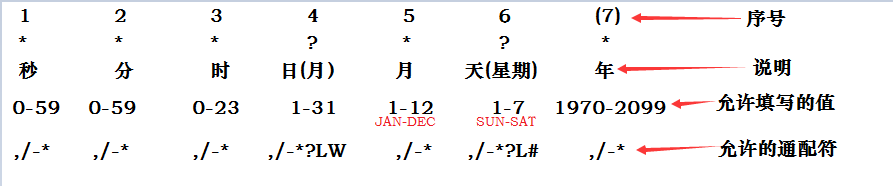
常用示例:
0 0 12 * * ? 每天12点触发
0 15 10 ? * * 每天10点15分触发
0 15 10 * * ? 每天10点15分触发
0 15 10 * * ? * 每天10点15分触发
0 15 10 * * ? 2005 2005年每天10点15分触发
0 * 14 * * ? 每天下午的 2点到2点59分每分触发
0 0/5 14 * * ? 每天下午的 2点到2点59分(整点开始,每隔5分触发)
0 0/5 14,18 * * ? 每天下午的 2点到2点59分、18点到18点59分(整点开始,每隔5分触发)
0 0-5 14 * * ? 每天下午的 2点到2点05分每分触发
0 10,44 14 ? 3 WED 3月份每周三下午的 2点10分和2点44分触发
0 15 10 ? * MON-FRI 从周一到周五每天上午的10点15分触发
0 15 10 15 * ? 每月15号上午10点15分触发
0 15 10 L * ? 每月最后一天的10点15分触发
0 15 10 ? * 6L 每月最后一周的星期五的10点15分触发
0 15 10 ? * 6L 2002-2005 从2002年到2005年每月最后一周的星期五的10点15分触发
0 15 10 ? * 6#3 每月的第三周的星期五开始触发
0 0 12 1/5 * ? 每月的第一个中午开始每隔5天触发一次
0 11 11 11 11 ? 每年的11月11号 11点11分触发(光棍节)
好脑袋不如烂笔头-Quartz使用总结的更多相关文章
- 【烂笔头】git常用命令篇
前言 常言道,好记性不如烂笔头,更何况笔者的记性也不是太好,于是就有了这篇“烂笔头”系列之一的git命令记录.本篇主要记录了笔者在工作当中使用过的相关命令,以方便平时查看,同时也供同行们参考.当然,读 ...
- Common lang一些边界方法总结(好记性不如烂笔头,需要慢慢积累).一定要利用好现有的轮子,例如Apache common与Google Guava
好记性真是不如烂笔头啊!!!! 如下代码: List<String> list = new ArrayList<String>(); list.add("1" ...
- 好记性不如烂笔头-linux学习笔记1
好记性不如烂笔头-linux学习笔记1 linux的文件系统有ext2,ext3,ext4,目前主流是ext4 linux主要用于服务器级别的操作系统,安装时需要至少2个分区 一个是交换分区,swap ...
- 好记性不如烂笔头-Mysql查找如何判断字段是否包含某个字符串
好记性不如烂笔头-Mysql查找如何判断字段是否包含某个字符串 利用mysql 字符串函数 find_in_set(); SELECT * FROM users WHERE find_in_set(' ...
- [nodejs]修改全局包位置,修复npm安装全局模块命令失效。好记性不如烂笔头
修复npm -g 全局安装命令失效,好的吧不得不承认,好记性不如烂笔头,我居然会忘记方法哈哈哈 Linux安装nodejs sudo apt install node sudo apt install ...
- MVC 好记星不如烂笔头之 ---> 全局异常捕获以及ACTION捕获
public class BaseController : Controller { /// <summary> /// Called after the action method is ...
- MVC 好记星不如烂笔头之 ---> 页面压缩GIP
public class BaseController : Controller { /// <summary> /// Called before the action method i ...
- Unity烂笔头1-自定义INSPECTOR属性窗口节点项
1.添加输入框和标签 LevelScript: using UnityEngine; using System.Collections; public class LevelScript : Mono ...
- MVC5 烂笔头
HttpContent Controller:HttpContextBase View:HttpContext.Current View的搜寻顺序:本文件夹.本共享.根共享等 class=" ...
随机推荐
- IE8的兼容性问题
IE的兼容性问题是前端开发人员的老大难问题,不过随着时代的发展,IE6逐渐的被淘汰,现在以及很少有网站兼容IE6了,一般都兼容到IE8,现在我总结了一些IE8的兼容性问题及解决方法. 1.使用meta ...
- CSS总则。
2.23:字体常用Css样式. font-family,font-size,color,font-weight,line-height,letter-spacing,text-decoration,t ...
- nginx url 重写
rewrite ^([^\.]*)/platform/(.+)/(.+)-(.+)\.html$ $1/platform.php?mod=asklist&ym=$2&fl=$3& ...
- leetcode problem sum
2. Add Two Numbers You are given two linked lists representing two non-negative numbers. The digits ...
- java轻量级Http Server
lighttpd 官方主页:www.lighttpd.netLighttpd是一个德国人领导的开源软件,其根本的目的是提供一个专门针对高性能网站,安全.快速.兼容性好并且灵活的web server环境 ...
- Mac OS X 安装Win7双系统
Mac10安装双系统 为了有一个纯净的开发环境,就在mac电脑中安装windows虚拟机.刚开始使用还很顺利,两个系统的交互很方便,mac用来下载.搜索和写笔记:windows纯开发.时间长了以后关机 ...
- 逐帧动画(Frame-by-frame Animations)
1.这一类动画可以创建一个Drawable序列,这些Drawable可以按照指定的时间间歇一个一个的显示. xml定义方法 <animation-list xmlns:android=" ...
- oracle常用语句总结
一.用户管理类 1.创建用户: Create user username Identified by password Default tablespace tablespacename Tempor ...
- python学习八皇后问题
0 # -*- coding: utf-8 -*- 1 import random #冲突检查,在定义state时,采用state来标志每个皇后的位置,其中索引用来表示横坐标,基对应的值表示纵坐标,例 ...
- 关于STM32-MDK中preprocessor symbols解释
preprocessor symbols 是预处理符号的意思,这里相当于宏定义,我们在使用STM32固件库时,由于固件库里面包含的是ST整个系列单片机的定义,如下图 这时在define框中可以作为一个 ...