
Android Notification如何显示表情?
打开之后,选中连接的设备,然后点击小手机图标,即可导出UI层次图。
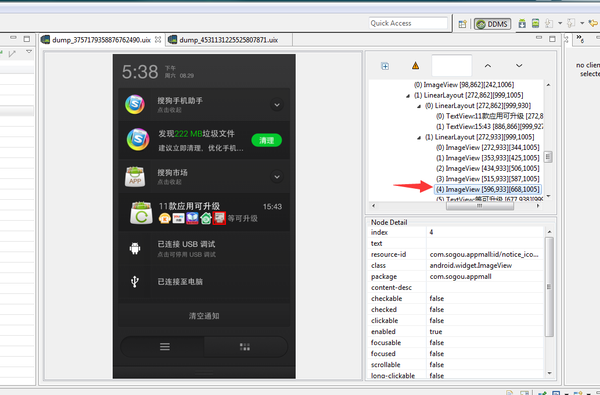
咱们来看下淘宝通知的UI层次图。
<img src="https://pic4.zhimg.com/08df4fad3cede85e28c121e820be7aff_b.png" data-rawwidth="1334" data-rawheight="768" class="origin_image zh-lightbox-thumb" width="1334" data-original="https://pic4.zhimg.com/08df4fad3cede85e28c121e820be7aff_r.png">看右侧,我擦嘞,居然是TextView,上面那个有个飞机的也是图片。
 看右侧,我擦嘞,居然是TextView,上面那个有个飞机的也是图片。
那是不是TextView的图文混排呢?
写段代码试下呗,测试发现没有卵用(具体为什么不可行,大家有兴趣可以分析下Android源码)。
那该怎么办,不知道你发现没有,淘宝使用的几乎都是emoji表情。
既然这样就好办了,在传入Notification的数据里面写入emoji数据试试。
果然,真的可以使用。而且,不限制放多少表情,客官随便放。
<img src="https://pic3.zhimg.com/fa46001dee8f320221bd612dd5552426_b.png" data-rawwidth="1083" data-rawheight="206" class="origin_image zh-lightbox-thumb" width="1083" data-original="https://pic3.zhimg.com/fa46001dee8f320221bd612dd5552426_r.png">
 <img src="https://pic1.zhimg.com/96c062c8a17162a7e229d9cd99ec7994_b.png" data-rawwidth="1057" data-rawheight="219" class="origin_image zh-lightbox-thumb" width="1057" data-original="https://pic1.zhimg.com/96c062c8a17162a7e229d9cd99ec7994_r.png">第一张图是锤子T1,第二张是一加2(氧系统)。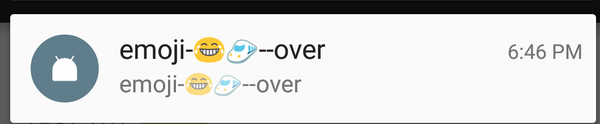
这种实现有3个问题:
一是只能只用Unicode范围内的表情(其实就是字体文字,只是系统渲染出来看着像表情),当然不一定限定于Emoji范围(比如Unicode 0x2708是个灰机✈);
二是不同系统显示的表情不一样;
三是貌似4.0系统以下不支持。
那我要显示其他表情该怎么办。那就只有自定义通知栏布局了。
看到那个搜狗市场的更新图标了么?布局大致如右侧。也就是 @hi大头鬼hi 同学所说的icon。
那如果真的要图文混排怎么办,那就整个通知栏一个ImageView,然后把文字、图片绘制到一个Bitmap上,然后再设置进去。理论可行。
<img src="https://pic1.zhimg.com/bdf6d67e2f7dadcd1ea966888a125fa4_b.png" data-rawwidth="1033" data-rawheight="680" class="origin_image zh-lightbox-thumb" width="1033" data-original="https://pic1.zhimg.com/bdf6d67e2f7dadcd1ea966888a125fa4_r.png">
最后,上淘宝通知栏显示表情的测试代码。
Emoji Unicode编码可参考附录。
String originalStr = "emoji-" + newString(0x1f602) +newString(0x1f684)+"--over";

              Notifier.getInstance().notify(originalStr,originalStr,"tickerText2",Notifier.TYPE_COMMON,false);

    public static final String newString(int codePoint) {

         return new String(Character.toChars(codePoint));

    }
作者:RxRead

链接:https://www.zhihu.com/question/34870984/answer/60229859

来源:知乎

著作权归作者所有,转载请联系作者获得授权。

/**

 * Notification

 */

public class Notifier {

    private static Notifier instance = null;

    private NotificationManager notificationManager;

    private static Object INSTANCE_LOCK = new Object();

    public static final int TYPE_COMMON = ;

    private static final String TAG = "Notifier";

    Intent mLauncherIntent = null;

    Notification notification = null;

    int count = ;

    public static Notifier getInstance() {

        if (instance == null)

            synchronized (INSTANCE_LOCK) {

                if (instance == null) {

                    instance = new Notifier();

                }

            }

        return instance;

    }

    private Notifier() {

        this.notificationManager = (NotificationManager) ZanPhoneRecorderApplication.getInstance().getSystemService(Context.NOTIFICATION_SERVICE);

    }

    /**

     * 清除所有通知

     * */

    public void cleanAll() {

        if (notificationManager != null) {

            notificationManager.cancelAll();

        }

    }

    public void cancelByType(int type) {

        if (notificationManager != null) {

            notificationManager.cancel(type);

        }

    }

    /**

     */

    public void notify(CharSequence title, CharSequence message, String tickerText, int type, boolean canClear) {

        try {

            Context context = ZanPhoneRecorderApplication.getInstance();

            Notification notification = new Notification();

            notification.icon = R.mipmap.ic_launcher;

            notification.defaults = Notification.DEFAULT_LIGHTS;

            // notification.defaults |= Notification.DEFAULT_SOUND;

            // notification.defaults |= Notification.DEFAULT_VIBRATE;

            if (canClear)

                notification.flags |= Notification.FLAG_AUTO_CANCEL;

            else

                notification.flags |= Notification.FLAG_NO_CLEAR;

            if (android.os.Build.VERSION.SDK_INT >= ) {// Android 4.1之后才有

                notification.priority = Notification.PRIORITY_MAX;

            }

            notification.tickerText = tickerText;

            notification.when = System.currentTimeMillis();

            Intent intent = new Intent();

            PendingIntent contentIntent = null;

            switch (type) {

                case TYPE_COMMON:

                    intent.setClass(context, HomeActivity.class);

                    contentIntent = PendingIntent.getActivity(context, TYPE_COMMON, intent, PendingIntent.FLAG_UPDATE_CURRENT);

                    notification.setLatestEventInfo(context, title, message, contentIntent);

                    break;

            }

            if (contentIntent != null) {

                notification.contentIntent = contentIntent;

                notificationManager.notify(type, notification);

            }

        } catch (Exception e) {

            e.printStackTrace();

        }

    }

}
Android Notification如何显示表情?的更多相关文章
- Android Notification 详解(一)——基本操作
Android Notification 详解(一)--基本操作 版权声明:本文为博主原创文章,未经博主允许不得转载. 微博:厉圣杰 源码:AndroidDemo/Notification 文中如有纰 ...
- Android Notification 详解——基本操作
Android Notification 详解 版权声明:本文为博主原创文章,未经博主允许不得转载. 前几天项目中有用到 Android 通知相关的内容,索性把 Android Notificatio ...
- 3、android notification 详细用法
在 android 系统中,在应用程序可能会遇到几种情况需要通知用户,有的需要用户回应,有的则不需要,例如: * 当保存文件等事件完成,应该会出现一个小的消息,以确认保存成功. * 如果应用程序在后台 ...
- android Notification定义与应用
首先要明白一个概念: Intent 与 PendingIntent 的区别: Intent:是意图,即告诉系统我要干什么,然后做Intent应该做的事,而intent是消息的内容 PendingInt ...
- Android NOtification 使用(震动 闪屏 铃声)
一. Notification 简介 在 android 系统中,在应用程序可能会遇到几种情况需要通知用户,有的需要用户回应,有的则不需要,例如: * 当保存文件等事件完成,应该会出现一个小的消息,以 ...
- Android Notification通知详细解释
Android Notification通知具体解释 Notification: (一).简单介绍: 显示在手机状态栏的通知. Notification所代表的是一种具有全局效果的通 ...
- Android 编辑框插入表情图片
首先,把整理好的表情图片以及布局用到的一些图片导入到项目的res/drawable目录中. 然后,编辑res/layout目录下布局.xml文件,这里我把oschina客户端的布局代码贴上来,供大家参 ...
- Android Notification通知简介
Android Notification通知简介 根据activity的生命周期,在activity不显示时,会执行onStop函数(比如按下home键),所以你在onStop函数(按退出键除外)里面 ...
- Android Notification状态栏通知
没有添加额外的震动及声音效果,这里直接实现了通知的功能,看效果吧: MainActivity.java package com.example.notification; import android ...
随机推荐
- Reentrant 可重入解释
作者:知乎用户链接:https://www.zhihu.com/question/37168009/answer/88086943来源:知乎著作权归作者所有.商业转载请联系作者获得授权,非商业转载请注 ...
- JavaScript--Module模式
//module: Module模式是JavaScript编程中一个非常通用的模式 window.onload = function() { //1.基本使用: var MyFn = function ...
- BZOJ 3732 Network Kruskal+倍增LCA
题目大意:给定一个n个点m条边的无向连通图.k次询问两点之间全部路径中最长边的最小值 NOIP2013 货车运输.差点儿就是原题...仅仅只是最小边最大改成了最大边最小.. . 首先看到最大值最小第一 ...
- 前端面试题(JavaScript)
(前端面试题大全,持续更新) 箭头函数特点?箭头函数和普通函数的区别 手写懒加载(考虑防抖和重复加载问题) 手写bind(为什么要加预参数,为什么要加new) apply, call, bind ne ...
- datetime小练习
题目: 1.计算你的生日比如近30年来(1990-2019),每年的生日是星期几,统计一下星期几出现的次数比较多2,生日提醒,距离生日还有几天 # !/usr/bin/env python # -*- ...
- hibernate 注解配置<?xml version="1.0" encoding="UTF-8"?> <beans xmlns="http://www.springframework.org/schema/beans" xmlns:xsi="http://www.w3.org/2001/X
<?xml version="1.0" encoding="UTF-8"?> <beans xmlns="http://www.sp ...
- Android应用开发-小巫CSDN博客client之获取评论列表
Android应用开发-小巫CSDN博客客户端之获取评论列表 上一篇博客介绍了博文具体内容的业务逻辑实现,本篇博客介绍小巫CSDN博客客户端的最后一项功能.获取评论列表,这个功能的实现跟前面获取文章列 ...
- js进阶 13-9/10 jquery如何实现三级列表
js进阶 13-9/10 jquery如何实现三级列表 一.总结 一句话总结:用的是定位,父标签相对定位,子标签就可以绝对定位了,绝对定位的孩子还是可以设置绝对定位.用toggle设置子菜单显示和隐藏 ...
- 微信支付v2开发(8) 维权通知
本文介绍微信支付中如何获得维权通知. 一.维权通知URL 在 微信支付开发(1) 微信支付URL配置 已提到,维权通知URL为 http://www.doucube.com/wxpay/rights. ...
- PyCharm下载主题以及个性化设置(详细)
说明:该篇博客是博主一字一码编写的,实属不易,请尊重原创,谢谢大家! 一.下载主题 1.在http://www.themesmap.com/theme.html上选择自己喜欢的主题点进去后进行下载. ...