
CSS画各种二维图形
1.效果
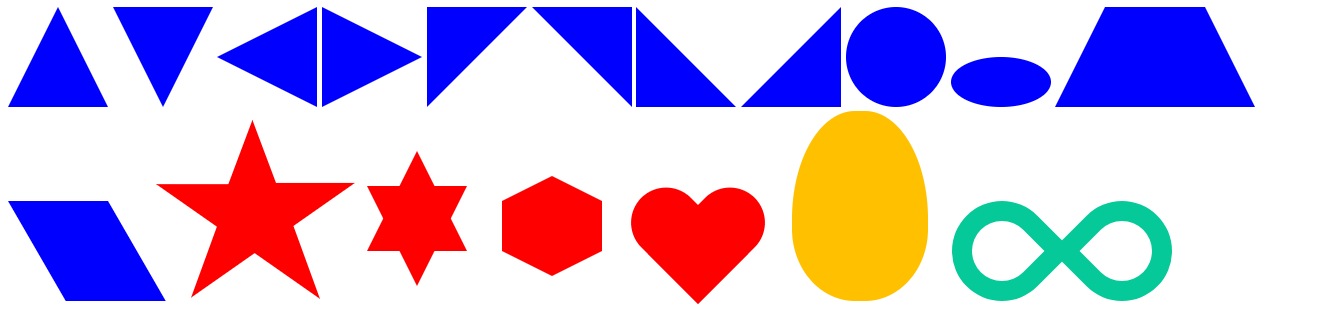
2.源码
<%@ page contentType="text/html;charset=UTF-8" language="java" %>

<html>

<head>

    <style type="text/css">

        #triangle_top{

            display: inline-block;

            width:0;

            height:0;

            border-left:50px solid transparent;

            border-right: 50px solid transparent;

            border-bottom:100px solid blue;

        }

        #triangle_bottom{

            display: inline-block;

            width:0;

            height:0;

            border-left:50px solid transparent;

            border-right:50px solid transparent;

            border-top:100px solid blue;

        }

        #triangle_left{

            display: inline-block;

            width:0;

            height:0;

            border-bottom:50px solid transparent;

            border-top:50px solid transparent;

            border-right:100px solid blue;

        }

        #triangle_right{

            display: inline-block;

            width:0;

            height:0;

            border-bottom:50px solid transparent;

            border-top:50px solid transparent;

            border-left:100px solid blue;

        }

        #right_triangle_top_left{

            display: inline-block;

            width:0;

            height:0;

            border-right:100px solid transparent;

            border-top:100px solid blue;

        }

        #right_triangle_top_right{

            display: inline-block;

            width:0;

            height:0;

            border-left:100px solid transparent;

            border-top:100px solid blue;

        }

        #right_triangle_bottom_left{

            display:inline-block;

            width:0;

            height:0;

            border-right:100px solid transparent;

            border-bottom:100px solid blue;

        }

        #right_triangle_bottom_right{

            display: inline-block;

            width:0;

            height:0;

            border-left:100px solid transparent;

            border-bottom:100px solid blue;

        }

        #circle{

            display: inline-block;

            width: 100px;

            height: 100px;

            background: blue;

            -webkit-border-radius: 50px;

            -moz-border-radius: 50px;

            border-radius: 50px;

        }

        #oval{

            display: inline-block;

            width:100px;

            height:50px;

            background-color: blue;

            -webkit-border-radius:50px/25px;

            -moz-border-radius:50px/25px;

            border-radius:50px/25px;

        }

        #trapezium{

            display: inline-block;

            height: 0;

            width: 100px;

            border-bottom: 100px solid blue;

            border-left: 50px solid transparent;

            border-right: 50px solid transparent;

        }

        #parallelogram{

            display: inline-block;

            height: 100px;

            width: 100px;

            background-color: blue;

            -webkit-transform: skewX(30deg);

            -moz-transform: skewX(30deg);

            -ms-transform: skewX(30deg);

            -o-transform: skewX(30deg);

            transform: skewX(30deg);

            transform-origin: 0 0;

        }

        #star {

            width: 0;

            height: 0;

            display: inline-block;

            border-right: 100px solid transparent;

            border-left: 100px solid transparent;

            border-bottom: 70px solid red;

            -moz-transform: rotate(35deg);

            -webkit-transform: rotate(35deg);

            -ms-transform: rotate(35deg);

            -o-transform: rotate(35deg);

            transform-origin: 80px 120px;

        }

        #star:before {

            content: '';

            height: 0;

            width: 0;

            display: inline-block;

            position: relative;

            top: -45px;

            left: -65px;

            border-left: 30px solid transparent;

            border-right: 30px solid transparent;

            border-bottom: 80px solid red;

            -webkit-transform: rotate(-35deg);

            -moz-transform: rotate(-35deg);

            -ms-transform: rotate(-35deg);

            -o-transform: rotate(-35deg);

            transform: rotate(-35deg);

        }

        #star:after{

            content: '';

            height:0;

            width:0;

            display: inline-block;

            position: relative;

            top: -78px;

            left: -105px;

            border-right: 100px solid transparent;

            border-left: 100px solid transparent;

            border-bottom: 70px solid red;

            -webkit-transform: rotate(-70deg);

            -moz-transform: rotate(-70deg);

            -ms-transform: rotate(-70deg);

            -o-transform: rotate(-70deg);

            transform: rotate(-70deg);

        }

        #star_six_points {

            width: 0;

            height: 0;

            position: relative;

            top: -50px;

            left: 50px;

            display: inline-block;

            border-left: 50px solid transparent;

            border-right: 50px solid transparent;

            border-bottom: 100px solid red;

        }

        #star_six_points:after{

            content: '';

            width:0;

            height:0;

            display: inline-block;

            position: absolute;

            top:35px;

            left:-50px;

            border-left: 50px solid transparent;

            border-right: 50px solid transparent;

            border-top: 100px solid red;

        }

        #hexagon{

            width:100px;

            height:50px;

            display: inline-block;

            position: relative;

            left: 80px;

            top: -50px;

            background-color: red;

        }

        #hexagon:before{

            content: '';

            width:0;

            height:0;

            display: inline-block;

            position: absolute;

            top: -25px;

            left: 0;

            border-left: 50px solid transparent;

            border-right: 50px solid transparent;

            border-bottom: 25px solid red;

        }

        #hexagon:after{

            content: '';

            width:0;

            height:0;

            display: inline-block;

            position: absolute;

            top: 50px;

            left: 0;

            border-left: 50px solid transparent;

            border-right: 50px solid transparent;

            border-top: 25px solid red;

        }

        #heart {

            top:-120px;

            left: 120px;

            position: relative;

            display: inline-block;

        }

        #heart:before,#heart:after {

            content: "";

            width: 70px;

            height: 115px;

            position: absolute;

            background: red;

            display: inline-block;

            -webkit-border-radius: 50px 50px 0 0;

            -moz-border-radius: 50px 50px 0 0;

            border-radius: 50px 50px 0 0;

            -webkit-transform: rotate(-45deg);

            -moz-transform: rotate(-45deg);

            -ms-transform: rotate(-45deg);

            -o-transform: rotate(-45deg);

            transform: rotate(-45deg);

        }

        #heart:after {

            left: 32px;

            -webkit-transform: rotate(45deg);

            -moz-transform: rotate(45deg);

            -ms-transform: rotate(45deg);

            -o-transform: rotate(45deg);

            transform: rotate(45deg);

        }

        #egg{

            width: 136px;

            height: 190px;

            position: relative;

            left: 260px;

            background: #ffc000;

            display: inline-block;

            -webkit-border-radius:63px 63px 63px 63px / 108px 108px 72px 72px;

            -moz-border-radius:63px 63px 63px 63px / 108px 108px 72px 72px;

            border-radius:63px 63px 63px 63px / 108px 108px 72px 72px;

        }

        #infinity{

            width: 220px;

            height: 100px;

            position: relative;

            display: inline-block;

            left: 280px;

        }

        #infinity:before,#infinity:after {

            content: "";

            width: 60px;

            height: 60px;

            position: absolute;

            top: 0;

            left: 0;

            border: 20px solid #06c999;

            -moz-border-radius: 50px 50px 0 50px;

            border-radius: 50px 50px 0 50px;

            -webkit-transform: rotate(-45deg);

            -moz-transform: rotate(-45deg);

            -ms-transform: rotate(-45deg);

            -o-transform: rotate(-45deg);

            transform: rotate(-45deg);

        }

        #infinity:after {

            left: auto;

            right: 0;

            -moz-border-radius: 50px 50px 50px 0;

            border-radius: 50px 50px 50px 0;

            -webkit-transform: rotate(45deg);

            -moz-transform: rotate(45deg);

            -ms-transform: rotate(45deg);

            -o-transform: rotate(45deg);

            transform: rotate(45deg);

        }

    </style>

</head>

<body>

<div id="triangle_top"></div>

<div id="triangle_bottom"></div>

<div id="triangle_left"></div>

<div id="triangle_right"></div>

<div id="right_triangle_top_left"></div>

<div id="right_triangle_top_right"></div>

<div id="right_triangle_bottom_left"></div>

<div id="right_triangle_bottom_right"></div>

<div id="circle"></div>

<div id="oval"></div>

<div id="trapezium"></div>

<div id="parallelogram"></div>

<div id="star"></div>

<div id="star_six_points"></div>

<div id="hexagon"></div>

<div id="heart"></div>

<div id="egg"></div>

<div id="infinity"></div>

</body>

</html>
CSS画各种二维图形的更多相关文章
- matlab绘制二维图形
常用的二维图形命令: plot:绘制二维图形 loglog:用全对数坐标绘图 semilogx:用半对数坐标(X)绘图 semilogy:用半对数坐标(Y)绘图 fill:绘制二维多边填充图形 pol ...
- VS2008集成QT的OpenGL开发(实现二维图形的旋转)
主要是利用Qt中的定时器实现了二维图形的旋转功能: #ifndef QGLTEST_H #define QGLTEST_H #include <QGLWidget> #include &l ...
- 通过Matrix进行二维图形仿射变换
Affine Transformation是一种二维坐标到二维坐标之间的线性变换,保持二维图形的"平直性"和"平行性".仿射变换可以通过一系列的原子变换的复合来 ...
- 二维图形的矩阵变换(三)——在WPF中的应用矩阵变换
原文:二维图形的矩阵变换(三)--在WPF中的应用矩阵变换 UIElement和RenderTransform 首先,我们来看看什么样的对象可以进行变换.在WPF中,用于呈现给用户的对象的基类为Vis ...
- 二维图形的矩阵变换(二)——WPF中的矩阵变换基础
原文:二维图形的矩阵变换(二)--WPF中的矩阵变换基础 在前文二维图形的矩阵变换(一)——基本概念中已经介绍过二维图像矩阵变换的一些基础知识,本文中主要介绍一下如何在WPF中进行矩阵变换. Matr ...
- 3ds max学习笔记(十五)-- 二维图形的操作
(二维图形的创建) 1,在命令面板的[新建],单击第二个按钮: 从中选择对象名称,在视图种单击拖动进行创建,特殊:线:摁[shift]限制水平,垂直方向: 2,二维对象参数: 在渲染中启用:显示二维线 ...
- openGL实现二维图形和三维图形
openGL是一个强大的底层图形库,其命令最初的时候使用C语言实现的.openGL定义了一个图形程序接口,常用于制作处理三维图像,功能强大,调用方便,在图像处理十分受欢迎. 实现图形主要使用的是ope ...
- QT 二维图形 原理、发展及应用
转载自 网易博客:sun的博客 http://zhouyang340.blog.163.com/blog/static/3024095920126710504178/ 2D绘图 Qt4中的2D绘图部分 ...
- Matlab 常用绘图指令(二维图形)
使用matlab的时候常常会忘掉一些指令,每次都要重新查找,挺麻烦的,这里收集一些常用的绘图指令,供自己和大家以后方便查找和使用. 1.例子-包含了常用绘图命令 clear clc %%数据准备 x ...
随机推荐
- 标准C 语言总结
***************C语言****************** --day01-- Linux是一个和Windows类似的操作系统 通常通过终端软件使用Linux操作系统 终端软件里只能使用 ...
- 面试:A
分析 System.Collections.Generic.List<T> 的 Remove<T> 方法和 Clear 方法的实现细节(不允许使用“移除”“清除”这种概念模糊的 ...
- js用正则表达式将英文引号字符替换为中文引号字符
<script> $(function(){ var str='"我是英文版的引号",我要变成"中文版的引号"'; alert(replaceDqm ...
- 第十五节:pandas之concat()级联
Pandas 提供了concat()函数可以轻松的将Series.DataFrame对象进行合并在一起. pandas.concat(obj , axis=0 , join="inner&q ...
- NYIST 760 See LCS again
See LCS again时间限制:1000 ms | 内存限制:65535 KB难度:3 描述There are A, B two sequences, the number of elements ...
- mysql5.7 简易修改mysql密码
MySQL 5.7 mysql库的user表中已经不再有password字段,取而代之的为authentication_string修改语法相同,步骤也相同.注意:/etc/my.cnf这个配置文件中 ...
- spring boot.定时任务问题记录(TaskScheduler/ScheduledExecutorService异常)
一.背景 spring boot的定时任务非常简单,只需要在启动类中加上@EnableScheduling注解,然后在对应的方法上配置@Scheduled就可以了,系统会自动处理并按照Schedule ...
- [转]十五天精通WCF——终结篇 那些你需要注意的坑
终于一路走来,到了本系列的最后一篇了,这一篇也没什么好说的,整体知识框架已经在前面的系列文章中讲完了,wcf的配置众多,如果 不加一些指定配置,你可能会遇到一些灾难性的后果,快来一睹为快吧. 一: 第 ...
- posix线程库1
posix线程库重要的程度不言而喻,这些天学习这个,参考 https://www.ibm.com/developerworks/cn/linux/thread/posix_thread1/ 首先先 ...
- Delphi春天将来临,Android遇到XE7我也是醉了,Hello World
回首往日,从Delphi 7走到如今.总感觉不愠不火.期间论坛倒掉无数,没倒掉的也半死不活,大批的程序猿转向C#,Java,PHP. Delphi的开发高效有目共睹,一直不忍放弃.Delphi以前一夜 ...