
SpringBoot学习笔记(16)----SpringBoot整合Swagger2
Swagger 是一个规范和完整的框架,用于生成,描述,调用和可视化RESTful风格的web服务
http://swagger.io
Springfox的前身是swagger-springmvc,是一个开源的API doc框架,可以将我们的Controller接口的方法以文档的形式展现,基于swagger,这样就方便开发人员不用在开发完接口服务之后还需要手写一份文档给需要的人。
使用方式如下
引入依赖:
pom.xml文件
<dependency>

            <groupId>io.springfox</groupId>

            <artifactId>springfox-swagger2</artifactId>

            <version>2.6.1</version>

        </dependency>

        <dependency>

            <groupId>io.springfox</groupId>

            <artifactId>springfox-swagger-ui</artifactId>

            <version>2.6.1</version>

        </dependency>
编写配置类,并使用@EnableSwagger2开启支持swagger2,配置类如下
package com.wangx.boot.util;

import org.springframework.context.annotation.Bean;

import org.springframework.context.annotation.Configuration;

import springfox.documentation.builders.ApiInfoBuilder;

import springfox.documentation.builders.RequestHandlerSelectors;

import springfox.documentation.service.ApiInfo;

import springfox.documentation.service.Contact;

import springfox.documentation.spi.DocumentationType;

import springfox.documentation.spring.web.plugins.Docket;

import springfox.documentation.swagger2.annotations.EnableSwagger2;

import static springfox.documentation.builders.PathSelectors.regex;

@Configuration

@EnableSwagger2

public class Swagger2Configuration {

    @Bean

    public Docket accessToker() {

        return new Docket(DocumentationType.SWAGGER_2).

                groupName("api")//定一组

                .select()//选择那些路径和接口api会生成document

                .apis(RequestHandlerSelectors.basePackage(""))//拦截的包

                .paths(regex("/api/.*"))//拦截该路劲下的接口

                .build() //创建
          .apiInfo(apiInfo()); //配置说明

    }

    private ApiInfo apiInfo() {

        return new ApiInfoBuilder()

                .title("测试项目")//标题

                .description("springboot整合swagger")//描述

                .termsOfServiceUrl("http://www.baidu.com")//

                .contact(new Contact("wangx", "http://baidu.com","1028106567@qq.com"))//联系人

                .version("1.0")//版本

                .build();

    }

}
这样就会拦截api路劲下的所有接口并生成document.
访问:http://localhost:8080/swagger-ui.html#/
视图如下:
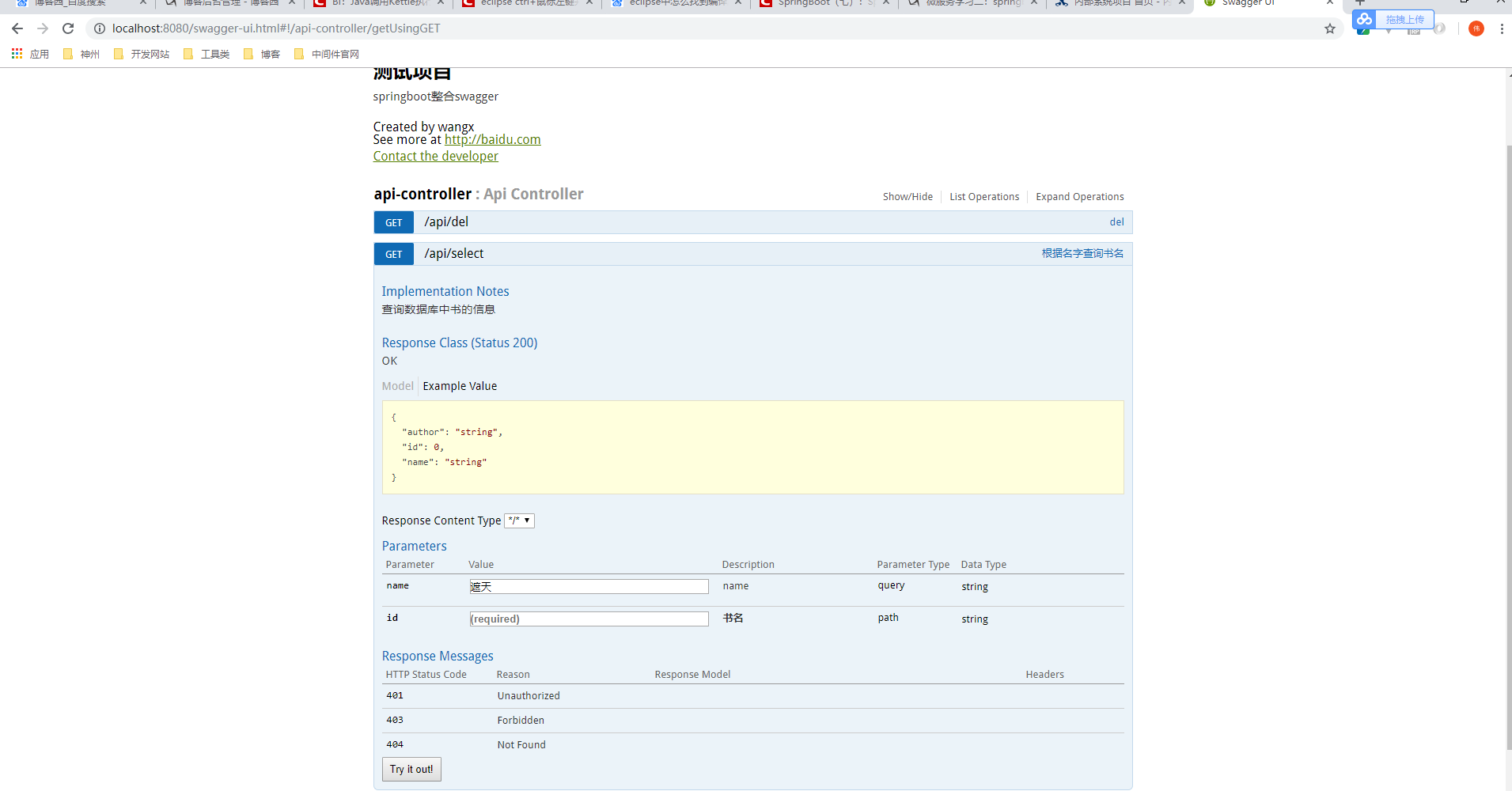
可以查看接口的相关信息,并且也可以不用通过postman就可以测试接口了。相当的便利的。
同时swagger也提供了一些注解可以让我们使用在类或者方法上
Swagger的注解及作用。
@Api:修饰整个类,描述Controller的作用
@ApiOperation:描述一个类的一个方法,或者说一个接口
@ApiParam:单个参数描述
@ApiModel:用对象来接收参数
@ApiProperty:用对象接收参数时,描述对象的一个字段
@ApiResponse:HTTP响应其中1个描述
@ApiResponses:HTTP响应整体描述
@ApiIgnore:使用该注解忽略这个API
@ApiError :发生错误返回的信息
@ApiImplicitParam:一个请求参数
@ApiImplicitParams:多个请求参数
SpringBoot学习笔记(16)----SpringBoot整合Swagger2的更多相关文章
- SpringBoot学习笔记(4)----SpringBoot中freemarker、thymeleaf的使用
1. freemarker引擎的使用 如果你使用的是idea或者eclipse中安装了sts插件,那么在新建项目时就可以直接指定试图模板 如图: 勾选freeMarker,此时springboot项目 ...
- springboot学习笔记-5 springboot整合shiro
shiro是一个权限框架,具体的使用可以查看其官网 http://shiro.apache.org/ 它提供了很方便的权限认证和登录的功能. 而springboot作为一个开源框架,必然提供了和sh ...
- springboot学习笔记-6 springboot整合RabbitMQ
一 RabbitMQ的介绍 RabbitMQ是消息中间件的一种,消息中间件即分布式系统中完成消息的发送和接收的基础软件.这些软件有很多,包括ActiveMQ(apache公司的),RocketMQ(阿 ...
- 【转】SpringBoot学习笔记(7) SpringBoot整合Dubbo(使用yml配置)
http://blog.csdn.net/a67474506/article/details/61640548 Dubbo是什么东西我这里就不详细介绍了,自己可以去谷歌 SpringBoot整合Dub ...
- SpringBoot学习笔记(9)----SpringBoot中使用关系型数据库以及事务处理
在实际的运用开发中,跟数据库之间的交互是必不可少的,SpringBoot也提供了两种跟数据库交互的方式. 1. 使用JdbcTemplate 在SpringBoot中提供了JdbcTemplate模板 ...
- SpringBoot学习笔记(6) SpringBoot数据缓存Cache [Guava和Redis实现]
https://blog.csdn.net/a67474506/article/details/52608855 Spring定义了org.springframework.cache.CacheMan ...
- SpringBoot学习笔记(15)----SpringBoot使用Druid
直接访问Druid官网wiki,有详细教程,地址如下: SpringBoot支持Druid地址:https://github.com/alibaba/druid/tree/master/druid-s ...
- SpringBoot学习笔记(11)-----SpringBoot中使用rabbitmq,activemq消息队列和rest服务的调用
1. activemq 首先引入依赖 pom.xml文件 <dependency> <groupId>org.springframework.boot</groupId& ...
- SpringBoot学习笔记(10)-----SpringBoot中使用Redis/Mongodb和缓存Ehcache缓存和redis缓存
1. 使用Redis 在使用redis之前,首先要保证安装或有redis的服务器,接下就是引入redis依赖. pom.xml文件如下 <dependency> <groupId&g ...
随机推荐
- 使用http-server开启一个本地服务器
前言 在写前端页面中,经常会在浏览器运行HTML页面,从本地文件夹中直接打开的一般都是file协议,当代码中存在http或https的链接时,HTML页面就无法正常打开,为了解决这种情况,需要在在本地 ...
- mysql定时清理binlog
一.没有主从同步的情况下清理日志 mysql -uroot -p123456 -e 'PURGE MASTER LOGS BEFORE DATE_SUB( NOW( ),INTERVAL 5 DAY) ...
- Pyhton学习——Day38
#CSS:Cascading Style Sheets——层叠样式表# CSS的四种引入方式# 行内式是在标记的style属性中设定CSS样式.这种方式没有体现出CSS的优势,不推荐使用.###### ...
- Django路由中的include
include(module,namespace = None,app_name = None)[source] include(pattern_list) include((pattern_list ...
- [学习笔记] CS131 Computer Vision: Foundations and Applications:Lecture 4 像素和滤波器
Background reading: Forsyth and Ponce, Computer Vision Chapter 7 Image sampling and quantization Typ ...
- QT_圆_直线_三角t
MyImgTest.h: #ifndef MYIMGTEST_H#define MYIMGTEST_H #include <QWidget> class MyImgTest : publi ...
- JS中常用开发知识点
JS中常用开发知识点 1.获取指定范围内的随机数 2.随机获取数组中的元素 3.生成从0到指定值的数字数组 等同于: 4.打乱数字数组的顺序 5.对象转换为数组 //注意对象必须是以下格式的才可以通 ...
- 【BZOJ 1305】[CQOI2009]dance跳舞
[链接] 我是链接,点我呀:) [题意] 在这里输入题意 [题解] 男生和女生每个人都分身成两个节点 即x[1],x[2]和y[1],y[2] 然后如果i和j不相互喜欢 那么add(x[i][2],y ...
- 【codeforces 500E】New Year Domino
[题目链接]:http://codeforces.com/problemset/problem/500/E [题意] 有n个多米诺骨牌; 你知道它们的长度; 然后问你,如果把第i骨牌往后推倒,然后要求 ...
- linux内核(二)内核移植(DM365-DM368开发攻略——linux-2.6.32的移植)
一.介绍linux-2.6.32: Linux-2.6.32的网上介绍:增添了虚拟化内存 de-duplicacion.重写了 writeback 代码.改进了 Btrfs 文件系统.添加了 ATI ...