
solr6.6 导入索引数据
1、什么是core
core是solr的一个索引库,可以理解为一个数据库,core可以根据需要,创建多个。
2、创建core
例如,创建一个core,名字叫mycore,就可以用一下命令:
E:\solr-6.6.0\solr-6.6.0\bin>solr.cmd create -c mycore
如果一个core创建成功之后,会有如下信息打印:
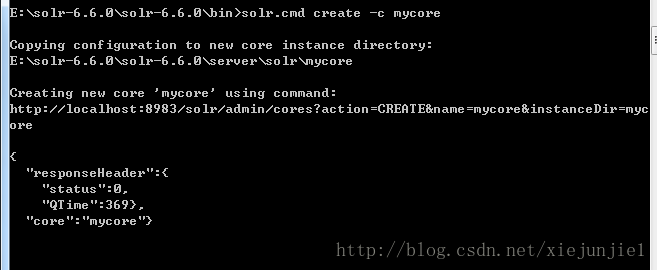
然后会在solr后台看到:
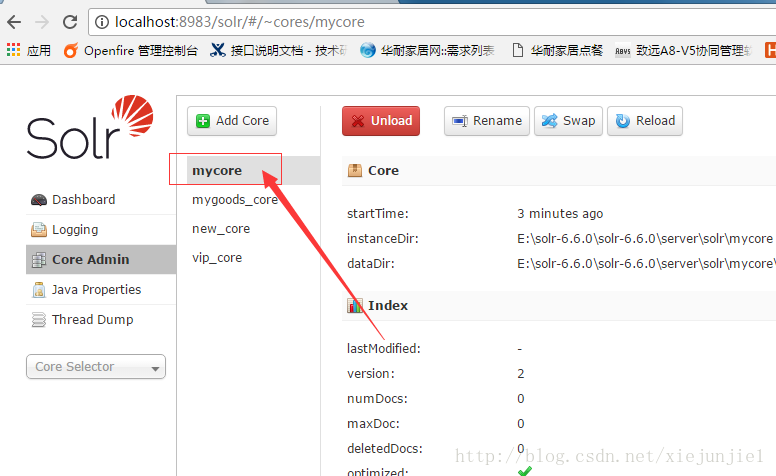
表示一个core已经创建成功!
3、core目录介绍
创建一个core之后,除了在后台看到结果,也会在E:\solr-6.6.0\solr-6.6.0\server\solr目录下创建了一个叫mycore的文件夹。
core里面默认创建如下目录和文件:
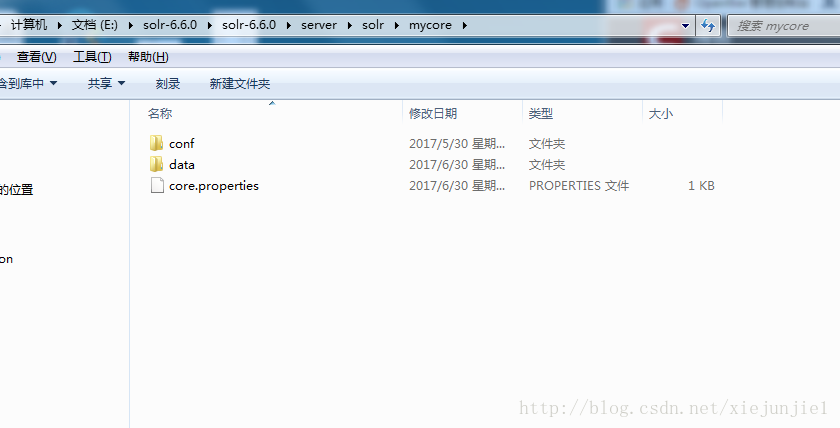
conf:是一个放置配置文件,里面有两个文件需要经常修改。
data:是索引数据的保存目录。
core.properties:当前core的属性文件。
4、给core创建索引数据,做个实验
创建一个例子,给core导入索引数据,用于后面的实验。
4.1 创建一个数据库
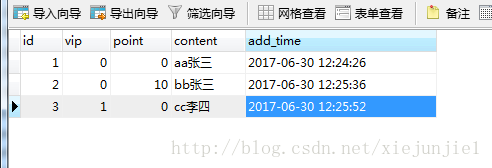
创建一个数据库,并创建几条数据,表结构:
id自增
vip表示是否vip
point表示点击次数
content随便填一些内容
add_time表示添加时间
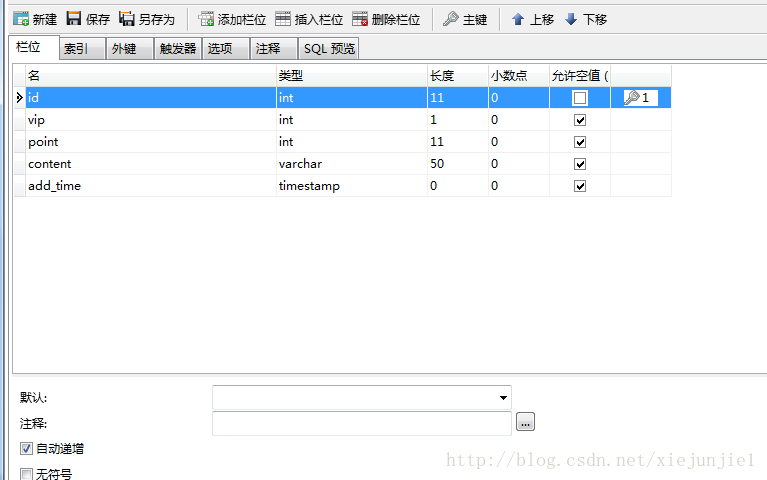
添加几条测试数据,content字段整规律一点,用于后面的实验。
4.2 配置solrconfig.xml
sorlconfig.xml文件与managed-shema文件是经常要修改的文件。位于创建的core目录里面的config文件夹里。例如:
E:\solr-6.6.0\solr-6.6.0\server\solr\mycore\conf
在solrconfig.xml文件的后面配置如下信息:
<!--引入DataImportHandler类的jar-->

<lib dir="${solr.install.dir:../../../..}/dist/" regex="solr-dataimporthandler-.*\.jar" />

<requestHandler name="/dataimport" class="org.apache.solr.handler.dataimport.DataImportHandler">

  <lst name="defaults">

    <str name="config">data-config.xml</str>

  </lst>

</requestHandler>
这里的配置表示mycore的数据导入使用solr的DataImportHandler,而这个handler所在的jar位于E:\solr-6.6.0\solr-6.6.0\dist目录里面,解压的时候就有。通过配置lib节点来进行引入
其中data-config.xml 需要在solrconfig.xml同级目录下自己手动创建。
配置之后应该是这样的:
<?xml version="1.0" encoding="UTF-8" ?>

<config>

 ......篇幅有限,此处省略很多默认内容

<!--引入DataImportHandler类的jar-->

<lib dir="${solr.install.dir:../../../..}/dist/" regex="solr-dataimporthandler-.*\.jar" />

<requestHandler name="/dataimport" class="org.apache.solr.handler.dataimport.DataImportHandler">

  <lst name="defaults">

    <str name="config">data-config.xml</str>

  </lst>

</requestHandler>

</config>
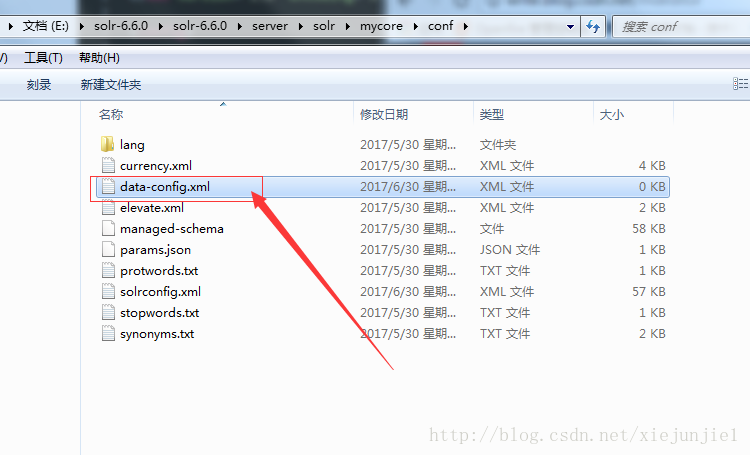
4.2.1 创建data-config.xml 暂时不填写内容,后面再写.
4.3 编写managed_schema
managed_schema里面定义了很多域,其实是使用了lucene中的域。
什么是域?域的作用是定义一个solr索引里面的字段是什么类型,能做什么,怎么做。有点类似数据库中字段的类型。但表示的含义更加的丰富。
在managed_schema后面添加如下代码:
   <!--这里无需定义id,因为managed_schema文件已经在前面开头位置定义了,id是必须,并且唯一的-->

<field name="vip" type="string" indexed="true"  stored="true" />

<field name="point" type="int" indexed="true" stored="true" />

<field name="content" type="string" indexed="true" stored="true"/>

<field name="add_time" type="date" indexed="true" stored="true"/>
name是这个域的名称,在整个managed_schema文件里面需要唯一,不能重复,这里定义成跟数据库表字段的名称,方便使用。当然,也可以定义成其他名字。
type是表示这个字段的类型是什么,string是字符串类型,int是整形数据类型,date是时间类型,相当于数据库里面的timestamp。
indexed表示是否索引,索引的话就能查询到,否则,搜索的时候,不会出现。
stored表示是否存储到索引库里面。
添加之后的managed_schema是这样的:
<?xml version="1.0" encoding="UTF-8" ?>

<!--

 Licensed to the Apache Software Foundation (ASF) under one or more

 contributor license agreements.  See the NOTICE file distributed with

 this work for additional information regarding copyright ownership.

 The ASF licenses this file to You under the Apache License, Version 2.0

 (the "License"); you may not use this file except in compliance with

 the License.  You may obtain a copy of the License at

     http://www.apache.org/licenses/LICENSE-2.0

 Unless required by applicable law or agreed to in writing, software

 distributed under the License is distributed on an "AS IS" BASIS,

 WITHOUT WARRANTIES OR CONDITIONS OF ANY KIND, either express or implied.

 See the License for the specific language governing permissions and

 limitations under the License.

-->

<!--

 This is the Solr schema file. This file should be named "schema.xml" and

 should be in the conf directory under the solr home

 (i.e. ./solr/conf/schema.xml by default)

 or located where the classloader for the Solr webapp can find it.

 This example schema is the recommended starting point for users.

 It should be kept correct and concise, usable out-of-the-box.

 For more information, on how to customize this file, please see

 http://wiki.apache.org/solr/SchemaXml

 PERFORMANCE NOTE: this schema includes many optional features and should not

 be used for benchmarking.  To improve performance one could

  - set stored="false" for all fields possible (esp large fields) when you

    only need to search on the field but don't need to return the original

    value.

  - set indexed="false" if you don't need to search on the field, but only

    return the field as a result of searching on other indexed fields.

  - remove all unneeded copyField statements

  - for best index size and searching performance, set "index" to false

    for all general text fields, use copyField to copy them to the

    catchall "text" field, and use that for searching.

  - For maximum indexing performance, use the ConcurrentUpdateSolrServer

    java client.

  - Remember to run the JVM in server mode, and use a higher logging level

    that avoids logging every request

-->

<schema name="example-data-driven-schema" version="1.6">

    ......篇幅有限,此处省略很多默认的内容

    <field name="vip" type="string" indexed="true"  stored="true" />

    <field name="point" type="int" indexed="true" stored="true" />

    <field name="content" type="string" indexed="true" stored="true"/>

    <field name="add_time" type="date" indexed="true" stored="true"/>

</schema>
4.4 编写之前创建的data-config.xml
之所以现在才写data-config.xml是因为这个文件需要managed_schema里面的域与数据库字段进行映射。
<?xml version="1.0" encoding="UTF-8"?>

<dataConfig>

    <dataSource type="JdbcDataSource" driver="com.mysql.jdbc.Driver" url="jdbc:mysql://127.0.0.1:3306/db_jx" user="root" password="root" batchSize="-1" />

  <document>

        <entity name="mycore_test" query="select id ,vip,point,content,add_time from solr_mycore">

             <!--column的id是数据库的id,name的id是managed_schema里面的id,id是必须,并且唯一的-->

            <field column="id" name="id" />

             <!--column的vip是数据库的vip字段,name的vip是managed_schema里面的vip,下面配置同理-->

            <field column="vip" name="vip" />

            <field column="point" name="point" />

            <field column="content" name="content" />

            <field column="add_time" name="add_time" />

        </entity>

    </document>

</dataConfig>
dataSource配置数据库信息
document配置数据库查询语句与managed_schema域的对应关系。目的是,在core导入数据的时候,会先通过该配置信息链接到数据库通过查询语句把数据查询出来,通过数据库字段与managed_schema域关联关系创建索引
4.5 开始导入数据
配置好了前面的信息,就可以在后台导入数据,配置信息需要reload一下core才能生效。如果配置文件出现错误,reload的时候也会有错误信息提示。
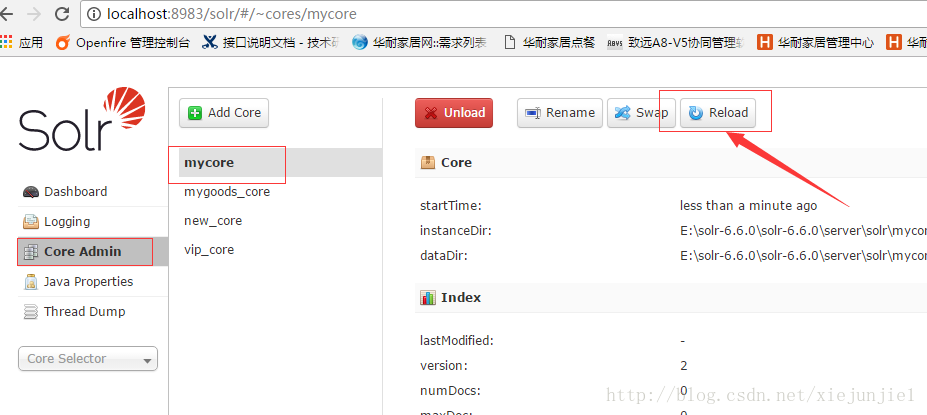
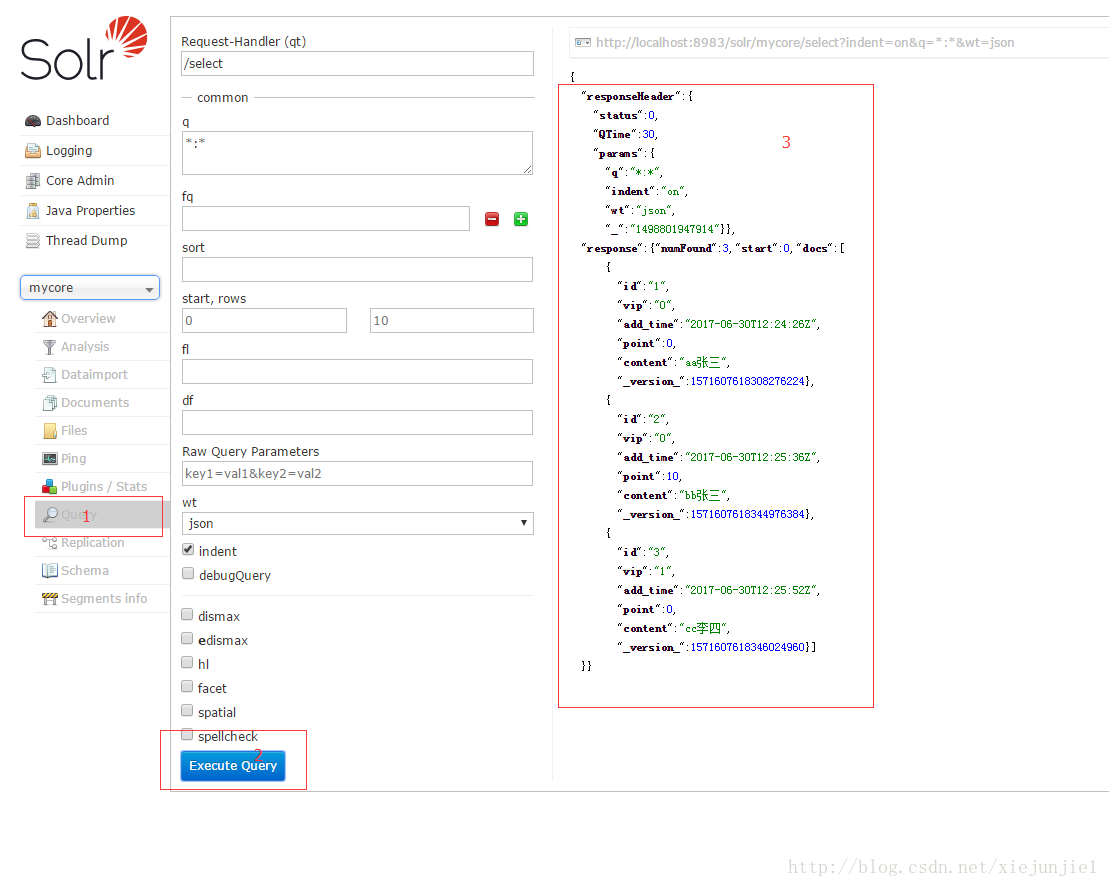
reload完之后,开始导入。
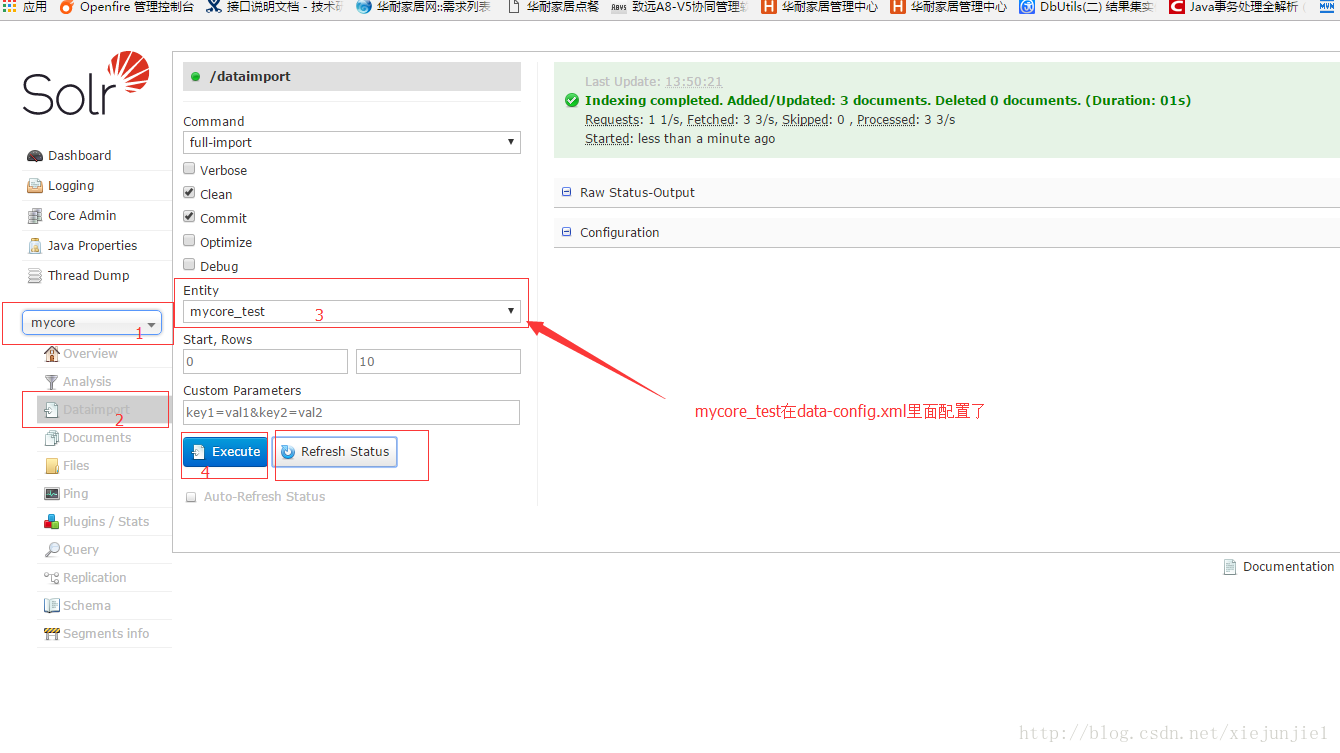
查询一下,发现已经导入成功
solr6.6 导入索引数据的更多相关文章
- .Net程序员 Solr-5.3之旅 (三)Solr 从MSSQ导入索引数据
阅读目录 引言 准备工作 data-config.xml schema.xml 导入数据 结尾 附件下载 引言 Other men live to eat, while I eat to live.- ...
- 【Solr】数据库数据导入索引库
目录 分析框图 配置数据库与solrconfig.xml 回到顶部 分析框图 框图画的粗糙!勿喷啊!勿喷啊! 回到顶部 配置数据库与solrconfig.xml Dataimport插件 可以批量把数 ...
- elasticsearch 导入基础数据并索引之 geo_point
elasticsearch 中的地理信息存储, 有geo_point形式和geo_shape两种形式 此篇只叙述geo_point, 地理位置需要声明为特殊的类型, 不显示在mapping中定义的话, ...
- (转)淘淘商城系列——导入商品数据到索引库——Service层
http://blog.csdn.net/yerenyuan_pku/article/details/72894187 通过上文的学习,我相信大家已经学会了如何使用Solrj来操作索引库.本文我们将把 ...
- (二) solr 索引数据导入:xml格式
xml 是最常用的数据索引格式,不仅可以索引数据,还可以对文档与字段进行增强,从而改变它们的重要程度. 下面就是具体的实现方式: schema.xml的字段配置部分如下: <field name ...
- 使用 Solr 创建 Core 并导入数据库数据
1. 输入 http://localhost:8080/solr/index.html 来到 Solr 的管理界面: 2. 点击左侧 Core Admin --> Add Core,然后输入自己 ...
- solr6.6 导入 pdf/doc/txt/json/csv/xml文件
文本主要介绍通过solr界面dataimport工具导入文件,包括pdf.doc.txt .json.csv.xml等文件,看索引结果有什么不同.其实关键是managed-schema.solrcon ...
- BCP导出导入大容量数据实践
前言 SQL SERVER提供多种不同的数据导出导入的工具,也可以编写SQL脚本,使用存储过程,生成所需的数据文件,甚至可以生成包含SQL语句和数据的脚本文件.各有优缺点,以适用不同的需求.下面介绍大 ...
- MySQL 快速导入大量数据 资料收集
一.LOAD DATA INFILE http://dev.mysql.com/doc/refman/5.5/en/load-data.html 二. 当数据量较大时,如上百万甚至上千万记录时,向My ...
随机推荐
- Ruby中如何复制对象 (deep clone)(转载)
Ruby中如何复制对象 (deep clone) 用Ruby复制一个对象(object)也许没有你想像的那么容易. 今天我google了半天, 做个总结吧. 先从最简单的开始, b = a 是复制吗? ...
- 使用TortoiseGit操作分支的创建与合并
第一步:创建本地分支 点击右键选择TortoiseGit,选择Create Branch…,在Branch框中填写新分支的名称(若选中”switch to new branch”则直接转到新分支上,省 ...
- GitHub学习笔记:本地操作
安装过程略,假设你已经注册好了Github, 已经有了一个准备好的程序.我们的一切工作都是基于Git Shell,与GUI客户端无关. 在使用前你先要配置好config中的几个内容,主要是你自己的个人 ...
- invalid bound statement (not found)
invalid bound statement (not found) mybatis 错误: 一般是Mapepr.xml文件中文nameapce没有和mapper接口发生映射,导致mybatis绑定 ...
- BOM,DOM常见操作和DHML
BOM (Browser Object Model)浏览器对象模型,控制浏览器的一些行为 window对象 代表一个HTML文档 属性 页面导航的5个属性 self, parent, top, ope ...
- 如何使用 toml 配置 SpaceVim
配置 SpaceVim 主要包括以下几个内容: 设置 SpaceVim 选项 启动/禁用模块 添加自定义插件 添加自定义按键映射以及插件配置 设置SpaceVim选项 原先,在 init.vim 文件 ...
- Codeforces Round #483 (Div. 2)
题目链接: https://cn.vjudge.net/contest/229761 A题: n个数字,两个人轮流去数字,直到剩下最后一个数字为止,第一个人希望剩下的数字最小,第二个人希望数字最大,最 ...
- 错误 C2280 Union : 尝试引用已删除的函数 以及 警告 C4624 “Grade”: 已将析构函数隐式定义为“已删除”的一种解决方法
Union 是C/C++语言中的一种结构类型,用于定义可共享内存的数据变量的一种方式,初次使用Union联合体时可能会遇到以下问题: 错误 C2280 Union : 尝试引用已删除的函数 警告 C4 ...
- 2. Java面向对象之泛型-构造方法中使用
package generic; class Construtgeneric<T> { private T value; public Construtgeneric(T value) { ...
- anguments
anguments是一个对象,长得很像数组的对象,但不是数组,而是伪数组. arguments的内容是函数运行时的实参列表 (function(d, e, f) { console.log(argum ...