
Jmeter之http性能测试实战 NON-GUI模式 进行分布式压力测试——干货(十二)
Apache JMeter Distributed Testing Step-by-step
This short tutorial explains how to use multiple systems to perform stress testing. Before we start, there are a couple of things to check.
- the firewalls on the systems are turned off or correct ports are opened.
- all the clients are on the same subnet.
- the server is in the same subnet, if 192.x.x.x or 10.x.x.x IP addresses are used. If the server doesn't use 192.xx or 10.xx IP address, there shouldn't be any problems.
- Make sure JMeter can access the server.
- Make sure you use the same version of JMeter and Java on all the systems. Mixing versions will not work correctly.
Once you've made sure the systems are ready, it's time to setup remote testing. The tutorial assumes you already have JMeter installed on all the systems. The way JMeter works is one master controller initiates the test on multiple slave systems.
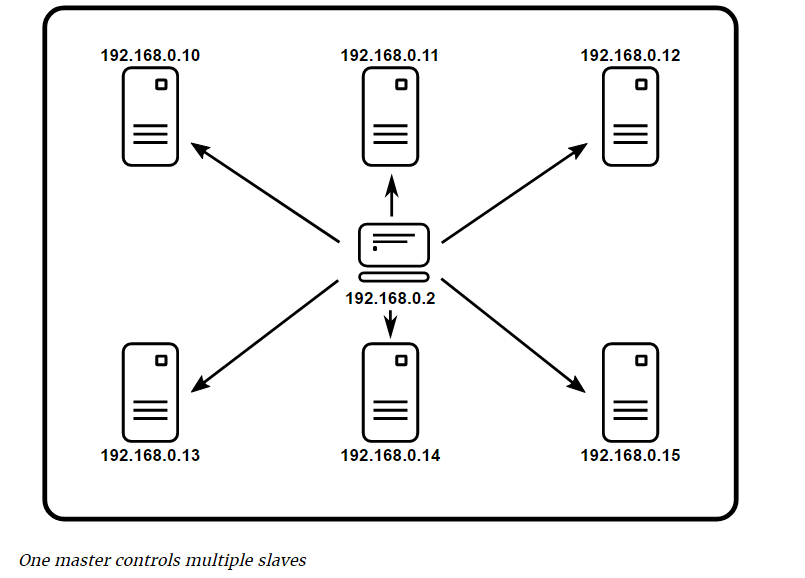
Before we dive into the step-by-step instructions, it's a good idea to define the terms and make sure the definition is clear.
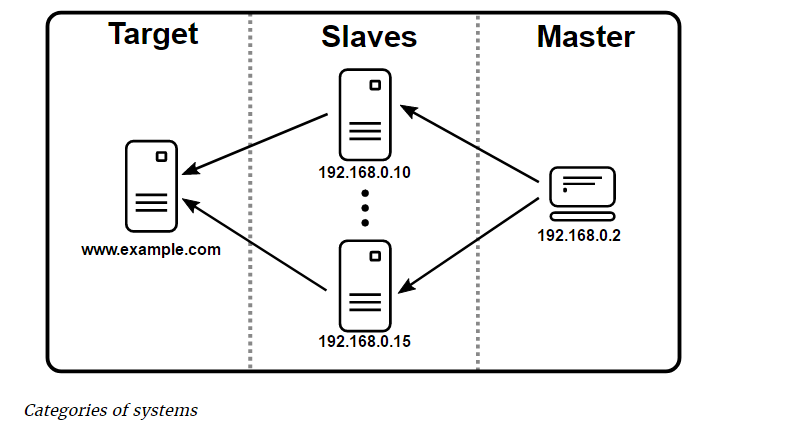
- Master
- the system running JMeter GUI, which controls the test
- Slave
- the system running jmeter-server, which takes commands from the GUI and send requests to the target system(s)
- Target
- the webserver we plan to stress test
- On the slave systems, go to jmeter/bin directory and execute jmeter-server.bat(jmeter-server on unix).
- On master system acting as the console, open windows explorer and go to jmeter/bin directory
- Open jmeter.properties in a text editor
- Edit the line remote_hosts=127.0.0.1
- Add the IP address. For example, if I have JMeter server running on 192.168.30.50:1099, …, 192.168.30.51:1099,the entry would like like this:
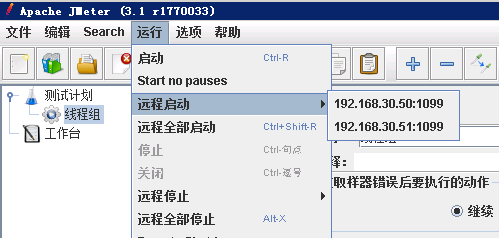
- Start JMeter.
- Open the test plan you want to use
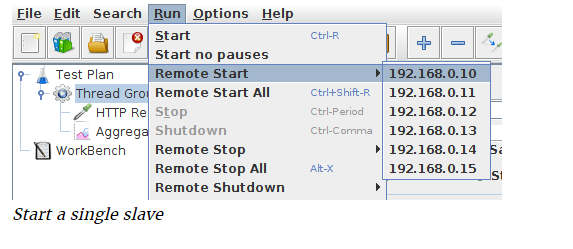
Start a single clients
- Click Run at the top
- Select Remote Start
- Select the IP address
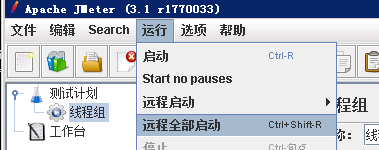
Start all clients
- Click Run at the top
- Select Remote Start all or use Ctrl + Shift + R
Limitations
There are some basic limitations for distributed testing. Here's the list of the known items in no specific order.
- RMI cannot communicate across subnets without a proxy; therefore neither can JMeter without a proxy.
- Since version 2.9, JMeter sends all the test results stripping Response data to the controlling console, this allows us to reduce impact on network IO. Ensure you monitor your network traffic so that this trafic does not incur contention
- A single JMeter client running on a 2-3 GHz CPU (recent CPU) can handle 1000-2000 threads depending on the type of test.
简单点的说
Jmeter分布式执行原理:
1、Jmeter分布式测试时,选择其中一台作为调度机(master),其它机器做为执行机(slave)。
2、执行时,master会把脚本发送到每台slave上,slave 拿到脚本后就开始执行,slave执行时不需要启动GUI,我理解它应该是通过命令行模式执行的。
3、执行完成后,slave会把结果回传给master,master会收集所有slave的信息并汇总。
术语解析
- master,以GUI模式运行,同时控制测试的运行,在这里就是client,启动脚本所在的那台机器。
- slave,运行jmeter-server并从master接收指令、向目标服务器发送请求
设置jmeter-server:
用文本编辑器打开Jmeter/bin目录下的jmeter.properties文件,添加运行jmeter-server的主机IP到remote_hosts
remote_hosts=192.168.30.50:1099,192.168.30.51:1099,localhost.....
如果你不希望你的客户端也作为jmeter-server运行的话,把localhost从上面的配置中移除。
小白解释分割线
----------------------------------------------------------
再白痴点的解释就是 有 A B C 三台压力机器,属于同一个内网IP
A作为 Master
B跟C两台作为slave
通过A去控制B跟C进行压测服务器
在压测的过程中 需要先开启B跟C的Jmeter的bin目录下的jmeter-server.bat 服务
然后通过A去进行NON-GUI模式去压测,B跟C分布式的压测结果会反馈到A
-----------------------------------------------------------
小白解释结束线
下面进行实战命令 压测
通过 jmeter -l 的帮助命令可以查看到
C:\Users\lamw\Desktop\lamw

λ D:\Jmeter\jmeter-3.1\bin\jmeter -l

Error: Missing argument to option -l

Usage

        --?

                print command line options and exit

        -h, --help

                print usage information and exit

        -v, --version

                print the version information and exit

        -p, --propfile <argument>

                the jmeter property file to use

        -q, --addprop <argument>

                additional JMeter property file(s)

        -t, --testfile <argument>

                the jmeter test(.jmx) file to run

        -l, --logfile <argument>

                the file to log samples to

        -j, --jmeterlogfile <argument>

                jmeter run log file (jmeter.log)

        -n, --nongui

                run JMeter in nongui mode

        -s, --server

                run the JMeter server

        -H, --proxyHost <argument>

                Set a proxy server for JMeter to use

        -P, --proxyPort <argument>

                Set proxy server port for JMeter to use

        -N, --nonProxyHosts <argument>

                Set nonproxy host list (e.g. *.apache.org|localhost)

        -u, --username <argument>

                Set username for proxy server that JMeter is to use

        -a, --password <argument>

                Set password for proxy server that JMeter is to use

        -J, --jmeterproperty <argument>=<value>

                Define additional JMeter properties

        -G, --globalproperty <argument>=<value>

                Define Global properties (sent to servers)

                e.g. -Gport=123

                 or -Gglobal.properties

        -D, --systemproperty <argument>=<value>

                Define additional system properties

        -S, --systemPropertyFile <argument>

                additional system property file(s)

        -L, --loglevel <argument>=<value>

                [category=]level e.g. jorphan=INFO or jmeter.util=DEBUG

        -r, --runremote

                Start remote servers (as defined in remote_hosts)

        -R, --remotestart <argument>

                Start these remote servers (overrides remote_hosts)

        -d, --homedir <argument>

                the jmeter home directory to use

        -X, --remoteexit

                Exit the remote servers at end of test (non-GUI)

        -g, --reportonly <argument>

                generate report dashboard only, from a test results file

        -e, --reportatendofloadtests

                generate report dashboard after load test

        -o, --reportoutputfolder <argument>

                output folder for report dashboard

Error: Missing argument to option -l
其中
-r, --runremote
Start remote servers (as defined in remote_hosts)------------------启动远程服务器(如remote_hosts中定义)
-R, --remotestart <argument>
Start these remote servers (overrides remote_hosts)-------------------启动这些远程服务器(覆盖remote_hosts)
那么我们就可以去选择执行所有的配置中的压测机器
D:\Jmeter\jmeter-3.1\bin\jmeter.bat -n -r -t test.jmx -l test.csv -e -o test

可以看到已经成功执行了配置中的2台压测机
PS 如果压测指标是1000并发数,比如我们现在配置了2台需要达到1000并发数,那么就是一台压测并发数500即可
Jmeter之http性能测试实战 NON-GUI模式 进行分布式压力测试——干货(十二)的更多相关文章
- Jmeter之http性能测试实战 非GUI模式压测 NON-GUI模式 结果解析TPS——干货(十一)
性能测试计划 性能测试用例 录制脚本 性能测试结果 性能测试报告 性能测试监控报告 准备工作 从脚本已录制成功之后开始进行压测 安装Jmeter拓展插件 查看 Transactions per Sec ...
- Jmeter性能测试-分布式压力测试
作为一个测试行业的菜鸟,由于投身于一个小公司,包揽所有的测试.刚开始的功能测试到接口测试,稳定性测试,兼容性测试等,一般由于是小项目所以对于性能有所忽略,也没怎么涉及,公司接了个大项目,后期对于性能上 ...
- 性能测试工具 jmeter 分布式压力测试实操
性能测试工具 jmeter 分布式压力测试实操 本文在Non-GUI Mode下进行,准备好三台有jdk环境,linux操作系统,同一局域网测试机器,运行两台slave,一台master机器,进行分布 ...
- jmeter分布式压力测试实践+登录为例
1.一张分布式压力的图解,如下 准备: 1.两台slave 2.一个master 3.待测目标地址 http://XXX 准备环境:linux环境,master如果可以最好有可视化电脑界面,便于jmx ...
- 桥接模式 桥梁模式 bridge 结构型 设计模式(十二)
桥接模式Bridge Bridge 意为桥梁,桥接模式的作用就像桥梁一样,用于把两件事物连接起来 意图 将抽象部分与他的实现部分进行分离,使得他们都可以独立的发展. 意图解析 依赖倒置原 ...
- 『动善时』JMeter基础 — 55、使用非GUI模式运行JMeter(命令行模式)
目录 1.JMeter的非GUI模式说明 2.为什么使用非GUI模式运行JMeter 3.使用非GUI模式运行JMeter (1)非GUI模式运行JMeter步骤 (2)其它参数说明 4.CLI模式运 ...
- 【转】Jmeter分布式压力测试
安装 下载地址:http://jmeter.apache.org/download_jmeter.cgi 安装前提(因为jmeter依赖于Java所以必须先配置好java) 下载后解压: tar -x ...
- linux上实现jmeter分布式压力测试(转)
摘要:最近根据公司工作的需求,学习了一些压力测试的知识,目前,公司使用的是jmeter进行压力测试.下面就记录下近期的学习.我想将这次的博文分成三个部分:1.开始测试前的准备(测试环境的搭建)2.在一 ...
- Jmeter 分布式压力测试
JMeter中进行分布式测试 作为一个纯 JAVA 的GUI应用,JMeter对于CPU和内存的消耗还是很惊人的,所以当需要模拟数以千计的并发用户时,使用单台机器模拟所有的并发用户就有些力不从心, ...
随机推荐
- 《跟我学IDEA》六、插件(编码利器)
idea的另一个可爱之处,就是它的强大的插件,下面我以CodeGlance插件为例,这个可以快速定位代码. 第一节:安装插件 ● All plugins 显示所有插件. ● Enabled 显示当前所 ...
- 城乡联谊胡策会糊厕R3
因为时间关系这把没设计题面,而且居然还出了锅……T_T 信 原题是leetcode WeeklyContest52 的T1(懒得去找url了 随便搞,但是无解输-1 数字统计 原题PE603 记前n个 ...
- See you~(二维树状数组)
题目链接:http://acm.hdu.edu.cn/showproblem.php?pid=1892 See you~ Time Limit: 5000/3000 MS (Java/Others) ...
- Android Studio解决导入项目非常慢的问题
http://www.androidchina.net/5527.html Android Studio比Eclipse ADT有巨大的优势. Android Studio原生支持使用Gradle来构 ...
- 遍历数组中的元素(含es6方法)
假如有这样一个数组.arr = [12,34,45,46,36,58,36,59],现在要遍历该数组. 方法1:以前我们可能会这样做: for(var i=0;i<arr.length;i++) ...
- 遍历Map集合:java.util.Map.Entry、KeySet两种方式
遍历Map集合的两种方式: 1.用KeySet Map.keySet(),返回一个存放所有key的set集合,通过遍历集合,根据key值取出所有的value值. Map<String,Strin ...
- UE4 Pure函数的特点
蓝图里的Pure函数跟正常函数的区别是:Pure函数在它连接到的正常函数执行的时候才执行,正常函数按照连接的顺序执行. Pure函数不会改变游戏中其他的变量,所以getter和其他一些纯计算的函数一般 ...
- 如何用SVN版本控制器将提交的文件还原到以前的版本
工具/原料 SVN乌龟软件和相关的文件 方法/步骤 在相关的文件中右击鼠标,按右图进行选择 在弹出框的地方点击我标记的地方,查看下曾经提交过的版本文件 在弹出框的地方,上面就是有版本号,下面就是我们文 ...
- Python3 引入模块的方法
例子 import random 产生随机整数 import random secret = random.randint(0,10)
- 微信小程序版2048
最近流行微信"跳一跳"小游戏,我也心血来潮写了一个微信小程序版2048,本篇文章主要分享实现2048的算法以及注意的点,一起来学习吧!(源码地址见文章末尾) 算法 1.生成4* ...