
WebApi 参数绑定方法
WebAPI 2参数绑定方法
简单类型参数
Example 1: Sending a simple parameter in the Url
|
01
02
03
04
05
06
07
08
09
10
11
|
[RoutePrefix("api/values")]public class ValuesController : ApiController{ // http://localhost:49407/api/values/example1?id=2 [Route("example1")] [HttpGet] public string Get(int id) { return "value"; }} |
Example 2: Sending simple parameters in the Url
|
01
02
03
04
05
06
07
|
// http://localhost:49407/api/values/example2?id1=1&id2=2&id3=3[Route("example2")][HttpGet]public string GetWith3Parameters(int id1, long id2, double id3){ return "value";} |
Example 3: Sending simple parameters using attribute routing
|
01
02
03
04
05
06
07
|
// http://localhost:49407/api/values/example3/2/3/4[Route("example3/{id1}/{id2}/{id3}")][HttpGet]public string GetWith3ParametersAttributeRouting(int id1, long id2, double id3){ return "value";} |
Example 4: Sending an object in the Url
// http://localhost:49407/api/values/example4?id1=1&id2=2&id3=3

[Route("example4")]

[HttpGet]

public string GetWithUri([FromUri] ParamsObject paramsObject)

{

  return "value:" + paramsObject.Id1;

}
Example 5: Sending an object in the Request body
[Route("example5")]

[HttpPost]

public string GetWithBody([FromBody] ParamsObject paramsObject)

{

  return "value:" + paramsObject.Id1;

}
注意 [FromBody] 只能用一次,多于一次将不能正常工作
Calling the method using Urlencoded in the body:
|
01
02
03
04
05
06
|
User-Agent: FiddlerHost: localhost:49407Content-Length: 32Content-Type: application/x-www-form-urlencodedid1=1&id2=2&id3=3 |
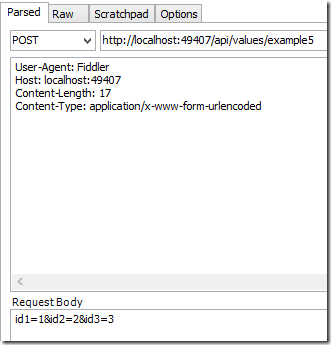
Calling the method using Json in the body
|
01
02
03
04
05
06
|
User-Agent: FiddlerHost: localhost:49407Content-Length: 32Content-Type: application/json{ "Id1" : 2, "Id2": 2, "Id3": 3} |
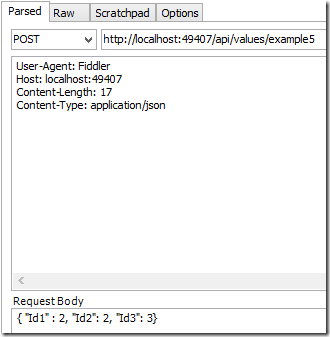
Calling the method using XML in the body
This requires extra code in the Global.asax
|
01
02
03
04
05
06
07
08
09
10
11
12
|
protected void Application_Start(){ var xml = GlobalConfiguration.Configuration.Formatters.XmlFormatter; xml.UseXmlSerializer = true;The client request is as follows:User-Agent: FiddlerContent-Type: application/xmlHost: localhost:49407Content-Length: 65<ParamsObject><Id1>7</Id1><Id2>8</Id2><Id3>9</Id3></ParamsObject> |
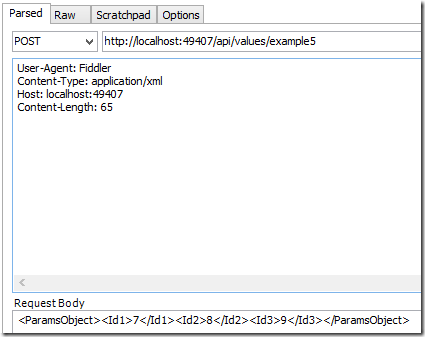
数组和列表(Array,List)
Example 6: Sending a simple list in the Url
|
01
02
03
04
05
06
07
08
09
10
11
12
|
// http://localhost:49407/api/values/example6?paramsObject=2,paramsObject=4,paramsObject=9[Route("example6")][HttpGet]public string GetListFromUri([FromUri] List<int> paramsObject){ if (paramsObject != null) { return "recieved a list with length:" + paramsObject.Count; } return "NOTHING RECIEVED...";} |
Example 7: Sending an object list in the Body
|
01
02
03
04
05
06
07
08
09
10
11
12
|
// http://localhost:49407/api/values/example8[Route("example8")][HttpPost]public string GetListFromBody([FromBody] List<ParamsObject> paramsList){ if (paramsList != null) { return "recieved a list with length:" + paramsList.Count; } return "NOTHING RECIEVED...";} |
Calling with Json:
|
01
02
03
04
05
06
|
User-Agent: FiddlerContent-Type: application/jsonHost: localhost:49407Content-Length: 91[{"Id1":3,"Id2":76,"Id3":19},{"Id1":56,"Id2":87,"Id3":94},{"Id1":976,"Id2":345,"Id3":7554}] |
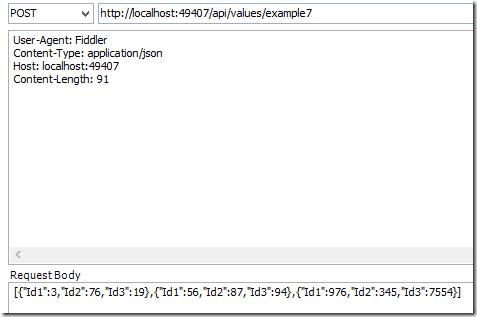
Calling with XML:
|
01
02
03
04
05
06
07
08
09
10
|
User-Agent: FiddlerContent-Type: application/xmlHost: localhost:49407Content-Length: 258<ArrayOfParamsObject><ParamsObject><Id1>3</Id1><Id2>76</Id2><Id3>19</Id3></ParamsObject><ParamsObject><Id1>56</Id1><Id2>87</Id2><Id3>94</Id3></ParamsObject><ParamsObject><Id1>976</Id1><Id2>345</Id2><Id3>7554</Id3></ParamsObject></ArrayOfParamsObject> |
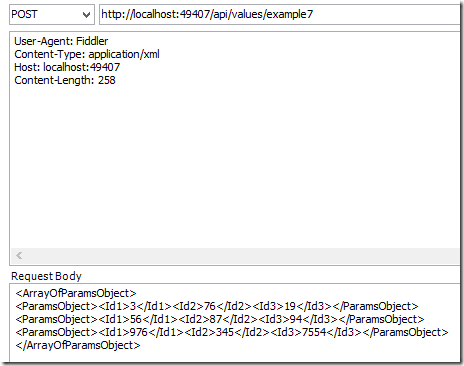
Example 8: Sending object lists in the Body
|
01
02
03
04
05
06
07
08
09
10
11
|
[Route("example8")][HttpPost]public string GetListsFromBody([FromBody] List<List<ParamsObject>> paramsList){ if (paramsList != null) { return "recieved a list with length:" + paramsList.Count; } return "NOTHING RECIEVED...";} |
This is a little bit different to the previous examples. The body can only send one single object to Web API. Because of this, the lists of objects are wrapped in a list or a parent object.
|
01
02
03
04
05
06
07
08
09
10
11
12
13
14
15
16
17
18
|
POST http://localhost:49407/api/values/example8 HTTP/1.1User-Agent: FiddlerContent-Type: application/jsonHost: localhost:49407Content-Length: 185[ [ {"Id1":3,"Id2":76,"Id3":19}, {"Id1":56,"Id2":87,"Id3":94}, {"Id1":976,"Id2":345,"Id3":7554} ], [ {"Id1":3,"Id2":76,"Id3":19}, {"Id1":56,"Id2":87,"Id3":94}, {"Id1":976,"Id2":345,"Id3":7554} ]] |
WebApi 参数绑定方法的更多相关文章
- asp.net webapi 参数绑定总结
首先必须得更正下自己一直以来对于get请求和post请求理解的一个误区:get请求只能通过url传参,post请求只能通过body传参. 其实上面的理解是错误的,翻阅了不少资料及具体实践,正确理解应该 ...
- asp.net webapi参数绑定
content={"content": [{"comb_id": "100323","comb_name": " ...
- WebAPI 2参数绑定方法
简单类型参数 Example 1: Sending a simple parameter in the Url [RoutePrefix("api/values")] public ...
- .net core webapi参数绑定处理
在 Startup的ConfigureServices方法中添加: services.Configure<ApiBehaviorOptions>(options => { optio ...
- springMVC使用HandlerMethodArgumentResolver 自定义解析器实现请求参数绑定方法参数
http://blog.csdn.net/truong/article/details/30971317 http://blog.csdn.net/fytain/article/details/439 ...
- webapi简介及参数绑定
介绍:WebAPI用来开发系统间接口的技术,基于HTTP协议,返回默认是json格式.比wcf简单 更通用,更轻量级,更省流量(json格式):WebAPI尽可能复用MVC路由.ModelBinder ...
- SpringMVC-简单参数绑定
SpringMVC-简单参数绑定 众所周知,springmvc是用来处理页面的一些请求,然后将数据再通过视图返回给用户的,前面的几篇博文中使用的都是静态数据,为了能快速入门springmvc,在 ...
- WebAPI下的如何实现参数绑定
本文将概述在WebAPI方式下将如何将参数绑定到一个action方法,包括参数是如何被读取,一系列规则决定特定环境采用的那种绑定方式,文章最后将给出一些实际的例子. Parameter binding ...
- [译]WebAPI下的如何实现参数绑定
本文将概述在WebAPI方式下将如何将参数绑定到一个action方法,包括参数是如何被读取,一系列规则决定特定环境采用的那种绑定方式,文章最后将给出一些实际的例子. Parameter binding ...
随机推荐
- 安卓和IOS兼容问题
点击穿透 click延迟 scroll元素临界的bug android screen.w/h 不准 rem不准 scroll时动画失效 animate回调 最小字号限制 不同机型全屏自适应 andro ...
- JDK及Tomcat集成到MyEclipse
JDK及Tomcat集成到MyEclipse 1.安装好MyEclipse 2.破解 3.配置环境JDK D:\jdk1.6.0_21\bin; ==>放在系统path前面 4.打开MyEcli ...
- operator重载运算符
1.重载运算符的函数一般格式如下 函数类型 operator 运算符名称 (形参表列) {对运算符的重载处理} 例如,想将"+"用于Complex(复数)的加法运算, ...
- 基于Controller接口的控制器及简单应用
DispatcherServlet在Spring当中充当一个前端控制器的角色,它的核心功能是分发请求.请求会被分发给对应处理的Java类,Spring MVC中称为Handle.在Spring 2.5 ...
- C#基础(七)虚函数
若一个实例方法声明前带有virtual关键字,那么这个方法就是虚方法.虚方法与非虚方法的最大不同是,虚方法的实现可以由派生类所取代,这种取代是通过方法的重写实现的(以后再讲)虚方法的特点:虚方法前不允 ...
- 转载-Oracle ORACLE的sign函数和DECODE函数
原文地址:http://www.cnblogs.com/BetterWF/archive/2012/06/12/2545829.html 转载以备用 比较大小函数 sign 函数语法:sign(n) ...
- (转)Unity控制反转和依赖注入
昨天,面试官说他们的项目使用的是Unity,我们的项目中使用的是autofac,看了一下,用法都差不多,就连方法的名字都是一样的哈,想了解的朋友可以看看这篇文章,作者讲解的挺详细的,关于autofac ...
- HTTP面试题都在这里
HTTP常见面试题 Http与Https的区别: Http与Https的区别: HTTP 的URL 以http:// 开头,而HTTPS 的URL 以https:// 开头 HTTP 是不安全的,而 ...
- 如何使用 scikit-learn 为机器学习准备文本数据
欢迎大家前往云+社区,获取更多腾讯海量技术实践干货哦~ 文本数据需要特殊处理,然后才能开始将其用于预测建模. 我们需要解析文本,以删除被称为标记化的单词.然后,这些词还需要被编码为整型或浮点型,以用作 ...
- R语言-选择样本数量
功效分析:可以帮助在给定置信度的情况下,判断检测到给定效应值时所需的样本量,也可以在给定置信水平的情况下,计算某样本量内可以检测到的给定效应值的概率 1.t检验 案例:使用手机和司机反应时间的实验 l ...