
Linux使用nexus搭建maven私服
一、准备工作
二、安装Nexus
1.解压nexus文件
|
1
|
[root@centos6 var]# tar -zvxf nexus-2.12.0-01-bundle.tar.gz |

nexus-2.12.0-01: 是nexus的核心文件
sonatype-work :maven下载jar存放地址
2.启动Nexus
|
1
2
3
4
5
6
|
[root@centos6 nexus-2.12.0-01]# ./bin/nexus start- ****************************************WARNING - NOT RECOMMENDED TO RUN AS ROOT****************************************If you insist running as root, then set the environment variable RUN_AS_USER=root before running this script. |
默认情况下,不建议以root用户运行Nexus,可以修改bin/nexus中的配置跳过警告(修改RUN_AS_USER=root)
|
1
|
[root@centos6 nexus-2.12.0-01]# vi bin/nexus |
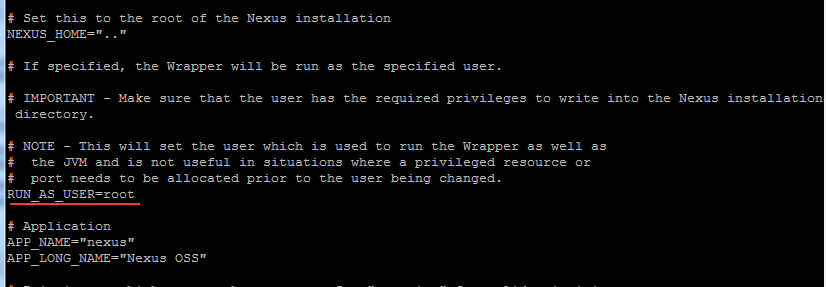
重新启动Nexus
|
1
2
3
4
5
6
7
|
[root@centos6 nexus-2.12.0-01]# ./bin/nexus start- ****************************************WARNING - NOT RECOMMENDED TO RUN AS ROOT****************************************Starting Nexus OSS...Started Nexus OSS. |
注:Nexus默认端口8081,如果想修改端口。修改/conf/nexus.properties文件
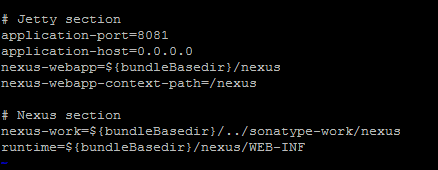
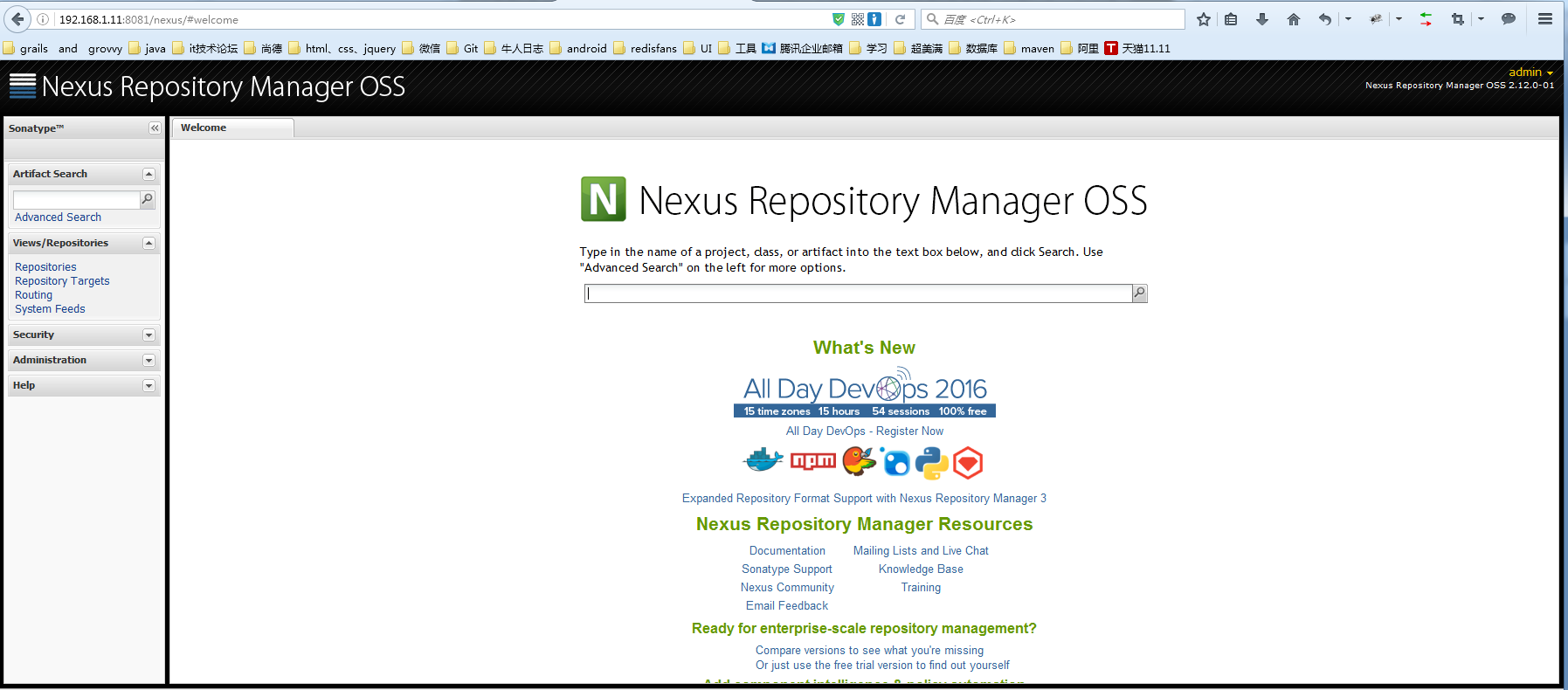
访问网址:http://192.168.1.11:8081/nexus/#welcome

点击右上角的 Log In 按钮即可登陆了。默认登录账号/密码为: admin/admin123 ,登陆成功后的界面
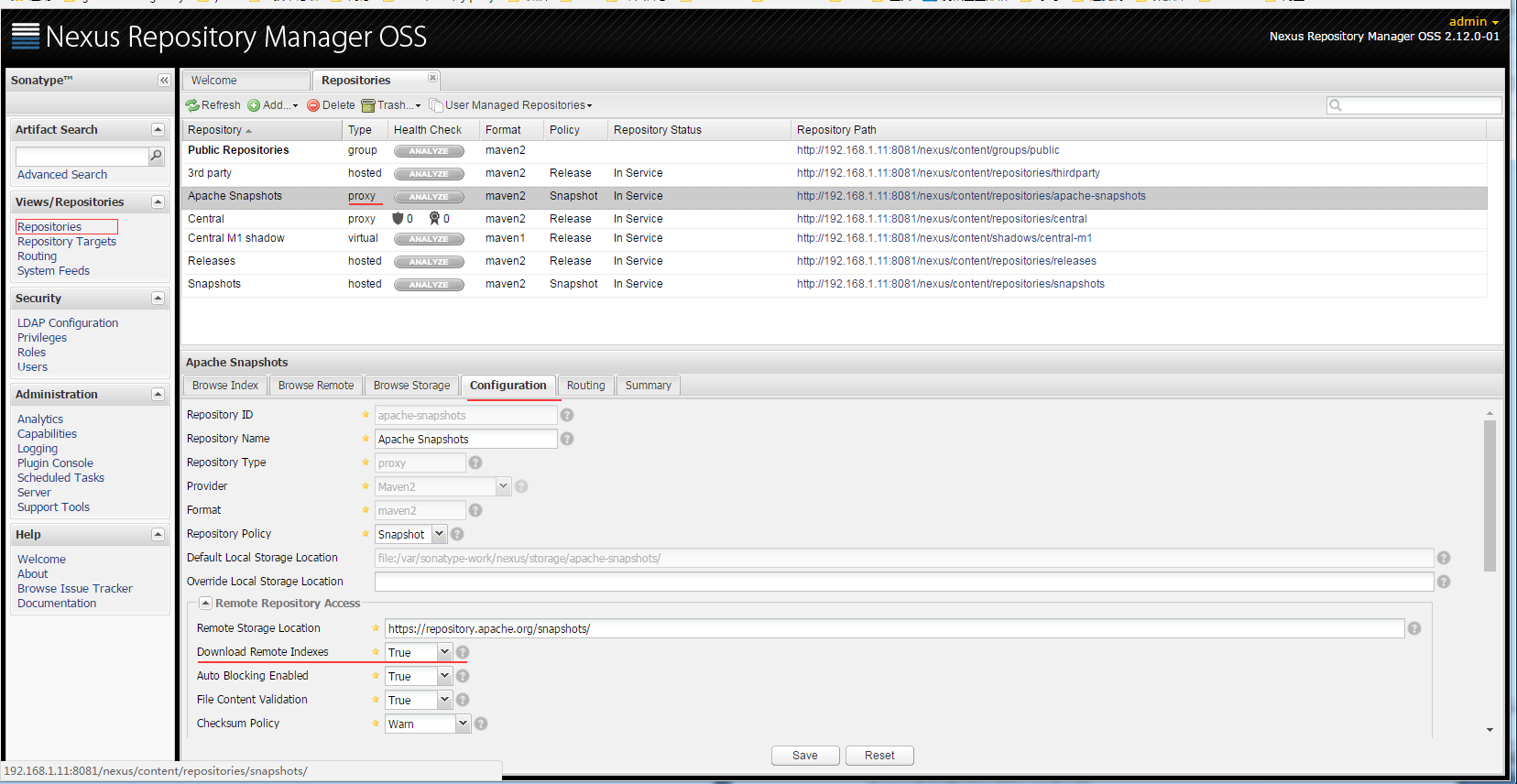
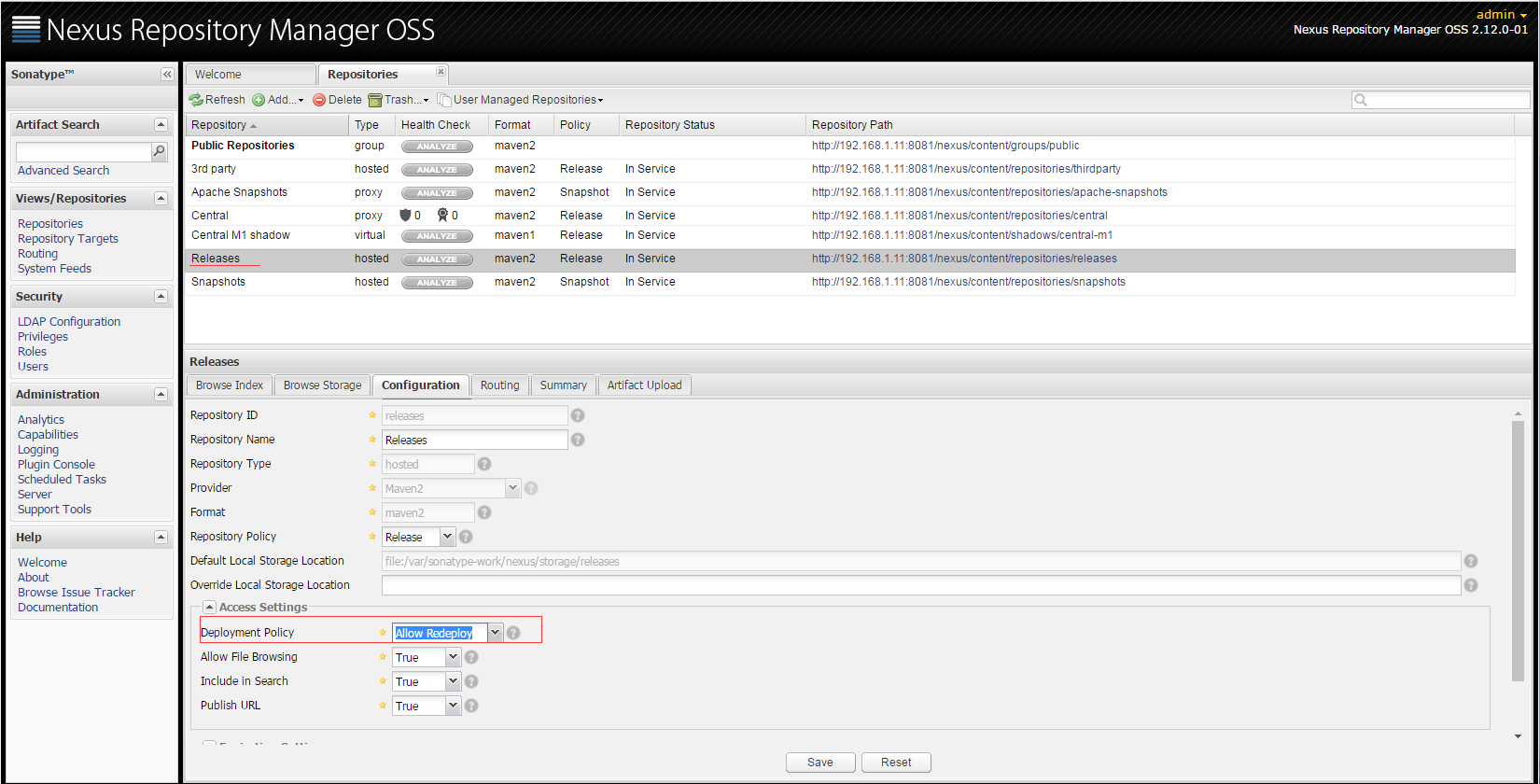
点击Repositories,将列表中所有Type为proxy 的项目的 Configuration 中的 Download Remote Indexes 设置为True
将Releases仓库的Deployment Policy设置为 Allow ReDeploy
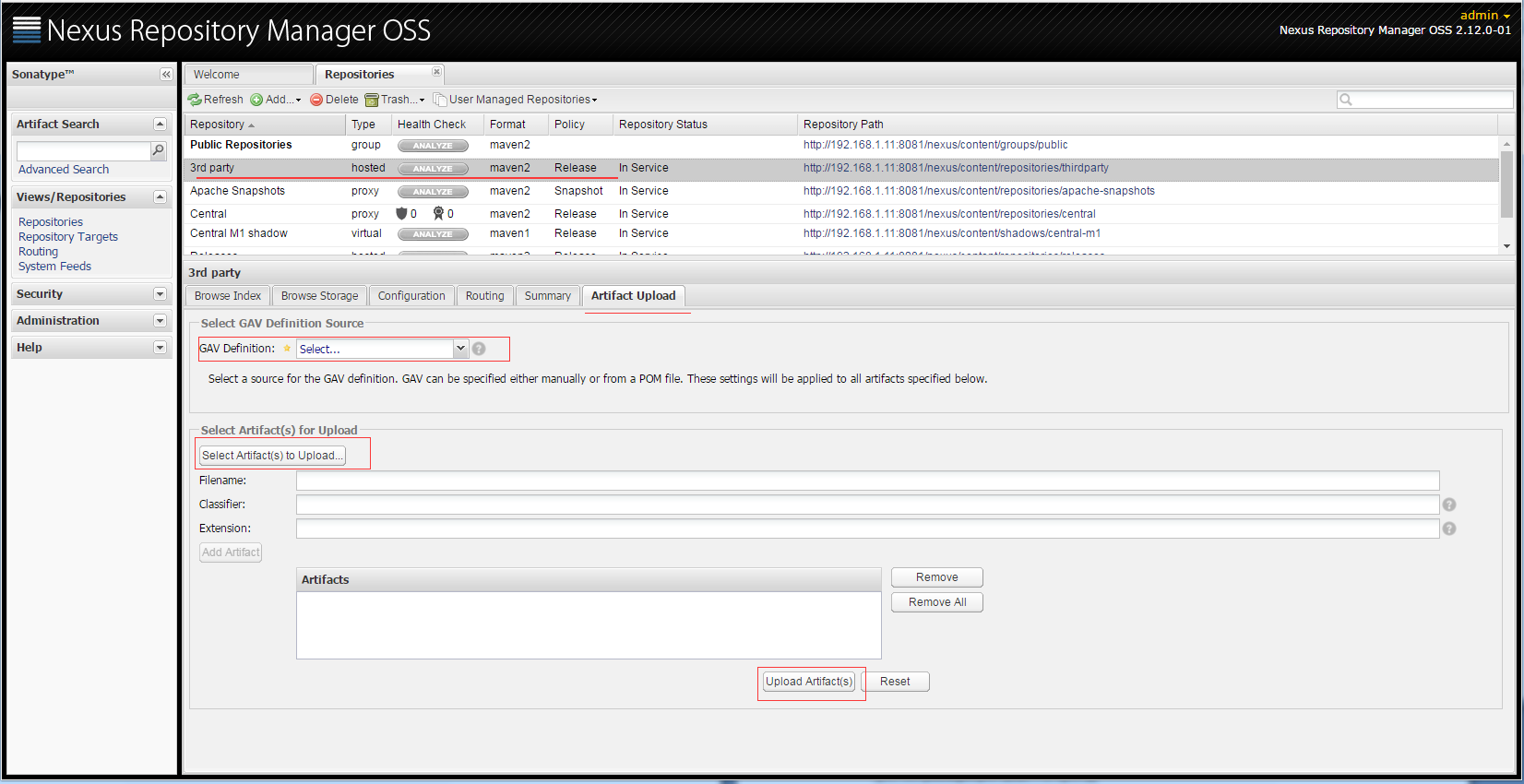
填写完必选字段,点击Upload Artifact(s)按钮即可。
3.配置本地项目引用私服
自动发布构件到远程仓库,在工程pom.xml中添加
|
1
2
3
4
5
6
7
8
9
10
|
<distributionManagement> <repository> <id>releases</id><!--这个ID需要与你的release仓库的Repository ID一致--> <url>http://192.168.1.11:8081/nexus/content/repositories/releases</url> </repository> <snapshotRepository> <id>snapshots</id><!--这个ID需要与你的snapshots仓库的Repository ID一致--> <url>http://192.168.1.11:8081/nexus/content/repositories/snapshots</url> </snapshotRepository></distributionManagement> |
修改本地$MAVEN_HOME\conf目录下的settings.xml配置文件,添加如下配置
|
1
2
3
4
5
6
7
8
9
10
11
12
|
<servers> <server> <id>releases</id> <username>admin</username> <password>admin123</password> </server> <server> <id>snapshots</id> <username>admin</username> <password>admin123</password> </server></servers> |
在本地工程目录下执行:
|
1
|
mvn deploy |
所部署的包就自动上传到了nexus安装目录下的
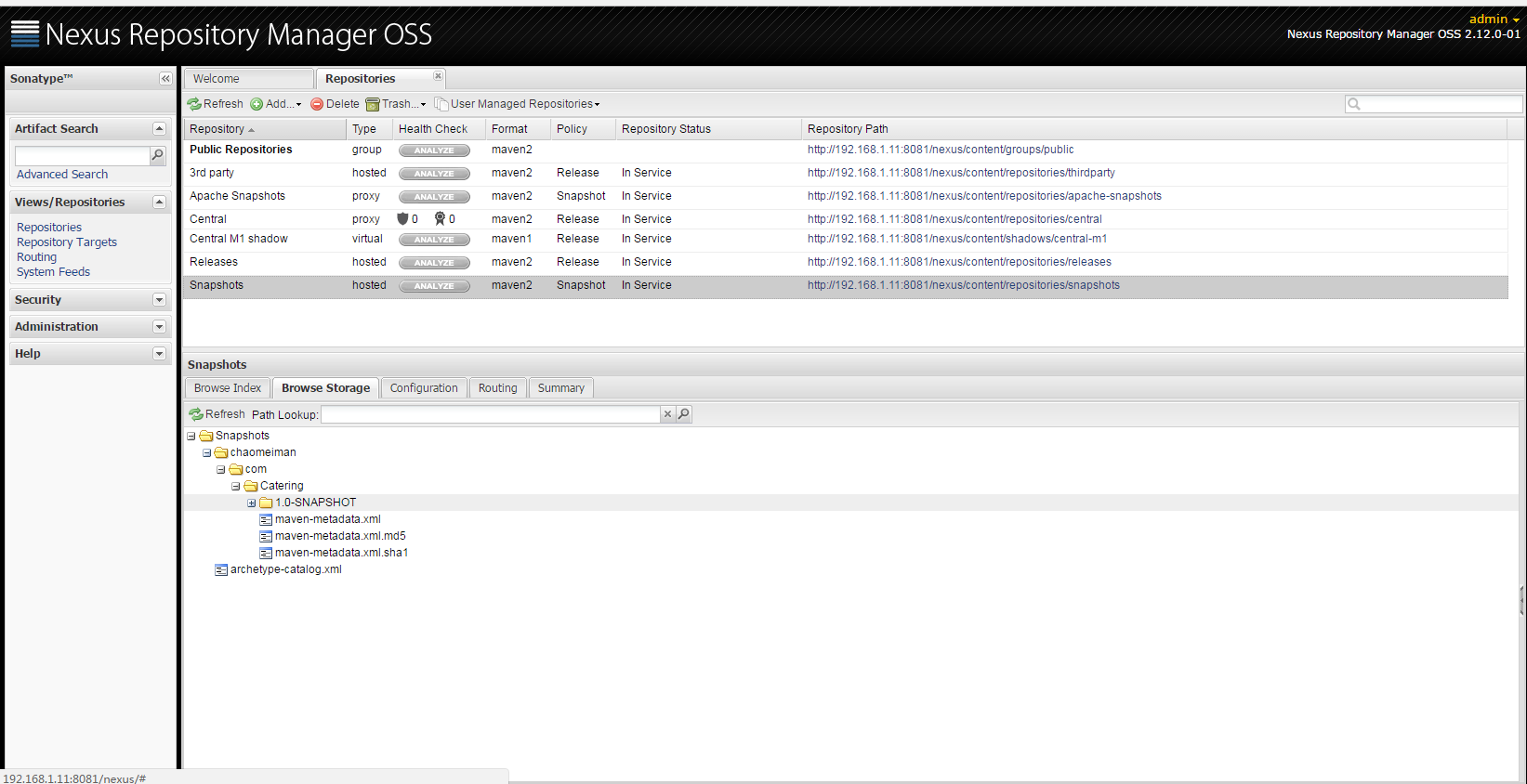
4.配置Maven从Nexus下载构件
在POM中配置Nexus私服,这样的配置只对当前的Maven项目有效。
|
1
2
3
4
5
6
7
8
9
10
11
12
13
14
15
16
17
18
19
20
21
22
23
24
25
26
27
28
29
|
<!--指定Nexus的构件仓库--><repositories> <repository> <id>public</id> <name>Team Maven Repository</name> <url>http://192.168.1.11:8081/nexus/content/groups/public/</url> <releases> <enabled>true</enabled> </releases> <snapshots> <enabled>true</enabled> </snapshots> </repository></repositories><!--指定Nexus的插件仓库--><pluginRepositories> <pluginRepository> <id>public</id> <name>Team Maven Repository</name> <url>http://192.168.1.11:8081/nexus/content/groups/public/</url> <releases> <enabled>true</enabled> </releases> <snapshots> <enabled>true</enabled> </snapshots> </pluginRepository></pluginRepositories> |
在settings.xml中配置profile元素,这样就能让本机所有的Maven项目都使用自己的Maven私服。
|
1
2
3
4
5
6
7
8
9
10
11
12
13
|
<properties> <repository> <id>public</id> <name>Team Maven Repository</name> <url>http://192.168.1.11:8081/nexus/content/groups/public/</url> <releases> <enabled>true</enabled> </releases> <layout>default</layout> <snapshots> <enabled>true</enabled> </snapshots> </repository><br></properties> |
Linux使用nexus搭建maven私服的更多相关文章
- Linux 使用nexus搭建maven私服
系统:LINUX JDK:已安装 Maven:已安装 Nexus Nexus是一个强大的Maven仓库管理器,它极大地简化了自己内部仓库的维 ...
- Maven-004-使用 Nexus 搭建 maven 私服
从去年至今,自己一直在学习自动化测试工具,想利用自动化工具尽可能的将重复的.关键的.耗时耗力的工作实现自动化,减轻日常测试工作,提升测试效率.在学习的过程中,将 maven 作为了项目开发管理工具,进 ...
- Maven使用笔记(五)Sonatype Nexus 搭建Maven 私服
1. 为什么使用Nexus 如果没有私服,我们所需的所有构件都需要通过maven的中央仓库和第三方的Maven仓库下载到本地, 而一个团队中的所有人都重复的从maven仓库下载构件无疑加大了仓库的负载 ...
- Maven——使用Nexus搭建Maven私服
原文:http://www.cnblogs.com/xdp-gacl/p/4068967.html Maven学习总结(九)--使用Nexus搭建Maven私服 一.搭建nexus私服的目的 为什么要 ...
- (转)Maven学习总结(九)——使用Nexus搭建Maven私服
孤傲苍狼只为成功找方法,不为失败找借口! Maven学习总结(九)——使用Nexus搭建Maven私服 一.搭建nexus私服的目的 为什么要搭建nexus私服,原因很简单,有些公司都不提供外网给项目 ...
- Maven学习二:使用Nexus搭建Maven私服及相关配置
处于安全等原因的考虑,一些企业内部网络是不允许访问外部网络的,但是项目内部搭建的项目又是Maven架构,这样就需要企业在内部网络中搭建自己的Maven仓库服务,再者一些大型企业或者内部模块化组件化划分 ...
- 使用Nexus搭建Maven私服问题总结
#业务场景 最近项目要交付给客户了,之前项目开发和测试一直都是使用公司内部的一套环境,项目交付后客户购置了大量服务器,也要将整套测试环境迁移至客户的服务器上,后续的需求变更以及新需求的开发都会在客户服 ...
- nexus搭建maven私服及私服jar包上传和下载
nexus搭建maven私服及私服jar包上传和下载 标签: nexus管理maven库snapshot 2017-06-28 13:02 844人阅读 评论(0) 收藏 举报 分类: Maven(1 ...
- nexus 搭建 maven 私服
nexus 搭建 maven 私服 本机环境 Win 8 JDK 7 Maven 3.2 Nexus 2.11 版本选择 http://www.sonatype.org/nexus/archivedn ...
随机推荐
- laravel 获取当前月,当前星期,当天起始时间方法
获取当前月起始时间: 1. $time=time(); $start=date('Y-m-01',$time);//获取指定月份的第一天 $end=date('Y-m-t',$time); //获取指 ...
- Nginx详解五:Nginx基础篇之HTTP请求
http请求 如今的http请求已经不是每一次请求都进行一次三次握手,可以在请求与相应之后,客户端和服务端不断的发送FIN和ACK包来保持连接的状态,即:长连接 HTTP请求建立在一次TCP连接基础上 ...
- Java SimpleDateFormat 中英文时间格式化转换
2015年08月29日 17:37:43 阅读数:32459 SimpleDateFormat是一个以与语言环境有关的方式来格式化和解析日期的具体类.它允许进行格式化(日期 -> 文本).解析( ...
- shell 脚本加密
日常编写shell脚本时会写一些账号和密码写入脚本内,但是不希望泄露账号密码,所以对shell脚本进行加密变成可执行文件. 主要使用 shc 对 Linux shell 脚本加密,shc是一个专业的加 ...
- Appium 常用方法总结 (python 版)
1.app后台运行 driver.background_app(5) 2.锁屏 driver.lock(5) 3.隐藏键盘 driver.hide_keyboard() 4.启动一个app或者在当前a ...
- C++ Primer 笔记——异常处理
1.栈展开过程沿着嵌套函数的调用链不断查找,直到找到了与异常匹配的catch句子为止,或者也可能一直没找到匹配的catch,则程序将调用terminate,退出主函数后查找过程终止.假设找到了一个ca ...
- 安装Mycat 曾经踩的那些坑
1. INFO | jvm | ----/--/-- --:--:-- | Caused by: io.mycat.config.util.ConfigException: schema TEST d ...
- java.lang.RuntimeException: Unable to instantiate org.apache.hadoop.hive.metastore.HiveMetaStoreClient
1.启动hive的时候出现这个问题,报错如下所示: [hadoop@slaver1 conf]$ hive Logging initialized -cdh5.-cdh5.3.6.jar!/hive- ...
- ipython启动 自动导入模块 自动%logstart
1. 参考 启动ipython或python解释器自动导入组件(例如:numpy) http://ipython.org/ipython-doc/stable/config/intro.html#se ...
- Docker镜像、容器剖析
我们通常所说的docker是什么? 在这里英文本意为“搬运工”这里指的的docker搬运点的是集装箱,集装箱装的是够任意类型的APP,开发者通过Docker可以将app变成一种标准化,可移植的.自管理 ...