
Android 开发 ConstraintLayout详解
依赖
implementation 'androidx.constraintlayout:constraintlayout:2.0.0-alpha3'
app:layout_constraintHorizontal_chainStyle
间隔类型
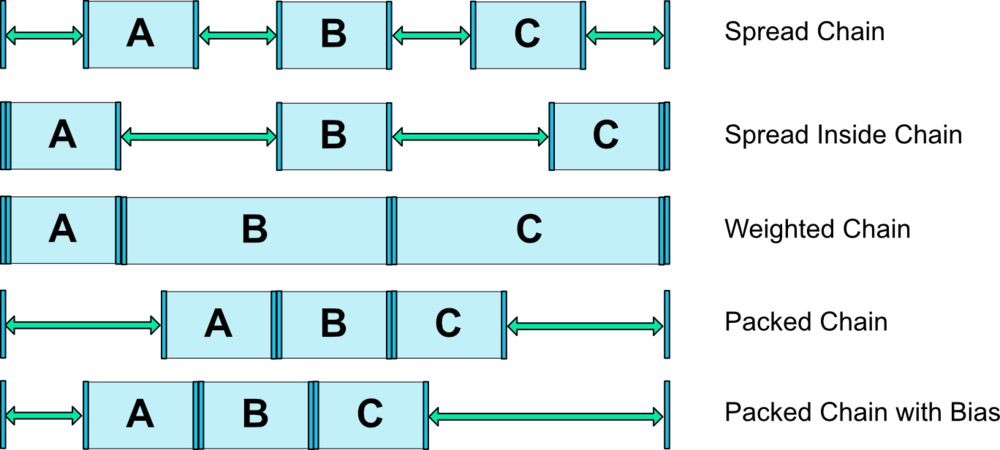
app:layout_constraintDimensionRatio
设置控件宽高百分百
<Button android:layout_width="0dp"

    android:layout_height="0dp"

    app:layout_constraintDimensionRatio="H,16:9"

    app:layout_constraintBottom_toBottomOf="parent"

    app:layout_constraintTop_toTopOf="parent"/>
app:layout_constraintHorizontal_bias 与 app:layout_constraintVertical_bias
设置 横向 和 竖向 控件位置百分百
<ImageView

            android:id="@+id/up_down_image"

            android:src="@mipmap/ic_triangle_black"

            android:layout_width="wrap_content"

            android:layout_height="wrap_content"

            app:layout_constraintHorizontal_bias="0.55"

            app:layout_constraintTop_toTopOf="@id/select_class"

            app:layout_constraintBottom_toBottomOf="@id/select_class"

            app:layout_constraintLeft_toRightOf="@id/bg"

            app:layout_constraintRight_toLeftOf="@id/bg"/>
app:layout_constraintWidth_percent 与 app:layout_constraintHeight_percent
设置控件宽度与高度在父布局宽度或者高度占的的百分比大小
<TextView

        android:id="@+id/text_noon"

        android:text="demo"

        android:textSize="@dimen/font_size_14"

        android:textColor="@color/fontBlack3"

        android:background="@color/colorGreen"

        android:gravity="center"

        android:layout_width="0dp"

        android:layout_height="match_parent"

        android:layout_marginTop="15dp"

        android:layout_marginBottom="15dp"

        app:layout_constraintHorizontal_bias="0.90"

        app:layout_constraintWidth_percent="0.20"

        app:layout_constraintTop_toTopOf="parent"

        app:layout_constraintBottom_toBottomOf="parent"

        app:layout_constraintRight_toRightOf="parent"

        app:layout_constraintLeft_toLeftOf="parent"/>
app:layout_constrainedWidth 与 app:layout_constrainedHeight
在一些TextView或者Button控件,控件大小可能会跟随内容变化,这个时候设置2个属性就可以分别在宽度和高度是强制约束给定的大小,让控件宽度或者高度不会超过给予的约束范围
constraintlayout.widget.Barrier
约束辅助线
用于当有2个View 都有可能在隐藏状态,但是另外一个View需要根据这2个View改变位置.这个时候layout_constraintRight_toLeftOf这个属性你会发现你只有一个,但是需要判断2个View.所以这个约束辅助线作用就出来了,它的constraint_referenced_ids这个属性可以添加多个View并且根据这些View改变位置.
<androidx.constraintlayout.widget.Barrier

            android:layout_width="wrap_content"

            android:layout_height="wrap_content"

            app:barrierDirection="left"

            app:constraint_referenced_ids="up_down_image,text_content"

            app:layout_constraintTop_toTopOf="@id/bg"

            app:layout_constraintBottom_toBottomOf="@id/bg"

            app:layout_constraintRight_toLeftOf="@id/up_down_image"/>
constraintlayout.widget.Guideline
辅助线
<androidx.constraintlayout.widget.Guideline

            android:id="@+id/guideline1"

            android:layout_width="wrap_content"

            android:layout_height="wrap_content"

            android:orientation="vertical"

            app:layout_constraintGuide_percent="0.04"/>
constraintlayout.widget.Group
将若干个控件组合在一起,主要是使用android:visibility="gone"属性一次性隐藏多个控件
<androidx.constraintlayout.widget.Group

        android:id="@+id/group"

        android:layout_width="wrap_content"

        android:layout_height="wrap_content"

        android:visibility="gone"

        app:constraint_referenced_ids="line,whether,opinion"

        app:layout_constraintTop_toBottomOf="@id/name"

        app:layout_constraintLeft_toLeftOf="parent"/>
app:layout_constraintCircle
圆形定位,让B控件以A控件为圆形围绕在指定角度文字
<Button android:id="@+id/buttonA" ... />

  <Button android:id="@+id/buttonB" ...

      //引用的控件ID

      app:layout_constraintCircle="@+id/buttonA"

      //圆半径

      app:layout_constraintCircleRadius="100dp"

      //偏移圆角度  水平右方向为0逆时针方向旋转

      app:layout_constraintCircleAngle="45" />
Space
<Space

        android:layout_width="0dp"

        android:layout_height="20dp"

        app:layout_constraintTop_toBottomOf="@id/opinion"

        app:layout_constraintLeft_toLeftOf="parent"

        app:layout_constraintRight_toRightOf="parent"/>
Android 开发 ConstraintLayout详解的更多相关文章
- Android开发实例详解之IMF(Android SDK Sample—SoftKeyboard)
本博前面的文章介绍了Android开发环境的搭建和模拟器的常用操作.本次,将以Android Sample中经典的SoftKeyboard项目为例,详细解析Android上一个小型项目的开发过程和注意 ...
- Android开发——AsyncTask详解
android提供AsynvTask,目的是为了不阻塞主线程(UI线程),且UI的更新只能在主线程中完成,因此异步处理是不可避免的. Android为了降低开发难度,提供了AsyncTask.Asyn ...
- Android开发 Context详解与类型 转载
转载地址:https://blog.csdn.net/guolin_blog/article/details/47028975 个人总结: Context分为 activity : activity其 ...
- Android开发之详解五大布局
http://bbs.chinaunix.net/thread-3654213-1-1.html 为了适应各式各样的界面风格,Android系统提供了5种布局,这5种布局分别是: LinearLayo ...
- Android 开发 HandlerThread详解 转载
转载请注明出处:http://blog.csdn.net/vnanyesheshou/article/details/75073307 对于Handler不太懂的可以参考我的这两篇文章: Androi ...
- Android开发 StateListDrawable详解
前言 StateListDrawable是与xml中的selector属性对应代码实现类,它需要配合GradientDrawable的使用,如果你还不了解GradientDrawable可以参考我的另 ...
- Android开发 GradientDrawable详解
前言 GradientDrawable类似与Xml布局里的shape,常用在一些自己封装的对话框控件的背景或者其他View中,优势是不需要你在带着xml布局文件一起封包.. 画线 GradientDr ...
- Android开发 layer-list详解
参考:https://blog.csdn.net/speverriver/article/details/80925686 挖坑,以后填坑
- Android开发 LevelListDrawable详解
前言 此篇博客正在施工中... 作者其实就是想挖个坑备忘一下... 十分抱歉, 可以参考https://www.jianshu.com/p/f9ec65241b6b
随机推荐
- 双十一LoanMarket压力测试报告
测试背景 评估服务器资源及几个重要接口的并发性能. 测试需求 由开发提供的5个重要接口: 业务场景 URL 访问量(万) TPS 请求比例(%) 随手借点-首页产品接口 /suishoujiedian ...
- ASCII工具类
对字符串简单的加密解密 描述:加密的时候对每个字符转成ASCII的时候进行 +1操作,最后用 “/” 拼接,解密原理相反. /** * ASCII 工具类 * Created by Administr ...
- H5中input[type="date"]默认样式修改 伪类
- win10下 git运行出现 fatal: open /dev/null or dup failed: No such file or directory
在C:\Window\System32 位置,找到cmd,以管理员运行cmd,输入 sfc/scannow命令,进行修复操作.然后重启就可以用了
- buildroot管理uboot+kernel+rootfs
鉴于自己制作根文件系统太麻烦了,所以想用buildroot管理uboot,kernel,另外还可以自动生产rootfs,于是花了两天研究了下buildroot的框架和使用,在自己的2440开发板上也跑 ...
- django 分页组件
一.仿django分页功能自己实现 urls.py 1 2 3 4 5 6 7 8 9 from django.conf.urls import url from django.contrib i ...
- 18.9 有关设置栈指针sp寄存器r13
为什么在调用C程序时,要在汇编(.S)文件中设置栈指针sp(Stack Pointer) r13?设置栈指针的时候赋的值是多少,如何确定? .text .global _start _start: / ...
- C# 控制CH341进行SPI,I2C读写
之前看了别人是C++ MFC开发的CH341 I2C,SPI读写flash的软件代码,看上去有点头晕,感觉还是使用C# winform开发更人性化些 C#控制需要调用CH341提供的DLL库,网上多数 ...
- 未处理AccessViolationException 异常
在进行arcgis的GP操作时,当操作栅格图像的拼接时,报错: AccessViolationException: 尝试读取或写入受保护的内存 原以为可以通过try catch屏蔽掉错误,不至于程序 ...
- 小梵同学 GO!
刘德翠 1. Vue.js实战读书笔记(1) 2.Vue.js实战读书笔记--计算属性 3. Vue.js实战读书笔记--v-bind及class与style绑定 4. Vue.js实战读书笔记--内 ...