
Android 开发 ConstraintLayout详解
依赖
implementation 'androidx.constraintlayout:constraintlayout:2.0.0-alpha3'
app:layout_constraintHorizontal_chainStyle
间隔类型
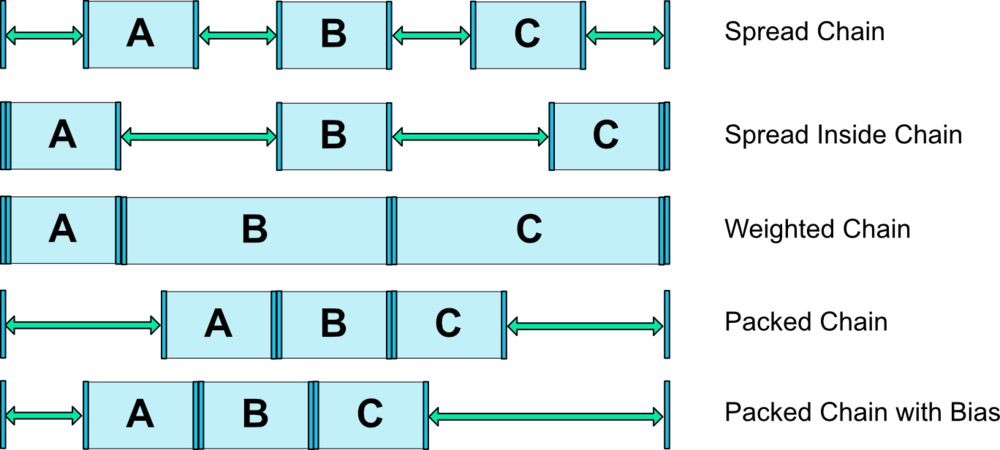
app:layout_constraintDimensionRatio
设置控件宽高百分百
<Button android:layout_width="0dp"

    android:layout_height="0dp"

    app:layout_constraintDimensionRatio="H,16:9"

    app:layout_constraintBottom_toBottomOf="parent"

    app:layout_constraintTop_toTopOf="parent"/>
app:layout_constraintHorizontal_bias 与 app:layout_constraintVertical_bias
设置 横向 和 竖向 控件位置百分百
<ImageView

            android:id="@+id/up_down_image"

            android:src="@mipmap/ic_triangle_black"

            android:layout_width="wrap_content"

            android:layout_height="wrap_content"

            app:layout_constraintHorizontal_bias="0.55"

            app:layout_constraintTop_toTopOf="@id/select_class"

            app:layout_constraintBottom_toBottomOf="@id/select_class"

            app:layout_constraintLeft_toRightOf="@id/bg"

            app:layout_constraintRight_toLeftOf="@id/bg"/>
app:layout_constraintWidth_percent 与 app:layout_constraintHeight_percent
设置控件宽度与高度在父布局宽度或者高度占的的百分比大小
<TextView

        android:id="@+id/text_noon"

        android:text="demo"

        android:textSize="@dimen/font_size_14"

        android:textColor="@color/fontBlack3"

        android:background="@color/colorGreen"

        android:gravity="center"

        android:layout_width="0dp"

        android:layout_height="match_parent"

        android:layout_marginTop="15dp"

        android:layout_marginBottom="15dp"

        app:layout_constraintHorizontal_bias="0.90"

        app:layout_constraintWidth_percent="0.20"

        app:layout_constraintTop_toTopOf="parent"

        app:layout_constraintBottom_toBottomOf="parent"

        app:layout_constraintRight_toRightOf="parent"

        app:layout_constraintLeft_toLeftOf="parent"/>
app:layout_constrainedWidth 与 app:layout_constrainedHeight
在一些TextView或者Button控件,控件大小可能会跟随内容变化,这个时候设置2个属性就可以分别在宽度和高度是强制约束给定的大小,让控件宽度或者高度不会超过给予的约束范围
constraintlayout.widget.Barrier
约束辅助线
用于当有2个View 都有可能在隐藏状态,但是另外一个View需要根据这2个View改变位置.这个时候layout_constraintRight_toLeftOf这个属性你会发现你只有一个,但是需要判断2个View.所以这个约束辅助线作用就出来了,它的constraint_referenced_ids这个属性可以添加多个View并且根据这些View改变位置.
<androidx.constraintlayout.widget.Barrier

            android:layout_width="wrap_content"

            android:layout_height="wrap_content"

            app:barrierDirection="left"

            app:constraint_referenced_ids="up_down_image,text_content"

            app:layout_constraintTop_toTopOf="@id/bg"

            app:layout_constraintBottom_toBottomOf="@id/bg"

            app:layout_constraintRight_toLeftOf="@id/up_down_image"/>
constraintlayout.widget.Guideline
辅助线
<androidx.constraintlayout.widget.Guideline

            android:id="@+id/guideline1"

            android:layout_width="wrap_content"

            android:layout_height="wrap_content"

            android:orientation="vertical"

            app:layout_constraintGuide_percent="0.04"/>
constraintlayout.widget.Group
将若干个控件组合在一起,主要是使用android:visibility="gone"属性一次性隐藏多个控件
<androidx.constraintlayout.widget.Group

        android:id="@+id/group"

        android:layout_width="wrap_content"

        android:layout_height="wrap_content"

        android:visibility="gone"

        app:constraint_referenced_ids="line,whether,opinion"

        app:layout_constraintTop_toBottomOf="@id/name"

        app:layout_constraintLeft_toLeftOf="parent"/>
app:layout_constraintCircle
圆形定位,让B控件以A控件为圆形围绕在指定角度文字
<Button android:id="@+id/buttonA" ... />

  <Button android:id="@+id/buttonB" ...

      //引用的控件ID

      app:layout_constraintCircle="@+id/buttonA"

      //圆半径

      app:layout_constraintCircleRadius="100dp"

      //偏移圆角度  水平右方向为0逆时针方向旋转

      app:layout_constraintCircleAngle="45" />
Space
<Space

        android:layout_width="0dp"

        android:layout_height="20dp"

        app:layout_constraintTop_toBottomOf="@id/opinion"

        app:layout_constraintLeft_toLeftOf="parent"

        app:layout_constraintRight_toRightOf="parent"/>
Android 开发 ConstraintLayout详解的更多相关文章
- Android开发实例详解之IMF(Android SDK Sample—SoftKeyboard)
本博前面的文章介绍了Android开发环境的搭建和模拟器的常用操作.本次,将以Android Sample中经典的SoftKeyboard项目为例,详细解析Android上一个小型项目的开发过程和注意 ...
- Android开发——AsyncTask详解
android提供AsynvTask,目的是为了不阻塞主线程(UI线程),且UI的更新只能在主线程中完成,因此异步处理是不可避免的. Android为了降低开发难度,提供了AsyncTask.Asyn ...
- Android开发 Context详解与类型 转载
转载地址:https://blog.csdn.net/guolin_blog/article/details/47028975 个人总结: Context分为 activity : activity其 ...
- Android开发之详解五大布局
http://bbs.chinaunix.net/thread-3654213-1-1.html 为了适应各式各样的界面风格,Android系统提供了5种布局,这5种布局分别是: LinearLayo ...
- Android 开发 HandlerThread详解 转载
转载请注明出处:http://blog.csdn.net/vnanyesheshou/article/details/75073307 对于Handler不太懂的可以参考我的这两篇文章: Androi ...
- Android开发 StateListDrawable详解
前言 StateListDrawable是与xml中的selector属性对应代码实现类,它需要配合GradientDrawable的使用,如果你还不了解GradientDrawable可以参考我的另 ...
- Android开发 GradientDrawable详解
前言 GradientDrawable类似与Xml布局里的shape,常用在一些自己封装的对话框控件的背景或者其他View中,优势是不需要你在带着xml布局文件一起封包.. 画线 GradientDr ...
- Android开发 layer-list详解
参考:https://blog.csdn.net/speverriver/article/details/80925686 挖坑,以后填坑
- Android开发 LevelListDrawable详解
前言 此篇博客正在施工中... 作者其实就是想挖个坑备忘一下... 十分抱歉, 可以参考https://www.jianshu.com/p/f9ec65241b6b
随机推荐
- PAT1001A+B Format
链接:https://www.patest.cn/contests/pat-a-practise/1001 时间限制 400 ms 内存限制 65536 kB 代码长度限制 16000 B 判题程序 ...
- java面试题03
1.一个”.java”源文件中是否可以包含多个类(不是内部类)?有什么限制?一个".java"源文件中是否可以包括多个类(不是内部类)?有什么限制?这个是可以的,一个“.java” ...
- 采用CAS算法 实现高性能的Disruptor 完成多线程下并发、等待、先后等操作
来源:https://blog.csdn.net/tianyaleixiaowu/article/details/79787377 拓展: https://www.jianshu.com/p/d24b ...
- ScreenPresso注册码
[3]-[screenpressopro]-[5705]-[www.dayanzai.me]-[01/26/2016]-[Zkj8i42HhuCW1UCNtaklHv7Eekr1Wkt4wKHFket ...
- nexus 数据库备份任务webhook 通知-另外一种方法
使用benthos 做为webhook,是一种方法,功能很强大,但是有点复杂,所以换了一个更简单直接的webhook 工具 根据请求的数据,只处理关于db exporter 任务部分的消息,然后就是调 ...
- Spring Boot的日志配置
一.配置logback日志 Spring Boot默认使用logback打印日志 需要增加依赖 <groupId>org.springframework.boot</groupId& ...
- Zabbix 3.4 服务端安装部署
关于zabbix的安装部署官方也提供了详细的安装文档,链接如下: https://www.zabbix.com/download 选择zabbix的版本,服务器平台及使用的数据库 安装和配置zabbi ...
- <python的线程与threading模块>
<python的线程与threading模块> 一 线程的两种调用方式 threading 模块建立在thread 模块之上.thread模块以低级.原始的方式来处理和控制线程,而thre ...
- day10 while else continue break
a. while else b. continue break continue ,终止当前循环,开始下一次循环 break ...
- 接口自动化 基于python+Testlink+Jenkins实现的接口自动化测试框架
链接:http://blog.sina.com.cn/s/blog_13cc013b50102w94u.html